

Teamsly
What is Teamsly?
Teamsly is a cloud-based workforce management platform for hourly, shift-based, deskless, frontline, and field teams. Available on the web, iOS, and Android, Teamsly brings employee scheduling, job and crew scheduling, time and attendance, GPS time tracking, timesheets, team communication, task management, digital forms, audits, employee training, paid time off, labor-cost management, and workforce reporting into one connected system.
The platform is designed to replace disconnected spreadsheets, paper timecards, printed checklists, group texts, and multiple single-purpose applications. Employees, roles, shifts, jobs, departments, and locations share the same operational data, helping managers move from workforce planning through daily execution and payroll preparation without repeatedly entering or reconciling information. Clock-ins flow into timesheets, approved shift changes update schedules, and completed tasks, forms, and audits create searchable operational records.
Employee Scheduling and Workforce Planning
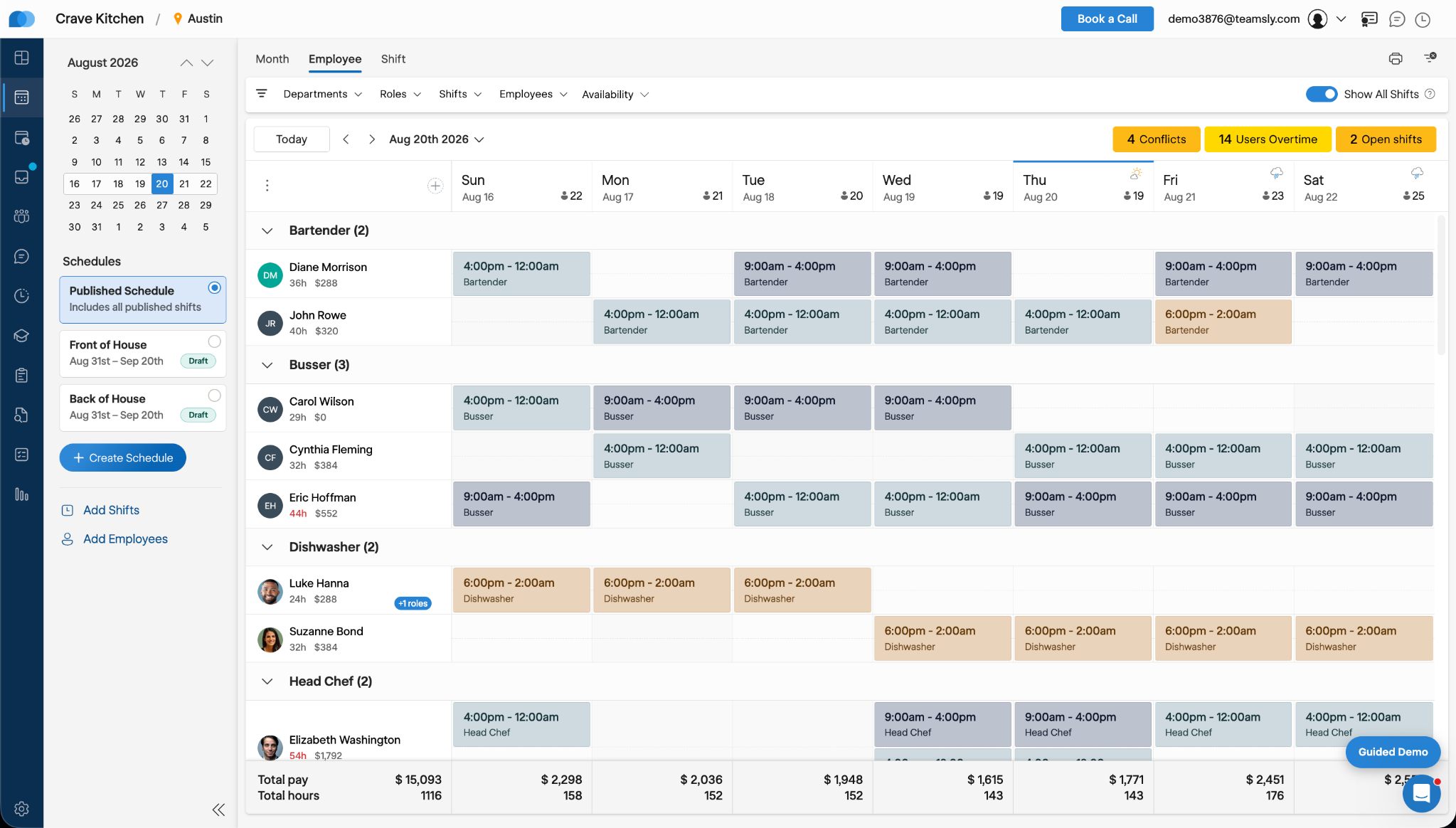
Teamsly provides drag-and-drop employee scheduling alongside AI-assisted schedule creation. Managers can define staffing requirements, shift types, employee roles, availability, preferences, and reusable schedule templates. The scheduling assistant can then generate a draft schedule using those operating requirements and previous scheduling patterns.
Organizations can manage separate schedules by location, department, or team while maintaining centralized oversight. Scheduling tools identify availability conflicts, overlapping shifts, projected overtime, scheduled hours, and estimated labor costs before a schedule is published. Employees can submit availability and time-off requests, request open shifts, offer or swap shifts, and receive schedule updates through the mobile app. Managers retain approval control over coverage changes.
Teamsly also supports shift alerts and on-call scheduling. Open shifts can be offered to eligible employees through text and mobile notifications, while on-call rules can distinguish standby time from hours worked and apply separate compensation when an employee is called in.
Time, Attendance, Timesheets, and GPS Visibility
The Teamsly employee time clock can be accessed from a mobile device, shared tablet kiosk, or web browser. Managers can monitor attendance in real time and configure geofenced clock-in locations, early clock-in restrictions, automatic clock-outs, break policies, reminders, and overtime rules.
For field-based teams, optional live GPS and route tracking provide visibility while employees are actively working. Geofences can be associated with company locations or individual jobs, helping confirm that time is recorded at the appropriate worksite.
Timesheets bring together regular hours, overtime, paid and unpaid breaks, wage roles, scheduled-versus-actual hours, estimated pay, tips, paid time off, and sick leave. Managers can review and edit individual timecards, investigate attendance issues, lock completed pay periods, and download payroll-ready time data. Job codes can also be required during clock-in so labor hours are attributed to the appropriate client, project, or type of work.
Job and Crew Scheduling
Teamsly extends workforce scheduling to field service and mobile crew operations. Job profiles can contain customer information, addresses, equipment requirements, crew instructions, and role requirements. Managers can assign qualified workers, build shifts from jobs, monitor scheduled hours and wages, and dispatch job information directly to employees’ phones.
Employees can access upcoming jobs, directions, instructions, and schedule changes from the mobile app. Job-specific time tracking, GPS visibility, route history, and job-code reporting help organizations understand where labor was used and prepare more accurate customer or project reporting.
Tasks, Forms, Audits, and Operational Accountability
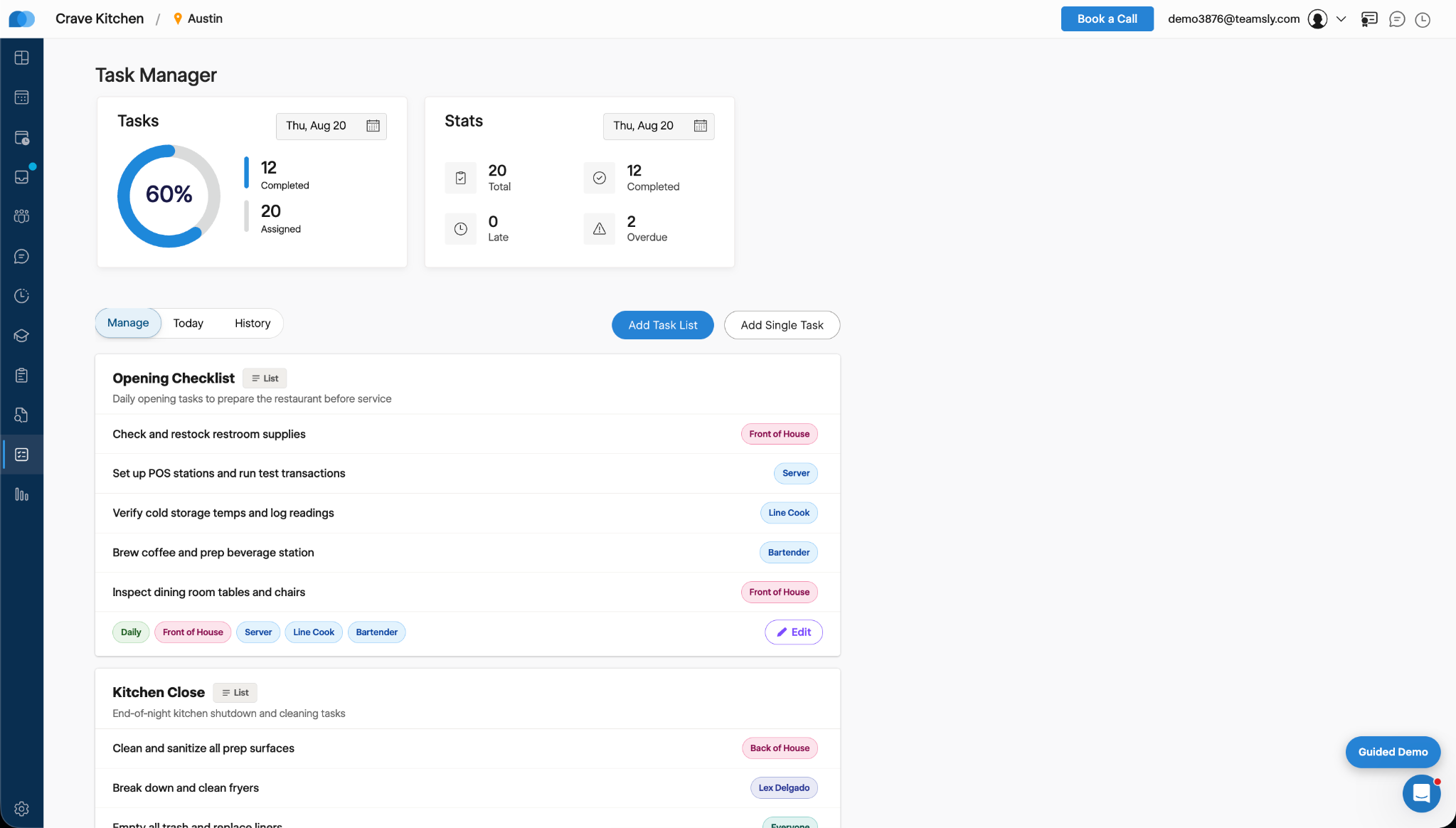
Teamsly includes task management for individual assignments and recurring operational checklists. Tasks can be assigned by employee, role, position, facility, or shift and can repeat daily, weekly, or on a custom schedule. Photo proof can be required before completion. Managers receive a live, timestamped history of completed, late, and overdue work rather than relying on verbal confirmation or paper checklists.
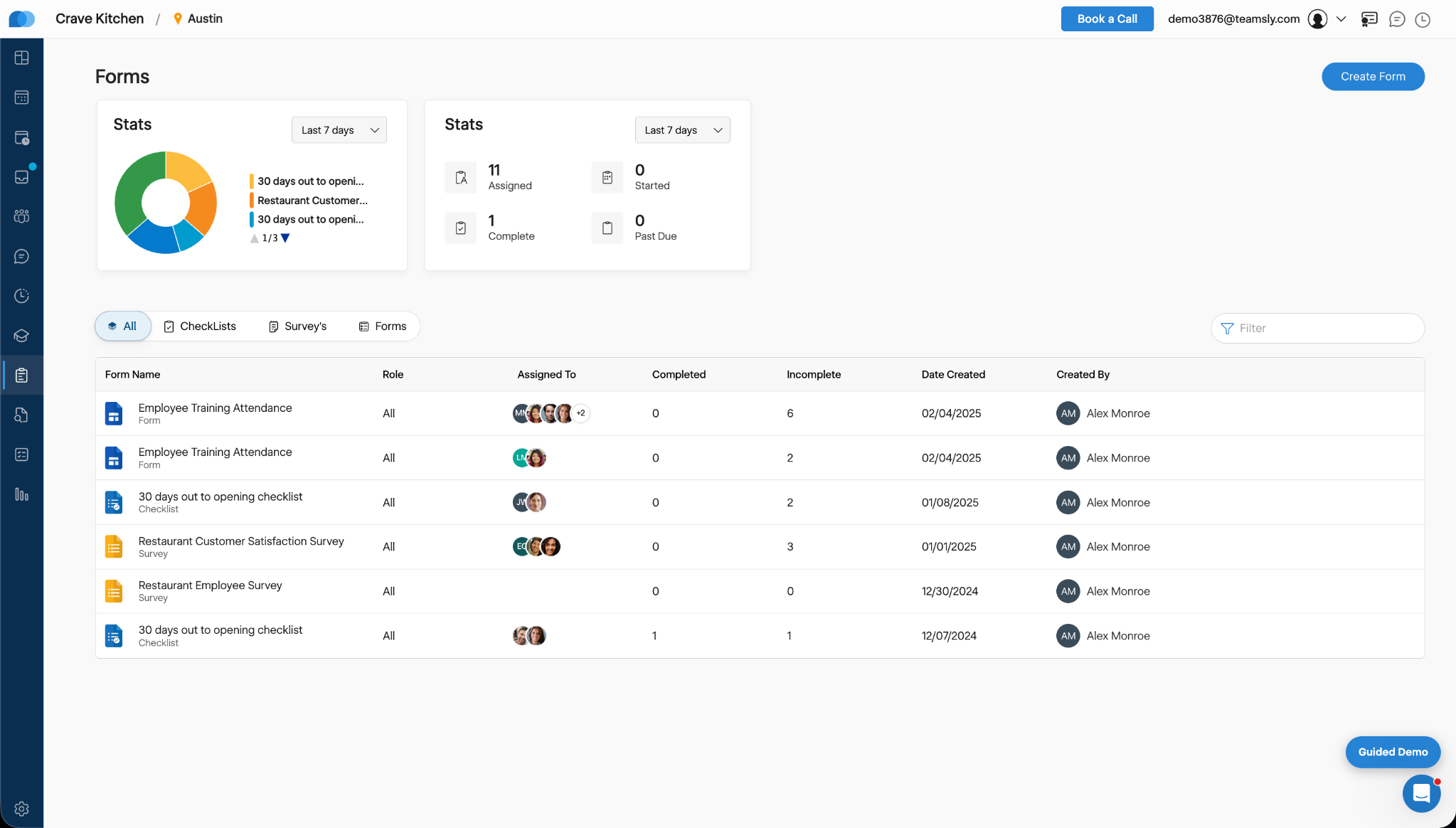
Digital forms can be created from templates, built from scratch, or generated with AI. Forms support required questions, photographs, signatures, comments, deadlines, reminders, and assignment to specific employees or shifts. Teamsly can be used for opening and closing checklists, equipment inspections, incident reports, safety documentation, employee surveys, field reports, and other repeatable processes.
Audit tools can evaluate employees, locations, equipment, or other operational subjects using consistent scoring criteria. Managers can monitor completion, average scores, overdue audits, and historical results through reporting dashboards.
Employee Training and Knowledge Management
Teamsly includes mobile employee training through courses, lessons, and quizzes. Training can be assigned to individuals or teams with due dates, reminders, completion tracking, and quiz scoring. AI-assisted creation can generate lesson or quiz drafts from a topic, helping managers build onboarding, safety, compliance, and process training without starting from an empty course.
Team Communication
Direct messages, group conversations, shift notes, and company announcements keep operational communication connected to the workforce platform. Announcements can include attachments, reminders, and read receipts, giving managers visibility into who has received important information. Post-shift feedback and surveys can also capture employee input while the work is still recent.
Mobile, Bilingual, and Configurable
Teamsly supports English and Spanish throughout the employee experience, with each user able to select a preferred language. Forms and audits can be presented in the employee’s selected language, making the platform suitable for multilingual frontline teams.
Administrators can enable only the modules their organization needs and configure permissions by user type, location, department, role, and managerial responsibility. This allows a growing organization to start with essential scheduling or timekeeping workflows and add jobs, training, audits, forms, tasks, or GPS functionality as its operations become more complex.
Best-Fit Organizations
Teamsly is suited to small and midsize organizations, growing multi-location businesses, and field operations that need more than a standalone employee scheduler or time clock. Relevant industries include restaurants and food service, hospitality and cleaning, retail, healthcare, veterinary and dental practices, construction and field services, home services, education and caregiving, beauty and wellness, moving companies, and political field operations.
The platform focuses on day-to-day workforce operations and payroll preparation rather than functioning as a full payroll, benefits administration, recruiting, or core HR system. Organizations requiring those functions can use Teamsly alongside their existing administrative systems.
Pricing Model and Reported Results
Teamsly offers a free plan, a 30-day trial, and paid plans priced by location rather than by employee. Paid plans support unlimited employees, which can make costs more predictable for businesses with large hourly workforces, seasonal staffing changes, or frequent turnover.
Customer stories provided by Teamsly offer examples of measurable operational outcomes. Sage Dental Arts reports reclaiming 12 administrative hours per week, achieving a 99.4% on-time clock-in rate, and filling open shifts three times faster. Y Strategy reports reclaiming eight hours per week, attributing all field hours to the correct client, and producing client reports five times faster. Results vary according to an organization’s previous processes, configuration, and employee adoption.
Categories & Use Cases
Media



1 / 6
Screenshot of Teamsly’s employee scheduling software, which gives managers a role-based weekly view of every employee and shift. Managers can create separate draft and published schedules, filter by department, role, shift, employee, or availability, identify scheduling conflicts, projected overtime, and open shifts, and review scheduled hours and estimated labor costs before publishing changes to the team.


