TrustRadius: an HG Insights company

Save this comparison

Save this comparison

Add Product

Recommended Comparisons

    Overview
    ProductRatingMost Used ByProduct SummaryStarting Price

    Buddy Punch

    Score10 out of 10
    Small Businesses (1-50 employees)
    Buddy Punch is an online time tracking, scheduling, and payroll application. Track time, time off, locations, and jobs. The solution aims to help make punching in and out intuitive for employees and easy for users to view and export time. Employees can clock in using a browser or the Buddy Punch Google, iOS, and Android apps. Users can view who's working, their GPS position, or even limit where they can punch. The solution integrates with QuickBooks, ADP, Paychex, and SurePayroll, to name a…

    $24.99

    per month ($19 base fee + 5.99 per user)

    Teamsly

    N/AN/ATeamsly is a cloud-based workforce management platform for hourly, shift-based, deskless, frontline, and field teams. Available on the web, iOS, and Android, Teamsly brings employee scheduling, job and crew scheduling, time and attendance, GPS time tracking, timesheets, team communication, task management, digital forms, audits, employee training, paid time off, labor-cost management, and workforce reporting into one connected system. The platform is designed to…

    $29

    per month per Location

    Pricing
    Buddy PunchTeamsly
    Editions & Modules
    Starter
    $5.99
    per month per user
    Pro
    $7.99
    per month per user
    Advanced
    $13.99
    per month per user
    Free
    $0
    per month Per Location
    Basic
    $29
    per month Per Location
    All-In-One
    $59
    per month Per Location
    Offerings
    Pricing Offerings
    Buddy PunchTeamsly
    Free Trial
    YesYes
    Free/Freemium Version
    NoYes
    Premium Consulting/Integration Services
    NoNo
    Entry-level Setup FeeNo setup feeNo setup fee
    Additional DetailsThree plans are available via a monthly or annual payment option. Each plan has a per user price and a base fee of $19. There are no startup, cancellation, support, or additional fees of any kind. A discount is available for the annual payment option.Teamsly uses flat per-location pricing rather than per-employee pricing. The Free plan supports one location with up to 10 employees. Basic and All-In-One paid plans include unlimited employees, helping businesses maintain predictable costs as their teams grow. Basic costs $29 per location per month with monthly billing or $24 per location per month when billed annually. All-In-One costs $59 per location per month with monthly billing or $49 per location per month when billed annually. Both paid plans include a 30-day free trial with no credit card required. Teamsly does not charge setup fees or require a locked-in contract, and customers can upgrade, downgrade, or change plans as their operational needs evolve.
    More Pricing Information
    Community Pulse
    Buddy PunchTeamsly
    Considered Both Products
    Buddy Punch
    No answer on this topic
    Teamsly
    No answer on this topic
    Key User Insights
    Would buy again
    100%
    Would buy again
    36 Answers
    No answers on this topic
    Delivers good value for the price
    100%
    Delivers good value for the price
    29 Answers
    No answers on this topic
    Happy with the feature set
    100%
    Happy with the feature set
    36 Answers
    No answers on this topic
    Lived up to sales and marketing promises
    100%
    Lived up to sales and marketing promises
    23 Answers
    No answers on this topic
    Implementation went as expected
    100%
    Implementation went as expected
    26 Answers
    No answers on this topic
    Best Alternatives
    Buddy PunchTeamsly
    Small Businesses
    Time Doctor
    Score8 out of 10
    Deputy
    Score8.6 out of 10
    Medium-sized Companies
    Toggl Track
    Score9 out of 10
    Harri
    Score6 out of 10
    Enterprises
    TimeCamp
    Score7.3 out of 10
    Enterprise eTIME, by ADP (discontinued)
    Score10 out of 10
    All AlternativesView all alternativesView all alternatives
    User Ratings
    Buddy PunchTeamsly
    Likelihood to Recommend
    10.0
    (37 ratings)
    -
    (0 ratings)
    Usability
    10.0
    (16 ratings)
    -
    (0 ratings)
    User Testimonials
    Buddy PunchTeamsly
    Likelihood to Recommend
    Buddy Punch
    I think that is very convenient as far as tracking your employees when they are punching in or out to ensure they are physically at the location they are supposed to be for that shift. I also think that the option to download this app to your personal phone is amazing, it makes it more convenient to punch in or out when you aren't near a laptop or a residence to use one. The feature of being able to attach a note with your punches explaining possible late punchers or absences is very beneficial to the employee allows show proof if needed.
    Read full review
    Teamsly
    No answers on this topic
    Pros
    Buddy Punch
    • Their customer service is second to none. We have requested several changes over the years for the web interface and app; I think all the requests we've made were implemented by this point. I only wish this was the case with other companies we utilize.
    • They allow you to set different pay rates based on department which allows us to pay employees more for the skilled jobs they perform versus the more basic work they perform. This is a huge benefit to a small company as it encourages employees to strive for more skilled work and they keep moving up the ladder to become even better assets to the company.
    • The reports you can run are very thorough and work very well for us when it comes time to enter payroll.
    • Having the ability to set alerts has allowed us to cut back on unnecessary overtime as employees can get reminders prior to going over. We can also set reminders for employees to punch in/out for the ones that have a tendency to forget.
    Incentivized
    Read full review
    Teamsly
    No answers on this topic
    Cons
    Buddy Punch
    • Sometimes I need to check back to be sure I'm still punched in.
    • The indicator between punched in and out is not very indicative of if I am or not.
    • I want to total hours not just by the week but by pay periods 1-15 days, 16-end of [the] month.
    Incentivized
    Read full review
    Teamsly
    No answers on this topic
    Usability
    Buddy Punch
    Most of my employees have figured it out pretty quickly, even the ones who are a little less technically savvy. If you have a phone, then you have the ability to use this app. There are a few quirky things with notes and punches that happen, but this may just be the employees
    Incentivized
    Read full review
    Teamsly
    No answers on this topic
    Alternatives Considered
    Buddy Punch
    We originally scheduled and ran payroll through Homebase, but in the last few months the software became very buggy, customer service was slow and when they did respond, was not helpful. When we cancelled our account they didn't even try to make things right. We are so happy that Buddy Punch is like us--taking care of their clients and really invested in their success!
    Incentivized
    Read full review
    Teamsly
    No answers on this topic
    Return on Investment
    Buddy Punch
    • Efficiency has definitely gone up switching to Buddy Punch. Ive never quantified specific hours or time lapse it has given to my personal managerial efficiency. But it has without doubt.
    • I can see a better overview of the employees I need to be concerned with and not have to filter out others not concerning me.
    • Ease of use has decreased mental stress and angst in maneuvering employee time cards.
    Incentivized
    Read full review
    Teamsly
    No answers on this topic
    ScreenShots

    Buddy Punch Screenshots

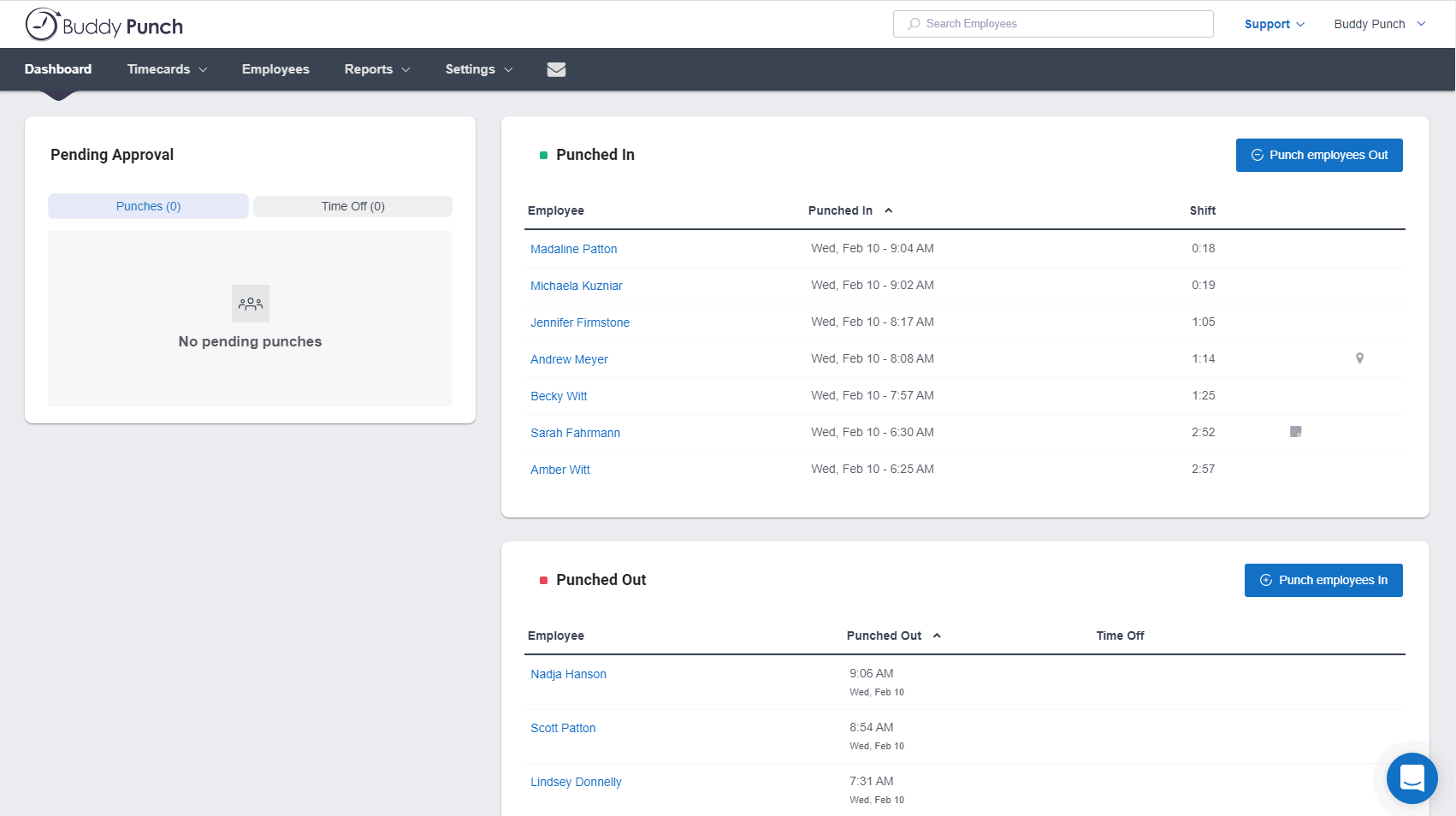
    Screenshot of the Administrator's DashboardScreenshot of Time Off CalendarScreenshot of Schedule View

    Teamsly Screenshots

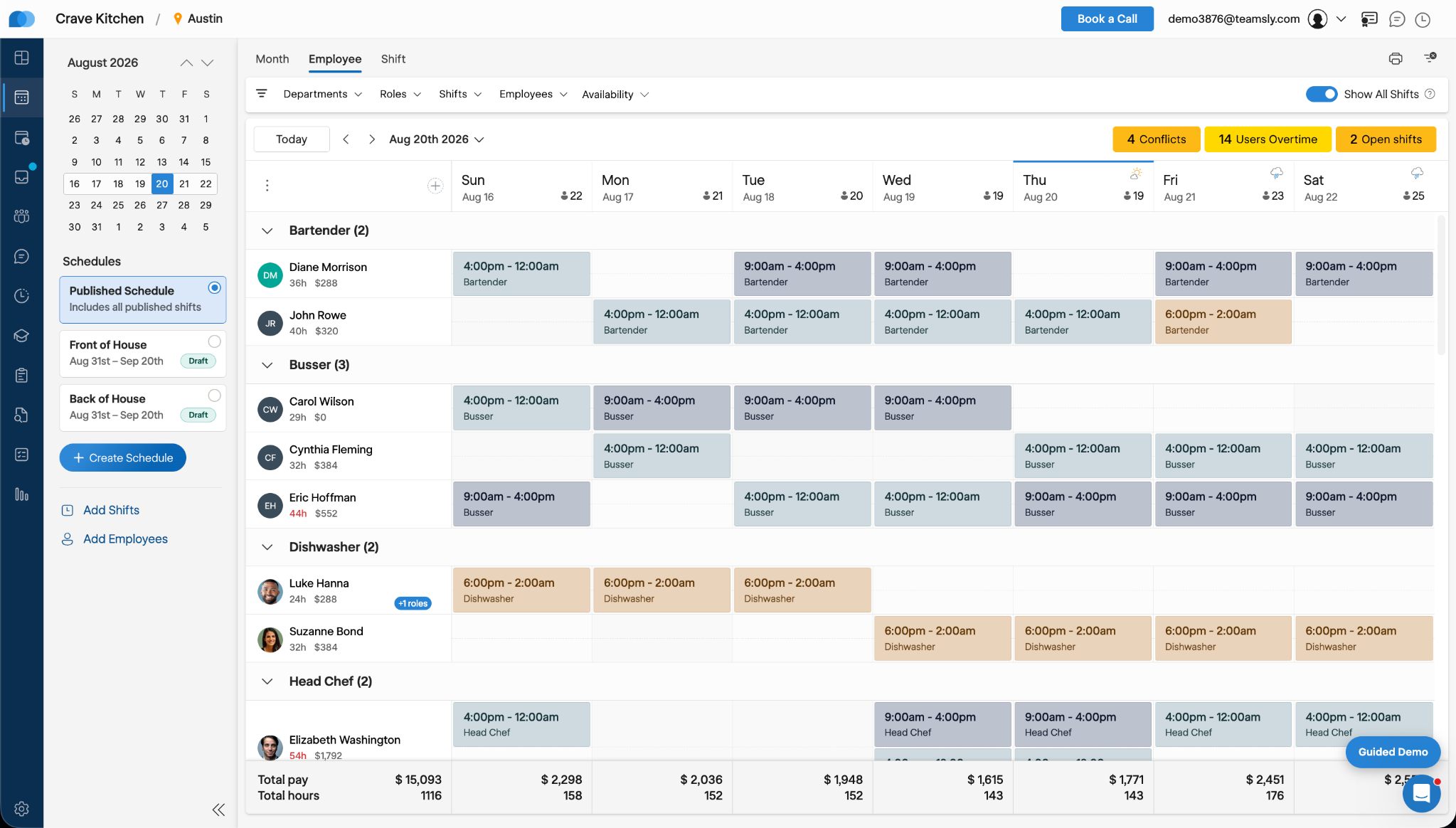
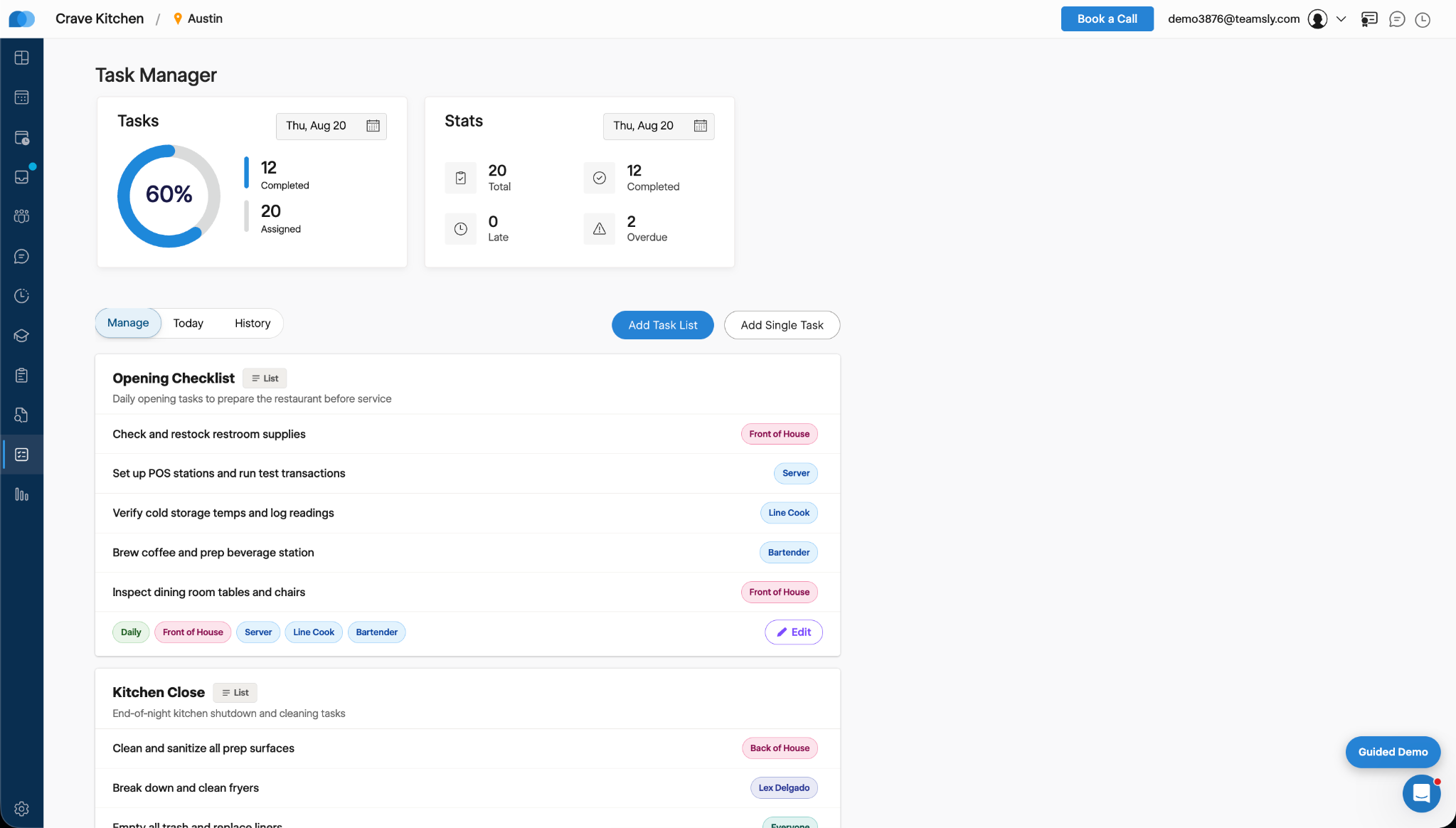
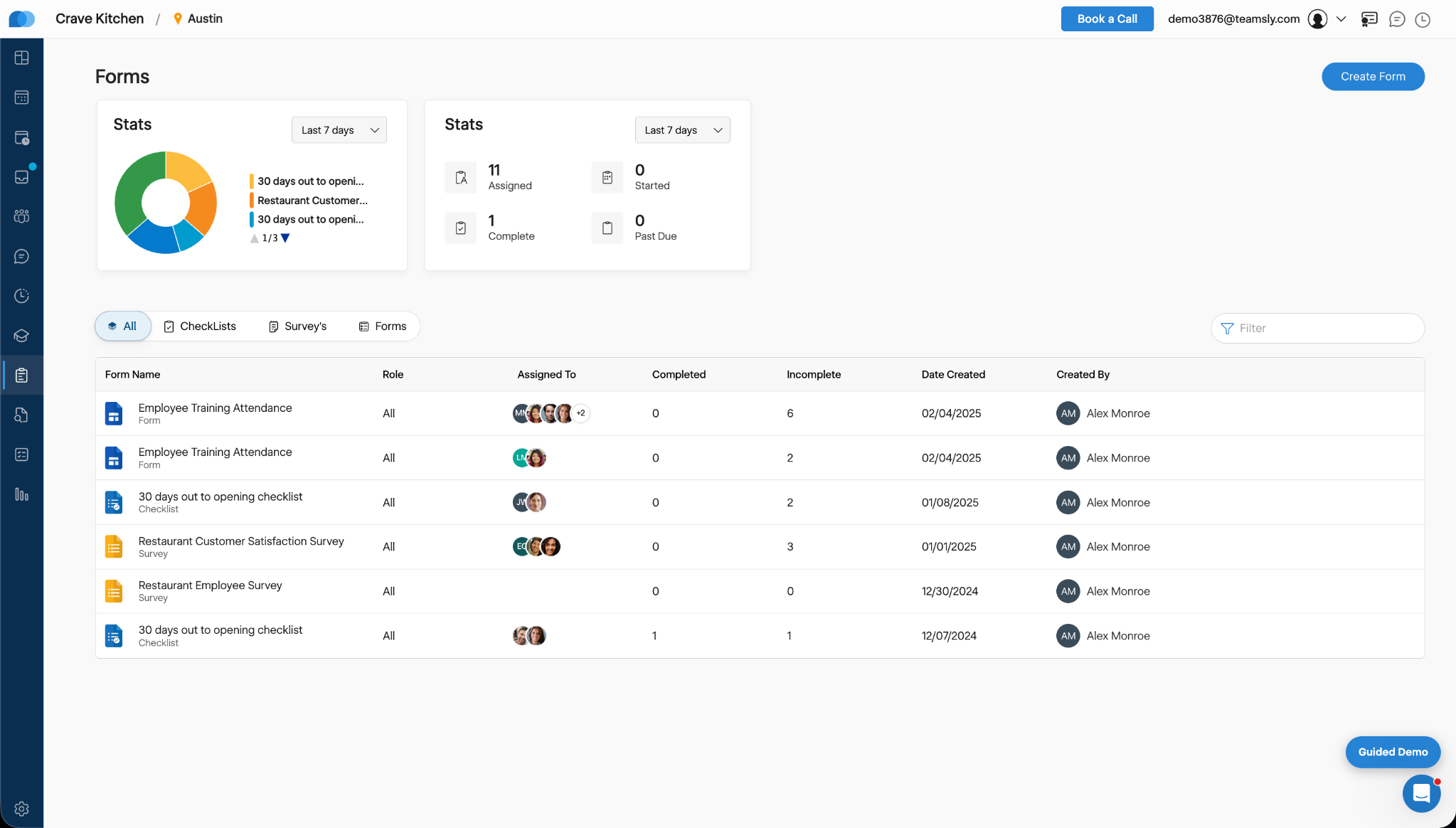
    Screenshot of Teamsly’s employee scheduling software, which gives managers a role-based weekly view of every employee and shift. Managers can create separate draft and published schedules, filter by department, role, shift, employee, or availability, identify scheduling conflicts, projected overtime, and open shifts, and review scheduled hours and estimated labor costs before publishing changes to the team.Screenshot of Teamsly’s workforce management dashboard. This brings daily staffing and operational data into one centralized view. Managers can monitor open shifts, shift swaps, employee requests, availability requests, scheduled coverage by role, paid hours, overtime, estimated pay, paid breaks, training quiz completion, and a visual shift timeline—making urgent staffing and workforce priorities easier to identify.Screenshot of Teamsly’s employee timesheet and time tracking software, which organizes timecards, paid hours, regular hours, overtime, paid and unpaid breaks, and estimated pay. Managers can compare scheduled hours with actual hours, spot timecard issues, review attendance data by employee and date range, add missing timecards, and download detailed reports for payroll preparation.Screenshot of Teamsly’s task management software, which helps managers create one-time tasks and recurring operational checklists, assign work by employee or role, and monitor completion from one dashboard. Status metrics show assigned, completed, late, and overdue work, while Today and History views strengthen accountability across opening, closing, cleaning, food preparation, and other repeatable team workflows.Screenshot of where Teamsly centralizes digital forms, checklists, and surveys for frontline and deskless teams. Managers can create and assign workflows such as employee training attendance forms, new-location opening checklists, customer satisfaction surveys, and employee surveys, then track assigned, started, completed, incomplete, and past-due submissions from a filterable reporting dashboard.Screenshot of Teamsly’s audit management software, which standardizes inspections and evaluations for employees, external participants, locations, equipment, and other operational subjects. Managers can assign audits, set scoring goals, monitor average scores, track completed and incomplete work, and identify past-due audits across food safety, employee hygiene, equipment maintenance, storage, workplace cleanliness, training, and knowledge.