TrustRadius: an HG Insights company

Save this comparison

Save this comparison

Add Product

Recommended Comparisons

    Overview
    ProductRatingMost Used ByProduct SummaryStarting Price

    Accelo

    Score3 out of 10
    Mid-Size Companies (51-1,000 employees)
    Accelo is a Professional Services Automation (PSA) platform designed to provide visibility into operational risks for service-based organizations. While traditional tools often focus on historical data, Accelo is intended to surface real-time risks such as Project Overruns, Resource Overloading, and Scope Creep. The platform integrates the full client lifecycle, including CRM, Quoting, Project Delivery, Support Ticketing, Time and Expense Tracking, Retainer Management, and…N/A

    Projectworks

    Score9 out of 10
    N/AProjectworks is Professional Services Automation (PSA) software suite designed for consulting and professional services organizations. The platform consolidates resource scheduling, time tracking, expense management, project accounting, and financial forecasting to streamline the service delivery lifecycle. Key Capabilities Resource Management: Provides real-time visibility into staff Availability, Resource Utilization, and Capacity Planning to coordinate project…

    $190

    per month for 10 users (minimum)

    Pricing
    AcceloProjectworks
    Editions & Modules
    No answers on this topic
    Build
    $19
    per month per user
    Offerings
    Pricing Offerings
    AcceloProjectworks
    Free Trial
    NoYes
    Free/Freemium Version
    NoNo
    Premium Consulting/Integration Services
    YesYes
    Entry-level Setup FeeOptional$1,000 one-time fee (starting cost for implementation)
    Additional DetailsThe minimum number of users is 10. There is a 10% discount for annual pricing.
    More Pricing Information
    Best Alternatives
    AcceloProjectworks
    Small Businesses
    Autotask PSA
    Score7.7 out of 10
    Autotask PSA
    Score7.7 out of 10
    Medium-sized Companies
    Workday Professional Services Automation
    Score8.2 out of 10
    Workday Professional Services Automation
    Score8.2 out of 10
    Enterprises
    Planview AdaptiveWork
    Score8.7 out of 10
    Planview AdaptiveWork
    Score8.7 out of 10
    All AlternativesView all alternativesView all alternatives
    User Ratings
    AcceloProjectworks
    Likelihood to Recommend
    8.0
    (8 ratings)
    -
    (0 ratings)
    Likelihood to Renew
    9.0
    (1 ratings)
    -
    (0 ratings)
    Usability
    7.0
    (1 ratings)
    -
    (0 ratings)
    Performance
    10.0
    (1 ratings)
    -
    (0 ratings)
    Support Rating
    8.2
    (3 ratings)
    -
    (0 ratings)
    User Testimonials
    AcceloProjectworks
    Likelihood to Recommend
    Accelo
    Accelo is a system that can do it all. It's extremely sophisticated. Depending on the sophistication of your organization, or specifically the abilities of the people you put in charge of the implementation, it can almost be too sophisticated. It all just depends on your situation. The more you use it, the more data you give it, the more you'll be able to see and do. It's incredibly powerful. But it's definitely not a tool that would be appropriate for smaller boutique type organizations that have only basic needs.
    Incentivized
    Read full review
    Spiderworks
    No answers on this topic
    Pros
    Accelo
    • Timing Client Work: You are able to better manage your time on your clients.
    • Housing Client Info in one Area: You can view all you need for any given client in one area.
    Incentivized
    Read full review
    Spiderworks
    No answers on this topic
    Cons
    Accelo
    • Accelo is excellent on the adaptation to its deep functionalities.
    • Managing multiple project is very challenging.
    • Not easy to collect multiple reports across platforms.
    Incentivized
    Read full review
    Spiderworks
    No answers on this topic
    Likelihood to Renew
    Accelo
    Looking forward to seeing more refinement of features provided and upcoming features promised :)
    Read full review
    Spiderworks
    No answers on this topic
    Support Rating
    Accelo
    From the beginning the Accelo team has been very invested in ensuring our success and overall happiness with the platform. The initial implementation specialists and trainers did a fairly good job of learning our company and needs, and tried to tailor the trainings accordingly. However, once we made the formal switch to the platform, meaning we no longer were using our legacy systems, we found that we had a lot of questions....and a lot of ideas and recommendations. The support team is extremely responsive and seemingly happy to receive our continual feedback. And if we encounter an issue that seems to be a system issue, they work diligently to fix it (we've actually had an engineer join a call with us to learn of the issue - and subsequently fix it)
    Incentivized
    Read full review
    Spiderworks
    No answers on this topic
    Alternatives Considered
    Accelo
    Accelo doesn't really exceed any competitors in any one area of their product, but in 2015 when we made the move this was the best option that included all the tools we wanted. However, user adoption was low in some areas due to the UI, so we scaled back Accelo and added other tools.
    Incentivized
    Read full review
    Spiderworks
    No answers on this topic
    Return on Investment
    Accelo
    • It substantially reduced the number of systems we use to run our business.
    • It reduced the need to train our staff on a variety of platforms.
    • It gave us the ability to have a client-facing portal that directly integrates with our backend systems.
    Incentivized
    Read full review
    Spiderworks
    No answers on this topic
    ScreenShots

    Accelo Screenshots

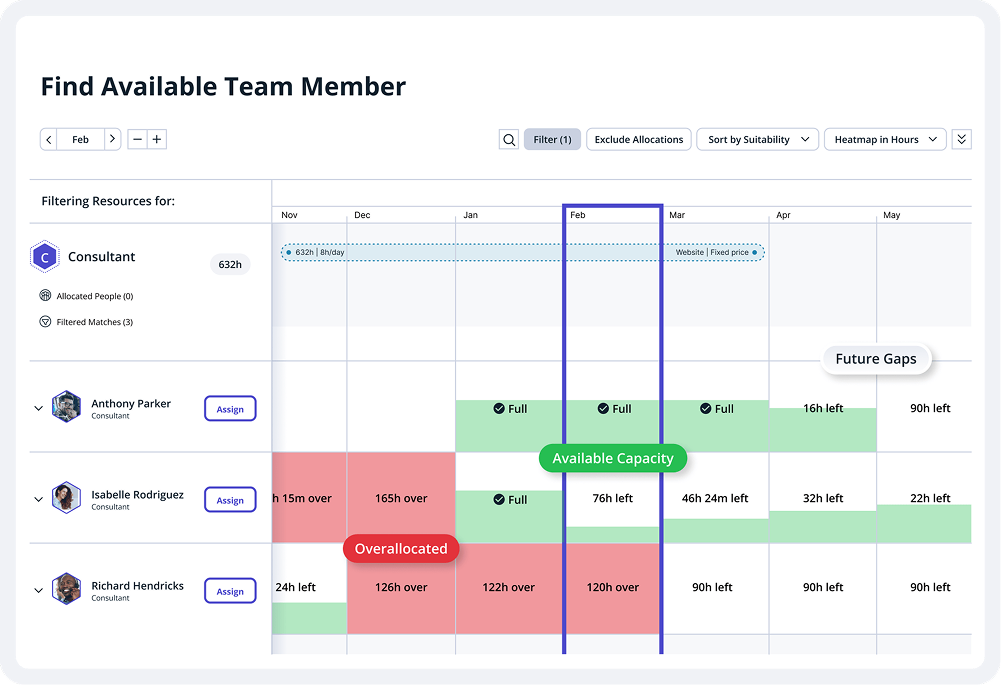
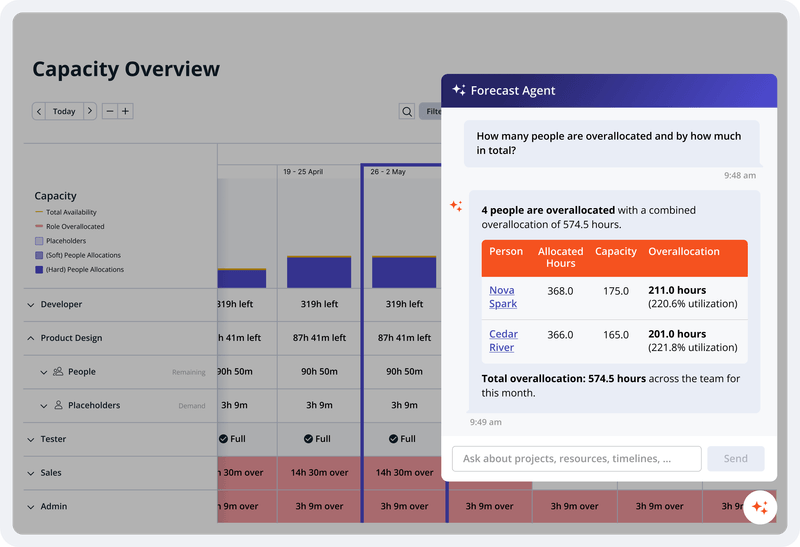
    Screenshot of project analytics. Accelo keeps projects on track with templates, task management, Gantt charts, AI-predicted completion dates, portfolio views, and built-in client approvals.Screenshot of the scheduling interface. Accelo matches work to the right person by skill, workload, and availability — with utilization reports, capacity forecasting, and dynamic allocations that keep delivery and pipeline aligned.Screenshot of the revenue dashboard. Revenue leakage hides in unbilled hours, missed scope, and late invoices. Accelo captures time automatically, tracks budget and margin live, automates invoicing end-to-end, and manages retainers and scope creep before the damage is done.Screenshot of an overview of capacity. Most firms make decisions on data that's already a month old. Accelo delivers real-time reporting across utilization, profitability, and project financials — with custom dashboards that give every role the signal they need to act.

    Projectworks Screenshots

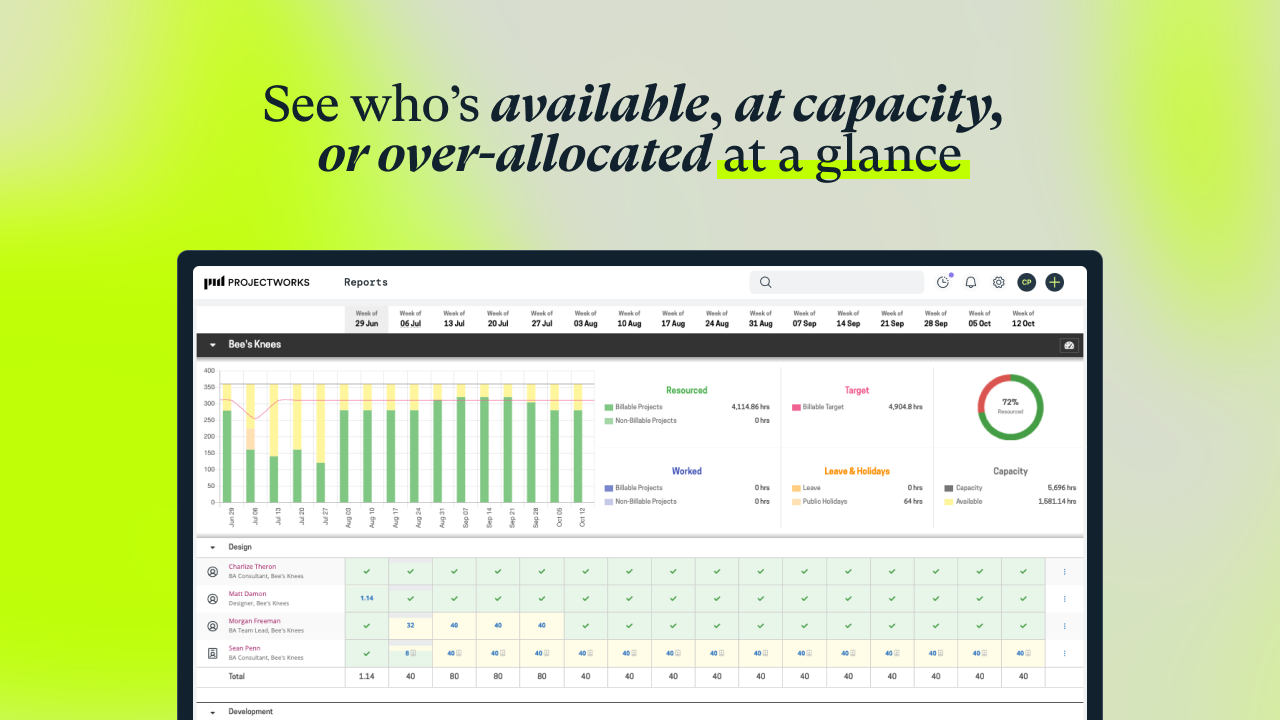
    Screenshot of visualization that helps to understand capacity, who is available, and when more staff will be needed for work coming down the pipeline. Tag and filter staff by skills and certifications to help make the right staffing decisions.Screenshot of workforce utilization metrics.Screenshot of an example timesheet built for professional services firms. The timecode setup is flexible, to enable users to track how time is spent on projects at any level of detail.Screenshot of a display showing how much of the budget has been burned through actual time spent, as well as what is planned. This lets users know when a project is going over budget. These forecasts can be used to set a billing schedule for fixed-price projects, and a percentage mode to support percentage-based billing. Invoicing runs can be started from the forecasts screen.Screenshot of where to track actuals and see where a project will land against the project budget.Screenshot of an example invoice, which can be based on a timesheet (time and material / T&M), fixed price engagements, or percentage-based billing. It integrates with accounting systems.