Adobe Customer Journey Analytics B2B Edition vs. Firebase

Overview
ProductRatingMost Used ByProduct SummaryStarting Price
Adobe Customer Journey Analytics B2B Edition
Score 0.0 out of 10
N/A
Launched in June of 2025, Adobe Customer Journey Analytics B2B Edition gives marketing sales teams actionable insights that let them optimize customer experiences, expand the sales pipeline, and drive strategic growth across the buyer’s journey.N/A
Firebase
Score 7.8 out of 10
N/A
Google offers the Firebase suite of application development tools, available free or at cost for higher degree of usages, priced flexibly accorded to features needed. The suite includes A/B testing and Crashlytics, Cloud Messaging (FCM) and in-app messaging, cloud storage and NoSQL storage (Cloud Firestore and Firestore Realtime Database), and other features supporting developers with flexible mobile application development.
$0.01
Per Verification
Pricing
Adobe Customer Journey Analytics B2B EditionFirebase
Editions & Modules
No answers on this topic
Phone Authentication
$0.01
Per Verification
Stored Data
$0.18
Per GiB
Offerings
Pricing Offerings
Adobe Customer Journey Analytics B2B EditionFirebase
Free Trial
NoNo
Free/Freemium Version
NoNo
Premium Consulting/Integration Services
NoNo
Entry-level Setup FeeNo setup feeNo setup fee
Additional DetailsContact Adobe for pricing information.
More Pricing Information
Community Pulse
Adobe Customer Journey Analytics B2B EditionFirebase
Best Alternatives
Adobe Customer Journey Analytics B2B EditionFirebase
Small Businesses
Ortto
Ortto
Score 8.9 out of 10
Visual Studio
Visual Studio
Score 8.8 out of 10
Medium-sized Companies
Quadient Inspire
Quadient Inspire
Score 9.3 out of 10
Visual Studio
Visual Studio
Score 8.8 out of 10
Enterprises
Quadient Inspire
Quadient Inspire
Score 9.3 out of 10
Visual Studio
Visual Studio
Score 8.8 out of 10
All AlternativesView all alternativesView all alternatives
User Ratings
Adobe Customer Journey Analytics B2B EditionFirebase
Likelihood to Recommend
-
(0 ratings)
4.4
(29 ratings)
Usability
-
(0 ratings)
4.4
(4 ratings)
Support Rating
-
(0 ratings)
7.3
(6 ratings)
User Testimonials
Adobe Customer Journey Analytics B2B EditionFirebase
Likelihood to Recommend
Adobe
No answers on this topic
Google
Firebase should be your first choice if your platform is mobile first. Firebase's mobile platform support for client-side applications is second to none, and I cannot think of a comparable cross-platform toolkit. Firebase also integrates well with your server-side solution, meaning that you can plug Firebase into your existing app architecture with minimal effort.
Firebase lags behind on the desktop, however. Although macOS support is rapidly catching up, full Windows support is a glaring omission for most Firebase features. This means that if your platform targets Windows, you will need to implement the client functionality manually using Firebase's web APIs and wrappers, or look for another solution.
Read full review
Pros
Adobe
No answers on this topic
Google
  • Analytics wise, retention is extremely important to our app, therefore we take advantage of the cohort analysis to see the impact of our middle funnel (retargeting, push, email) efforts affect the percent of users that come back into the app. Firebase allows us to easily segment these this data and look at a running average based on certain dates.
  • When it comes to any mobile app, a deep linking strategy is essential to any apps success. With Firebase's Dynamic Links, we are able to share dynamic links (recognize user device) that are able to redirect to in-app content. These deep links allow users to share other deep-linked content with friends, that also have link preview assets.
  • Firebase allows users to effectively track events, funnels, and MAUs. With this simple event tracking feature, users can put organize these events into funnels of their main user flows (e.g., checkout flows, onboarding flows, etc.), and subsequently be able to understand where the drop-off is in the funnel and then prioritize areas of the funnel to fix. Also, MAU is important to be able to tell if you are bringing in new users and what's the active volume for each platform (Android, iOS).
Read full review
Cons
Adobe
No answers on this topic
Google
  • Attribution and specifically multi-touch attribution could be more robust such as Branch or Appsflyer but understand this isn't Firebases bread and butter.
  • More parameters. Firebase allows you to track tons of events (believe it's up to 50 or so) but the parameters of the events it only allows you to track 5 which is so messily and unbelievable. So you're able to get good high-level data but if you want to get granular with the events and actions are taken on your app to get real data insight you either have to go with a paid data analytics platform or bring on someone that's an expert in SQL to go through Big Query.
  • City-specific data instead of just country-specific data would have been a huge plus as well.
Read full review
Usability
Adobe
No answers on this topic
Google
Firebase functions are more difficult to use, there are no concepts of triggers or cascading deletes without the use of Firebase functions. Firebase functions can run forever if not written correctly and cause billing nightmares. While this hasn't happened to us specifically it is a thing that happens more than one realizes.
Read full review
Support Rating
Adobe
No answers on this topic
Google
Our analytics folks handled the majority of the communication when it came to customer service, but as far as I was aware, the support we got was pretty good. When we had an issue, we were able to reach out and get support in a timely fashion. Firebase was easy to reach and reasonably available to assist when needed.
Read full review
Alternatives Considered
Adobe
No answers on this topic
Google
Before using Firebase, we exclusively used self hosted database services. Using Firebase has allowed us to reduce reliance on single points of failure and systems that are difficult to scale. Additionally, Firebase is much easier to set up and use than any sort of self hosted database. This simplicity has allowed us to try features that we might not have based on the amount of work they required in the past.
Read full review
Return on Investment
Adobe
No answers on this topic
Google
  • Makes building real-time interfaces easy to do at scale with no backend involvement.
  • Very low pricing for small companies and green-fields projects.
  • Lack of support for more complicated queries needs to be managed by users and often forces strange architecture choices for data to enable it to be easily accessed.
Read full review
ScreenShots

Adobe Customer Journey Analytics B2B Edition Screenshots
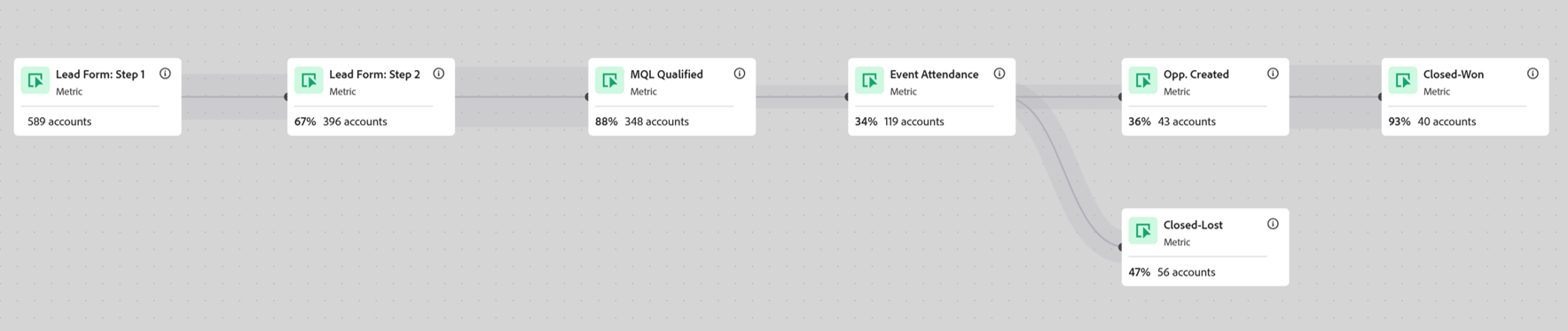
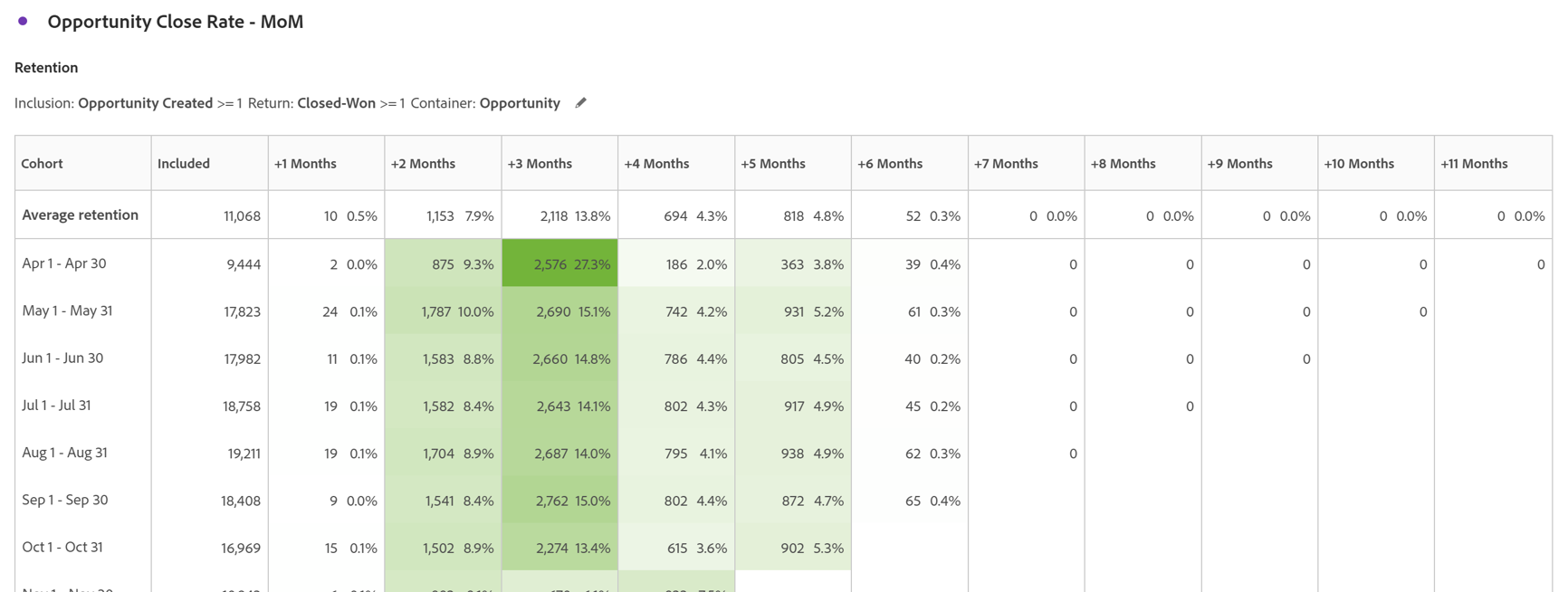
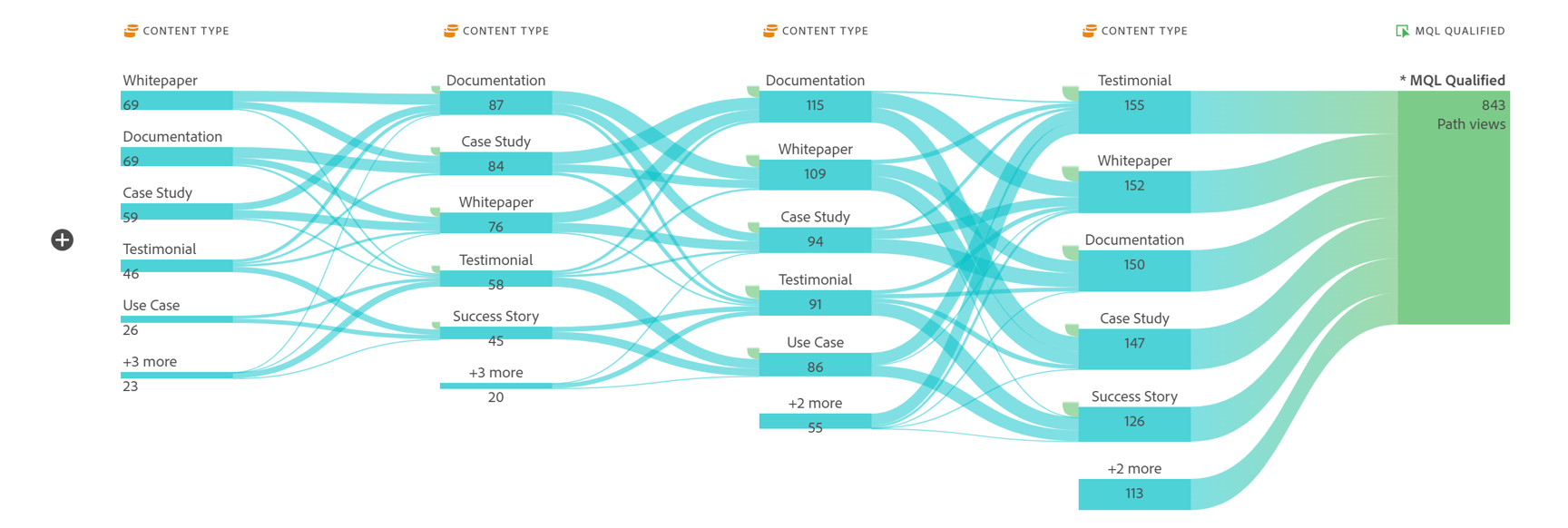
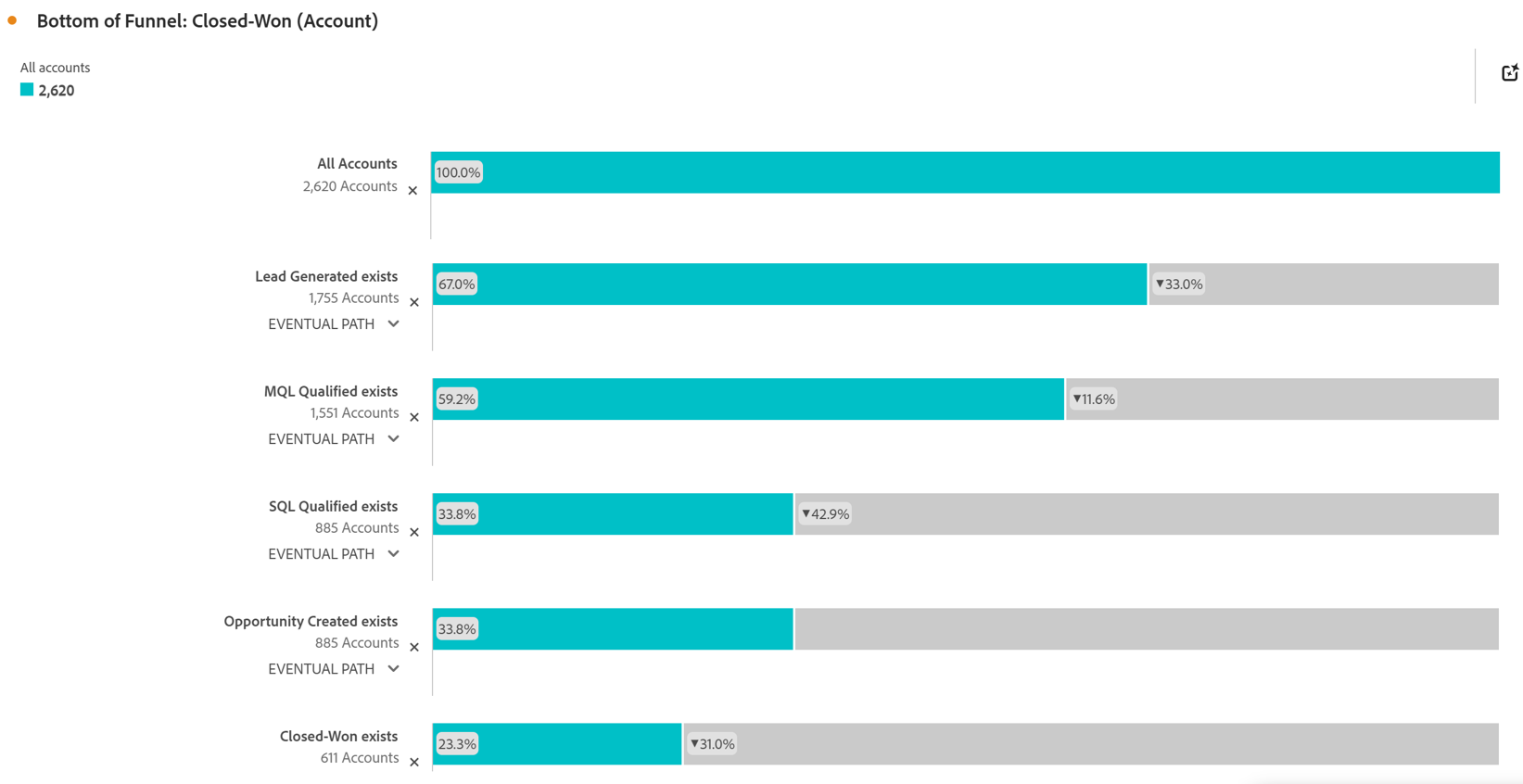
Screenshot of Account Based Marketing Engagement using the Journey Canvas feature. Effective Account Based Marketing requires a deep understanding of the buying journey at the account level to determine the most impactful marketing activities to drive deal closer. Identify which experiences - both online and offline - are most impactful in driving closed opportunities. Journey canvas maps every interaction across accounts, buying groups, opportunities, campaigns and channels for clarity on what's working and what isn't. The Journey Canvas feature in CJA B2B Edition lets users see a detailed path for a specific high value account or buying group, including all known online and offline interactions. And users can contextualize key events, such as an MQL trigger and an Opportunity creation. Plus, Sales Development Reps can see the interaction history for specific accounts before outreach, allowing for highly relevant conversations.Screenshot of Cohort Segmentation. This identifies key groups of buyers to publish to CDP for activation in paid media, personalization or email orchestration. Cohort tables lets users group B2B entities - Accounts, Opportunities, Buying Groups - based on a shared starting point and track their progress across pipeline stages over time. By analyzing behavior patterns of buying groups, marketing and sales teams can understand the time to reach key milestones in the buying journey and determine which marketing efforts lead to faster pipeline progression.Screenshot of In-Person Events. The impact of in-person event attendance can be optimized by reporting on engaged accounts and viewing activity across multiple in-person events. Flow lets you visualize the paths accounts and buying groups take between key interactions or stages over time. Understanding what behaviors led to a key milestone, such as registering for an in-person event or flagging a lead as an MQL, helps both marketing and sales teams understand the most influential experiences that lead to conversion. For in-person events, the steps leading up to registration may include previous in-person event attendance, as well as digital experiences such as downloading white papers and case studies.Screenshot of Sales Stage Progression. The fallout report in CJA B2B Edition gives you sales funnel insights by letting you visualize conversion and drop off rates between predefined steps in a sequential journey. The fallout report can answer key questions around which steps in the sales stages caused the most drop off towards deal close.