AI SoloHR vs. IBM Case Manager

Overview
ProductRatingMost Used ByProduct SummaryStarting Price
AI SoloHR
Score 0.0 out of 10
N/A
AI SoloHR is HR case management software for U.S. small businesses and lean HR teams that need a structured way to manage sensitive HR workflows. The product is designed for teams that handle HR in-house and need more than spreadsheets, inbox threads, and shared folders to track case activity. AI SoloHR helps users organize FMLA, ADA accommodation, employee relations, benefits renewal, leave-related, and other HR follow-up workflows in a case-based workspace. Each…
$79
per month per workspace
IBM Case Manager
Score 10.0 out of 10
N/A
IBM Case Manager is a case management product that allows customers to resolve complex cases by providing persistent access to information, workflow, tasks, and analytics.N/A
Pricing
AI SoloHRIBM Case Manager
Editions & Modules
Starter
$79
per month Per workspace
Solo HR
$199
per month Per workspace
HR Ops Team
$399
per month Per workspace
Compliance Plus
$799
per month Per workspace
No answers on this topic
Offerings
Pricing Offerings
AI SoloHRIBM Case Manager
Free Trial
YesNo
Free/Freemium Version
NoNo
Premium Consulting/Integration Services
NoNo
Entry-level Setup FeeNo setup feeNo setup fee
Additional DetailsAI SoloHR is sold as subscription SaaS with four monthly plan tiers. Starter begins at $79/month. Solo HR is $199/month, HR Ops Team is $399/month, and Compliance Plus is $799/month. Plans are based on workspace tier and operational limits such as active cases, people records, seats, AI drafts, intake links, outbound email, audit exports, and advanced controls. A 14-day free trial is available with no credit card required.
More Pricing Information
Community Pulse
AI SoloHRIBM Case Manager
User Ratings
AI SoloHRIBM Case Manager
Likelihood to Recommend
-
(0 ratings)
8.0
(1 ratings)
User Testimonials
AI SoloHRIBM Case Manager
Likelihood to Recommend
DragonVerse Media Inc
No answers on this topic
IBM
It's well suited for complex applications in health, banking industries, legal departments that deal with repeatable complex business problems and it allows/provide those authority to case workers to resolve these issues. And I feel IBM Case Manager might not be suitable for organization who deal with less complex problems that can be easily resolved by other business process products.
Read full review
Pros
DragonVerse Media Inc
No answers on this topic
IBM
  • IBM Case Manager provide case builder to build customer solution that create your case types, workflows, relevant document types that connect with cases, and capability of authorizing people to access through different roles.
  • IBM Case Manager provides lot extensive case REST API which allows applications to integrate with IBM Case Manager and Content Engine.
  • IBM Case Manager comes with one of the admin client tool which is very easy for an administrator to manage the solution deployments.
Read full review
Cons
DragonVerse Media Inc
No answers on this topic
IBM
  • Integration with IBM BPM.
  • Integration with Cloud
Read full review
Alternatives Considered
DragonVerse Media Inc
No answers on this topic
IBM
IBM Case manager suites comes with bunch of underlying products, 1. Content Platform Engine, 2. IBM Content Navigator which provide rich user interface and room for customization's, 3. IBM Case Manager admin client, Case builder 4. Extensive Case Manager Rest API 5. User friendly configuration tool for configuring case manager environment and many more. And we feel this is one of the leading product that provides shared service platform.
Read full review
Return on Investment
DragonVerse Media Inc
No answers on this topic
IBM
  • We have been seeing organizations who implemented ICM had faster processing of their transactions.
  • We have been seeing organizations who implemented ICM found improved customer service
Read full review
ScreenShots

AI SoloHR Screenshots

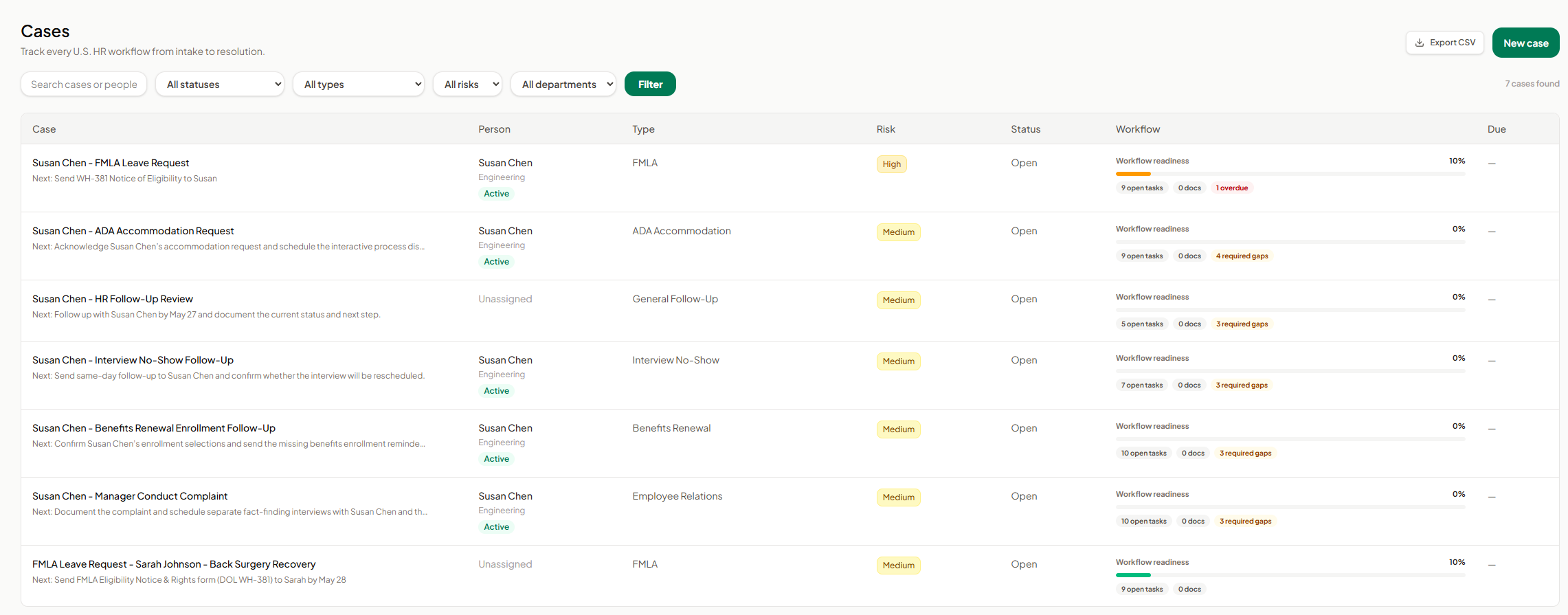
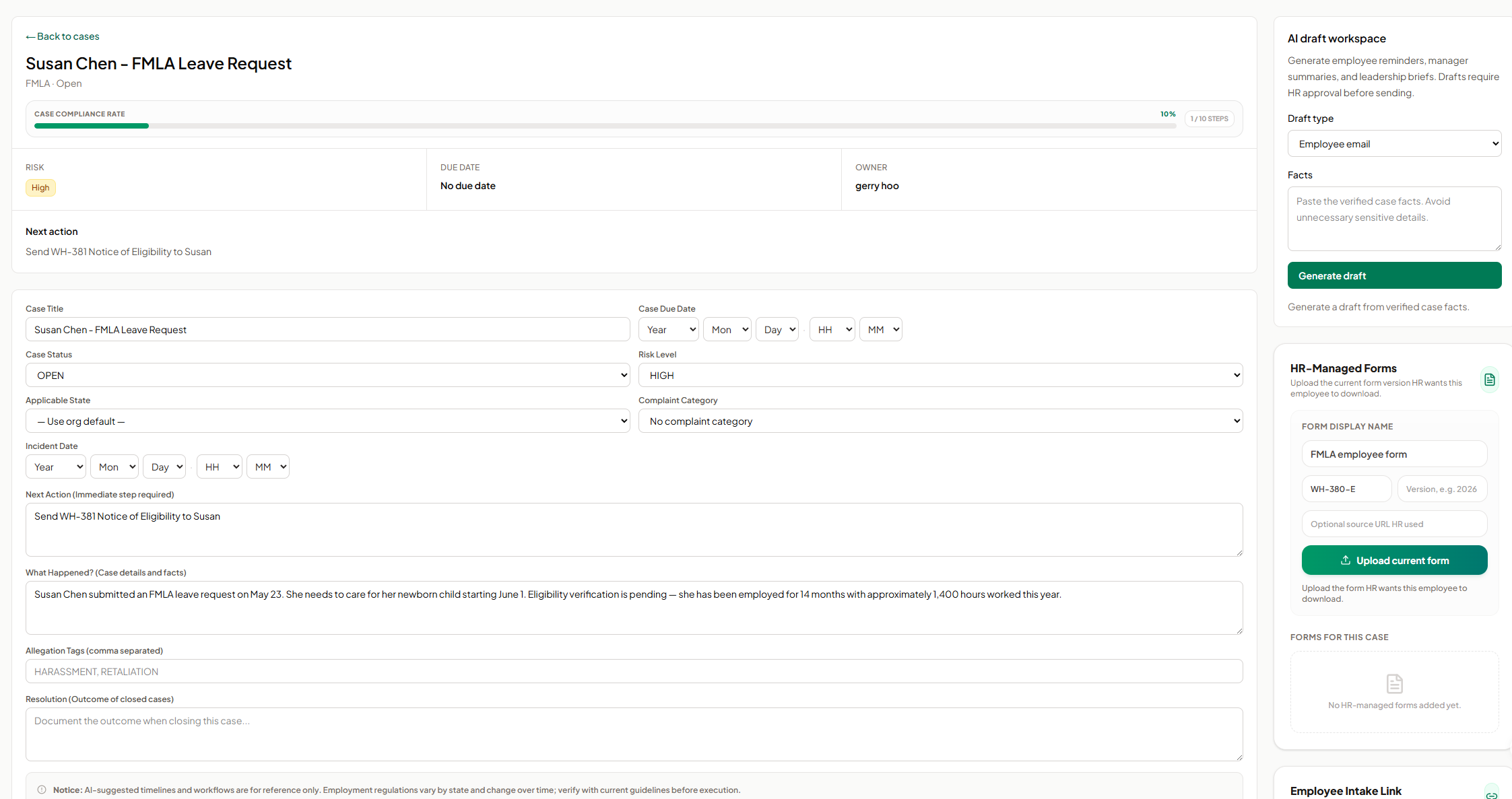
Screenshot of AI SoloHR FMLA workflow screen showing how HR teams can track leave request details, eligibility review, notice dates, certification deadlines, designation status, payroll or benefits status, and return-to-work readiness in one structured case workflow. The screen shows a case moving from intake through certification and designation, with workflow state, blocking reason, key dates, status fields, notes, and a save action for maintaining an organized FMLA case record.Screenshot of AI SoloHR HR-managed forms screen showing how HR can upload and organize the current form version for an employee case. The panel includes fields for form display name, form code, version, optional source URL, and an upload action, helping HR keep case-specific forms such as FMLA employee forms connected to the relevant case record.Screenshot of AI SoloHR AI draft workspace showing how HR can generate draft communications from verified case facts. The screen includes a draft type selector for employee emails, manager summaries, or leadership briefs, a case facts field, and a generate action, with drafts positioned for HR review before sending.Screenshot of AI SoloHR cases dashboard showing a centralized list of HR workflows from intake to resolution. The screen includes search, status, type, risk, and department filters, plus case rows for FMLA, ADA accommodation, interview no-show, benefits renewal, employee relations, and general follow-up workflows. Each row shows the related person, case type, risk level, status, workflow readiness, open tasks, document count, required gaps, overdue items, and export or new case actions.Screenshot of AI SoloHR case detail screen for an FMLA leave request, showing the case summary, compliance progress, risk level, owner, next action, due date, editable case fields, incident details, case facts, tags, and resolution notes. The screen also includes side panels for AI draft generation and HR-managed forms, helping HR keep case tracking, communication drafts, and required form uploads connected to the same employee case record.Screenshot of AI SoloHR new case screen showing how HR can create a structured HR case by capturing the minimum facts first. The form includes primary person, case title, workflow type, risk level, applicable state, next action, and case summary fields, with a disclaimer reminding users to verify AI-generated workflow guidance against current official requirements.