Airtable vs. Lightning Tools Data Viewer

Overview
ProductRatingMost Used ByProduct SummaryStarting Price
Airtable
Score 8.6 out of 10
N/A
Airtable is a web-based application builder that combines spreadsheet usability with relational database architecture. The platform enables users to construct custom operational applications, configure automated workflows, and design tailored interfaces without traditional software development.
$24
per month per seat
Lightning Tools Data Viewer
Score 9.1 out of 10
Mid-Size Companies (51-1,000 employees)
The Data Viewer provides data visualization in the form of reports or charts that can be created and customized to suit a business's needs. Silos of data exist in most organizations and yet contain valuable insights into how well the organization is performing and where action is needed. Those silos often include Microsoft Excel workbooks, Microsoft SQL Azure databases, On-Premises data sources accessible through OData or Business Connectivity Services and even SharePoint Lists. These data…
$2,200
per year per installation
Pricing
AirtableLightning Tools Data Viewer
Editions & Modules
Team
$24
per month per user
Business
$54
per month per user
Enterprise
Custom Pricing
Data Viewer OnPrem
$1,000
per year Per installation, 1 x WFE
Data Viewer Online
$2,200
per year per installation
Data Viewer OnPrem Enterprise Edition
POA
per year Per installation, 4+ WFE
Data Viewer Online Enterprise Edition
POA
per year per installation
Offerings
Pricing Offerings
AirtableLightning Tools Data Viewer
Free Trial
YesYes
Free/Freemium Version
YesNo
Premium Consulting/Integration Services
NoYes
Entry-level Setup FeeNo setup feeNo setup fee
Additional DetailsPrices stated are minimum per installation for "stock" products. $2.20 per user / year on top of base price. Enterprise editions can be amended to suit business needs if deemed necessary, additional costs incurred and TBD. All packages include free technical support. Free upgrades available to latest versions of tool as they are released. (online version)
More Pricing Information
Community Pulse
AirtableLightning Tools Data Viewer
Features
AirtableLightning Tools Data Viewer
Project Management
Comparison of Project Management features of Product A and Product B
Airtable
7.8
235 Ratings
1% above category average
Lightning Tools Data Viewer
-
Ratings
Task Management8.9199 Ratings00 Ratings
Resource Management8.0193 Ratings00 Ratings
Gantt Charts8.489 Ratings00 Ratings
Scheduling7.4165 Ratings00 Ratings
Workflow Automation8.0143 Ratings00 Ratings
Team Collaboration7.9218 Ratings00 Ratings
Support for Agile Methodology8.3108 Ratings00 Ratings
Support for Waterfall Methodology8.580 Ratings00 Ratings
Document Management7.5170 Ratings00 Ratings
Email integration7.1115 Ratings00 Ratings
Mobile Access5.9191 Ratings00 Ratings
Timesheet Tracking7.893 Ratings00 Ratings
Change request and Case Management8.2102 Ratings00 Ratings
Budget and Expense Management7.1127 Ratings00 Ratings
BI Standard Reporting
Comparison of BI Standard Reporting features of Product A and Product B
Airtable
-
Ratings
Lightning Tools Data Viewer
9.1
1 Ratings
12% above category average
Customizable dashboards00 Ratings9.11 Ratings
Report Formatting Templates00 Ratings9.11 Ratings
Ad-hoc Reporting
Comparison of Ad-hoc Reporting features of Product A and Product B
Airtable
-
Ratings
Lightning Tools Data Viewer
8.2
1 Ratings
5% above category average
Drill-down analysis00 Ratings6.41 Ratings
Formatting capabilities00 Ratings9.11 Ratings
Report sharing and collaboration00 Ratings9.11 Ratings
Data Discovery and Visualization
Comparison of Data Discovery and Visualization features of Product A and Product B
Airtable
-
Ratings
Lightning Tools Data Viewer
3.6
1 Ratings
73% below category average
Pre-built visualization formats (heatmaps, scatter plots etc.)00 Ratings3.61 Ratings
Best Alternatives
AirtableLightning Tools Data Viewer
Small Businesses
Kintone
Kintone
Score 9.7 out of 10
Supermetrics
Supermetrics
Score 9.7 out of 10
Medium-sized Companies
Kintone
Kintone
Score 9.7 out of 10
Supermetrics
Supermetrics
Score 9.7 out of 10
Enterprises
Planview AgilePlace
Planview AgilePlace
Score 7.8 out of 10
IBM Analytics Engine
Score 7.1 out of 10
All AlternativesView all alternativesView all alternatives
User Ratings
AirtableLightning Tools Data Viewer
Likelihood to Recommend
8.6
(239 ratings)
9.1
(1 ratings)
Likelihood to Renew
9.5
(5 ratings)
-
(0 ratings)
Usability
8.0
(36 ratings)
-
(0 ratings)
Availability
10.0
(2 ratings)
-
(0 ratings)
Performance
9.0
(1 ratings)
-
(0 ratings)
Support Rating
9.0
(30 ratings)
-
(0 ratings)
In-Person Training
8.0
(1 ratings)
-
(0 ratings)
Online Training
9.0
(1 ratings)
-
(0 ratings)
Implementation Rating
9.0
(2 ratings)
-
(0 ratings)
Configurability
10.0
(2 ratings)
-
(0 ratings)
Contract Terms and Pricing Model
5.0
(1 ratings)
-
(0 ratings)
Ease of integration
8.0
(2 ratings)
-
(0 ratings)
Product Scalability
9.0
(2 ratings)
-
(0 ratings)
Vendor post-sale
8.0
(1 ratings)
-
(0 ratings)
Vendor pre-sale
8.0
(1 ratings)
-
(0 ratings)
User Testimonials
AirtableLightning Tools Data Viewer
Likelihood to Recommend
Airtable
Airtable is an ideal platform for small and growing businesses to keep track of just about EVERYTHING they need to keep things running smoothly. It's a great way to keep tasks organized, and keep everyone on the same page with progress on all things. Our company finds the kanban particularly useful, as products go through a lifecycle from ideation to retirement, it's good to keep a database of what is in production, what's working, and what we've tried before. I can see the platform being challenging with much larger businesses, but for the small to medium businesses I've used the platform with, it is ideal.
Read full review
Lightning Tools
Lightning Tools Data Viewer is well suited for re-surfacing data and customizing its look and feel.
Read full review
Pros
Airtable
  • I can create tables, create and customize fields
  • Airtable has capabilities commonly found in spreadsheet applications, but also has some of the features found in databases.
  • The ability to filter fields. I set up a filter on the status field, so when a project is marked, complete, on hold, or canceled, that record is hidden from my current projects table view. If it is marked complete, the record is moved to the completed projects table view. In this way I can easily access a record of past projects
  • Being able to duplicate tables and create alternate views
  • Collapse and expand records. When I collapse the rows, I can easily scan current projects, next steps, project status, and due dates. When I expand the row, or field, I can see more detailed information about that field or record very easily. I can also expand or open the entire record. This is is helpful, when I am entering a lot of information to multiple fields in that record.
Read full review
Lightning Tools
  • Shows Lists created on different sites to be seen and controlled on another site in a Tenant
  • Allows selection of layouts and coloring way beyond what other programs do.
  • Easy to learn and very functional.
Read full review
Cons
Airtable
  • When records are deleted, there could be more options for what happens to associated records in other tables.
  • Multi-select fields should be sortable.
  • The per-user pricing model can be cumbersome when you need to share bases with third parties but can't use a publicly accessible URL.
Read full review
Lightning Tools
  • Data Viewer has a graph feature that is old school flat design. We loved the In House real 3D graph Lightning Tools program.
Read full review
Likelihood to Renew
Airtable
We will 10/10 renew the use of Airtable because it has brought great value to our team. Not only is Airtable affordable, but it's also user-friendly and helps our team be efficient. We no longer need to rely on Excel spreadsheets being passed from person to person via email. Furthermore, we aren't dealing with corrupt Excel spreadsheets and the need to salvage data when a file is accidentally altered.
Read full review
Lightning Tools
No answers on this topic
Usability
Airtable
IMO the usability of this product is its greatest asset. The UI is clean and the menus are intuitive to the point where I'd feel confident having a non-spreadsheety colleague take on building an Airtable for the first time with next to no training. I can't say that about every table-like software product that I've used such as Notion.
Read full review
Lightning Tools
No answers on this topic
Reliability and Availability
Airtable
I have rarely experience downtime, compared to other tools, and given how much time we spend on the tool. Even if there were to be, their updates on it are very timely, and our support team are able to provide any questions regarding
Read full review
Lightning Tools
No answers on this topic
Performance
Airtable
I never had any issues with load time, even with the integrations that we use today (google sheets) However, I'm curious if adding additional layers of integrations would slow down performance. We do carry quite a bit of data in Airtable, but, again, no impact on overall performance
Read full review
Lightning Tools
No answers on this topic
Support Rating
Airtable
Airtable has great support. They have a variety of support features to answer any questions. They have great self teaching instructions for templates and product tours. They also have support for teams and project management. They also have a fantastic customer help line. They are able and willing to answer customer questions and never have customers waiting long
Read full review
Lightning Tools
No answers on this topic
In-Person Training
Airtable
This training was done in-house, but the Airtable team provided resources and how to guides to ensure that we covered all components of the system
Read full review
Lightning Tools
No answers on this topic
Online Training
Airtable
Recorded trainings were provided by the Airtable team. Great as an evergreen resources to new team members and for anyone that wants to refresh their Airtable knowledge
Read full review
Lightning Tools
No answers on this topic
Implementation Rating
Airtable
Training all users was an important part of the implementation, which did take considerable time and effort. At first glance without training, the content calendar can be overwhelming because of the amount of data. The features within Airtable seem to be endless but our team was able to identify the most important to be successful.
Read full review
Lightning Tools
No answers on this topic
Alternatives Considered
Airtable
Airtable was a really good fit for this specific use case as it provided a huge number of collaboration features in an intuitive and pleasant-to-use interface. The free tier worked initially with our work, and the upgrade pathway was fair and made sense for us.
Read full review
Lightning Tools
Lightning Tools Data Viewer is much easier and more powerful than Infowise similar viewer in their lineup. In this case, we use Data Viewer over the one offered by Infowise.
Read full review
Contract Terms and Pricing Model
Airtable
I did not help purchase the product, but Airtable's per user pricing structure is inconvenient when some users only need occasional or read-only use.
Read full review
Lightning Tools
No answers on this topic
Scalability
Airtable
There are TONS of opportunity to scale, but I think it's a matter if you have the time and resources to do so because the initial setup can be fairly time consuming and prioritized dedication
Read full review
Lightning Tools
No answers on this topic
Return on Investment
Airtable
  • It gives us a real-time experience of working.
  • Through this platform, I always have the idea bout which of my team member is working on which particular part of the project, I can easily track their progress, and also I can easily correct them where it is required by adding sticky notes, by sending the attachments and URLs.
  • Quality services.
Read full review
Lightning Tools
  • It allows us to do things that would take a great deal more time to duplicate in SharePoint
  • It cuts down on ugly looking built in SP list layouts
  • Users find it easy to access, thus this product is more productive
Read full review
ScreenShots

Airtable Screenshots

Screenshot of Screenshot of Screenshot of Screenshot of Screenshot of

Lightning Tools Data Viewer Screenshots
Screenshot of DISPLAYING EXTERNAL DATA WITHIN SHAREPOINT OR MICROSOFT TEAMS
The Data Viewer Client Side Web Part can be configured by Business Users within a few minutes to display Line of Business Data from Data Sources such as Excel,  SQL Azure, Business Connectivity Services, OData and SharePoint Lists.  Connections to an organizations data such as Customer Relationship Management Systems, Accounting Systems, or Custom Databases can be connected, giving business users a live up-to-date view of business information within the context of their SharePoint Team Sites or Microsoft Teams Tabs.Screenshot of HIGHLIGHTING KEY BUSINESS DATA (NO CODE)
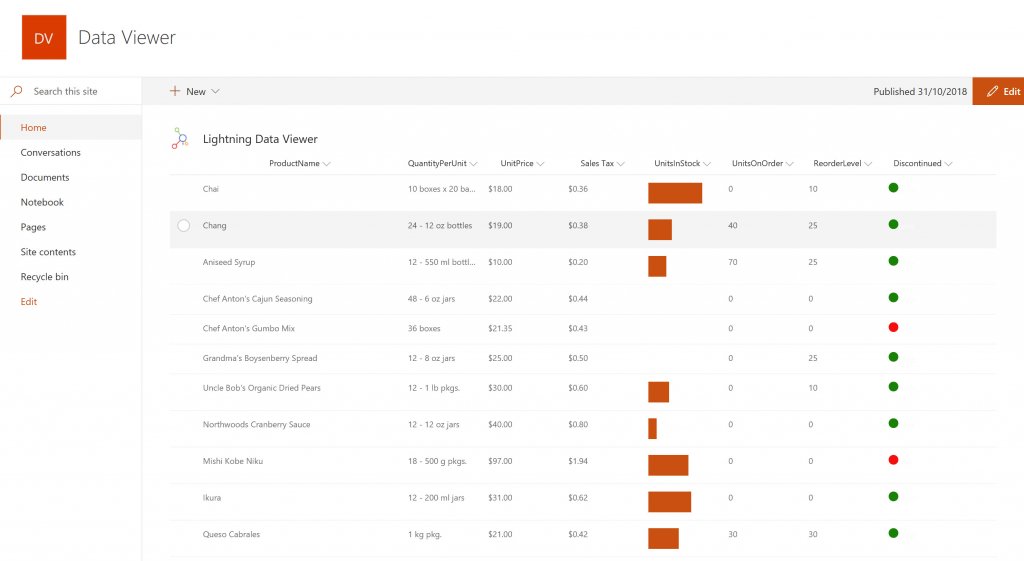
Conditional formatting can be used to highlight key business data. Overdue Tasks, Low Stock, Currency Exchange Rates, Sales Revenue are examples of data to highlight visually allowing for a quick reaction time. Key Financial Indicators and Key Performance Indicators can be configured with a simple dialog and no need to write any code. Choose colours, icons or data bars to highlight key data.Screenshot of SELECTING AND STYLING ICONS
Icons can be chosen as part of the conditional formatting to make data stand out. The Office 365 Fabric icons can be selected and styled and applied to cell values. Pepper pots, Smileys, Envelopes and more icons are available. There are hundreds of options to choose from to highlight data that needs to be acted upon.Screenshot of DATA VIEWER CAN BE A GRID OF DATA OR A CHART IN SHAREPOINT OR MICROSOFT TEAMS
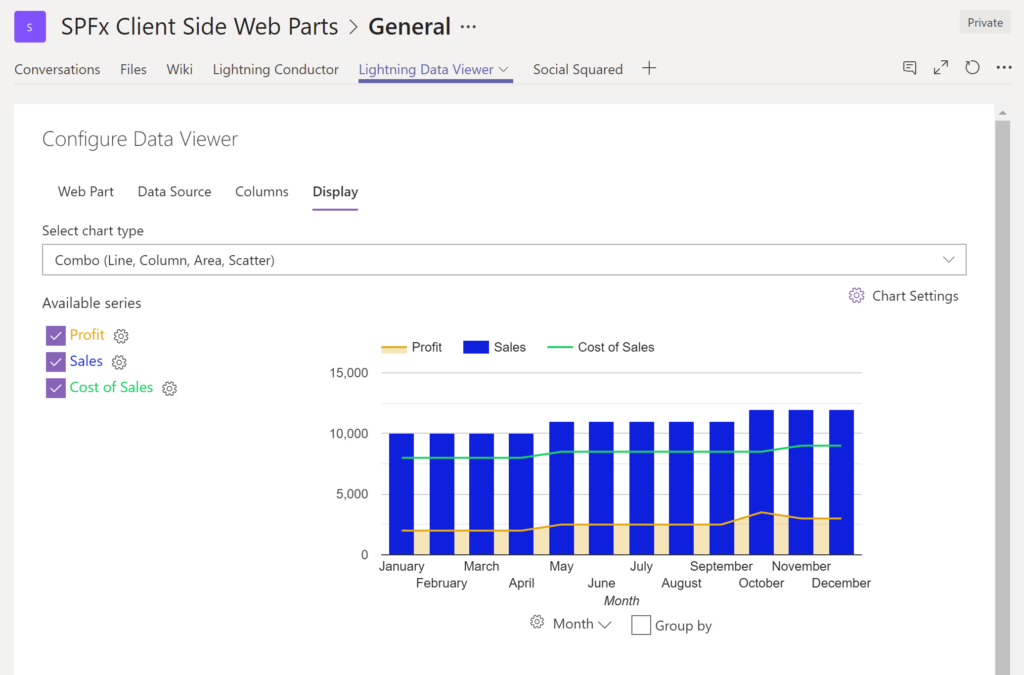
The Data Viewer can be used within Microsoft SharePoint Modern Sites or Microsoft Teams Tabs as a Grid of Data with styling or as a Chart which can be configured. The Charting Feature allows for Pie, Donut, Column, Line, Area, and Scatter Charts which can all be configured and displayed in 2D or 3D.Screenshot of TREEMAPS
summary information can be displayed within a TreeMap next to the detail. Users will be able to see trends, and how the business is performing  using the TreeMap view of data.Screenshot of CHARTS AND GAUGES
The Data Viewer is used to represent data in multiple ways using Gauges, TreeMaps, Multiple Series Charts, and Pie Charts.