Altify’s suite of Salesforce native solutions guide and coach sellers to identify and map key relationships, uncover business insights, align sales processes to buying processes, qualify, manage and execute deals, and grow wallet share in accounts.
N/A
Revenue Grid
Score 8.0 out of 10
N/A
Revenue Grid is an AI Guided Selling platform that nudges sales teams with step-by-step guidance towards actions that bring the best results, shows deals at risk, and prioritizes tactics with the greatest impact. Guided Selling is a new concept in B2B selling that focuses on the needs and challenges of sales teams. The vendor states their philosophy is to provide step-by-step guidance on each deal reps have in their pipeline and help sales teams be in…
Altify is very well suited for customer relationship mapping and for use on very large, long term and complex deals. Altify is created and represented as an enterprise-level tool, but even some of its functions are too overbuilt for enterprise level sales activities. Altify is a tool best utilized only for the top level of complex deals within an organization. Features such as customer relationship mapping do have use and benefit for mid to large level deals and is arguably the most valuable tool in the Altify suite. After nearly a year using Altify, my recommendation on its use would be to enable account plans, account management, opportunity management, and sales process manager only to the top strategic account reps in the organization, realizing that they are probably best used purely out of the box as any customizations create other complications. For the rest of the sales teams, the customer relationship mapping feature is the one tool reps would gain the most value out of.
If you are using Office365 and it is within your budget, utilizing SmartCloud Connect as an interface with a CRM is a no-brainer. It remains hidden when Outlook opens, but with an email selected you can open it with a single click. It then allows you to associate the email and even attachments with email addresses that were included in the to, cc, or from sections of the email. It's a very intuitive user interface and saves time in email tracking.
Sales Process Manager: The Altify Sales Process manager's biggest drawback is the lack of usability for the end user. Altify has an out of the box sales process or a custom one can be created based on the company sales process. The drawback is that unless the sales process includes very few items, it can be more cumbersome than helpful. The Rep walks through the Sales Process by selection whether they have "Completed" are "In Progress" or have "Not Completed" the sales process activities at each stage of the opportunity. Altify saves after each selection so there is considerable downtime as the user waits for their selection to be recorded before they can answer the next question. Altify has an option to automatically advance the Salesforce opportunity Sales Stage once a certain % or mandatory steps in the sales process are completed, however this is not entirely useful as it does not advance until the set % or mandatory marked processes within a Sales Stage are completed AS WELL as at least one process from the next sales stage. This becomes very confusing and cumbersome for the users. In most cases, the sales process manager becomes more of a micromanagement tool with managers requiring all items to be marked completed and the Users merely marking items to satisfy that requirement without getting the intended benefit of the guided selling experience.
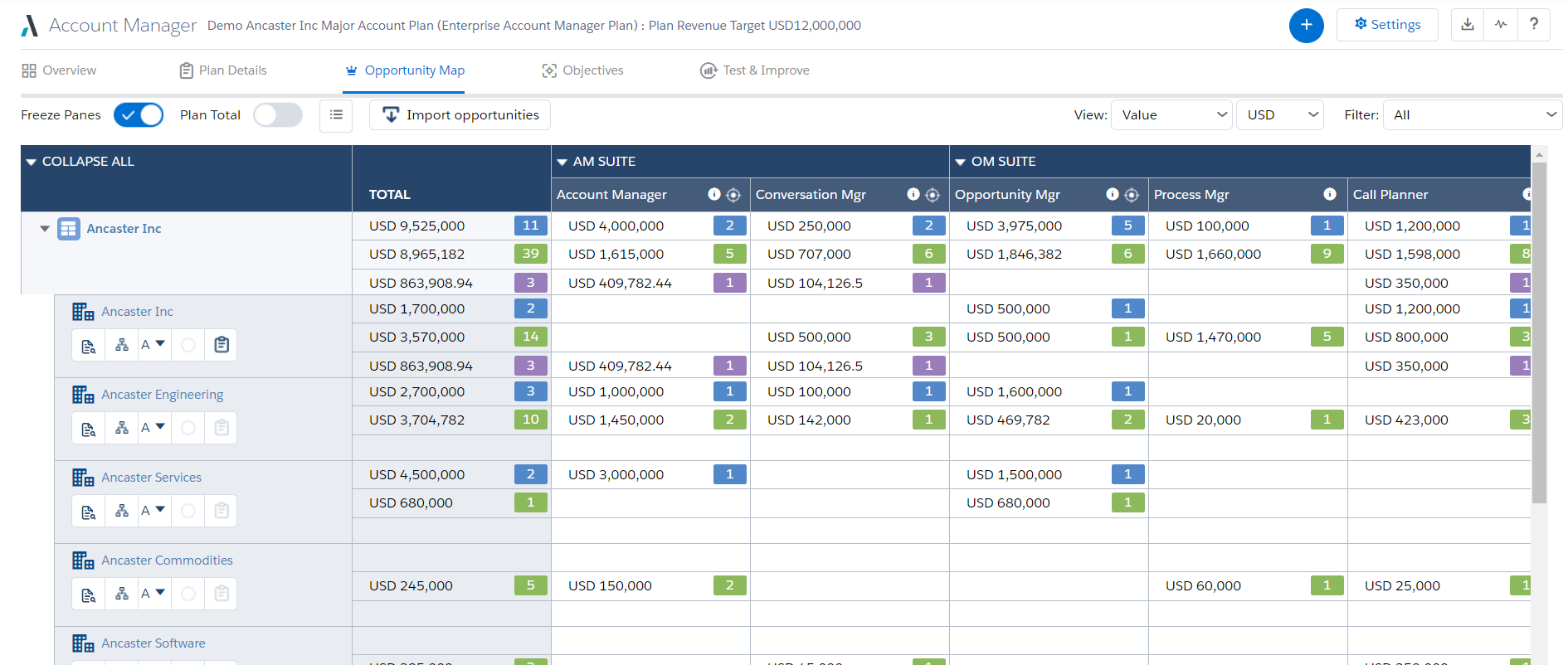
Account Plans: Account Plans can be grouped in both "does well" and "does poorly" for the Altify Suite. I will outline the bad in this portion of the review. Altify Account Plans do have some ability for customization, however the standard out of the box options are incredibly overbuilt. Filling out all of the information within the Account Plan can consume 40+ man hours for a single Account. While some of this information can be useful and important to note, other portions become more cumbersome than useful. The Completeness and Scorecard portions of the use a number of calculations. These calculations are explained at the bottom of the page but from a user perspective are very confusing and not straightforward. Most users that begin using account plans quickly abandon them because of the difficulty in setting them up correctly and the minimal insights that are gleaned out of the work put into them. One place for the greatest opportunity to improve account plans is in the objectives section, there the user can set objectives and activities (tasks) to meet them. The tasks must be manually selected to create an actual task in Salesforce and this cannot be assigned out to other SF Users. This portion of the Account plan would be improved if it could be used as a holistic account management platform to manage tasks across all the opportunities and potential opportunities, with an ability to assign them out to others in Salesforce within the account team.
Altify Max Insights: Altify max insights is intended to provide coaching advice at the opportunity level. This feature is tied into the opportunity manager. The drawback to this feature is that the insight mainly pertains to whether or not a user filled out all the steps in the opportunity manager: the sales process, the opportunity assessment, strategy, and the customer relationship map. The insights are far less action-oriented and more of a reminder to use the tool components. This tool just doesn't hold value, especially as it is an add on product.
Lack of Customization - While Altify does allow customization of some of their products and components, Altify has a ton of limitations. One of the most frustrating aspects is that all of the processes happen from their "black box" which is the dealmaker opportunity objects that Altify creates. This is essentially a shadow copy of the opportunities within Salesforce that then push changes to the actual opportunity. There is no way to tap into this shadow opportunity to either run custom processes or to even surface the Altify insights in a BI tool such as Einstein. This means that a lot of the use and functionality that Altify does do well cannot be leveraged for company insights or user end improvements.
Because of the issues we have been having regarding connectivity and instability of the google extension. At some point if this is not handled we may have to find a new vendor to support our needs
Sometimes they ask for way to much information. They need screenshots, full event names, date and times events were set (Which can be very difficult when you have a reoccurring meeting that was originally set years ago)
While Skuid is not a match to what Altify does in terms of capabilities, Skuid did allow us to natively create the functions that we needed within the business in a way that was more useful than the Altify tools out of the box functionality. Altify does not offer anything for a more "light touch" opportunity, which is its greatest drawback. With Skuid we were able to create our own solution for these lighter touch opportunities
Out of all the other utilities we've used, SmartCloud connect seems to be the most stable. The other interfaces sometimes caused glitchy integrations with Outlook, requiring a user to restart the add-in to restore functionality, but so far that has not been the case with SmartCloud Connect. SmartCloud connect also allows you to connect to different CRM's instead of just one, which means you can still use it when migrating between CRM's.