Altium Develop vs. Dynamo BIM vs. PTC Windchill

Overview
ProductRatingMost Used ByProduct SummaryStarting Price
Altium Develop
Score 9.1 out of 10
N/A
Altium Develop is a platform that unifies multidisciplinary teams across engineering, sourcing, and manufacturing to support seamless co-creation. It provides real-time visibility into designs, requirements, and supply chain data, enabling contributors to work together concurrently rather than in silos.
$995
per year per seat
Dynamo BIM
Score 8.0 out of 10
N/A
Dynamo is an open-source software platform for computational design and building information modeling (BIM). Through a visual interface, construct logic routines to smooth and automate workflows, find optimum solutions, and sift through design options. The commercial product Dynamo Studio is discontinued and will be excluded from Autodesk's suite of products (capabilities of Dynamo Studio now appear as part of Revit itself). However, Dynamo’s open-source version still works with Autodesk Revit…
$0
PTC Windchill
Score 7.1 out of 10
N/A
PTC offers Windchill, the company's Product Lifecycle Management (PLM) platform that includes BOM (a digital bill of materials) for cost and product quality control via parts-centric source of truth, dynamic and updated product change and configuration management to ensure up-to-date product information, industry standards and requirements validation and control, and role-based data access among other features.N/A
Pricing
Altium DevelopDynamo BIMPTC Windchill
Editions & Modules
No answers on this topic
Offerings
Pricing Offerings
Altium DevelopDynamo BIMPTC Windchill
Free Trial
YesNoNo
Free/Freemium Version
NoYesNo
Premium Consulting/Integration Services
NoNoNo
Entry-level Setup FeeNo setup feeNo setup feeNo setup fee
Additional Details
More Pricing Information
Community Pulse
Altium DevelopDynamo BIMPTC Windchill
Best Alternatives
Altium DevelopDynamo BIMPTC Windchill
Small Businesses
SOLIDWORKS
SOLIDWORKS
Score 8.6 out of 10
Onshape
Onshape
Score 7.6 out of 10
monday dev
monday dev
Score 8.5 out of 10
Medium-sized Companies
SOLIDWORKS
SOLIDWORKS
Score 8.6 out of 10
Onshape
Onshape
Score 7.6 out of 10
Arena PLM and QMS
Arena PLM and QMS
Score 8.5 out of 10
Enterprises
Autodesk Fusion
Autodesk Fusion
Score 7.9 out of 10
Rhino
Rhino
Score 8.4 out of 10
Roadmunk
Roadmunk
Score 6.2 out of 10
All AlternativesView all alternativesView all alternativesView all alternatives
User Ratings
Altium DevelopDynamo BIMPTC Windchill
Likelihood to Recommend
9.6
(54 ratings)
8.0
(1 ratings)
1.0
(6 ratings)
Likelihood to Renew
8.2
(4 ratings)
-
(0 ratings)
-
(0 ratings)
Usability
8.4
(51 ratings)
-
(0 ratings)
1.0
(1 ratings)
Availability
6.4
(1 ratings)
-
(0 ratings)
-
(0 ratings)
Performance
7.3
(1 ratings)
-
(0 ratings)
-
(0 ratings)
Support Rating
7.3
(3 ratings)
-
(0 ratings)
-
(0 ratings)
Online Training
9.1
(1 ratings)
-
(0 ratings)
-
(0 ratings)
Implementation Rating
6.9
(2 ratings)
-
(0 ratings)
-
(0 ratings)
Product Scalability
2.7
(1 ratings)
-
(0 ratings)
-
(0 ratings)
User Testimonials
Altium DevelopDynamo BIMPTC Windchill
Likelihood to Recommend
Altium
It's the most approachable "professional" package for small to medium-sized businesses, given the price point. It's fairly mature feature-wise and has improved stability enough over the last 5 years that it no longer constantly crashes. But it feels like there's a push to constantly increase prices until it's no longer an obvious choice. That, coupled with the insistence on subscription models and the terrible user experience when on poorly connected mobile data plans, means it's still my CAD package of choice, but I'm now a reluctant user rather than a fan.
Read full review
Autodesk
Dynamo is the main tool for making BIM automation very well . By using Dyanmo our work take less time to complete. After correct Dynamo script applying in Revit most of the time work take less time to complete in a smart way . I think coding and Dyanmo will make a better combination in BIM field.
Read full review
PTC
This product is perhaps typical of something that seems as though it was conceived in the 90's and has seen various appendages since, none of which do their job particularly well. Nothing in this system is efficient and all its processes demand a huge, close to maximum possible level of human effort. No doubt many companies, such as my own are spend huge amounts of money for the debateable privilege of tripling their employees workload and making them as inefficient as possible to make the administration of the system seem more important than it actually is.
Read full review
Pros
Altium
  • Extremely straightforward and easy to use
  • Easy to find all tools, including laying traces, adding net labels, etc.
  • Great training documents and videos, very using friendly; especially for first time users
  • 3D models of the PCB are excellent
  • Easy to generate files; including schematics, BOMs, Gerber files, etc.
Read full review
Autodesk
  • I create a Dyanmo script for placing a light family in all over model in a single click with maintaining a standard.
  • I can create a Dyanmo script for PDF creation of my all 2d sheets .
  • I can create a Dyanmo script to cut my whole pipe in a standard pipe length in a single click .
Read full review
PTC
  • It is compatible with all devices and operating systems such as web-based, Android, and iOS.
  • It allows user to customize its interface based on their requirement.
  • It provides a digital part list with all required data like Part Name, Part No., Weight, Material, etc.
  • Searching data is so facile that one can get data without any trouble.
Read full review
Cons
Altium
  • It is difficult to create new components while reusing existing footprints/symbols. For example, reuse a 1206 package footprint, create a variant for resistors with an appropriate 3D model, and then a variant for capacitors with an appropriate 3D model.
  • The software's overall responsiveness seems slow, and it does not update properly in all instances. For example, clicking a component in the schematic will not always show its properties; it usually shows the properties of the last selected component. Clicking the blank space in the schematic first, then selecting the component, seems to load some of the correct data. But the 3D model in the properties view would still show the last EDITED part.
  • Saving components to the server would not always register correctly, requiring the component editor to be closed 'without saving' to close the part out, even though no changes were made since the last save to the server.
  • It is unclear where a list of footprints/symbols can be managed. For example, deleting a deprecated footprint so that it does not appear as a valid option in the future.
  • BOM part choice data has an NRFND component selected as in use, causing the status to be yellow. There is no apparent way to select a different manufacturer part as the 'in use' part to resolve the warning.
  • Updating from the library does not pull the most up-to-date symbol/footprint data for a given component. So far, there does not appear to be a way to do this, even though the component itself has been updated to use the correct references. This may be related to the general delays and consistency/reliability issues with the online link.
Read full review
Autodesk
  • For making a dyanmo script we should do alot of work and I think this news to be smart.
  • Dyanmo with navisworks is require
  • Dynamo free tutorial is to be shared by company.
Read full review
PTC
  • Extract partlist should be directly in Excel because everyone time we have to convert it to Excel.
  • ECN report formatting need improvement.
  • Many times part no doesn't go to ERP even after ERP released state.
Read full review
Likelihood to Renew
Altium
ALTIUM DESIGNER is the reference tool in the electronic circuit design sector, its use is widespread worldwide. Although there are other alternatives, some of them free do not rival ALTIUM DESIGNER in terms of features and reliability. It is also very practical to request quotes with ALTIUM DESIGNER BOM reports since all suppliers are accustomed to using the tool.
Read full review
Autodesk
No answers on this topic
PTC
No answers on this topic
Usability
Altium
I originally chose Altium Develop for its superior usability. All operations being handled in one cohesive platform greatly improves efficiency. When handling many different designs, project setup and component creation eat into every project's productivity. Templates, defaults and design reuse all speed up design. I hold back from a higher rating because development focus on those usability features seems to have stagnated a bit. Simple missing features requested seem to remain missing. New collaboration features, simulation and sourcing features are released, but I just want to be able to draw dashed lines! I think this reflects a general focus on the 10% of datacenter/AI/smartphone customers over the 90% of 2-4 layer designs. The lack of information available during the platform transition gave me significant pause before buying in as well.
Read full review
Autodesk
No answers on this topic
PTC
Windchill is an extremely verbose and unintuitive system, with masses of unnecessary duplication of fields, convoluted workflows, unclear roles and terrible search capabilities. It is one of the worst software products I have ever seen to propose solving something that is actually factors quicker to do with manual writing and paper work
Read full review
Reliability and Availability
Altium
Not very stable. Sudden lack of functionality when the license expires is not indicated clearly and can lead to loss of work.
Read full review
Autodesk
No answers on this topic
PTC
No answers on this topic
Support Rating
Altium
Long process for solving problems. Problem solved after multiple emails, but not explained what was the solution, just "it is solved now"
Read full review
Autodesk
No answers on this topic
PTC
No answers on this topic
Online Training
Altium
easy to follow, Good technical materials. good videos The platform is easy to use.
Read full review
Autodesk
No answers on this topic
PTC
No answers on this topic
Implementation Rating
Altium
Some times it is slow down PC due to polygons
Read full review
Autodesk
No answers on this topic
PTC
No answers on this topic
Alternatives Considered
Altium
In terms of collaborative work, Altium 365 is the easiest to use since KiCad nor OrCAD have sophisticated infrastructure for team members to interact with each other. By allowing features such as organizations and version control, Altium 365 is by far the best product for collaborative work. Additionally, electronics parts management and creation is better in Altium 365 than the other products. Actions such as importing schematic libraries, creating bills of materials, and conducting simulations are simply better in Altium 365.
Read full review
Autodesk
I think Dyanmo is a basic to advance version of automation in BIM Industry so we choose Dynamo against any other software. Many of our people knows about the software so training of this software is become easy for organisation. On YouTube we have found many videos about Dyanmo. Most important it take less money and save very much time of our employees.
Read full review
PTC
Windchill is having a great market share & its UI is simple & neat, integration with Creo & ERP system. These are the main reasons of considering Windchill by our organization.
Read full review
Scalability
Altium
Because, in my opinion, usage for small organization is poor, it is difficult to set up initial configuration to support scaling.
Read full review
Autodesk
No answers on this topic
PTC
No answers on this topic
Return on Investment
Altium
  • I can only guess, but I think the investment, at least for real industry, is a no-brainer. The labor savings are obvious and far over the outlay.
  • To be more specific, the time saved on component selection/procurement is phenomenal. I will no longer waste days poring over catalogs and websites.
  • The biggest downside I know of is the time spent explaining the above to the accounts department because, let's face it, it's still pretty spendy.
Read full review
Autodesk
  • Positive impact is it will save our employees time to do his job
  • It will create an automation in BIM industry
  • Not take too much money for licence
Read full review
PTC
  • Saves time as all of our drawings and business instructions and procedures are housed in a central location with check-in/out capability and version control.
Read full review
ScreenShots

Altium Develop Screenshots

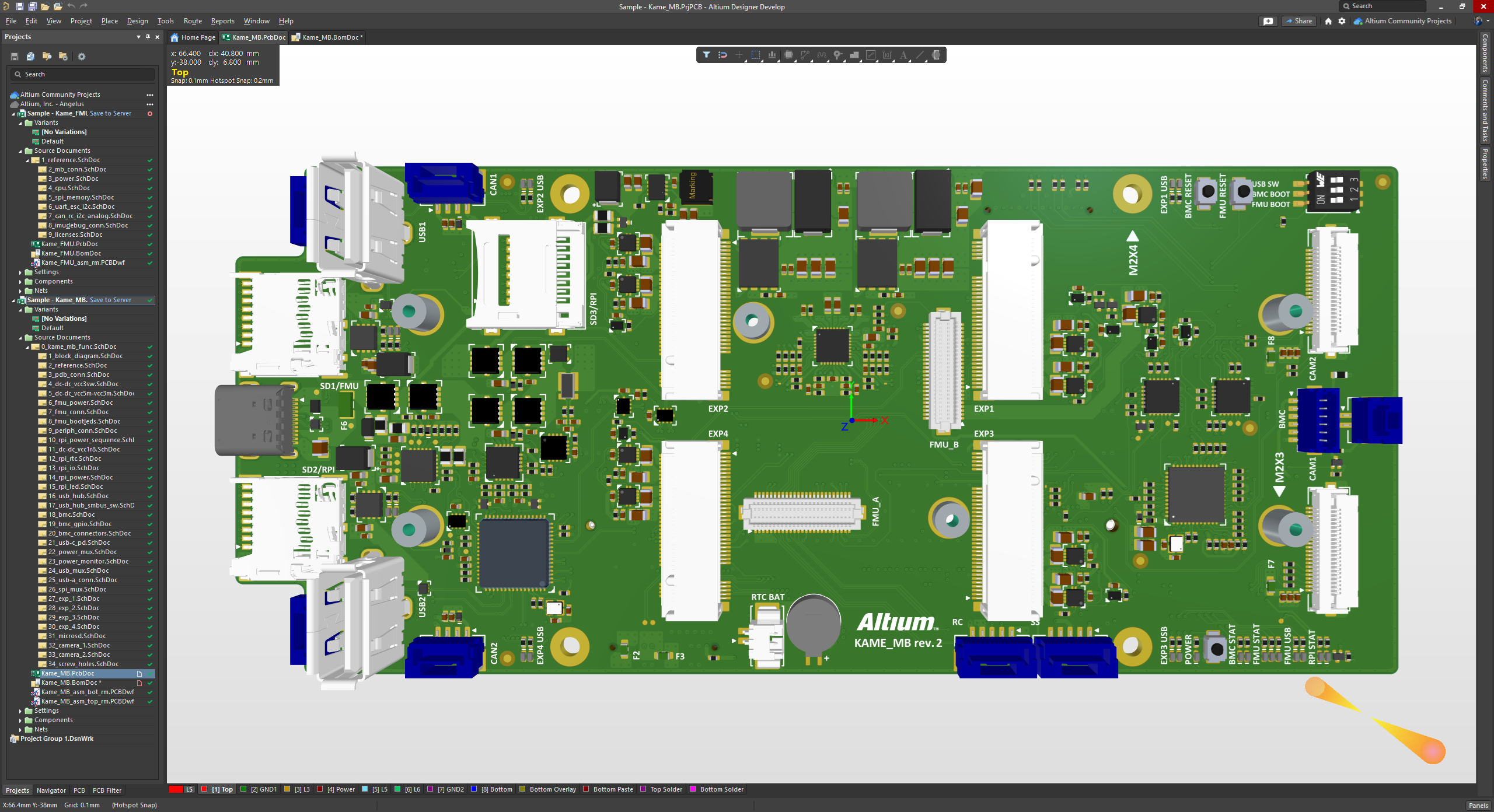
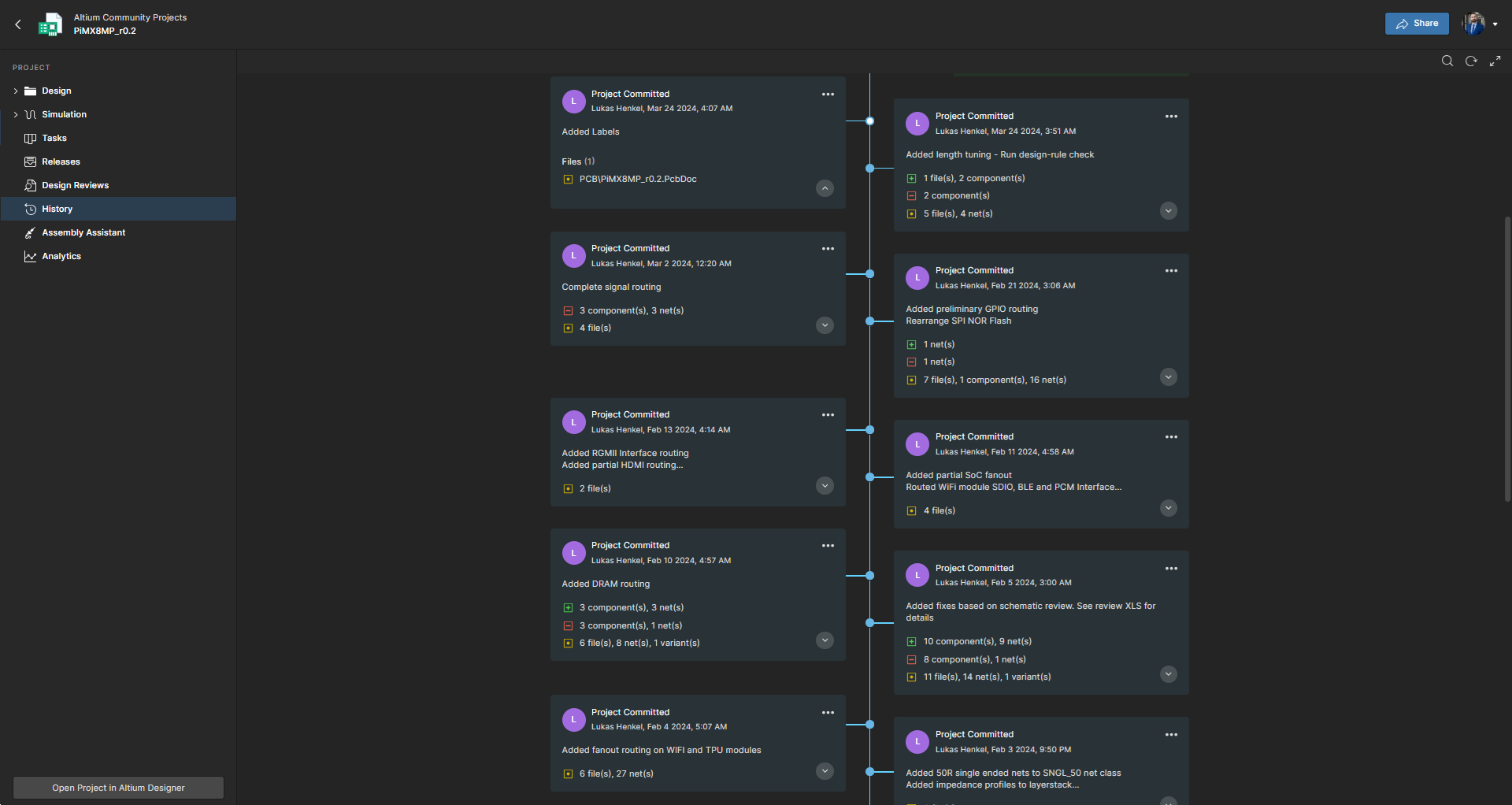
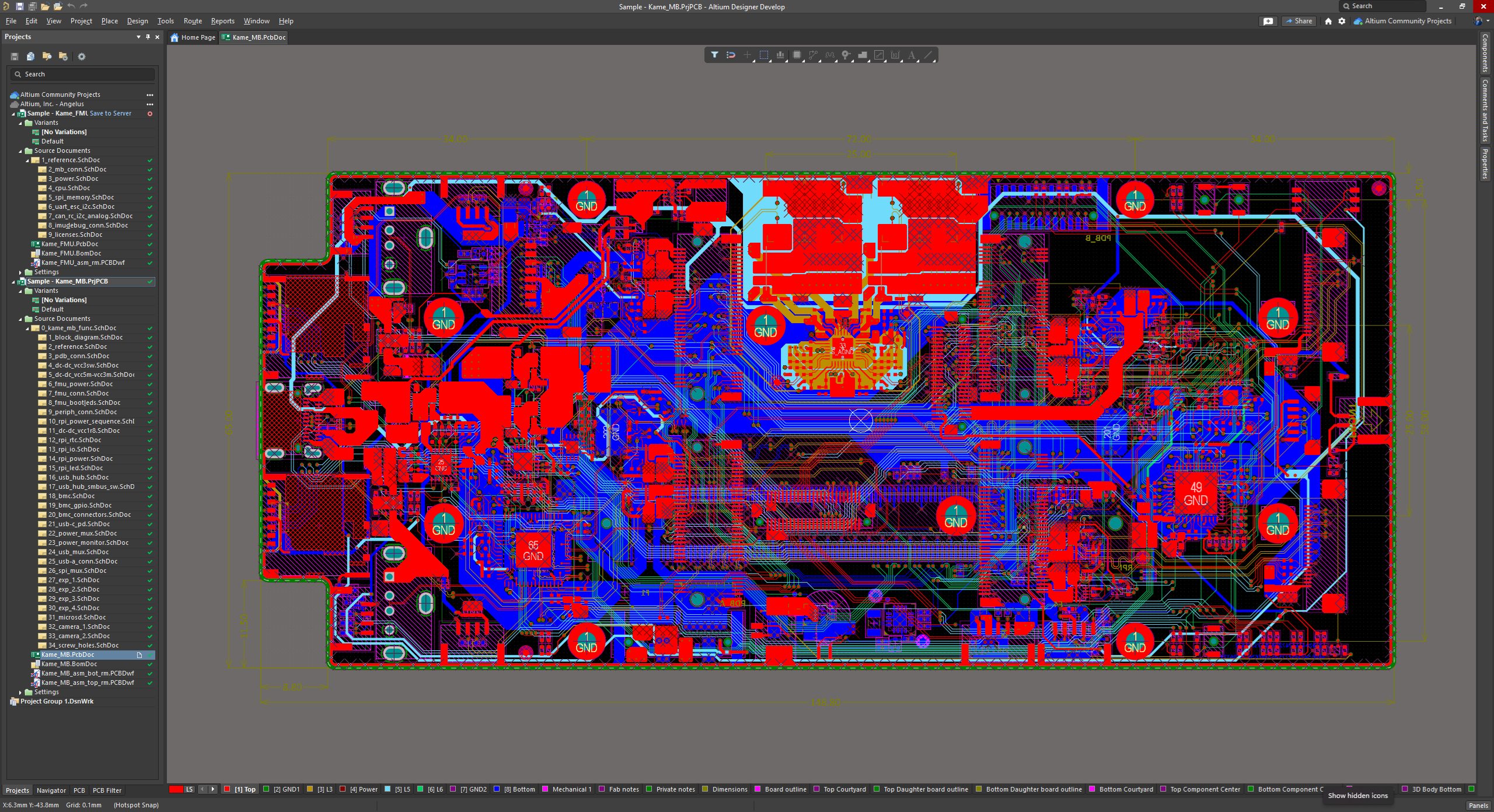
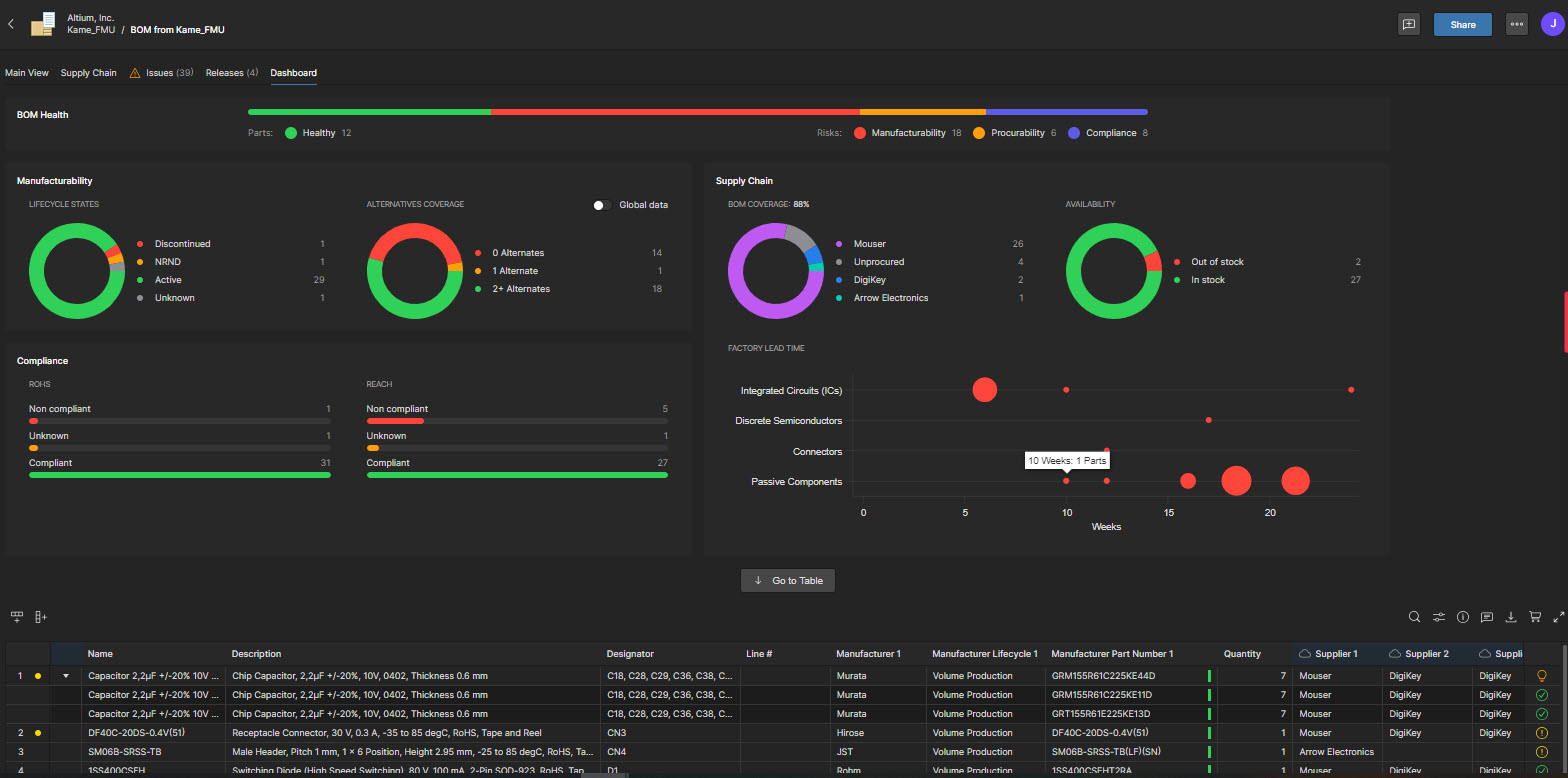
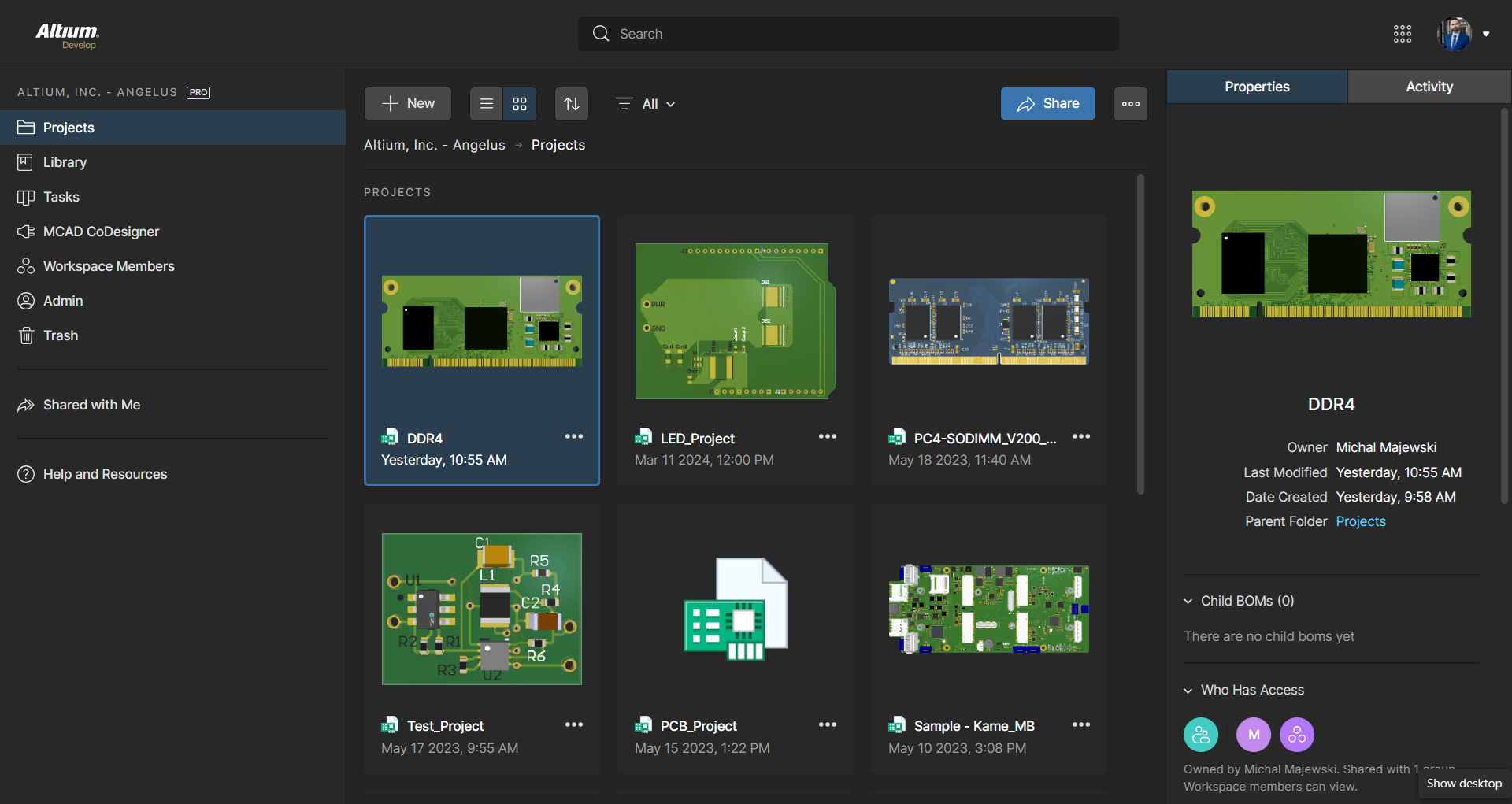
Screenshot of the 3D View Editor in Altium Develop that transforms the standard 2D PCB workspace into a fully interactive, three‑dimensional design environment. Users can toggle between 2D and 3D modes, then zoom, pan, and rotate the board freely using tools like a directional sphere for precise pivot control and adjust display settings (such as transparency or coloring) via the View Configuration panel to visually explore and inspect PCB layouts in realistic detail.Screenshot of Project History in Altium Develop, which provides a browser-based, visually chronological timeline of a project's key events such as: creation, commits, releases, clones, and MCAD exchanges offering version control transparency directly within workspace.Screenshot of Altium Develop's unified design environment built on a single data model. From schematic capture to PCB layout, routing, and assembly preparation, every step flows seamlessly. Smart placement and routing features make complex designs faster, easier, and more reliable.Screenshot of ActiveBOM, which is a dynamic, table-based Bill of Materials (BOM) editor integrated into Altium Develop that elevates component management to a real-time, design-aware process. It automatically aggregates supply chain data such as pricing, stock, lifecycle status, and lead times - from sources like Octopart and IHS Markit, enabling parts selection, alternates, cost calculation, rule-based verification, and traceability - within the same environment as the schematic and PCB design.Screenshot of BOM Portal, which is a cloud-native, procurement-focused tool within Altium Develop that transforms traditional Excel-like Bill of Materials (BOM) workflows by integrating live supply chain, compliance, and pricing data. It enables collaboration between engineering and procurement, helps identify supply risks like obsolescence or shortages, supports BOM consolidation and alternates, and ensures thorough version control and traceability bridging design to manufacturing with real-time visibility and control.Screenshot of Workspace Projects, which provide a cloud-native, version-controlled hub within Altium Develop that simplifies electronic project management with centralized storage, collaboration, and built-in Git-based version control. This interface enables real-time design navigation (including schematic, 2D/3D PCB, BOM, and Draftsman views), task tracking, release and manufacturing management, historical timeline review, and sharing.