
TrustRadius: an HG Insights company

Altium Develop

Score9.1 out of 10

128 Reviews and Ratings

Learn More

Contact about Altium Develop

Please fill out the form below to get in touch.

Altium

Connect with Altium

What are you interested in?

Already have an account?

You hereby consent to have TrustRadius share the information supplied on this form with Altium so that Altium and TrustRadius may contact you in regard to the information requested.

What is Altium Develop?

Altium Develop is a platform that unifies multidisciplinary teams across engineering, sourcing, and manufacturing to support seamless co-creation. It provides real-time visibility into designs, requirements, and supply chain data, enabling contributors to work together concurrently rather than in silos.

Media

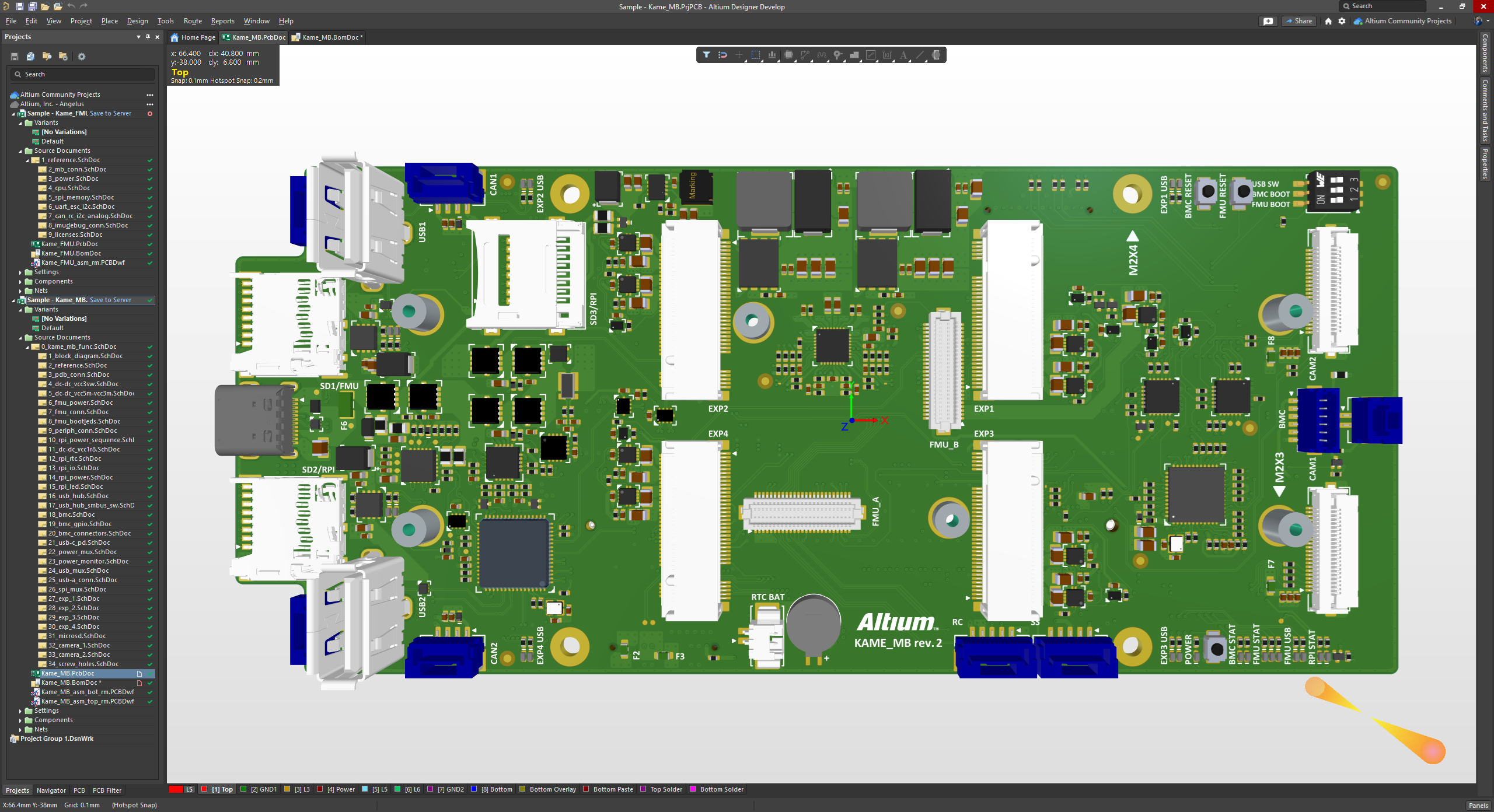
the 3D View Editor in Altium Develop that transforms the standard 2D PCB workspace into a fully interactive, three‑dimensional design environment. Users can toggle between 2D and 3D modes, then zoom, pan, and rotate the board freely using tools like a directional sphere for precise pivot control and adjust display settings (such as transparency or coloring) via the View Configuration panel to visually explore and inspect PCB layouts in realistic detail.
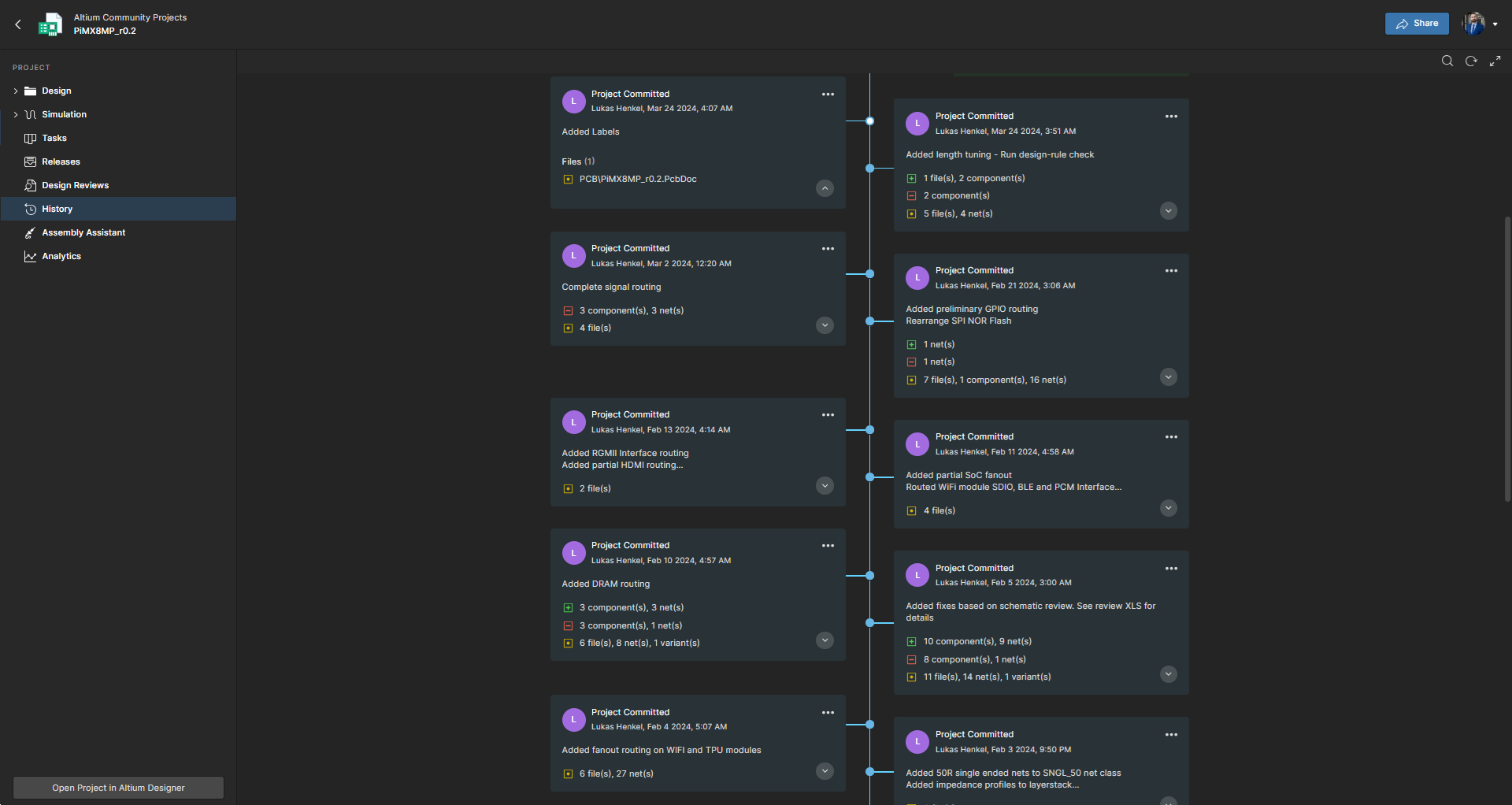
Project History in Altium Develop, which provides a browser-based, visually chronological timeline of a project's key events such as: creation, commits, releases, clones, and MCAD exchanges offering version control transparency directly within workspace.
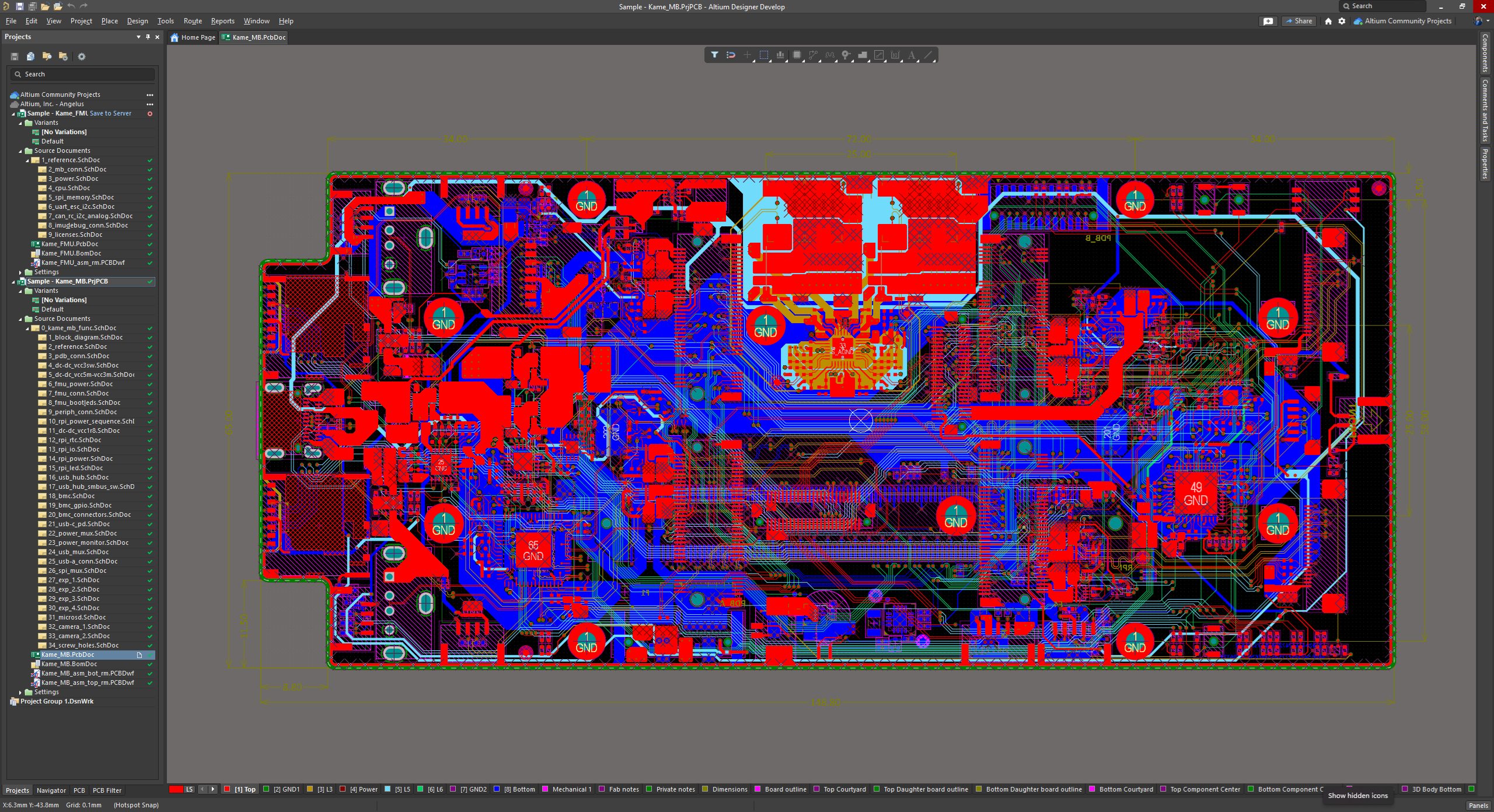
Altium Develop's unified design environment built on a single data model. From schematic capture to PCB layout, routing, and assembly preparation, every step flows seamlessly. Smart placement and routing features make complex designs faster, easier, and more reliable.
ActiveBOM, which is a dynamic, table-based Bill of Materials (BOM) editor integrated into Altium Develop that elevates component management to a real-time, design-aware process. It automatically aggregates supply chain data such as pricing, stock, lifecycle status, and lead times - from sources like Octopart and IHS Markit, enabling parts selection, alternates, cost calculation, rule-based verification, and traceability - within the same environment as the schematic and PCB design.
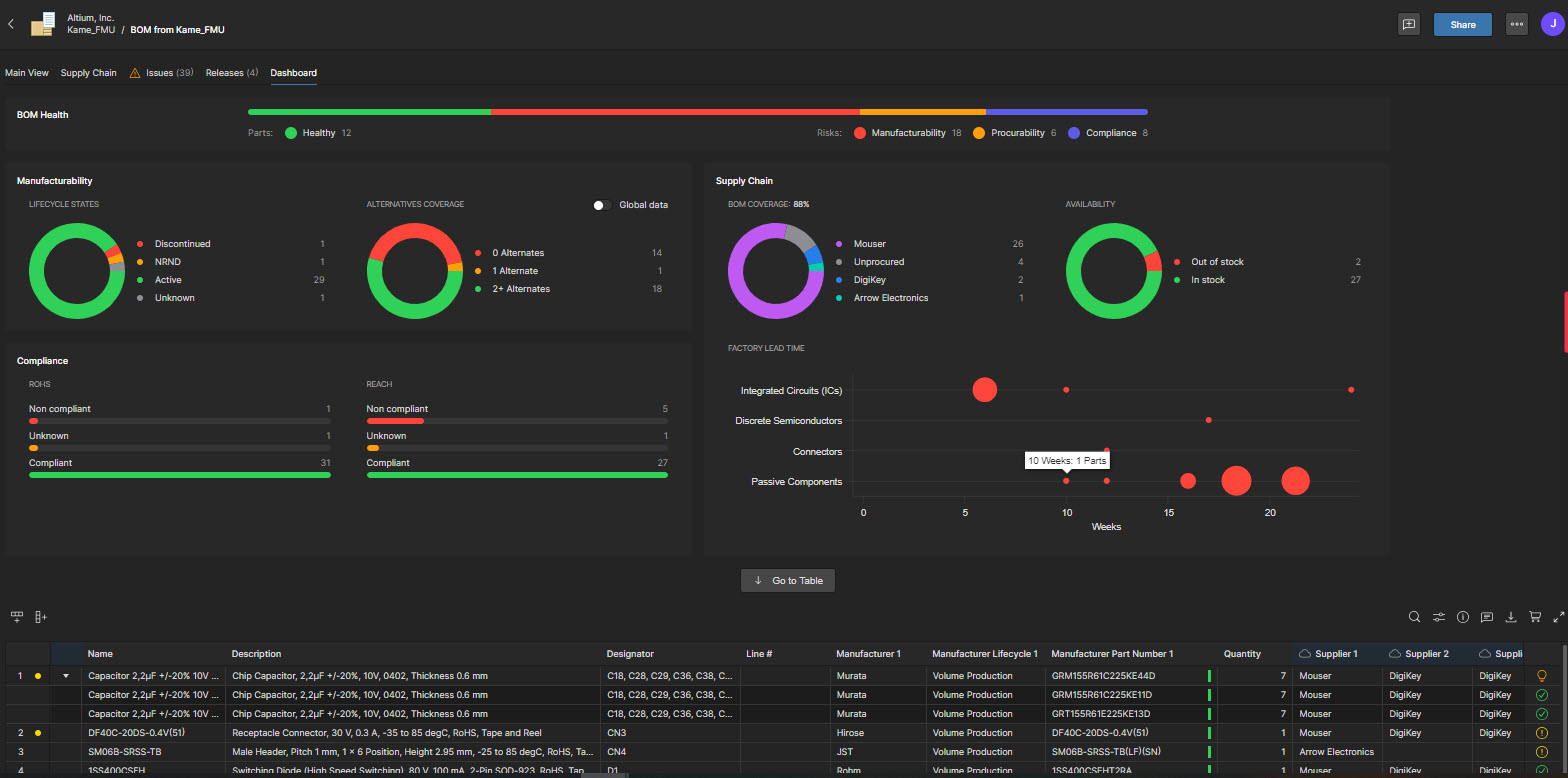
BOM Portal, which is a cloud-native, procurement-focused tool within Altium Develop that transforms traditional Excel-like Bill of Materials (BOM) workflows by integrating live supply chain, compliance, and pricing data. It enables collaboration between engineering and procurement, helps identify supply risks like obsolescence or shortages, supports BOM consolidation and alternates, and ensures thorough version control and traceability bridging design to manufacturing with real-time visibility and control.
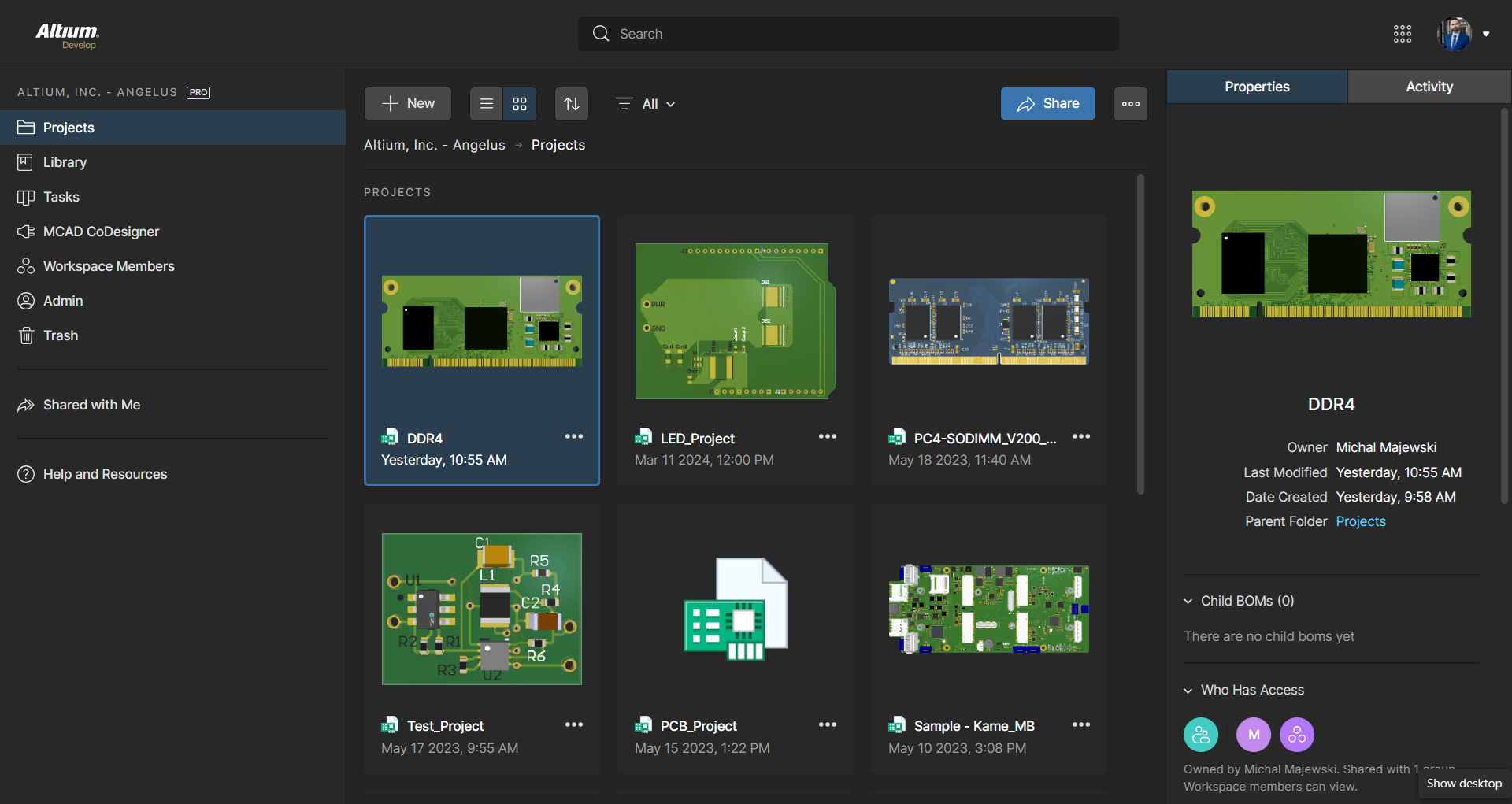
Workspace Projects, which provide a cloud-native, version-controlled hub within Altium Develop that simplifies electronic project management with centralized storage, collaboration, and built-in Git-based version control. This interface enables real-time design navigation (including schematic, 2D/3D PCB, BOM, and Draftsman views), task tracking, release and manufacturing management, historical timeline review, and sharing.
the Requirements Portal, which is a cloud-native, AI‑enhanced requirements engineering platform within Altium Develop that streamlines the definition, breakdown, and management of technical requirements. It supports cross-disciplinary collaboration via live dashboards, version control, parametric requirements, automated verification, system modeling, scripting, and traceable design linkage bridging high-level needs to implementation across designs with full audit readiness.

1 / 7

Altium Develop Over 8 Years and 3 Companies

Use Cases and Deployment Scope

I use Altium Develop to create custom PCB designs for many types of customers. It is a core part of our business allowing us to provide custom electronics designs, protypes, and test fixtures to customers. Modern features like cloud integration and revision control also make things much easier when managing many different designs across many customers. Cloud features also make it easier to view and share designs with customers without being tied to an individual PC.

Pros

  • Fully Integrated Design Environment
  • 3D Rendering and Modeling
  • Library Management
  • Good Import/Export Options
  • Efficient Manual Routing with Online DRC

Cons

  • New Platform Transition seemed Very Chaotic
  • Part Explorer/Library Management has Always Been Sluggish
  • Component Templates Should be Part of Develop Package
  • Provide a Comparison of What is Actually Included in the Various Platforms
  • API Could be Very Powerful - If There were Any Documentation
  • Improvements Could be Made on Core Functionality for 90% of Users Making 2-4 Layer PCBs over Advanced Simulation, AutoRouter, and Other More Cutting-Edge Features

Return on Investment

  • Fastest Platform from Concept to Layout I've Used
  • Good Value for Features Compared to Others
  • Very Easy to Add Users

Usability

Alternatives Considered

Siemens Xpedition Enterprise, KiCad EDA and OrCAD

Other Software Used

SOLIDWORKS, Microsoft Visual Studio

World Class Electronic Development Environment for Teams.

Use Cases and Deployment Scope

I use it in all electronic device development, combined with either SolidWorks or Fusion, and integrated using Altium Co-Designer. Previously integrated with Arena at a previous job. I find that many reference designs are now being created in Altium, and that it accelerates the design process. Also, the large part library that minimizes PCB footprints saves significant effort. A new user of Altium Develop will have some start-up issues; however, the eventual goal is to use managed components. The existing parts in Altium libraries are not generally set up for this, as symbols like caps and resistors vary greatly, and models seem to come from many sources. The goal is to harmonize all the components, but the tools to do this are somewhat tedious. Another issue I have had is the new browser-based login. As sometimes the internet disappears for a few minutes, the login goes away, and you are locked until you can re-login when it comes back. This needs a better solution. Used to be that when you grabbed a license, you kept it until you logged out or forced a license disconnect. This would be a much better method. I miss some of the flexibility of the enterprise version, but I'm sure Altium Develop will improve. I also use it for simulating real components, PCB impedance, and timing analysis. It's a great tool overall, and I look forward to its continued use.

Pros

  • Schematic PCB integration.
  • Component Libraries.
  • PCB trace analysis and rule base layout including impedance.
  • Mechanical Co-Designer.
  • Web sharing with team.

Cons

  • Component library harmonized symbols and parameters including layers
  • License control under varying internet conditions
  • For develop more flexibility in sharing control for outside team members

Return on Investment

  • At the moment couldn't do without it.

Usability

Other Software Used

Autodesk Fusion, SOLIDWORKS, Atempo Time Navigator (TINA), Microsoft 365 Copilot, Microsoft 365 Business Premium, Google Gemini

Altium Develop is the best for small teams.

Use Cases and Deployment Scope

Altium Develop is our PCBA design platform. It serves as the single point of truth for PCB design. component library management, supply chain management, cross-functional design reviews, and MCAD collaboration. The platform solves the problem of bringing together electrical engineering, mechanical engineering, procurement, and other disciplines on a single, easy-to-manage platform without requiring multiple licences, viewers, or file exports.

Pros

  • Cross functional design reviews.
  • Component Library management.
  • Built-in component libraries.

Cons

  • MCAD integration with Onshape is missing.
  • The built-in component library is inconsistent sometimes (symbols not standardized).

Return on Investment

  • Reduced number of licensed viewers.
  • Reduced time to design components.
  • Reduced time to get from design to manufacturing release.

Usability

Alternatives Considered

Cadence Virtuoso Studio, eCADSTAR PCB and KiCad EDA

Altium the tool to move faster

Use Cases and Deployment Scope

I use Altium to design schematics and PCBs. I use the CAD codesigner to ensure the PCBs fit the mechanical enclosures and will integrate with the rest of the system. I also use altium 365 to track part inventory and get an estimate on part cost.

Pros

  • Schematic design
  • PCB layout
  • Impedance matching
  • BOM management

Cons

  • layout replication can be difficult with more advanced designs where the core is the same but then the upper level has different connections. If I need to do replication changes late in a design I usually have to cut all nets to have a chance at successful replication with the tool.
  • Would be nice if there was an easier way to select like a template for common parts like resistors and capacitors when creating new parts. As we reuse the same symbol and layout across parts, but right now have to search for both each time.
  • Would be great if you could supply templates for rules to get new users started with a basic set of standard rules, setting up rules has a major learning curve.

Return on Investment

  • Saves time in schematic design, layout, and BOM management. At least 3X savings compared to diptrace that our company was using prior to Altium.
  • Moving from Altium to Altium develop was a painful process, it took several weeks to get moved over when that should have taken a day or less in my mind

Usability

Alternatives Considered

Allegro X Design Platform

Other Software Used

Cursor, Microsoft Visual Studio Code, Slack, Dropbox Business, SOLIDWORKS

Altium Develop - Best EDA Platform

Use Cases and Deployment Scope

Altium Develop addresses several issues.

The main issue is providing an environment for collaboration between electrical and mechanical engineers.

Altium Develop also is a much better EDA tool than our current solution because of the rich feature set. Features like routing of impedance matched signals, elaborate design rule constraints, and much more are so integral to electrical design these days.

Pros

  • Revision control
  • Workspace and Altium Designer Integration
  • Library Management
  • Tool Performance
  • Ease of use
  • Documentation

Cons

  • Parameter Manager able to apply template (format) to description field across a whole library.

Return on Investment

  • Improved time required for engineering tasks
  • Standardized final documentation
  • More efficient workflows between disciplines

Usability

Alternatives Considered

Autodesk Fusion