TrustRadius: an HG Insights company

Save this comparison

Save this comparison

Add Product

Recommended Comparisons

    Overview
    ProductRatingMost Used ByProduct SummaryStarting Price

    Anaplan

    Score8.7 out of 10
    Enterprise companies (1,001+ employees)
    Anaplan is a scenario planning and analysis platform designed to optimize decision-making in complex business environments so that enterprises can outpace their competition and the market. By building connections and collaboration across organizational silos, the Anaplan platform surfaces key insights.N/A

    Lightning Tools Data Viewer

    Score9.1 out of 10
    Mid-Size Companies (51-1,000 employees)
    The Data Viewer provides data visualization in the form of reports or charts that can be created and customized to suit a business's needs. Silos of data exist in most organizations and yet contain valuable insights into how well the organization is performing and where action is needed. Those silos often include Microsoft Excel workbooks, Microsoft SQL Azure databases, On-Premises data sources accessible through OData or Business Connectivity Services and even SharePoint Lists. These data…

    $2,200

    per year per installation

    Pricing
    AnaplanLightning Tools Data Viewer
    Editions & Modules
    No answers on this topic
    Data Viewer OnPrem
    $1,000
    per year Per installation, 1 x WFE
    Data Viewer Online
    $2,200
    per year per installation
    Data Viewer OnPrem Enterprise Edition
    POA
    per year Per installation, 4+ WFE
    Data Viewer Online Enterprise Edition
    POA
    per year per installation
    Offerings
    Pricing Offerings
    AnaplanLightning Tools Data Viewer
    Free Trial
    NoYes
    Free/Freemium Version
    NoNo
    Premium Consulting/Integration Services
    YesYes
    Entry-level Setup FeeOptionalNo setup fee
    Additional Details—Prices stated are minimum per installation for "stock" products. $2.20 per user / year on top of base price. Enterprise editions can be amended to suit business needs if deemed necessary, additional costs incurred and TBD. All packages include free technical support. Free upgrades available to latest versions of tool as they are released. (online version)
    More Pricing Information
    Community Pulse
    AnaplanLightning Tools Data Viewer
    Considered Both Products
    Anaplan
    No answer on this topic
    Lightning Tools
    No answer on this topic
    Key User Insights
    Would buy again
    100%
    Would buy again
    258 Answers
    No answers on this topic
    Delivers good value for the price
    100%
    Delivers good value for the price
    236 Answers
    No answers on this topic
    Happy with the feature set
    99%
    Happy with the feature set
    256 Answers
    No answers on this topic
    Lived up to sales and marketing promises
    96%
    Lived up to sales and marketing promises
    192 Answers
    No answers on this topic
    Implementation went as expected
    96%
    Implementation went as expected
    236 Answers
    No answers on this topic
    Features
    AnaplanLightning Tools Data Viewer
    BI Standard Reporting
    Comparison of BI Standard Reporting features of Anaplan and Lightning Tools Data Viewer
    Feature
    Anaplan
    7.2
    244 Ratings
    4% below category average
    Lightning Tools Data Viewer
    9.1
    1 Ratings
    12% above category average
    Pixel Perfect reports6.47 Ratings00 Ratings
    Customizable dashboards7.5244 Ratings9.11 Ratings
    Report Formatting Templates7.96 Ratings9.11 Ratings
    Ad-hoc Reporting
    Comparison of Ad-hoc Reporting features of Anaplan and Lightning Tools Data Viewer
    Feature
    Anaplan
    9.1
    8 Ratings
    16% above category average
    Lightning Tools Data Viewer
    8.2
    1 Ratings
    5% above category average
    Drill-down analysis9.18 Ratings6.41 Ratings
    Formatting capabilities9.18 Ratings9.11 Ratings
    Report sharing and collaboration9.18 Ratings9.11 Ratings
    Report Output and Scheduling
    Comparison of Report Output and Scheduling features of Anaplan and Lightning Tools Data Viewer
    Feature
    Anaplan
    8.2
    251 Ratings
    3% above category average
    Lightning Tools Data Viewer
    -
    Ratings
    Publish to Web8.67 Ratings00 Ratings
    Publish to PDF8.3248 Ratings00 Ratings
    Report Versioning8.0219 Ratings00 Ratings
    Report Delivery Scheduling7.98 Ratings00 Ratings
    Data Discovery and Visualization
    Comparison of Data Discovery and Visualization features of Anaplan and Lightning Tools Data Viewer
    Feature
    Anaplan
    8.2
    8 Ratings
    11% above category average
    Lightning Tools Data Viewer
    3.6
    1 Ratings
    73% below category average
    Pre-built visualization formats (heatmaps, scatter plots etc.)9.17 Ratings3.61 Ratings
    Location Analytics / Geographic Visualization9.17 Ratings00 Ratings
    Predictive Analytics6.43 Ratings00 Ratings
    Access Control and Security
    Comparison of Access Control and Security features of Anaplan and Lightning Tools Data Viewer
    Feature
    Anaplan
    9.1
    260 Ratings
    8% above category average
    Lightning Tools Data Viewer
    -
    Ratings
    Multi-User Support (named login)9.18 Ratings00 Ratings
    Role-Based Security Model8.9260 Ratings00 Ratings
    Multiple Access Permission Levels (Create, Read, Delete)9.18 Ratings00 Ratings
    Report-Level Access Control9.2110 Ratings00 Ratings
    Single Sign-On (SSO)9.18 Ratings00 Ratings
    Mobile Capabilities
    Comparison of Mobile Capabilities features of Anaplan and Lightning Tools Data Viewer
    Feature
    Anaplan
    7.1
    245 Ratings
    3% below category average
    Lightning Tools Data Viewer
    -
    Ratings
    Responsive Design for Web Access7.6235 Ratings00 Ratings
    Mobile Application6.7222 Ratings00 Ratings
    Dashboard / Report / Visualization Interactivity on Mobile7.1230 Ratings00 Ratings
    Budgeting, Planning, and Forecasting
    Comparison of Budgeting, Planning, and Forecasting features of Anaplan and Lightning Tools Data Viewer
    Feature
    Anaplan
    8.9
    358 Ratings
    10% above category average
    Lightning Tools Data Viewer
    -
    Ratings
    Long-term financial planning9.5333 Ratings00 Ratings
    Financial budgeting9.5337 Ratings00 Ratings
    Forecasting9.3346 Ratings00 Ratings
    Scenario modeling8.9347 Ratings00 Ratings
    Management reporting7.3347 Ratings00 Ratings
    Consolidation and Close
    Comparison of Consolidation and Close features of Anaplan and Lightning Tools Data Viewer
    Feature
    Anaplan
    7.7
    305 Ratings
    1% below category average
    Lightning Tools Data Viewer
    -
    Ratings
    Financial data consolidation8.0283 Ratings00 Ratings
    Journal entries and reports7.7237 Ratings00 Ratings
    Multi-currency management7.312 Ratings00 Ratings
    Intercompany Eliminations7.39 Ratings00 Ratings
    Minority Ownership7.38 Ratings00 Ratings
    Local and consolidated reporting7.9272 Ratings00 Ratings
    Detailed Audit Trails8.5285 Ratings00 Ratings
    Financial Reporting and Compliance
    Comparison of Financial Reporting and Compliance features of Anaplan and Lightning Tools Data Viewer
    Feature
    Anaplan
    8.2
    327 Ratings
    1% above category average
    Lightning Tools Data Viewer
    -
    Ratings
    Financial Statement Reporting8.8302 Ratings00 Ratings
    Management Reporting8.3318 Ratings00 Ratings
    Excel-based Reporting8.2297 Ratings00 Ratings
    Automated board and financial reporting8.214 Ratings00 Ratings
    XBRL support for regulatory filing7.31 Ratings00 Ratings
    Analytics and Reporting
    Comparison of Analytics and Reporting features of Anaplan and Lightning Tools Data Viewer
    Feature
    Anaplan
    8.8
    348 Ratings
    15% above category average
    Lightning Tools Data Viewer
    -
    Ratings
    Personalized dashboards8.5342 Ratings00 Ratings
    Color-coded scorecards8.6326 Ratings00 Ratings
    KPIs9.120 Ratings00 Ratings
    Cost and profitability analysis8.8304 Ratings00 Ratings
    Key Performance Indicator setting8.7316 Ratings00 Ratings
    Benchmarking with external data9.114 Ratings00 Ratings
    Integration
    Comparison of Integration features of Anaplan and Lightning Tools Data Viewer
    Feature
    Anaplan
    8.2
    355 Ratings
    2% above category average
    Lightning Tools Data Viewer
    -
    Ratings
    Flat file integration9.2345 Ratings00 Ratings
    Excel data integration8.1321 Ratings00 Ratings
    Direct links to 3rd-party data sources7.4304 Ratings00 Ratings
    Best Alternatives
    AnaplanLightning Tools Data Viewer
    Small Businesses
    No answers on this topic
    Chartio (discontinued)
    Score7.5 out of 10
    Medium-sized Companies
    IBM Planning Analytics
    Score8.5 out of 10
    Jet Reports
    Score9.5 out of 10
    Enterprises
    Oracle Fusion Cloud Enterprise Performance Management
    Score7.1 out of 10
    Kibana
    Score8.4 out of 10
    All AlternativesView all alternativesView all alternatives
    User Ratings
    AnaplanLightning Tools Data Viewer
    Likelihood to Recommend
    8.9
    (362 ratings)
    9.1
    (1 ratings)
    Likelihood to Renew
    10.0
    (37 ratings)
    -
    (0 ratings)
    Usability
    8.8
    (94 ratings)
    -
    (0 ratings)
    Availability
    9.1
    (7 ratings)
    -
    (0 ratings)
    Performance
    9.1
    (7 ratings)
    -
    (0 ratings)
    Support Rating
    4.2
    (27 ratings)
    -
    (0 ratings)
    In-Person Training
    9.1
    (6 ratings)
    -
    (0 ratings)
    Online Training
    8.6
    (7 ratings)
    -
    (0 ratings)
    Implementation Rating
    8.1
    (27 ratings)
    -
    (0 ratings)
    Configurability
    9.1
    (5 ratings)
    -
    (0 ratings)
    Ease of integration
    9.1
    (3 ratings)
    -
    (0 ratings)
    Product Scalability
    9.1
    (7 ratings)
    -
    (0 ratings)
    Professional Services
    9.1
    (1 ratings)
    -
    (0 ratings)
    Vendor post-sale
    9.1
    (4 ratings)
    -
    (0 ratings)
    Vendor pre-sale
    9.0
    (4 ratings)
    -
    (0 ratings)
    User Testimonials
    AnaplanLightning Tools Data Viewer
    Likelihood to Recommend
    Anaplan
    With its versions and native time features Anaplan is well suited for all activities around planning in time and scenarios. Tasks involving calculating across multiple dimensions make Anaplan shine - the easiness to build complex calculation and present results on customizable pages. With its access restrictions it's well suited also for working with sensitive data (employee and customers personal data).
    Read full review
    Lightning Tools
    Lightning Tools Data Viewer is well suited for re-surfacing data and customizing its look and feel.
    Read full review
    Pros
    Anaplan
    • Anaplan removes the time consuming process of integrating the results of individual spreadsheets.
    • Anaplan facilitates the standardization of assumptions across all sub-processes
    • Anaplan provides full transparency of the calculations and source inputs
    • Anaplan allows us to automate certain planning processes that would have been impossible when relying on the computational capabilities of an individual computer.
    Read full review
    Lightning Tools
    • Shows Lists created on different sites to be seen and controlled on another site in a Tenant
    • Allows selection of layouts and coloring way beyond what other programs do.
    • Easy to learn and very functional.
    Read full review
    Cons
    Anaplan
    • Some end users don't spend the required amount of time to familiar themselves with Anaplan.
    • Auditability, while good in theory, can be lacking and clunky when needed.
    • Model building can become convoluted over time, leading to confusion over the specific use of line items.
    Read full review
    Lightning Tools
    • Data Viewer has a graph feature that is old school flat design. We loved the In House real 3D graph Lightning Tools program.
    Read full review
    Likelihood to Renew
    Anaplan
    Anaplan is a very strong multi-dimensional modeling tool that provides a calculation engine to empower a complex planning process. It is fairly easy to learn for those with experience in similar tools, or excel. It forces structure and auditability that spread sheets do not have, along with extensive security capabilities
    Read full review
    Lightning Tools
    No answers on this topic
    Usability
    Anaplan
    Anaplan's usability is dependent on who is implementing the project and how clear business processes are at the beginning of the implementation. Complex business processes with many inputs and reviews will still be complicated in Anaplan; however, the UX is very flexible in how to help people through the process and there are also other items such as Workflow that can help people move through the system.
    Read full review
    Lightning Tools
    No answers on this topic
    Reliability and Availability
    Anaplan
    There are very few outages. Maintenance is scheduled on two or three Saturdays per month, so as not to affect businesses. When there is an outage, users are kept informed of progress to restore the platform and typically this takes no more than an hour. Anaplan customer support is very responsive if we ever have questions about platform issues
    Read full review
    Lightning Tools
    No answers on this topic
    Performance
    Anaplan
    Everything is calculated in memory in the cloud. It's nearly instantaneous updates when you make changes. The only time things get a little slow is when you have a massive model with very intricate calculations...but "slow" for Anaplan is not what I would call "slow" for something like Hyperion. We used to have Hyperion calcs that ran for 60 mins before you could use data. The equivalent would be 60 seconds in Anaplan.
    Incentivized
    Read full review
    Lightning Tools
    No answers on this topic
    Support Rating
    Anaplan
    Support quality has dropped since Thoma Bravo has taken over. I think some serious re-focus needs to happen here -- part of the beauty of being in the Anaplan community was how involved you felt in it before. Before I didn't dread sending a support ticket, now I am starting to.
    Read full review
    Lightning Tools
    No answers on this topic
    In-Person Training
    Anaplan
    In my opinion, in-person training is always the best if you have the option to do so. This allows real-time interactions with the instructions, whereas the online training I took required me to write-down questions, email them, and wait for responses. This slows down the process, as you can imagine. That said, in-person training is an extra cost and it likely isn't needed for everyone. I would suggest selecting a small number of people to take in-person training and then having them act as mentors to the rest of your team. That way, as the rest of the team takes the online training, they have a resource to help them in real time.
    Read full review
    Lightning Tools
    No answers on this topic
    Online Training
    Anaplan
    Anaplan training materials are clear, simple, easy to understand and to follow. Visuals are excellent. The vendor is good at updating training materials in a timely manner and encouraging users and administrators to keep coming back to Academy site for refresher courses or new feature courses. I really like their interactive diagrams
    Read full review
    Lightning Tools
    No answers on this topic
    Implementation Rating
    Anaplan
    One key insight from implementing Anaplan is that success comes from focusing on designing the process, not just building the model. Anaplan is extremely flexible—there are very few planning scenarios it cannot support—but that flexibility means the project needs strong governance, clear ownership of requirements, and a well-defined data model. When those foundations are in place, implementations are fast, iterations are easy, and users can quickly see value.
    In our projects, both Financial Planning and Integrated Business Planning models were adopted smoothly because we involved business users early, kept the model design intuitive, and leveraged Anaplan’s Excel-like syntax and user-friendly dashboards. The result was more efficient day-to-day work, reduced manual tasks, and increased collaboration across teams. In short: when you combine Anaplan’s flexibility with a structured implementation approach, adoption and value realization happen quickly.
    Read full review
    Lightning Tools
    No answers on this topic
    Alternatives Considered
    Anaplan
    Anaplan is more powerful than Pigment considering that it is an Enterprise class system and is able to manage bigger data sets. Anaplan allows for advanced scenario modeling and formula capabilities along with custom reporting functionalities. Anaplan has proven its capabilities and stability across various use cases and across bigger enterprises when compared to Pigment which is still in earlier phases of its development
    Read full review
    Lightning Tools
    Lightning Tools Data Viewer is much easier and more powerful than Infowise similar viewer in their lineup. In this case, we use Data Viewer over the one offered by Infowise.
    Read full review
    Scalability
    Anaplan
    We have managed to leverage Anaplan for financial planning and forecasting across the business. It is now used by almost every department, with more than 50 users (but I know of companies that have hundreds of users) and still the platform is quick and reliable. It is easy to make changes to divisions and departments or add users and apply different user settings - the core part of the model is not affected and end users can continue their work without any disruption
    Read full review
    Lightning Tools
    No answers on this topic
    Return on Investment
    Anaplan
    • Anaplan's implementation led to a significant reduction in planning cycle errors and bugs, streamlining processes and improving overall accuracy in data inputs
    • Standardizing the planning process and enabling cross-functional collaboration through Anaplan enhanced our ability to adapt swiftly to changing business needs, resulting in improved agility in decision-making
    • The platform's capabilities, especially in Demand Planning and Supply Chain, positively impacted our ROI by optimizing resource allocation and solving complex business problems efficiently across multiple functions
    Read full review
    Lightning Tools
    • It allows us to do things that would take a great deal more time to duplicate in SharePoint
    • It cuts down on ugly looking built in SP list layouts
    • Users find it easy to access, thus this product is more productive
    Read full review
    ScreenShots

    Anaplan Screenshots

    Screenshot of a preview of the Anaplan login page.Screenshot of a preview of an Anaplan home page.Screenshot of a preview of an Anaplan board.

    Lightning Tools Data Viewer Screenshots
    Screenshot of DISPLAYING EXTERNAL DATA WITHIN SHAREPOINT OR MICROSOFT TEAMS
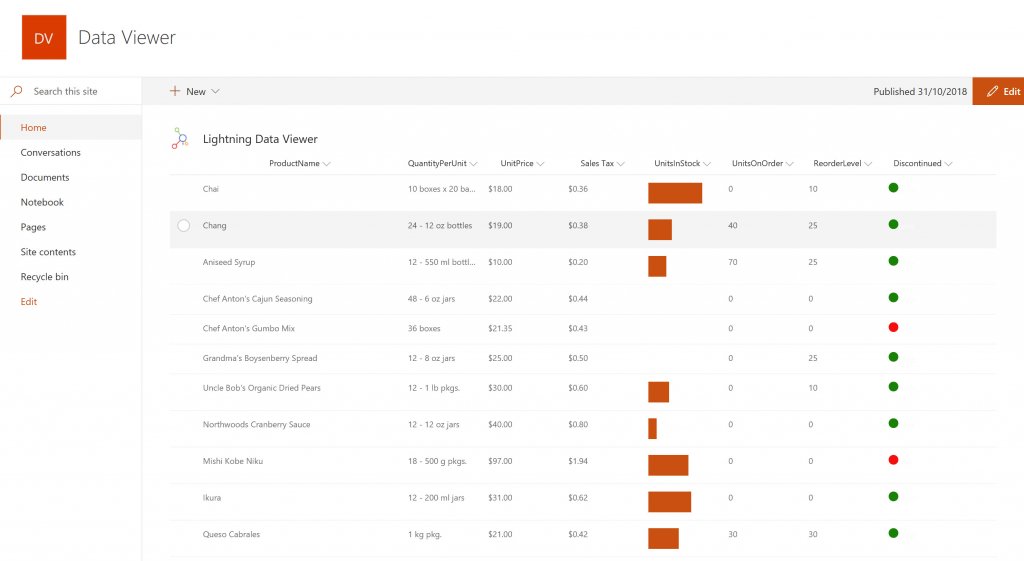
The Data Viewer Client Side Web Part can be configured by Business Users within a few minutes to display Line of Business Data from Data Sources such as Excel,  SQL Azure, Business Connectivity Services, OData and SharePoint Lists.  Connections to an organizations data such as Customer Relationship Management Systems, Accounting Systems, or Custom Databases can be connected, giving business users a live up-to-date view of business information within the context of their SharePoint Team Sites or Microsoft Teams Tabs.Screenshot of HIGHLIGHTING KEY BUSINESS DATA (NO CODE)
Conditional formatting can be used to highlight key business data. Overdue Tasks, Low Stock, Currency Exchange Rates, Sales Revenue are examples of data to highlight visually allowing for a quick reaction time. Key Financial Indicators and Key Performance Indicators can be configured with a simple dialog and no need to write any code. Choose colours, icons or data bars to highlight key data.Screenshot of SELECTING AND STYLING ICONS
Icons can be chosen as part of the conditional formatting to make data stand out. The Office 365 Fabric icons can be selected and styled and applied to cell values. Pepper pots, Smileys, Envelopes and more icons are available. There are hundreds of options to choose from to highlight data that needs to be acted upon.Screenshot of DATA VIEWER CAN BE A GRID OF DATA OR A CHART IN SHAREPOINT OR MICROSOFT TEAMS
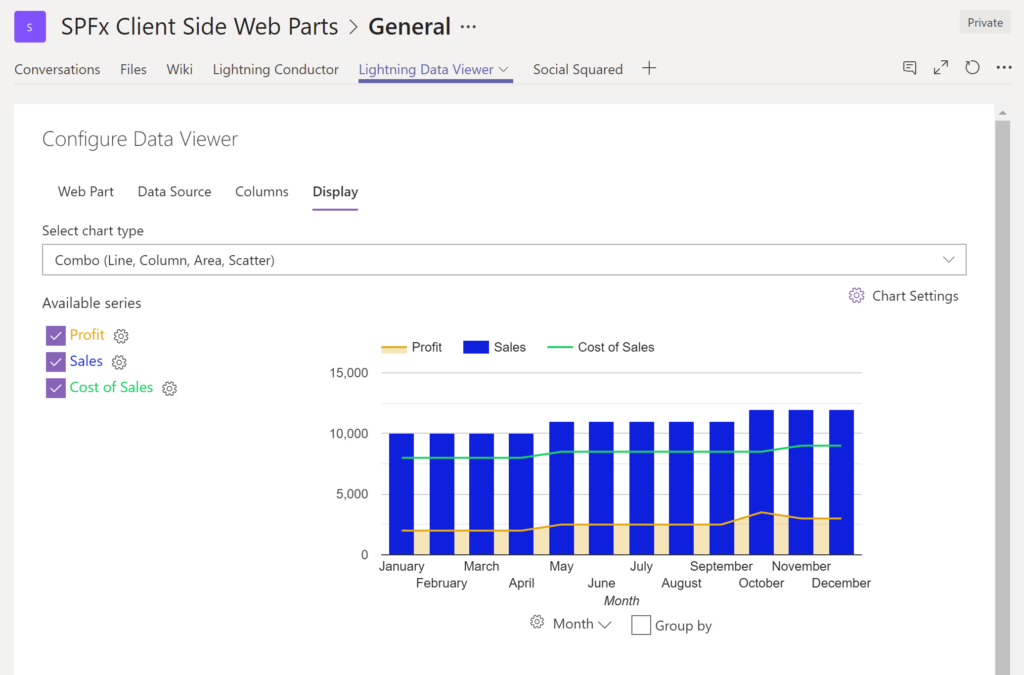
The Data Viewer can be used within Microsoft SharePoint Modern Sites or Microsoft Teams Tabs as a Grid of Data with styling or as a Chart which can be configured. The Charting Feature allows for Pie, Donut, Column, Line, Area, and Scatter Charts which can all be configured and displayed in 2D or 3D.Screenshot of TREEMAPS
summary information can be displayed within a TreeMap next to the detail. Users will be able to see trends, and how the business is performing  using the TreeMap view of data.Screenshot of CHARTS AND GAUGES
The Data Viewer is used to represent data in multiple ways using Gauges, TreeMaps, Multiple Series Charts, and Pie Charts.