Appy Pie vs. DeskRoll Remote Desktop

Overview
ProductRatingMost Used ByProduct SummaryStarting Price
Appy Pie
Score 8.0 out of 10
N/A
Appy Pie is a diversified no-code development platform. It offers app and web development, helpdesk support, chatbot building, design features, and integration that are helpful when starting, running, or growing a business.
$16
per app/per month
DeskRoll Remote Desktop
Score 9.5 out of 10
N/A
DeskRoll was built to be easy to use by end-users and IT teams alike. It's browser-based, so users being helped do not need to install any applications on their local device; DeskRoll Remote Desktop Sharing requires only a small app on the remote (controlling) computer. DeskRoll guides users through setup and connection processes for 3 basic scenarios: providing remote assistance to a customer, configuring unattended remote access to a remote computer, or configuring unattended remote…
$8.25
per user/per month
Pricing
Appy PieDeskRoll Remote Desktop
Editions & Modules
Basic
$16
per app/per month
Gold
$36
per app/per month
Platinum
$60
per app/per month
DeskRoll Lite
$8.25
per user/per month
DeskRoll Pro 1 Month
$29.95
per seat
DeskRoll Starter
$39
per user/per year
DeskRoll Lite
$99
per user/per year
DeskRoll Pro 1 Year
$299.40
per seat
Offerings
Pricing Offerings
Appy PieDeskRoll Remote Desktop
Free Trial
YesYes
Free/Freemium Version
NoYes
Premium Consulting/Integration Services
YesNo
Entry-level Setup FeeNo setup fee$3.25 per seat/per month
Additional DetailsWith each license a user can configure unlimited remote computers to access from any location. Also, users can make unlimited parallel remote connections - each will open in a new browser tab. Users can pause and resume remote sessions.
More Pricing Information
Community Pulse
Appy PieDeskRoll Remote Desktop
Features
Appy PieDeskRoll Remote Desktop
Low-Code Development
Comparison of Low-Code Development features of Product A and Product B
Appy Pie
9.0
1 Ratings
7% above category average
DeskRoll Remote Desktop
-
Ratings
Visual Modeling9.01 Ratings00 Ratings
Drag-and-drop Interfaces10.01 Ratings00 Ratings
Platform Security8.01 Ratings00 Ratings
Platform Scalability9.01 Ratings00 Ratings
Remote Administration
Comparison of Remote Administration features of Product A and Product B
Appy Pie
-
Ratings
DeskRoll Remote Desktop
8.2
2 Ratings
4% above category average
Screen sharing00 Ratings8.02 Ratings
File transfer00 Ratings8.02 Ratings
Instant message00 Ratings7.01 Ratings
Over-the-Internet remote session00 Ratings10.02 Ratings
Initiate remote control from mobile00 Ratings8.01 Ratings
Multi-platform remote control00 Ratings8.01 Ratings
Best Alternatives
Appy PieDeskRoll Remote Desktop
Small Businesses
Creatio
Creatio
Score 9.0 out of 10
Getscreen.me
Getscreen.me
Score 9.6 out of 10
Medium-sized Companies
Quixy
Quixy
Score 9.9 out of 10
Remote Desktop Manager
Score 9.5 out of 10
Enterprises
Creatio
Creatio
Score 9.0 out of 10
Remote Desktop Manager
Score 9.5 out of 10
All AlternativesView all alternativesView all alternatives
User Ratings
Appy PieDeskRoll Remote Desktop
Likelihood to Recommend
8.0
(1 ratings)
7.0
(2 ratings)
Usability
8.0
(1 ratings)
-
(0 ratings)
Support Rating
9.0
(1 ratings)
-
(0 ratings)
User Testimonials
Appy PieDeskRoll Remote Desktop
Likelihood to Recommend
Appy Pie
Based on my personal experience, this application is well-suited for noncoders who are busy setting up their businesses and since coders are expensive for the company in the initial days as in for startups, this application goes hand in hand and is quick and robust along with its amazing features like drag and drop and just the cloud storage facility.
Read full review
Tomsk Inc.
During the pandemic, our company worked remotely. Various staff in our company had technical difficulties or needed assistance installing software in order to work. DeskRoll Remote Desktop helped us to make this process seamless. Rather than deal with the aggravation of trying to walk someone through something over the phone, we were able to get things established in a simple, easy way.
Read full review
Pros
Appy Pie
  • Having chatbot to be able to know the visitor and cater to his/her requirements
  • Unlike other app developments, we were able to develop app faster and robust
  • User friendly features like drag and drop is great to have
  • Cost effective as it uses cloud storage and no need to buy servers and invest on maintenannce
Read full review
Tomsk Inc.
  • Ability to remote in at any time
  • Can support unlimited clients with hardware and software issues
  • Multiple remote client logins
  • Cost!
Read full review
Cons
Appy Pie
  • The application requires to be run on fast processing computers/laptops
  • This is a good application that isn't much known among non-coders, it needs to be marketed so that boosts this app developer to add more advanced features
  • It seems to have little bugs for the mobile app.
Read full review
Tomsk Inc.
  • It could be more cost-effective.
  • It could include better "help" or "how-to" sections for people who are not as tech savvy.
Read full review
Usability
Appy Pie
Like I said in previous questions, the no-code application has basic and easy features that are literally a no-brainer and even a person with zero knowledge of coding can do wonders with this as his/her tool. Apart from that, the application is cost-effective while time and money are two key things to be taken care of as a startup owner, this app came hand in hand with me
Read full review
Tomsk Inc.
No answers on this topic
Support Rating
Appy Pie
I have been using this for some time now and the website of the no-code application is all self-explanatory that is the reason I never have reached to the support team anytime, but before using this application I have gone through the reviews and read the positive response and I believe it has still gotten stronger since then.
Read full review
Tomsk Inc.
No answers on this topic
Alternatives Considered
Appy Pie
Webflow has quite a lot of complexity in comparison to the no-code app which instead is user-friendly. There are more issues with application getting hung in between working but that isn't a bigger problem in the no-code app. Apart from that, the no-code app has blocks that can be used to edit/add/delete which are literally a no-brainer.
Read full review
Tomsk Inc.
Cost, ease of use, file transfer and chat capabilities.
Read full review
Return on Investment
Appy Pie
  • Saved my money with low cost feature like cloud storage
  • Did not take months of my time to develop an app or website
  • did not require training and saved training costs
Read full review
Tomsk Inc.
  • It saved time, which always saves money!
  • It allowed us to save money on additional software licensing - we now use Quickbooks through the use of DeskRoll Remote Desktop.
  • DeskRoll Remote Desktop allowed us to transition to work-from-home easily, which saved us valuable time during the pandemic.
Read full review
ScreenShots

Appy Pie Screenshots

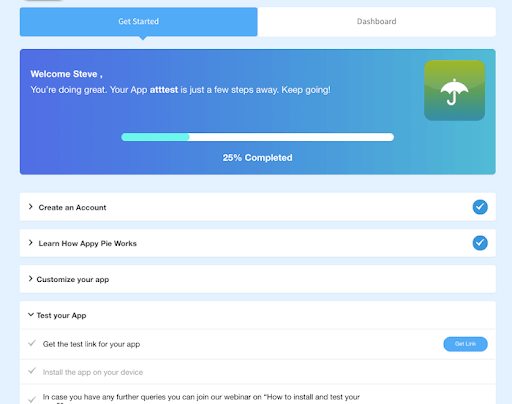
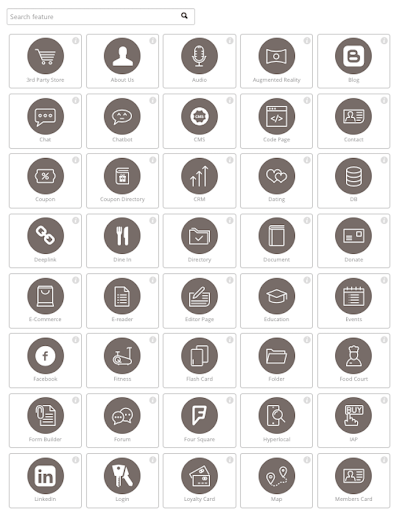
Screenshot of New setup wizard. Step-by-step guide.Screenshot of The long list of features that is always growing.

DeskRoll Remote Desktop Screenshots

Screenshot of DeskRoll remote connection view - Windows remote desktop.Screenshot of DeskRoll wizard that quickly guides you through basic remote access scenarios.