ArcGIS vs. Glympse PRO

Overview
ProductRatingMost Used ByProduct SummaryStarting Price
ArcGIS
Score 8.0 out of 10
N/A
Esri in Redlands, California offers ArcGIS, a geographic information system.
$100
per year
Glympse PRO
Score 0.0 out of 10
N/A
Glympse PRO is a solution used to enhance and improve operations for field services, delivery, and last mile logistics. It provide businesses with on-location service appointments looking to provide their customers with better information around scheduled jobs. Glympse PRO provides real-time, continuously updated ETAs reminders of when the service technician will arrive via tailored and professional on-the-way text/email messages. It aims to provide customers with a stress-free…
$15
per month per user
Pricing
ArcGISGlympse PRO
Editions & Modules
Viewer
$100
per year
ArcGIS for Personal Use
$100
per year
ArcGIS for Student Use
$100
per year
Editor
$200
per year
Field Worker
$350
per year
Creator
$500
per year
GIS Professional Basic
$700
per year
GIS Professional Basic
2,750
per year
GIS Professional Advanced
3,800
per year
No answers on this topic
Offerings
Pricing Offerings
ArcGISGlympse PRO
Free Trial
NoYes
Free/Freemium Version
NoNo
Premium Consulting/Integration Services
NoNo
Entry-level Setup FeeNo setup feeNo setup fee
Additional Details
More Pricing Information
Community Pulse
ArcGISGlympse PRO
Best Alternatives
ArcGISGlympse PRO
Small Businesses
Google Maps API
Google Maps API
Score 8.7 out of 10
ArcGIS
ArcGIS
Score 8.0 out of 10
Medium-sized Companies
Google Maps API
Google Maps API
Score 8.7 out of 10
ArcGIS
ArcGIS
Score 8.0 out of 10
Enterprises
Google Maps API
Google Maps API
Score 8.7 out of 10
ArcGIS
ArcGIS
Score 8.0 out of 10
All AlternativesView all alternativesView all alternatives
User Ratings
ArcGISGlympse PRO
Likelihood to Recommend
8.0
(40 ratings)
-
(0 ratings)
Likelihood to Renew
8.0
(1 ratings)
-
(0 ratings)
Usability
8.0
(3 ratings)
-
(0 ratings)
Support Rating
9.1
(12 ratings)
-
(0 ratings)
User Testimonials
ArcGISGlympse PRO
Likelihood to Recommend
Esri
I'm very grateful to be able to use it, and I have a master's degree with a focus in Geospatial Analysis. There can be a bit of a learning curve, and I try to build user-friendly ways for volunteers to see & collect data. Meanwhile, if a colleague is less confident with building such a system, it may be more difficult for them to implement.
Read full review
Glympse
No answers on this topic
Pros
Esri
  • Enterprise GIS - multi-user, multi-versioned geodatabase access through a host of apps and web tools really help people stay connected to data.
  • Cartography - fantastic control and customization available with the ability to automate workflows.
  • Training - tons of training videos, seminars, and other learning materials are easily accessed. The help documentation is superb.
  • Ability to manage an organization through dashboards is extremely helpful.
Read full review
Glympse
No answers on this topic
Cons
Esri
  • There is a steep learning curve for ArcGIS users.
  • It takes a lot of computing power for ArcGIS, as it can't be installed on every computer.
  • At times, tools can be outdated and there are many similar competitors making more web-based tools that can replace ArcGIS.
Read full review
Glympse
No answers on this topic
Likelihood to Renew
Esri
Simply because the program deserves it. It seems to me that it is a fundamental tool for the storage, analysis, and interpretation of medium and large-scale phenomena, unmanageable with traditional engineering software. Its versatility in the handling of the different "layers" with which the data is handled and interpolation tools, make this software a powerful ally both for companies and for the educational part of the universities.
Read full review
Glympse
No answers on this topic
Usability
Esri
Once set up, the tools are extremely easy to use. I had a staff member develop a tool for field data collection, that included an external and internal dashboards to monitor progress in days. The field workers that collected the data, barely knew how to use a computer, and within minutes they could use the application that was configured for them.
Read full review
Glympse
No answers on this topic
Support Rating
Esri
Unlike other platforms (ex: EMSI), there is no "help desk" new users can easily call into for troubleshooting or errors, and so you have to spend LOTS of time trying workarounds. This is also because the help center blog posts are usually pretty confusing, and many times do not include images or videos to help you along. Any such changes would be immensely useful!
Read full review
Glympse
No answers on this topic
Alternatives Considered
Esri
My students love the "drop" feature in Google Maps, but besides that it truly doesn't compare. I love that you can add, delete, or change layers to this map to better understand its larger affect. There are many more ways to manipulate maps on ArcGIS than on Google Maps. I can also add personal details and information if I want to create a specific map, something that I am unable to do with Google
Read full review
Glympse
No answers on this topic
Return on Investment
Esri
  • ArcGIS saves us countless hours of manual paperwork by allowing us to conduct inspections in the field.
  • Due to the high upfront costs, the ROI will definitely take longer than other competing products
  • The PDF export feature allows us to share our maps with the public while maintaining control of the data associated with the map.
Read full review
Glympse
No answers on this topic
ScreenShots

Glympse PRO Screenshots

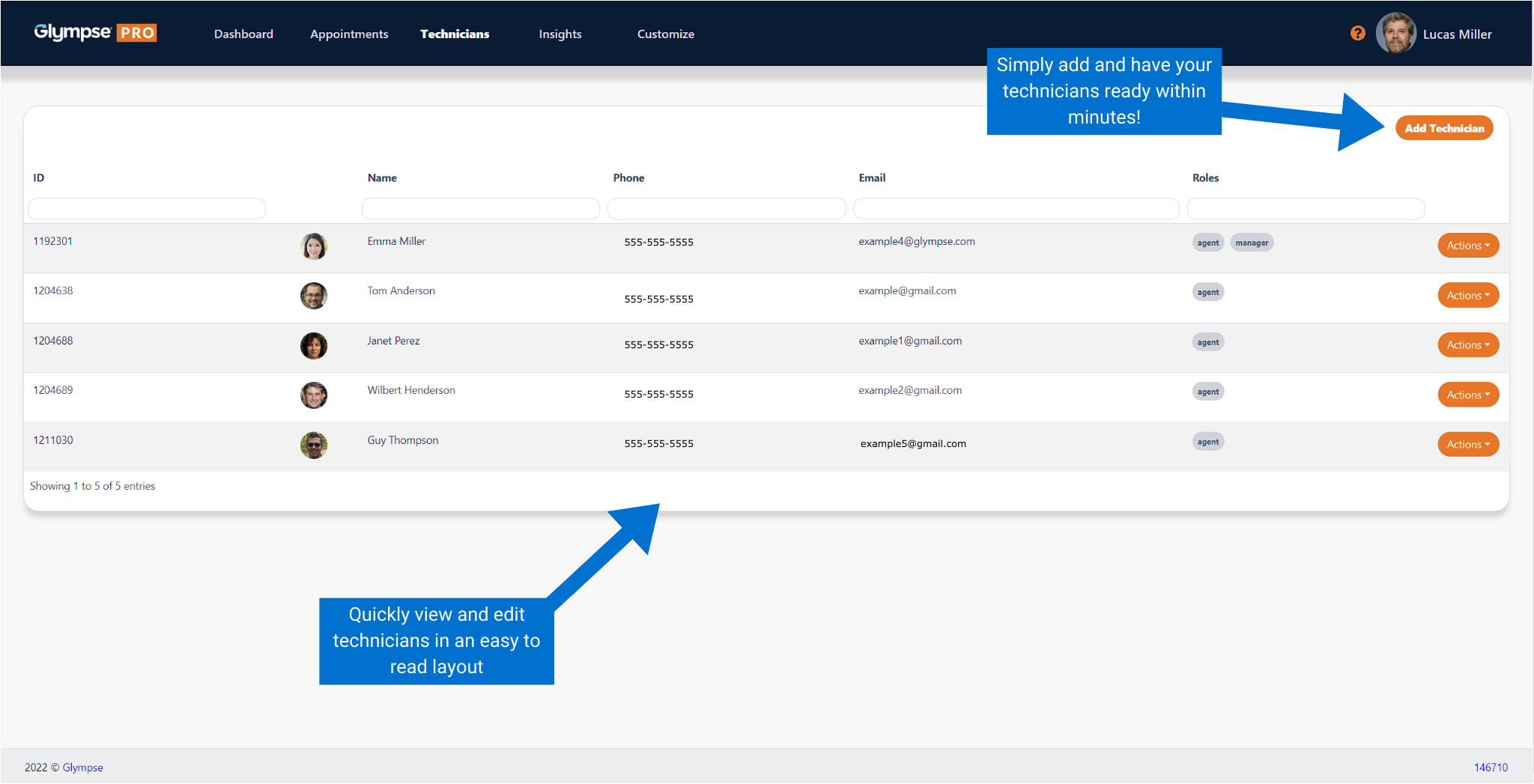
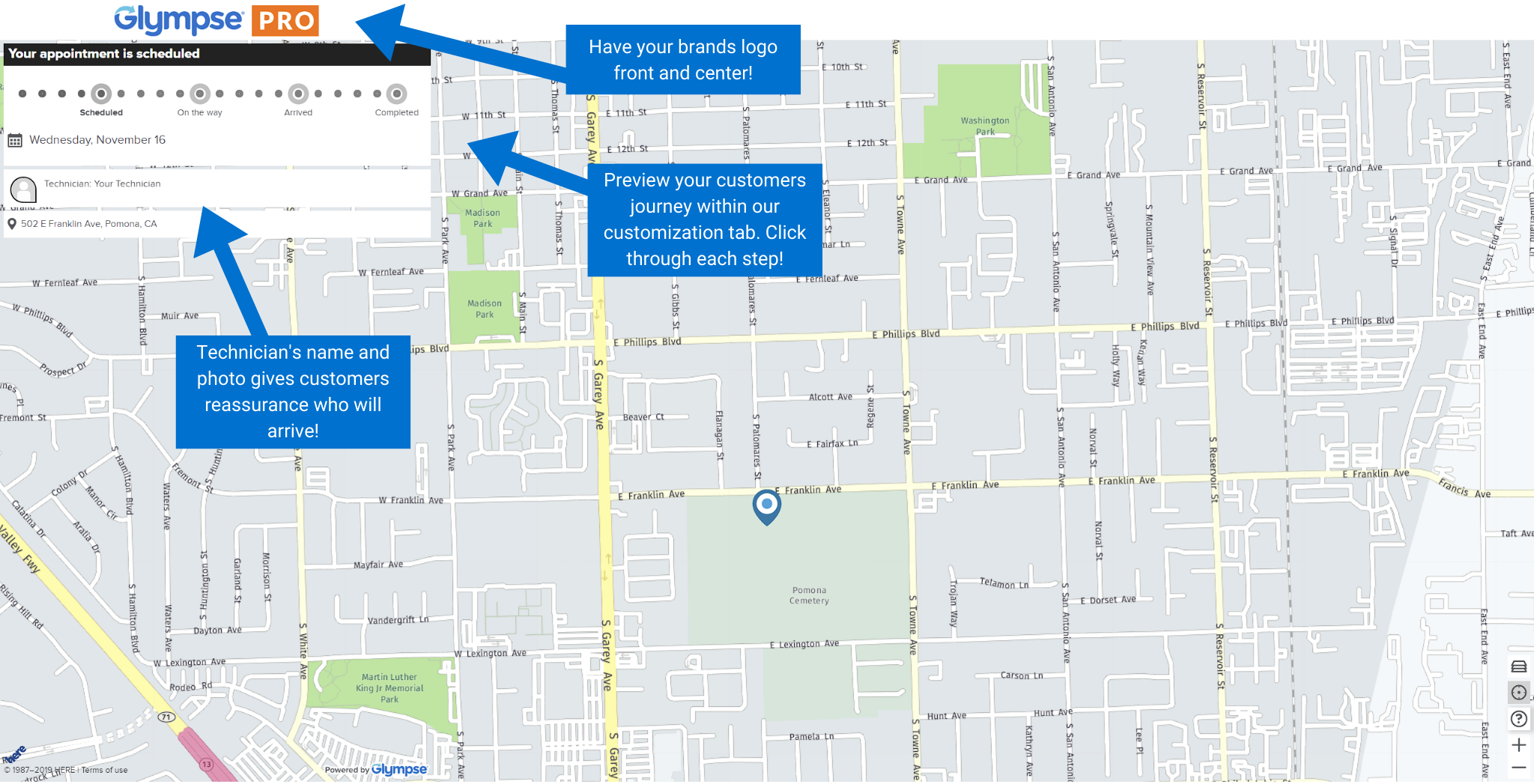
Screenshot of The Glympse PRO Dashboard provides office staff a glimpse of the operational benefits of having technicians share their on-the-way location with customers. It provides key metrics on current and historical data around the overall daily activities, metrics, and statistics. Examples include data on technicians’ total jobs completed, canceled jobs, promise time, and location of the technician shared with the customer.Screenshot of The “Orders Tab” gives an overview of upcoming orders, scheduled orders and past orders. There is a filter capability at the top of the row to allow for data information filters and narrowing a search, such as an order description/number, name of a staff member, an order description, etc.Screenshot of In the “Technicians” tab, technicians can be added into the system, searched by name, email, or their role in the organization.Screenshot of The “insights'' tab shows data collected and compiled by Glympse PRO. Important information such as deliveries completed, delivered canceled, customer feedback, and a graph of the average daily volume can be viewed in this tab with a detailed breakdown of each of the data insights, by clicking on each insight.Screenshot of The Glympse PRO experience seen by customers can be branded and personalized by clicking on the “Customize” tab. The company’s logo (in .png, .jpg or .svg) can be uploaded so the brand can be displayed when customers click on their unique URL link received in their text notifications. Colors that will be displayed to customers in the live ETA phase can also be changed.Screenshot of The preview tab displays exactly what customer will see. The preview tab can be used to experiment with logos and color schemes.