TrustRadius: an HG Insights company

Save this comparison

Save this comparison

Add Product

Recommended Comparisons

    Overview
    ProductRatingMost Used ByProduct SummaryStarting Price

    AutoCAD

    Score8.4 out of 10
    N/AAutoCAD is a CAD product from Autodesk. It allows designers to work in 2D and 3D, and is available on Windows and Mac, but with extensive online collaboration tools.

    $245

    per month

    SubmittalLink

    Score8.2 out of 10
    N/ASubmittalLink is construction submittal software and a project management tool that streamlines submittal workflows and provides tools for managing construction documentation, communication, and project execution. The platform digitizes submittal processes by enabling users to create, submit, track, review, and approve construction submittals through a centralized cloud-based system, replacing manual processes and email chains that often cause delays and miscommunication on construction…

    $150

    per month

    Pricing
    AutoCADSubmittalLink
    Editions & Modules
    Monthly Subscription
    $245
    per month per user
    Yearly Subscription
    $1975
    per year per user
    3-Year Subscription
    $5925
    3 years per user
    No answers on this topic
    Offerings
    Pricing Offerings
    AutoCADSubmittalLink
    Free Trial
    YesNo
    Free/Freemium Version
    NoNo
    Premium Consulting/Integration Services
    NoNo
    Entry-level Setup FeeNo setup feeNo setup fee
    Additional Details——
    More Pricing Information
    Community Pulse
    AutoCADSubmittalLink
    Considered Both Products
    Autodesk
    No answer on this topic
    SubmittalLink
    No answer on this topic
    Key User Insights
    Would buy again
    96%
    Would buy again
    45 Answers
    No answers on this topic
    Delivers good value for the price
    93%
    Delivers good value for the price
    38 Answers
    No answers on this topic
    Happy with the feature set
    91%
    Happy with the feature set
    43 Answers
    No answers on this topic
    Lived up to sales and marketing promises
    88%
    Lived up to sales and marketing promises
    29 Answers
    No answers on this topic
    Implementation went as expected
    95%
    Implementation went as expected
    38 Answers
    No answers on this topic
    Features
    AutoCADSubmittalLink
    Computer-Aided Design Software
    Comparison of Computer-Aided Design Software features of AutoCAD and SubmittalLink
    Feature
    AutoCAD
    7.1
    7 Ratings
    5% below category average
    SubmittalLink
    -
    Ratings
    3D Modeling6.27 Ratings00 Ratings
    2D Drafting8.67 Ratings00 Ratings
    Rendering and Visualization6.57 Ratings00 Ratings
    Parametric Design7.67 Ratings00 Ratings
    Collaboration and Sharing8.97 Ratings00 Ratings
    Compatibility with other software and formats8.97 Ratings00 Ratings
    Assembly Design6.87 Ratings00 Ratings
    Simulation and Analysis4.76 Ratings00 Ratings
    Documentation and Annotation7.67 Ratings00 Ratings
    Customization and Extensions5.47 Ratings00 Ratings
    Reporting & Analytics
    Comparison of Reporting & Analytics features of AutoCAD and SubmittalLink
    Feature
    AutoCAD
    -
    Ratings
    SubmittalLink
    8.4
    1 Ratings
    9% above category average
    Dashboards00 Ratings9.11 Ratings
    Standard reports00 Ratings8.21 Ratings
    Custom reports00 Ratings7.31 Ratings
    Data exportability00 Ratings9.11 Ratings
    Construction Project & Field Management
    Comparison of Construction Project & Field Management features of AutoCAD and SubmittalLink
    Feature
    AutoCAD
    -
    Ratings
    SubmittalLink
    8.0
    1 Ratings
    5% above category average
    Plan distribution & viewing00 Ratings7.31 Ratings
    Plan markups & sharing00 Ratings8.21 Ratings
    Issue tracking & punchlists00 Ratings8.21 Ratings
    Photo documentation00 Ratings7.31 Ratings
    Jobsite reports00 Ratings8.21 Ratings
    Document sharing00 Ratings7.31 Ratings
    RFI tools00 Ratings9.11 Ratings
    Collaboration & approvals00 Ratings9.11 Ratings
    As-built drawings00 Ratings7.31 Ratings
    Mobile app00 Ratings7.31 Ratings
    Submittal design and management00 Ratings8.21 Ratings
    Checklists00 Ratings8.21 Ratings
    Specifications00 Ratings9.11 Ratings
    Change orders00 Ratings7.31 Ratings
    Best Alternatives
    AutoCADSubmittalLink
    Small Businesses
    Onshape
    Score7.4 out of 10
    Autodesk BIM Collaborate Pro
    Score8.2 out of 10
    Medium-sized Companies
    Onshape
    Score7.4 out of 10
    Autodesk Build
    Score9 out of 10
    Enterprises
    PTC Creo
    Score7.8 out of 10
    Revit
    Score8.9 out of 10
    All AlternativesView all alternativesView all alternatives
    User Ratings
    AutoCADSubmittalLink
    Likelihood to Recommend
    7.7
    (88 ratings)
    8.2
    (1 ratings)
    Likelihood to Renew
    10.0
    (3 ratings)
    -
    (0 ratings)
    Usability
    8.3
    (9 ratings)
    8.2
    (1 ratings)
    Support Rating
    6.9
    (13 ratings)
    -
    (0 ratings)
    Implementation Rating
    8.0
    (2 ratings)
    -
    (0 ratings)
    User Testimonials
    AutoCADSubmittalLink
    Likelihood to Recommend
    Autodesk
    Once again, for jobs/companies where you are doing a lot of design and modelling of tanks, pipework or filling machine or basic electronics its fantastic as a 3D and 2D modelling tool, however once again when it comes to testing these actual products in the real world, I feel like AutoCAD is let down by its clunky fitting and spec management and also in very limited in-house engineering simulations.
    Read full review
    SubmittalLink
    It is a perfect fit for general contractors who need a professional and organized submittal process without all the extra bloat and high costs of enterprise systems like Procore. It’s great for teams that just want to get a project up and running in minutes. It might be less appropriate for those massive, billion dollar infrastructure projects that need specialized financial modules or a hundred different features beyond just document control.
    Read full review
    Pros
    Autodesk
    • Compatibility of different file formats, and also exports to different file formats.
    • CLI Commands as well as internal functions which are exposed can be used for automation of various tasks.
    • The new 2025 comes with .NET Core support which helps AutoCAD to connect with Cloud based features.
    Incentivized
    Read full review
    SubmittalLink
    No answers on this topic
    Cons
    Autodesk
    • User Interface Customisation: AutoCAD's user interface could benefit from more robust customisation options. Allowing users to rearrange toolbars, menus, and panels according to their specific workflows and preferences would enhance productivity.
    • Enhanced 3D Modeling Tools: While AutoCAD is capable of 3D modeling, it's not as intuitive or feature-rich as dedicated 3D modeling software. Streamlining the process and adding more advanced modeling tools would be a welcome improvement.
    • Enhanced Collaboration and Version Control: AutoCAD could improve its collaboration tools, such as real-time editing and version tracking, to facilitate smoother teamwork, especially in multi-disciplinary projects.
    • Intelligent Object Libraries: AutoCAD could benefit from an expanded and more intelligent library of standard objects and components. This would save time for designers who often have to create custom components from scratch.
    Read full review
    SubmittalLink
    No answers on this topic
    Likelihood to Renew
    Autodesk
    Because rarely we [would] rather wait for a whole year to update, sometimes the new updates don't bring many new features and we are still ok with the current version. Also the change of interface is always something that takes time for every partner in the company to get comfortable with. So those are the main reasons we may want to keep the same version.
    Incentivized
    Read full review
    SubmittalLink
    No answers on this topic
    Usability
    Autodesk
    It is very usable once you understand the program. I believe there is room for improvement in the 2D to 3D modeling capability. We have to use other apps to 3D model and that can be time consuming and sometimes AutoCAD doesn't transfer work that well between apps. They can improve there.
    Read full review
    SubmittalLink
    I give it a high score because it focuses on speed.
    You don't have to click through five different menus just to see the status of
    a submittal. If you can use a basic spreadsheet, you can use this.
    Read full review
    Support Rating
    Autodesk
    AutoCAD has the issue of crashing or slowing down the design procedure once a heavy design that includes several disciplines or multiple families/blocks is involved. Customer services gets the feedback from the crash reports but this issue seems like it has never been addressed in the software updates past several years.
    Incentivized
    Read full review
    SubmittalLink
    No answers on this topic
    Implementation Rating
    Autodesk
    the implementation was realy easy , to set up our workstation we pay for the licenses we are about to use , there was a little bit of delay to get the payment processed to receive the serial but after that the install runs without any problem , so you can fell secure there will be not issue with the implementation.
    Incentivized
    Read full review
    SubmittalLink
    No answers on this topic
    Alternatives Considered
    Autodesk
    I use Revit far more than I use AutoCAD. AutoCAD is great for simple linework, but even then I will often create the lines in Revit and then export to AutoCAD for final touches and printing. AutoCAD is a bit easier for large-format prints, which is why I almost always end up using it after starting in Revit.
    Incentivized
    Read full review
    SubmittalLink
    We have used Procore in the past. It's powerful, but they are often way too complicated for what we need and they are very expensive. We felt like we were paying for 50 features and only using about 5 of them. SubmittalLink is faster, more focused, and much more affordable. We chose it because it gives us a professional look with automated coversheets and audit trails without the big company price tag.
    Read full review
    Return on Investment
    Autodesk
    • As an educational institute there are no overall business objectives.
    • As a negative, the licensing is expensive and we have to limit the number of computers we put it on.
    • As a positive, many of our students will have a leg up when entering into programs or companies that use this software.
    Incentivized
    Read full review
    SubmittalLink
    No answers on this topic
    ScreenShots

    SubmittalLink Screenshots

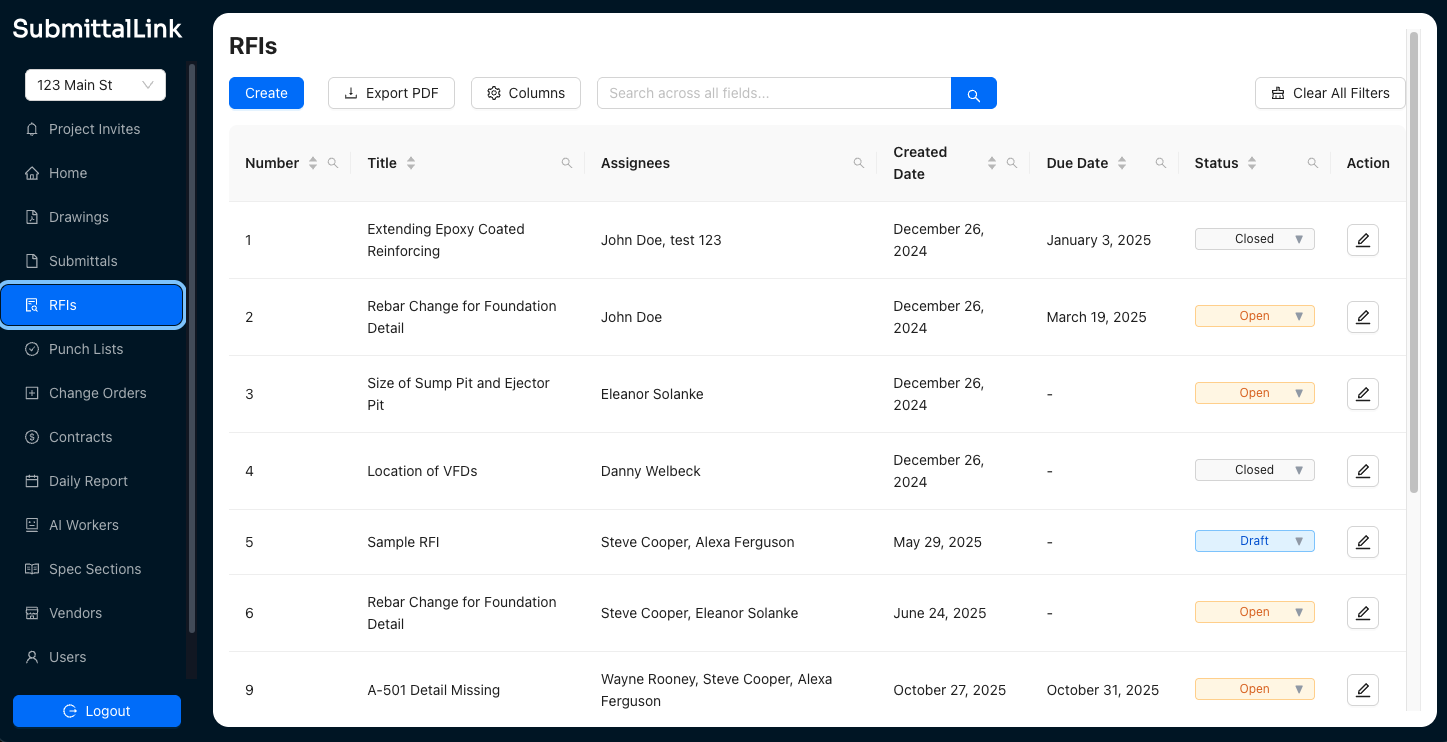
    Screenshot of SubmittalLink showing the submittals listScreenshot of SubmittalLink showing the RFIs listScreenshot of SubmittalLink showing the drawings module