Autodesk Construction Cloud vs. SubmittalLink

Overview
ProductRatingMost Used ByProduct SummaryStarting Price
Autodesk Construction Cloud
Score 8.7 out of 10
N/A
The Autodesk Construction Cloud provides a bundle of construction management products to suite various use cases. Current bundles include Construction Operations, Preconstruction, as well as Virtual Design and Construction.N/A
SubmittalLink
Score 8.2 out of 10
N/A
SubmittalLink is construction submittal software and a project management tool that streamlines submittal workflows and provides tools for managing construction documentation, communication, and project execution. The platform digitizes submittal processes by enabling users to create, submit, track, review, and approve construction submittals through a centralized cloud-based system, replacing manual processes and email chains that often cause delays and miscommunication on construction…
$150
per month
Pricing
Autodesk Construction CloudSubmittalLink
Editions & Modules
No answers on this topic
Offerings
Pricing Offerings
Autodesk Construction CloudSubmittalLink
Free Trial
NoNo
Free/Freemium Version
NoNo
Premium Consulting/Integration Services
NoNo
Entry-level Setup FeeNo setup feeNo setup fee
Additional Details
More Pricing Information
Features
Autodesk Construction CloudSubmittalLink
Human Resource Management
Comparison of Human Resource Management features of Product A and Product B
Autodesk Construction Cloud
4.6
4 Ratings
42% below category average
SubmittalLink
-
Ratings
Employee demographic data3.73 Ratings00 Ratings
Employment history3.03 Ratings00 Ratings
Job profiles and administration5.64 Ratings00 Ratings
Workflow for transfers, promotions, pay raises, etc.3.83 Ratings00 Ratings
Organizational charting4.73 Ratings00 Ratings
Organization and location management5.73 Ratings00 Ratings
Compliance data (COBRA, OSHA, etc.)5.93 Ratings00 Ratings
Payroll Management
Comparison of Payroll Management features of Product A and Product B
Autodesk Construction Cloud
3.6
3 Ratings
62% below category average
SubmittalLink
-
Ratings
Pay calculation3.43 Ratings00 Ratings
Support for external payroll vendors3.53 Ratings00 Ratings
Off-cycle/On-Demand payment3.13 Ratings00 Ratings
Benefit plan administration3.53 Ratings00 Ratings
Direct deposit files3.83 Ratings00 Ratings
Salary revision and increment management3.83 Ratings00 Ratings
Reimbursement management3.83 Ratings00 Ratings
Asset Management
Comparison of Asset Management features of Product A and Product B
Autodesk Construction Cloud
5.4
4 Ratings
24% below category average
SubmittalLink
-
Ratings
Tracking of all physical assets5.44 Ratings00 Ratings
Reporting & Analytics
Comparison of Reporting & Analytics features of Product A and Product B
Autodesk Construction Cloud
6.9
5 Ratings
11% below category average
SubmittalLink
8.4
1 Ratings
9% above category average
Dashboards6.75 Ratings9.11 Ratings
Standard reports7.15 Ratings8.21 Ratings
Custom reports7.05 Ratings7.31 Ratings
Data exportability6.95 Ratings9.11 Ratings
Construction Project & Field Management
Comparison of Construction Project & Field Management features of Product A and Product B
Autodesk Construction Cloud
7.5
8 Ratings
1% above category average
SubmittalLink
8.0
1 Ratings
8% above category average
Plan distribution & viewing7.57 Ratings7.31 Ratings
Plan markups & sharing7.18 Ratings8.21 Ratings
Issue tracking & punchlists8.08 Ratings8.21 Ratings
Photo documentation7.27 Ratings7.31 Ratings
Jobsite reports7.46 Ratings8.21 Ratings
Document sharing8.58 Ratings7.31 Ratings
RFI tools8.07 Ratings9.11 Ratings
Collaboration & approvals8.67 Ratings9.11 Ratings
As-built drawings6.26 Ratings7.31 Ratings
Mobile app6.26 Ratings7.31 Ratings
Submittal design and management7.88 Ratings8.21 Ratings
Checklists7.87 Ratings8.21 Ratings
Meeting Minutes8.26 Ratings00 Ratings
Specifications7.07 Ratings9.11 Ratings
Change orders7.06 Ratings7.31 Ratings
Estimating
Comparison of Estimating features of Product A and Product B
Autodesk Construction Cloud
5.5
3 Ratings
32% below category average
SubmittalLink
-
Ratings
Takeoff tools5.73 Ratings00 Ratings
Job costing5.03 Ratings00 Ratings
Cost databases5.03 Ratings00 Ratings
Cost calculator5.43 Ratings00 Ratings
Bid creation6.53 Ratings00 Ratings
Best Alternatives
Autodesk Construction CloudSubmittalLink
Small Businesses
FollowUp CRM
FollowUp CRM
Score 1.9 out of 10
FollowUp CRM
FollowUp CRM
Score 1.9 out of 10
Medium-sized Companies
InEight
InEight
Score 8.3 out of 10
InEight
InEight
Score 8.3 out of 10
Enterprises
InEight
InEight
Score 8.3 out of 10
InEight
InEight
Score 8.3 out of 10
All AlternativesView all alternativesView all alternatives
User Ratings
Autodesk Construction CloudSubmittalLink
Likelihood to Recommend
10.0
(1 ratings)
-
(0 ratings)
Usability
10.0
(1 ratings)
-
(0 ratings)
User Testimonials
Autodesk Construction CloudSubmittalLink
Likelihood to Recommend
Autodesk
Well Suited: Autodesk Construction Cloud is cost effective, user friendly, and robust. They aren't nickel and diming you for use of each module. Once users are on-board with the system it creates an ecosystem that all users "go to first" for an answer. Less Appropriate: As a Developer, there are some hiccups as it is designed more for the GC (general contractor). A template option that is Developer forward would an improvement.
Read full review
SubmittalLink
It is a perfect fit for general contractors who need a professional and organized submittal process without all the extra bloat and high costs of enterprise systems like Procore. It’s great for teams that just want to get a project up and running in minutes. It might be less appropriate for those massive, billion dollar infrastructure projects that need specialized financial modules or a hundred different features beyond just document control.
Read full review
Pros
Autodesk
  • Meeting Minutes: Simple to use and adapt from Agenda to Minutes, attach reference documents efficiently, and assign accountability to attendees.
  • Budget/Cost Reporting: There is a learning curve, but the visibility of budgets and costs from inception to closeout is beneficial for the user and makes reporting to investors simple and consistent.
  • Document Management: The version history on drawings "sheets" is very helpful when managing a project through design and construction. Issuing addenda, drawings, or tracking down a change in design is simple.
  • Pay Applications/Change Order Workflow: the customizable workflows along with time stamps of reviews and response makes tracking down status and bottlenecks very easy.
Read full review
SubmittalLink
No answers on this topic
Cons
Autodesk
  • Managing Data
  • The footprint large projects leave within Desktop Connector and Mitigating that data
  • REMOVE "add up to 80 projects" from the Desktop Connector Select Projects Screen! It is better to cycle the project data in/out for syncing latest greatest rather than have users load up their desktop connector full of projects and let data stagnate/have to be racked to update.
Read full review
SubmittalLink
No answers on this topic
Likelihood to Renew
Autodesk
I don't make these decisions and its what the company wants
Read full review
SubmittalLink
No answers on this topic
Usability
Autodesk
It is overall a very great product in terms of usability. Some features need some work like RFI tools and contruction administration tools. As the product develops I imagine these becoming more important and easier to use
Read full review
SubmittalLink
I give it a high score because it focuses on speed.
You don't have to click through five different menus just to see the status of
a submittal. If you can use a basic spreadsheet, you can use this.
Read full review
Reliability and Availability
Autodesk
5 major outages in the last year, some on days of major deliverables or deadlines... dependent upon AWS
Read full review
SubmittalLink
No answers on this topic
Performance
Autodesk
The data mitigation is complete garbage. Any cloud collaborated model takes 2x to load in the Autodesk Construction Cloud environment that if it was saved locally or to on prem servers. We had our systems and bandwidth all evaluated to be applicable but the data downloads and sequencing through Desktop Connector leaves much to be desired.
Read full review
SubmittalLink
No answers on this topic
Support Rating
Autodesk
Autodesk staff intervention often required to support IT when normal installs and direction was erroneous
Read full review
SubmittalLink
No answers on this topic
In-Person Training
Autodesk
Great to have hands on folks to answer questions. Live training worked better for real time scenarios.
Read full review
SubmittalLink
No answers on this topic
Online Training
Autodesk
Good as any other online content, not incredible. There was a cost associated with this training
Read full review
SubmittalLink
No answers on this topic
Implementation Rating
Autodesk
Be prepared for nothing to work originally, and support staff to fight change and be cumbersome at properly learning how to use in my opinion.
Read full review
SubmittalLink
No answers on this topic
Alternatives Considered
Autodesk
Procore's user interface is not as user-friendly. Next steps are not as obvious and the overall graphic design is more old-school. I do however like how Procore lists the specific issues that you are assigned on the home page. Procore can be more difficult to navigate and it's hard to find attachments.
Read full review
SubmittalLink
We have used Procore in the past. It's powerful, but they are often way too complicated for what we need and they are very expensive. We felt like we were paying for 50 features and only using about 5 of them. SubmittalLink is faster, more focused, and much more affordable. We chose it because it gives us a professional look with automated coversheets and audit trails without the big company price tag.
Read full review
Contract Terms and Pricing Model
Autodesk
Required yearly upgrades and contracts a opposed to one-time purchases
Read full review
SubmittalLink
No answers on this topic
Scalability
Autodesk
Not applicable/harder to implement across larger workforces or large-scale projects
Read full review
SubmittalLink
No answers on this topic
Professional Services
Autodesk
They were attentive and thorough when their software releases caused errors
Read full review
SubmittalLink
No answers on this topic
Return on Investment
Autodesk
  • Make us easier to manage files
  • Coordination model more easier
  • Keep internal file secret to external by managing access to our Autodesk Construction Cloud system
Read full review
SubmittalLink
No answers on this topic
ScreenShots

SubmittalLink Screenshots

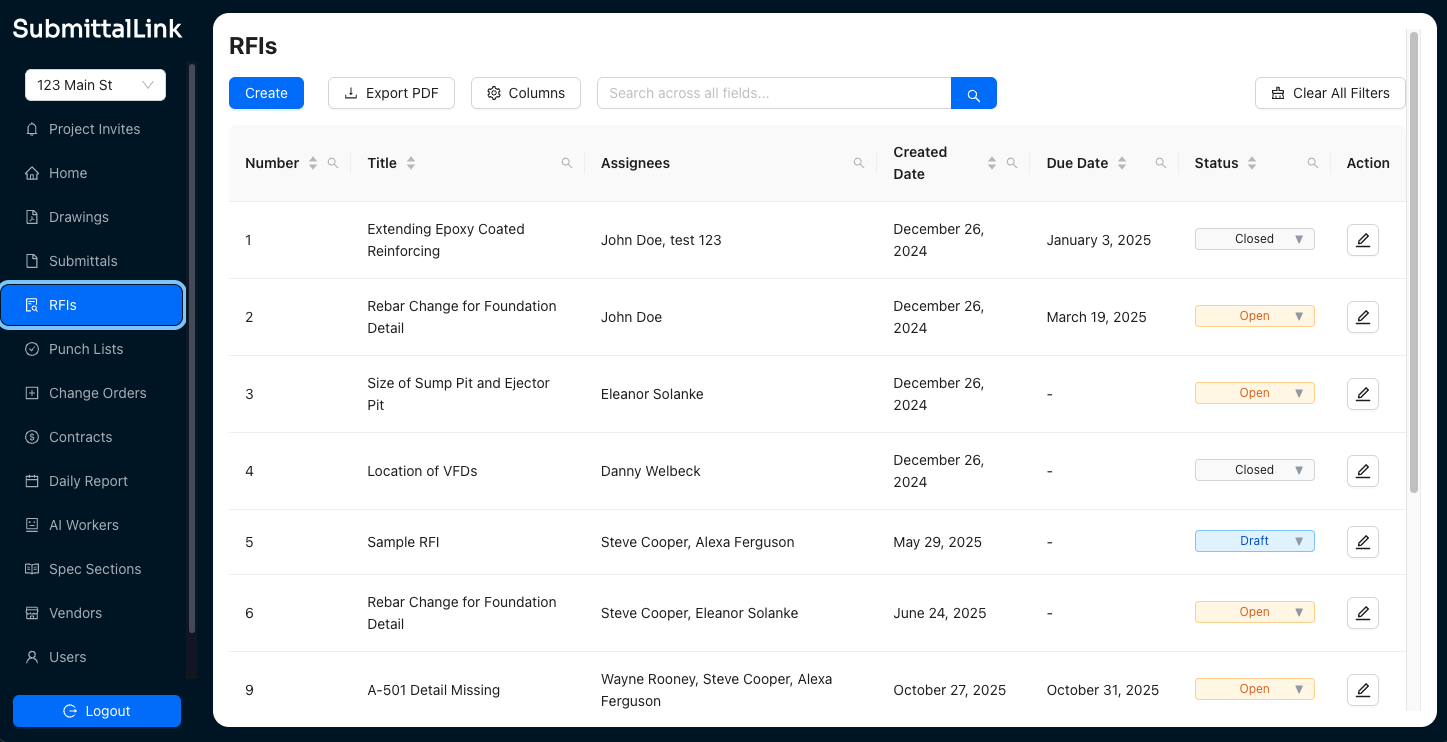
Screenshot of SubmittalLink showing the submittals listScreenshot of SubmittalLink showing the RFIs listScreenshot of SubmittalLink showing the drawings module