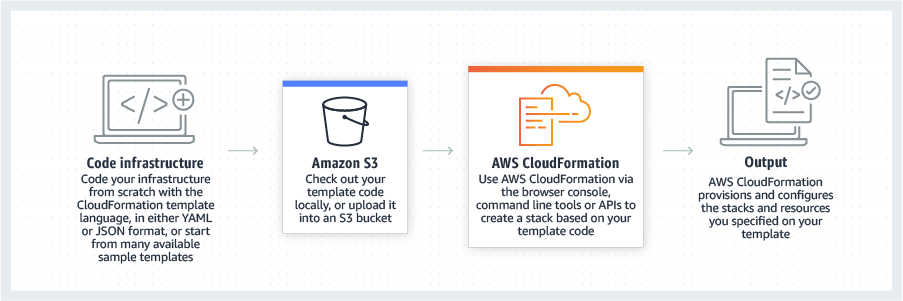
AWS CloudFormation gives developers and systems administrators a way to create and manage a collection of related AWS resources, provisioning and updating them in a predictable fashion. Use AWS CloudFormation’s sample templates or create templates to describe the AWS resources, and any associated dependencies or runtime parameters, required to run an application. Users don’t need to figure out the order for provisioning AWS services or the subtleties of making those dependencies work.…
$0
AWS Trusted Advisor
Score 6.2 out of 10
N/A
AWS Trusted Advisor is an online tool that provides users real time guidance to help provision resources following AWS best practices. Trusted Advisor checks help optimize AWS infrastructure, increase security and performance, reduce overall costs, and monitor service limits. Whether establishing new workflows, developing applications, or as part of ongoing improvement, the recommendations provided by Trusted Advisor are designed to help keep solutions provisioned optimally.
N/A
Pricing
AWS CloudFormation
AWS Trusted Advisor
Editions & Modules
Free Tier - 1,000 Handler Operations per Month per Account
$0.00
Handler Operation
$0.0009
per handler operation
No answers on this topic
Offerings
Pricing Offerings
AWS CloudFormation
AWS Trusted Advisor
Free Trial
Yes
No
Free/Freemium Version
Yes
No
Premium Consulting/Integration Services
No
No
Entry-level Setup Fee
No setup fee
No setup fee
Additional Details
There is no additional charge for using AWS CloudFormation with resource providers in the following namespaces: AWS::*, Alexa::*, and Custom::*. In this case you pay for AWS resources (such as Amazon EC2 instances, Elastic Load Balancing load balancers, etc.) created using AWS CloudFormation as if you created them manually. You only pay for what you use, as you use it; there are no minimum fees and no required upfront commitments.
When you use resource providers with AWS CloudFormation outside the namespaces mentioned above, you incur charges per handler operation. Handler operations are create, update, delete, read, or list actions on a resource.
—
More Pricing Information
Community Pulse
AWS CloudFormation
AWS Trusted Advisor
Considered Both Products
AWS CloudFormation
Verified User
Anonymous
Chose AWS CloudFormation
The only real comparison would be to Terraform, which is another IaC technology at the infra level. Terraform is cloud-agnostic, which means most popular cloud providers are supported. While AWS CloudFormation is AWS-only. Although, if you consider CDK, CDK for Terraform …
Since the product I'm involved is primarily hosted on AWS we use CloudFormation but in some other products where we have hybrid cloud deployments we prefer terraform which is opensource.
Cloning a virtual machine creates a virtual machine that is cloning a virtual machine creates a virtual machine that is a copy of the original. The new virtual machine is configured with the same virtual hardware, installed software, and other properties that were configured …
As we have our whole infrastructure on AWS, that is why we selected AWS CloudFormation. AWS CloudFormation is better integrated with AWS services than other available products and also provides visibility and tracking on AWS. AWS CloudFormation is free while Terraform …
We didn't look into anything else as Cloudformation was "built-in" for AWS, it just kind of made sense to go with that. Terraform was something that we briefly looked into Terraform but decides to stick with Cloudformation because our task was relatively "simple". Apparently if …
AWS CloudFormation has more features and robustness. It is suited for professional projects since it provides stability and a wide variety of options for configurations. These include not only dividing stacks by specific code changes, but also in regions. This allows more …
It does a good job not only it provides cost estimation but also it provides security measures that we have to take to make sure that we are not vulnerable to attacks. It also gives a performance report which helps to analyze the resource allocation and free resources more …
I still give it an 8 because it's one of those tools that just quietly does the heavy lifting for you but it can really test your patience when it breaks esp with deep nested stacks. It's perfect for projects where we need clean consistent environments every time. It's less ideal for quick experimental setups like new EC2 configs or Lambda permission tweaks.
It is well suited for an organization that uses AWS tools and technologies. as AWS is very popular in the market. you can use almost any service with it. the only thing is your organization must be using AWS services. It is not also cheap so the price can be the issue.
You just have to learn how it thinks then you'll be set. That however comes with a learning curve. Writing YAML or jSON templates feels natural now but early on, even a small syntax mistake could break a whole stack.
Since the product I'm involved is primarily hosted on AWS we use CloudFormation but in some other products where we have hybrid cloud deployments we prefer Terraform which is opensource.
It does a good job not only it provides cost estimation but also it provides security measures that we have to take to make sure that we are not vulnerable to attacks. It also gives a performance report which helps to analyze the resource allocation and free resources more effectively.