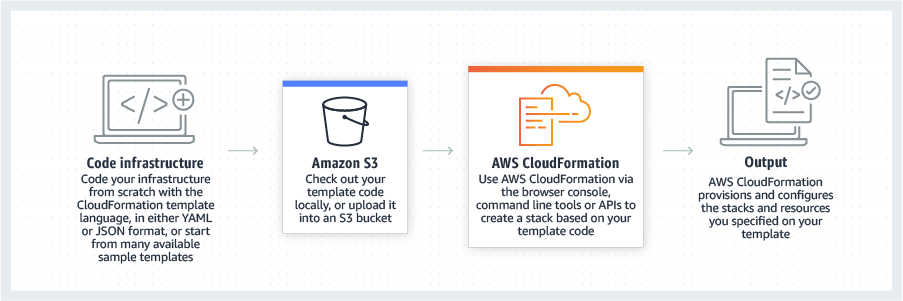
AWS CloudFormation gives developers and systems administrators a way to create and manage a collection of related AWS resources, provisioning and updating them in a predictable fashion. Use AWS CloudFormation’s sample templates or create templates to describe the AWS resources, and any associated dependencies or runtime parameters, required to run an application. Users don’t need to figure out the order for provisioning AWS services or the subtleties of making those dependencies work.…
$0
Azure NetApp Files
Score 9.0 out of 10
N/A
Azure NetApp Files is a Microsoft Azure file storage service built on NetApp technology, giving users the file capabilities in Azure that core business applications require, with pricing plans for different performance tiers.
$21,474,836.48
per month
Microsoft Azure
Score 8.4 out of 10
N/A
Microsoft Azure is a cloud computing platform and infrastructure for building, deploying, and managing applications and services through a global network of Microsoft-managed datacenters.
$29
per month
Pricing
AWS CloudFormation
Azure NetApp Files
Microsoft Azure
Editions & Modules
Free Tier - 1,000 Handler Operations per Month per Account
$0.00
Handler Operation
$0.0009
per handler operation
Restore
$0.02/GiB
per month
Backup
$0.05/GiB
per month
Cross Region Replication Daily - Replication frequency is once a day
$0.11/GiB
per month
Cross Region Replication Hourly - Replication frequency is every 1 hour
$0.12/GiB
per month
Cross Region Replication Minutes - Replication frequency is every 10 mins
$0.14/GiB
per month
Standard Storage
$0.14746 per GiB
per month
Premium Storage
$0.29419 per GiB
per month
Ultra Storage
$0.39274 per GiB
per month
Developer
$29
per month
Standard
$100
per month
Professional Direct
$1000
per month
Basic
Free
per month
Offerings
Pricing Offerings
AWS CloudFormation
Azure NetApp Files
Microsoft Azure
Free Trial
Yes
Yes
Yes
Free/Freemium Version
Yes
No
Yes
Premium Consulting/Integration Services
Yes
No
No
Entry-level Setup Fee
No setup fee
No setup fee
No setup fee
Additional Details
There is no additional charge for using AWS CloudFormation with resource providers in the following namespaces: AWS::*, Alexa::*, and Custom::*. In this case you pay for AWS resources (such as Amazon EC2 instances, Elastic Load Balancing load balancers, etc.) created using AWS CloudFormation as if you created them manually. You only pay for what you use, as you use it; there are no minimum fees and no required upfront commitments.
When you use resource providers with AWS CloudFormation outside the namespaces mentioned above, you incur charges per handler operation. Handler operations are create, update, delete, read, or list actions on a resource.
Azure NetApp Files (ANF) cloud file storage service is charged per hour based on the provisioned ANF capacity. Customers can provision a minimum of 4TiB of ANF capacity and then add additional provision capacity in the increments of 1TiB. Cross Region Replication pricing varies by the desired replication frequency per unit of data, and the region of the destination volume.
The free tier lets users have access to a variety of services free for 12 months with limited usage after making an Azure account.
The solution is amazing. It scales up and down, which is quite unique for a cloud solution and also it is billed to you on a per-hour basis, which provides a great opportunity to save the cost when you don't need it. Compared to others, we really liked that option for Azure …
AWS takes the cake here just due to how simple it is to configure IAM roles, users, and policies. Microsoft Azure is nearly neck-and-neck and could probably overtake them in the near future. Splunk for logging isn't that great and Microsoft Azure does a solid job but they could …
I still give it an 8 because it's one of those tools that just quietly does the heavy lifting for you but it can really test your patience when it breaks esp with deep nested stacks. It's perfect for projects where we need clean consistent environments every time. It's less ideal for quick experimental setups like new EC2 configs or Lambda permission tweaks.
In my opinion, I would say it is more suitable to huge workloads, where you really needs the reliability and performance that a Netapp storage provides to you, larger share sizes, etc. Use cases where you really needs to store large amounts of non-structured data. It is not a cheap solution, I mean, you can find other options to store your data on the Cloud at smaller prices. So, for small companies, or companies that depends mostly on web-applications, or don't have such a specific requirements, I would not go with Azure Netapp Files.
Azure is particularly well suited for enterprise environments with existing Microsoft investments, those that require robust compliance features, and organizations that need hybrid cloud capabilities that bridge on-premises and cloud infrastructure. In my opinion, Azure is less appropriate for cost-sensitive startups or small businesses without dedicated cloud expertise and scenarios requiring edge computing use cases with limited connectivity. Azure offers comprehensive solutions for most business needs but can feel like there is a higher learning curve than other cloud-based providers, depending on the product and use case.
We have found that it scales very well. In some cases we had a large existing storage infrastructure and were able to migrate it while other times we started from scratch with low storage demands and Azure NetApp Files fit the bill each time.
We have been impressed with the replication capabailities.
The read and write speed when interacting with files is a major asset.
Microsoft Azure is highly scalable and flexible. You can quickly scale up or down additional resources and computing power.
You have no longer upfront investments for hardware. You only pay for the use of your computing power, storage space, or services.
The uptime that can be achieved and guaranteed is very important for our company. This includes the rapid maintenance for security updates that are mostly carried out by Microsoft.
The wide range of capabilities of services that are possible in Microsoft Azure. You can practically put or create anything in Microsoft Azure.
It does not support file locking although its available as an add-on
Design is far from native and has a learning curve
We would like to have backup functionality built in so that we don't run into the issue where the replication process makes a copy of the corrupted data.
The cost of resources is difficult to determine, technical documentation is frequently out of date, and documentation and mapping capabilities are lacking.
The documentation needs to be improved, and some advanced configuration options require research and experimentation.
Microsoft's licensing scheme is too complex for the average user, and Azure SQL syntax is too different from traditional SQL.
Moving to Azure was and still is an organizational strategy and not simply changing vendors. Our product roadmap revolved around Azure as we are in the business of humanitarian relief and Azure and Microsoft play an important part in quickly and efficiently serving all of the world. Migration and investment in Azure should be considered as an overall strategy of an organization and communicated companywide.
It's easy enough to get a shared template & apply it. You don't even have to download-then-upload or copy-and-paste, a publicly-accessible url works.
Diving deeper, it has enough powerful capabilities to make the life of a platform / DevOps engineer bearable.
However, you need equally deep knowledge to troubleshoot issues, when they inevitably pop up. This is the same for all IaC technologies, as they are additional abstraction layers on top of the native API provided by the cloud providers.
As Microsoft Azure is [doing a] really good with PaaS. The need of a market is to have [a] combo of PaaS and IaaS. While AWS is making [an] exceptionally well blend of both of them, Azure needs to work more on DevOps and Automation stuff. Apart from that, I would recommend Azure as a great platform for cloud services as scale.
We were running Windows Server and Active Directory, so [Microsoft] Azure was a seamless transition. We ran into a few, if any support issues, however, the availability of Microsoft Azure's support team was more than willing and able to guide us through the process. They even proposed solutions to issues we had not even thought of!
As I have mentioned before the issue with my Oracle Mismatch Version issues that have put a delay on moving one of my platforms will justify my 7 rating.
Cloning a virtual machine creates a virtual machine that is cloning a virtual machine creates a virtual machine that is a copy of the original. The new virtual machine is configured with the same virtual hardware, installed software, and other properties that were configured for the original virtual machine. For information about persistent memory and PMem storage, see the vSphere Cloning a virtual machine creates a virtual machine that is a copy of the original. The new virtual machine is configured with the same virtual hardware, installed software, and other properties that were configured for the original virtual machine. For information. Management guide.For information copy of the original. The new virtual Cloning virtual machine creates a virtual machine that is a copy of the original. The new virtual machine is configured with the same virtual hardware, installed software, and other properties that were configured for the original virtual machine. For information about persistent memory and PMem storage, see the vSphere Resource Management Guide. For information is configured with the same virtual hardware, installed software, and other properties that were configured for the original virtual machine. For information about persistent memory and PMem storage, see the vSphere Resource Management Guide. For information
Azure NetApp Files is very well integrated with Microsoft Azure, we use the same request methods that everyone knows from Azure. NetApp and Microsoft has built a very efficient solution that allows you to transfer virtually any service to the Microsoft public cloud. Azure NetApp Files also protects our data very well.
As I continue to evaluate the "big three" cloud providers for our clients, I make the following distinctions, though this gap continues to close. AWS is more granular, and inherently powerful in the configuration options compared to [Microsoft] Azure. It is a "developer" platform for cloud. However, Azure PowerShell is helping close this gap. Google Cloud is the leading containerization platform, largely thanks to it building kubernetes from the ground up. Azure containerization is getting better at having the same storage/deployment options.
The main hurdle in promoting this solution is the price. Its price definitely requires an improvement. It is more expensive than other options, so customers go for a cheaper option.
For about 2 years we didn't have to do anything with our production VMs, the system ran without a hitch, which meant our engineers could focus on features rather than infrastructure.
DNS management was very easy in Azure, which made it easy to upgrade our cluster with zero downtime.
Azure Web UI was easy to work with and navigate, which meant our senior engineers and DevOps team could work with Azure without formal training.