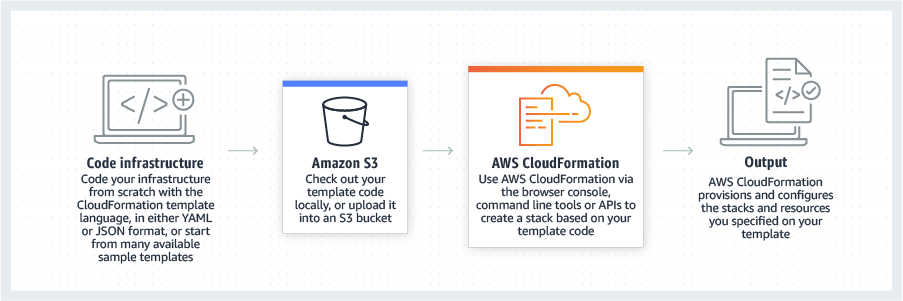
AWS CloudFormation gives developers and systems administrators a way to create and manage a collection of related AWS resources, provisioning and updating them in a predictable fashion. Use AWS CloudFormation’s sample templates or create templates to describe the AWS resources, and any associated dependencies or runtime parameters, required to run an application. Users don’t need to figure out the order for provisioning AWS services or the subtleties of making those dependencies work.…
$0
HashiCorp Terraform
Score 8.7 out of 10
N/A
Terraform from HashiCorp is a cloud infrastructure automation tool that enables users to create, change, and improve production infrastructure, and it allows infrastructure to be expressed as code. It codifies APIs into declarative configuration files that can be shared amongst team members, treated as code, edited, reviewed, and versioned. It is available Open Source, and via Cloud and Self-Hosted editions.
$0
Pricing
AWS CloudFormation
HashiCorp Terraform
Editions & Modules
Free Tier - 1,000 Handler Operations per Month per Account
$0.00
Handler Operation
$0.0009
per handler operation
Open Source
$0
Team & Governance
$20/user
per user/per month
Enterprise
Contact sales team
Offerings
Pricing Offerings
AWS CloudFormation
HashiCorp Terraform
Free Trial
Yes
No
Free/Freemium Version
Yes
Yes
Premium Consulting/Integration Services
Yes
No
Entry-level Setup Fee
No setup fee
No setup fee
Additional Details
There is no additional charge for using AWS CloudFormation with resource providers in the following namespaces: AWS::*, Alexa::*, and Custom::*. In this case you pay for AWS resources (such as Amazon EC2 instances, Elastic Load Balancing load balancers, etc.) created using AWS CloudFormation as if you created them manually. You only pay for what you use, as you use it; there are no minimum fees and no required upfront commitments.
When you use resource providers with AWS CloudFormation outside the namespaces mentioned above, you incur charges per handler operation. Handler operations are create, update, delete, read, or list actions on a resource.
—
More Pricing Information
Community Pulse
AWS CloudFormation
HashiCorp Terraform
Considered Both Products
AWS CloudFormation
Verified User
Employee
Chose AWS CloudFormation
We didn't look into anything else as Cloudformation was "built-in" for AWS, it just kind of made sense to go with that. Terraform was something that we briefly looked into Terraform but decides to stick with Cloudformation because our task was relatively "simple". Apparently if …
As we have our whole infrastructure on AWS, that is why we selected AWS CloudFormation. AWS CloudFormation is better integrated with AWS services than other available products and also provides visibility and tracking on AWS. AWS CloudFormation is free while Terraform …
Since the product I'm involved is primarily hosted on AWS we use CloudFormation but in some other products where we have hybrid cloud deployments we prefer Terraform which is opensource.
The only real comparison would be to Terraform, which is another IaC technology at the infra level. Terraform is cloud-agnostic, which means most popular cloud providers are supported. While AWS CloudFormation is AWS-only. Although, if you consider CDK, CDK for Terraform …
AWS CloudFormation is better if you just want to stick with AWS because it's integration with AWS is better, provides auto-rollback in case of failures, and has GUI to manage and view the stacks built. Terraform is better when we want to stay cloud-agnostic. Terraform is better …
HashiCorp Terraform is much better than Cloud Formation. For one, the language is just easier to use, but more importantly, the provider ecosystem is much better in HashiCorp Terraform than in Cloud Formation.
CloudFormation is only for AWS so if you're trying to deploy to another cloud provider then Terraform is your product. Terraform has lots of public support so you can find answers to questions by Googling. CloudFormation is easy to view the resources/services that are …
I still give it an 8 because it's one of those tools that just quietly does the heavy lifting for you but it can really test your patience when it breaks esp with deep nested stacks. It's perfect for projects where we need clean consistent environments every time. It's less ideal for quick experimental setups like new EC2 configs or Lambda permission tweaks.
Anything that needs to be repeated en masse. Terraform is great at taking a template and have it be repeated across your estate. You can dynamically change the assets they're generating depending on certain variables. Which means though templated assets will all be similar, they're allowed to have unique properties about them. For example flattening JSON into tabular data and ensuring the flattening code is unique to the file's schema.
The language itself is a bit unusual and this makes it hard for new users to get onboarded into the codebase. While it's improving with later releases, basic concepts like "map an array of options into a set of configurations" or "apply this logic if a variable is specified" are possible but unnecessarily cumbersome.
The 'Terraform Plan' operation could be substantially more sophisticated. There are many situations where a Terraform file could never work but successfully passes the 'plan' phase only to fail during the 'apply' phase.
Environment migrations could be smoother. Renaming/refactoring files is a challenge because of the need to use 'Terraform mv' commands, etc.
It's easy enough to get a shared template & apply it. You don't even have to download-then-upload or copy-and-paste, a publicly-accessible url works.
Diving deeper, it has enough powerful capabilities to make the life of a platform / DevOps engineer bearable.
However, you need equally deep knowledge to troubleshoot issues, when they inevitably pop up. This is the same for all IaC technologies, as they are additional abstraction layers on top of the native API provided by the cloud providers.
I love Terraform and I think it has done some great things for people that are working to automate their provisioning processes and also for those that are in the process of moving to the cloud or managing cloud resources. There are some quirks to HCL that take a little bit of getting used to and give picking up Terraform a little bit of a learning curve, thus the rating
Terraform's performance is quite amazing when it comes to deployment of resources in AWS. Of course, the deployment times depend on various parameters like the number of resources to deploy and different regions to deploy. Terraform cannot control that. The only minor drawback probably shows up when a terraform job is terminated mid way. Then in many cases, time-consuming manual cleanup is required.
I have yet to have an opportunity to reach out directly to HashiCorp for support on Terraform. However, I have spent a great deal of time considering their documentation as I use the tool. This opinion is based solely on that. I find the Terraform documentation to have great breadth but lacking in depth in many areas. I appreciate that all of the tool's resources have an entry in the docs but often the examples are lacking. Often, the examples provided are very basic and prompt additional exploration. Also, the links in the documentation often link back to the same page where one might expect to be linked to a different source with additional information.
Cloning a virtual machine creates a virtual machine that is cloning a virtual machine creates a virtual machine that is a copy of the original. The new virtual machine is configured with the same virtual hardware, installed software, and other properties that were configured for the original virtual machine. For information about persistent memory and PMem storage, see the vSphere Cloning a virtual machine creates a virtual machine that is a copy of the original. The new virtual machine is configured with the same virtual hardware, installed software, and other properties that were configured for the original virtual machine. For information. Management guide.For information copy of the original. The new virtual Cloning virtual machine creates a virtual machine that is a copy of the original. The new virtual machine is configured with the same virtual hardware, installed software, and other properties that were configured for the original virtual machine. For information about persistent memory and PMem storage, see the vSphere Resource Management Guide. For information is configured with the same virtual hardware, installed software, and other properties that were configured for the original virtual machine. For information about persistent memory and PMem storage, see the vSphere Resource Management Guide. For information
Terraform is the solid leader in the space. It allows you to do more then just provisioning within a pre-existing servers. It is more extensible and has more providers available than it competitors. It is also open source and more adopted by the community then some of the other solutions that are available in the market place.
we are able to deploy our infrastructure in a couple of ours in an automated and repeatable way, before this could take weeks if the work was done manually and was a lot of error prone.
having the state file, you can see a diff of what things have changed manually out side of Terraform which is a huge plus
if state file gets corrupted, it is very hard to debug or restore it without an impact or spending hours ..
writing big scale code can be very challenging and hard to be efficient so it's usable by the whole team