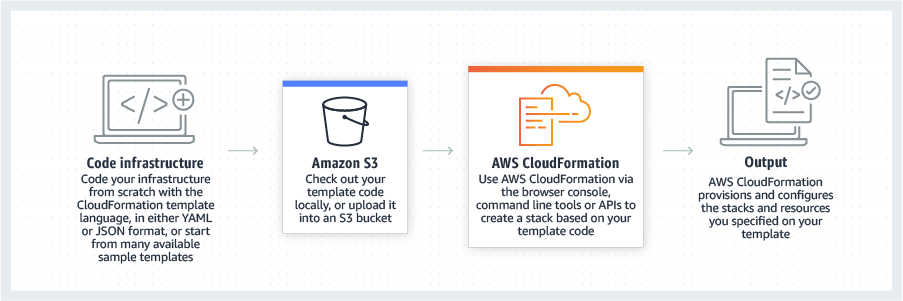
AWS CloudFormation gives developers and systems administrators a way to create and manage a collection of related AWS resources, provisioning and updating them in a predictable fashion. Use AWS CloudFormation’s sample templates or create templates to describe the AWS resources, and any associated dependencies or runtime parameters, required to run an application. Users don’t need to figure out the order for provisioning AWS services or the subtleties of making those dependencies work.…
$0
IBM Cloud Virtual Servers for VPC
Score 6.1 out of 10
N/A
IBM Cloud Virtual Servers are customizable, public or private, cloud-based servers available from IBM. User can launch applications and software across blended, hybrid environments as the servers integrate with all cloud models.
$0.01
per hour
Pricing
AWS CloudFormation
IBM Cloud Virtual Servers for VPC
Editions & Modules
Free Tier - 1,000 Handler Operations per Month per Account
$0.00
Handler Operation
$0.0009
per handler operation
IBM Cloud Virtual Servers (dedicated host)
starting at $0.22
per hour
IBM Cloud Virtual Servers (dedicated host)
starting at $149.00
per month
IBM Cloud Virtual Servers (multi-tenant)
starting at $0.038
per hour
IBM Cloud Virtual Servers (multi-tenant)
starting at $25.21
per month
IBM Cloud Virtual Servers (reserved)
starting at $0.02
per hour
IBM Cloud Virtual Servers (reserved)
starting at $13.27
per month
IBM Cloud Virtual Servers (transient)
starting at $0.01
per hour
Offerings
Pricing Offerings
AWS CloudFormation
IBM Cloud Virtual Servers for VPC
Free Trial
Yes
Yes
Free/Freemium Version
Yes
Yes
Premium Consulting/Integration Services
Yes
Yes
Entry-level Setup Fee
No setup fee
Optional
Additional Details
There is no additional charge for using AWS CloudFormation with resource providers in the following namespaces: AWS::*, Alexa::*, and Custom::*. In this case you pay for AWS resources (such as Amazon EC2 instances, Elastic Load Balancing load balancers, etc.) created using AWS CloudFormation as if you created them manually. You only pay for what you use, as you use it; there are no minimum fees and no required upfront commitments.
When you use resource providers with AWS CloudFormation outside the namespaces mentioned above, you incur charges per handler operation. Handler operations are create, update, delete, read, or list actions on a resource.
IBM Cloud virtual servers include 250 GB of outbound public bandwidth, unmetered inbound public bandwidth, and unmetered private and management network bandwidth.
We decided to make use of IBM Virtual Cloud Servers because we were offered IBM Credits and assistance for set up. Our experience was unfortunately negative and in particular, we feel that IBM Cloud Virtual Servers would benefit from having more personnel available to provide …
The selection of Virtual servers is easy and deployments and upgrades are easy to handle compared to the IBM cloud. Firstly UI is very easy and helps us to choose and customize fast without delay in critical times.AWS has a lot of varieties in instances we can choose based on …
We used to have our virtual machines at a contender, however, IBMs item range is substantially more practical which expanded our ROI. When I started using IBM for all my hosting solutions, I became a really big fan. They have well-built security and other features.
We used to have our virtual machines at a contender however IBM's item range is substantially more practical which expanded our ROI. Likewise having a cooperate with IBM opens up entryways that would've recently been closed.
I still give it an 8 because it's one of those tools that just quietly does the heavy lifting for you but it can really test your patience when it breaks esp with deep nested stacks. It's perfect for projects where we need clean consistent environments every time. It's less ideal for quick experimental setups like new EC2 configs or Lambda permission tweaks.
One scenario that immediately came to my mind was large-scale data processing, IBM Cloud Virtual Servers is well-suited for organizations that require high-performance computing capabilities, particularly when processing large amounts of data. It can also be useful for companies or organizations that wish to migrate their workplace to the cloud and it may suite companies that have strict compliance requirements since the servers have robust security features.
Scalability: IBM Cloud Virtual Servers enable businesses to simply and quickly scale up or down the resources they require in response to changing business demands. This enables firms to respond to traffic spikes, requests for new services, or changes in business size without the need for additional hardware purchases or maintenance.
Cost savings: By employing virtual servers in the cloud, enterprises can decrease capital expenditures for hardware and infrastructure while also lowering ongoing operational expenses by removing server maintenance and management costs. This can result in significant cost savings for enterprises, particularly those that need to raise or decrease their computer capacity fast and easily.
High availability: IBM Cloud Virtual Servers is built with high availability in mind, giving enterprises the certainty that their applications and data will be available and accessible even if hardware fails or other disruptions occur. This assists enterprises in maintaining business continuity and lowering the chance of downtime, which is crucial for firms that rely on 24/7 access to their systems. Furthermore, IBM's comprehensive network and security features aid in the prevention of data breaches and other security risks, assuring the availability and reliability of their applications and data.
It would also be nice if there were more templates to choose from when creating a server. Right now there are only a few options, and we'd like to see more variety.
We'd like to see the ability to create server groups. This would make it easier to manage a large number of servers since we could do all of the updates and management tasks for them at once.
There doesn't seem to be a way to automatically install updates on all of the virtual servers. We have to go in and manually update each one, which can be time-consuming. It would be really nice if automatic updates can be done.
It has a flexible and affordable pricing, easy to configure and manage. It is easy to spawn one or multiple instances and have them up and running in no time
It's easy enough to get a shared template & apply it. You don't even have to download-then-upload or copy-and-paste, a publicly-accessible url works.
Diving deeper, it has enough powerful capabilities to make the life of a platform / DevOps engineer bearable.
However, you need equally deep knowledge to troubleshoot issues, when they inevitably pop up. This is the same for all IaC technologies, as they are additional abstraction layers on top of the native API provided by the cloud providers.
It is adequate, but you need to be ready to argue your point - which is fair enough, I suppose, but being given the opposite of the benefit of the doubt every time does not necessarily result in an enjoyable user experience.
Cloning a virtual machine creates a virtual machine that is cloning a virtual machine creates a virtual machine that is a copy of the original. The new virtual machine is configured with the same virtual hardware, installed software, and other properties that were configured for the original virtual machine. For information about persistent memory and PMem storage, see the vSphere Cloning a virtual machine creates a virtual machine that is a copy of the original. The new virtual machine is configured with the same virtual hardware, installed software, and other properties that were configured for the original virtual machine. For information. Management guide.For information copy of the original. The new virtual Cloning virtual machine creates a virtual machine that is a copy of the original. The new virtual machine is configured with the same virtual hardware, installed software, and other properties that were configured for the original virtual machine. For information about persistent memory and PMem storage, see the vSphere Resource Management Guide. For information is configured with the same virtual hardware, installed software, and other properties that were configured for the original virtual machine. For information about persistent memory and PMem storage, see the vSphere Resource Management Guide. For information
IBM Cloud Virtual Servers offer more customization options than Amazon EC2, with the ability to select from a range of operating systems, storage types, and network configurations. IBM also provides a wide range of tools and services to help manage and optimize your virtual servers, including a web-based console, CLI, and API.
AWS EC2 is a more managed platform, with a focus on providing a simple and easy-to-use interface. Amazon provides a range of predefined instance types, each with different specs and pricing, to make it easy to find the right option for your needs. AWS also offers a number of management and monitoring tools, but these are often more basic than what is available from IBM.