
Gorthy Rohith
Big Data Developer
Chose Azure Data Factory
Easier UI, Pipelines & Dataflows with various different sources.

| Product | Rating | Most Used By | Product Summary | Starting Price |
|---|---|---|---|---|
 Azure Data Factory | N/A | Microsoft's Azure Data Factory is a service built for all data integration needs and skill levels. It is designed to allow the user to easily construct ETL and ELT processes code-free within the intuitive visual environment, or write one's own code. Visually integrate data sources using more than 80 natively built and maintenance-free connectors at no added cost. Focus on data—the serverless integration service does the rest. | N/A | |
 Databricks Data Intelligence Platform | N/A | Databricks offers the Databricks Lakehouse Platform (formerly the Unified Analytics Platform), a data science platform and Apache Spark cluster manager. The Databricks Unified Data Service provides a platform for data pipelines, data lakes, and data platforms. | $0.07 Per DBU | |
 Snowflake | N/A | The Snowflake Cloud Data Platform is the eponymous data warehouse with, from the company in San Mateo, a cloud and SQL based DW that aims to allow users to unify, integrate, analyze, and share previously siloed data in secure, governed, and compliant ways. With it, users can securely access the Data Cloud to share live data with customers and business partners, and connect with other organizations doing business as data consumers, data providers, and data service providers. | N/A |
| Azure Data Factory | Databricks Data Intelligence Platform | Snowflake | ||||||||||||||||||||||
|---|---|---|---|---|---|---|---|---|---|---|---|---|---|---|---|---|---|---|---|---|---|---|---|---|
| Editions & Modules | No answers on this topic |
| No answers on this topic | |||||||||||||||||||||
| Offerings |
| |||||||||||||||||||||||
| Entry-level Setup Fee | No setup fee | No setup fee | No setup fee | |||||||||||||||||||||
| Additional Details | — | — | — | |||||||||||||||||||||
| More Pricing Information | ||||||||||||||||||||||||
| Azure Data Factory | Databricks Data Intelligence Platform | Snowflake | |
|---|---|---|---|
| Considered Multiple Products |  Azure Data Factory Gorthy Rohith Big Data Developer Chose Azure Data Factory Easier UI, Pipelines & Dataflows with various different sources. | Databricks Data Intelligence Platform  Axel Richier Tech Lead Data Engineer Chose Databricks Data Intelligence Platform  Austin Franchino Senior Data and Security Engineer Chose Databricks Data Intelligence Platform Databricks is a true all-in-one platform, and at the time of implementation, it had more features available to us, making it a clear choice over Snowflake. Moving our workloads from local computing to the servers in Databricks gave our start-up staff a great quality of life …  Surendranatha Reddy Chappidi Senior Data Engineer Chose Databricks Data Intelligence Platform Databricks provides support for CURD operations by introducing Delta Lake file format. Cloudera doesn't have support for the same. |  Snowflake  Prateek Rao Partner and MD at Roland Berger Chose Snowflake We use these tools for applications they are better suited for vs a Snowflake. For e.g. MS Fabric has powerful agentic AI capabilities; Redshift is our go to choice for the TMT vertical within the organization and Databricks is the default choice for AI/ML applications.  David Williams Head of Engineering Chose Snowflake We particularly liked Snowflake's security model as well as its unique storage (whereby everything is essentially a pointer to immutable micro-partitions, which is the key behind its zero-copy cloning, its secure sharing, its time travel, etc.). and also how it separates … |
| Azure Data Factory | Databricks Data Intelligence Platform | Snowflake | |||||||||||||||||||||||
|---|---|---|---|---|---|---|---|---|---|---|---|---|---|---|---|---|---|---|---|---|---|---|---|---|---|
| Data Source Connection |
| ||||||||||||||||||||||||
| Data Transformations |
| ||||||||||||||||||||||||
| Data Modeling |
| ||||||||||||||||||||||||
| Data Governance |
|
| Azure Data Factory | Databricks Data Intelligence Platform | Snowflake | |
|---|---|---|---|
| Small Businesses |  Skyvia Score 10.0 out of 10 | No answers on this topic |  Google BigQuery Score 8.8 out of 10 |
| Medium-sized Companies |  IBM InfoSphere Information Server Score 8.0 out of 10 | Snowflake Score 8.7 out of 10 | Google BigQuery Score 8.8 out of 10 |
| Enterprises | IBM InfoSphere Information Server Score 8.0 out of 10 | Snowflake Score 8.7 out of 10 | Google BigQuery Score 8.8 out of 10 |
| All Alternatives | View all alternatives | View all alternatives | View all alternatives |
| Azure Data Factory | Databricks Data Intelligence Platform | Snowflake | |
|---|---|---|---|
| Likelihood to Recommend | 9.0 (7 ratings) | 10.0 (18 ratings) | 9.0 (43 ratings) |
| Likelihood to Renew | - (0 ratings) | - (0 ratings) | 10.0 (2 ratings) |
| Usability | 8.0 (1 ratings) | 10.0 (4 ratings) | 9.3 (19 ratings) |
| Support Rating | 7.0 (1 ratings) | 8.7 (2 ratings) | 9.9 (8 ratings) |
| Contract Terms and Pricing Model | - (0 ratings) | 8.0 (1 ratings) | 8.0 (1 ratings) |
| Professional Services | - (0 ratings) | 10.0 (1 ratings) | - (0 ratings) |
| Azure Data Factory | Databricks Data Intelligence Platform | Snowflake | |
|---|---|---|---|
| Likelihood to Recommend | Microsoft
 Raghuram Subramaniam Solution architect | Databricks
Austin Franchino Senior Data and Security Engineer | Snowflake Computing
|
| Pros | Microsoft
 Yoganand Shinde Data & Analytics Architect | Databricks
| Snowflake Computing
 Harvey Wyche Director of Technical Product Management |
| Cons | Microsoft
| Databricks
| Snowflake Computing
|
| Likelihood to Renew | Microsoft No answers on this topic | Databricks No answers on this topic | Snowflake Computing
|
| Usability | Microsoft
| Databricks
| Snowflake Computing
|
| Support Rating | Microsoft
| Databricks
 Jonatan Bouchard Director Data Science | Snowflake Computing
David Williams Head of Engineering |
| Alternatives Considered | Microsoft
 Rajarshi Maitra Director/Client Engagement Leader- P&C Insurance (Digital Transformation) | Databricks
| Snowflake Computing
|
| Return on Investment | Microsoft
 Niloofar Keshvari Nia IT Operations and Support Specialist | Databricks
| Snowflake Computing
 Sahil Khan Data Analyst |
| ScreenShots | Snowflake Screenshots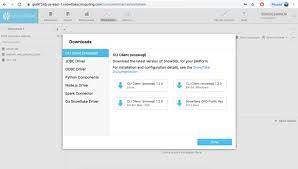 |