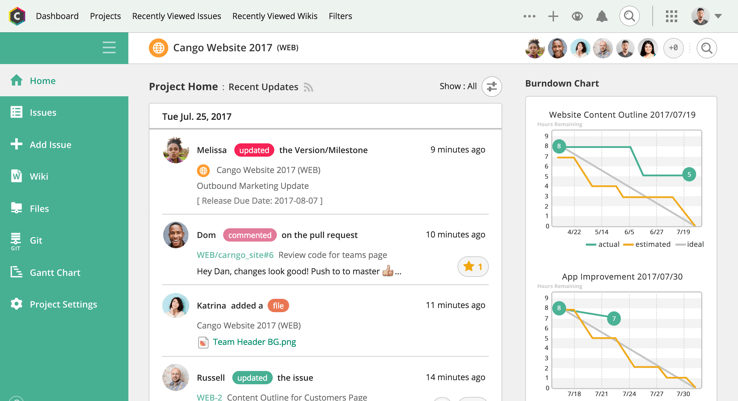
Backlog is a project management and bug tracking tool for teams that want higher productivity, greater visibility, and simple project tracking. Development teams can work together with Design, Marketing, IT, and more.
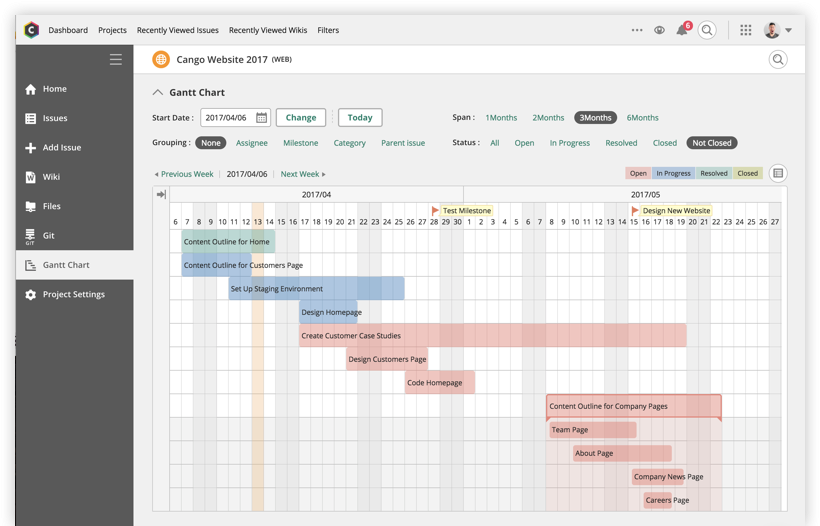
Backlog is designed to get everyone on track by organizing work, teammates, projects and tasks. The activity feed and watchlist are designed to help users keep an eye on relevant work and deadlines. Gantt charts and burndown charts are designed to help users visualize project…
N/A
MindGenius
Score 7.7 out of 10
N/A
MindGenius is a project management software built around capabiliities such as map creation, meeting management, and strategic planning.
$16
per month
Pricing
Backlog
MindGenius
Editions & Modules
No answers on this topic
MindGenius20 Online
$16/month or $160 annual
MindGenius20 Subscription
$160 first year - $56 year two onwards
MindGenius20 Perpetual
$256 one-time cost
Offerings
Pricing Offerings
Backlog
MindGenius
Free Trial
Yes
No
Free/Freemium Version
Yes
No
Premium Consulting/Integration Services
No
No
Entry-level Setup Fee
No setup fee
No setup fee
Additional Details
—
—
More Pricing Information
Community Pulse
Backlog
MindGenius
Features
Backlog
MindGenius
Project Management
Comparison of Project Management features of Product A and Product B
Backlog
7.0
3 Ratings
10% below category average
MindGenius
8.0
1 Ratings
3% above category average
Task Management
10.03 Ratings
9.01 Ratings
Gantt Charts
7.03 Ratings
00 Ratings
Scheduling
10.03 Ratings
00 Ratings
Team Collaboration
10.03 Ratings
8.01 Ratings
Support for Waterfall Methodology
5.03 Ratings
00 Ratings
Document Management
10.03 Ratings
00 Ratings
Email integration
3.03 Ratings
00 Ratings
Mobile Access
1.03 Ratings
6.01 Ratings
Resource Management
00 Ratings
9.01 Ratings
Professional Services Automation
Comparison of Professional Services Automation features of Product A and Product B
[It's] Wonderful for small group or individual planning, brainstorming, explaining, projecting etc. It is also great for reporting or sharing findings of outcomes whether research or business related. It has a free viewer so that if you are presenting on a different computer, the viewer will allow the visuals to be shared. It is not ideal for collaboration unless everyone has this software.
Backlog is one of the best management and collaboration tools available in the market for better managing of resources at the workplace.
I have been using this platform for a very long time and it has been helping me a lot to manage the business processes, manage employees, managing leads on different projects, and coordinating with colleagues.
It has been helping me a lot to check the issue in the project completion.
It gives me real-time status on the project/gives right insights of the system.
GOAL SETTING: Because of the available templates, it is easy to set goals and then revisit them for revision or follow through. I like to brainstorm while I set goals and then come back and annotate my goals with changes, improvements, or add/substract them as needed.
STRATEGIC PLANNING: MindGenius is terrific for working through ideas and parameters. I can either use a freelance screen or a template and brainstorm through the goals that I need to meet. Then I can branch out from each objective with the required facets of each one. I am visual so color coding and using shapes to organize the parts of the objective (i.e. the resources needed, people/stakeholders that are involved, missing pieces etc.). When organizing a project or research, I find it invaluable.
BRAINSTORMING: MindGenius is a wonderful visual to use in a small group or classroom to brainstorm or record ideas. I also adjunct teach and I find MG a wonderful visual for planning a paper or demonstrating how to support ideas in a paper or to verify that research is completed properly. it is a teacher's must-have.
MindGenius is not as intuitive as I would like it to be. Although there is a quick-key stroke or movement that will replicate a shape or field if I want to make a parent or child block, I never remember what it is. I always use the manual insert by clicking with the mouse and it takes longer. If CONTROL ENTER created a new shape field like "the last one" or the one where the cursor is blinking, that would help considerably.
Changing the default visuals for a template or making a new template is overly time-consuming. Although I understand these details may only matter to someone as ULTRA-VISUAL a I am, if the font is too small or the shapes need to be visually altered, there is not a way to quickly grab those boxes and change the settings in one fell swoop. Although there is a way they can be changed, I have to navigate inside this and then inside this to get to the screen and then I have to figure out which changes the lines or the inside color of the shape etc. These details are a little overwhelming.
It would be great if I could make one shape in the font and layout I want and then replicate that pattern to other shapes or apply a different color scheme to it entirely. If these features already exist, i cannot find them and I consider myself to be rather tech savvy.
Backlog has all of the top-notch features to increase productivity, visibility, and project tracking. Backlog is easy to use. I first just logged in to the platform and it was [ready] to go. I easily started working on it and it started giving me the bugs’ details on our project. Always available for queries. Listen to the queries very attentively and try to give a solution on the go if applicable. Otherwise, take some time and respond with the advanced workable solution in the limited time frame.
I have not used another product like MindGenius. Although I use Microsoft One Note for sometimes making lists that sync across my PC and my devices, I do not have another mind-mapping programming. MindGenius only has an app for iPad and without accessibility on iOS, I have not been able to use it for my daily TO DO lists etc that I would otherwise do. I use One Note for that role since MG does not have a phone app
I have not tracked the positive or negative impact of MG on my overall business objectives. I have successfully used it in the aspects of my personal and professional management.
MG helps me stay on track with my research and personal editing. It keeps me accountable so that I meet my deadlines. Although I have not applied a dollar value to it, it helps me signficantly.