Overview
ProductRatingMost Used ByProduct SummaryStarting Price
Brault
Score 9.0 out of 10
Small Businesses (1-50 employees)
Brault is a creative asset management (DAM) platform built for teams that need more than generic cloud storage. It combines file storage, AI-powered search, project tracking, feedback, file transfer, and brand management in a single workspace, reducing the need for multiple tools across the creative stack. The platform analyzes the content of images, videos, audio files, and documents across 50+ formats, enabling natural language search. Workspaces organize assets by…
$0
Frame.io
Score 9.0 out of 10
N/A
Frame.io is a video collaboration platform, supporting the video editing process by providing creative teams with time stamped comments, annotations and hashtags, and an accelerated sharing and approval process.
$15
per user/per month
Pricing
BraultFrame.io
Editions & Modules
Free
$0
Lite
$4
per month per seat
Pro
$12
per month per seat
Growth
$75
per month per seat
Enterprise
$8000
per year per account
Pro
$15
per user/per month
Team
$25
per user/per month
Free
Free
For up to 2 users
Enterprise
Contact sales team
Offerings
Pricing Offerings
BraultFrame.io
Free Trial
NoYes
Free/Freemium Version
YesYes
Premium Consulting/Integration Services
NoNo
Entry-level Setup Fee$1,500 one-time fee per installation (Enterprise tier only)No setup fee
Additional Details
More Pricing Information
Community Pulse
BraultFrame.io
Considered Both Products
Brault
Chose Brault
It was the best all-in-one solution at the best price. Harder to find anything more balanced!
Chose Brault
Brault had the best ROI by far - simpler, smarter, more flexible, and much more affordable.
Frame.io
Chose Frame.io
frame.io being included in the Adobe stack meant I never even tried another service because it was so seamless.
Chose Frame.io
Frame is a better product for just video of course - MarkUp (our own product) does a lot more than video
Chose Frame.io
Box provides company-wide storage for our teams and remains our baseline file storage system; however, it is extremely limited for collaboration. Frame.io's review/comment system tags videos by timeline, making it invaluable for receiving client feedback and completing creative …
Chose Frame.io
Frame.io seamlessly integrates with the rest of the Adobe software, so it streamlines our processes. It’s also very intuitive and easy to use.
Chose Frame.io
Frame.io is slightly different from the rest of the media management tools I've used. It being able to integrate directly into Premiere is a game changer. It makes it so much easier to collaborate on videos, organize footage, and know who's working on what projects at any given …
Chose Frame.io
Frame.io's integration with other Adobe products makes it a great choice. Being able to mark up the files to show edits makes it a much better tool than some of the alternatives where you can only leave comments.
Chose Frame.io
Asana is better for task management. Frame.io works best for feedback purposes before posting to Asana.
Chose Frame.io
Wipster is better for smaller teams but lacks some of features of Frame.io
Chose Frame.io
I don't think another product like Frame.io exists. When I first started to use it, I loved it. The download, syncing with premiere, versioning, all of the features are great. I just feel like you guys do too many updates that aren't necessary.
Chose Frame.io
There is no other app that compares
Chose Frame.io
Harder for reviews, but a good trail of information
Chose Frame.io
We utilize both Synthesia and Frame.io for different projects. Frame.io we use for editing actual video content that has been captured. Primary use is for customer training and education.
We use Synthesia for short-form video production, primarily for software screen …
Chose Frame.io
I would choose playbook it has more options
Chose Frame.io
Our organization chose Frame.io because, in our experience, Frame.io is a friendly tool
Chose Frame.io
We chose Frame.io for our organization because, in our opinion, Frame.io has Better scrubbing
Chose Frame.io
Our organization chose to purchase Frame.io because, in our opinion, it doesn’t compare!
Features
BraultFrame.io
DAM Features
Comparison of DAM Features features of Product A and Product B
Brault
8.8
Ratings
7% above category average
Frame.io
-
Ratings
Uploading assets9.00 Ratings00 Ratings
Downloading assets9.00 Ratings00 Ratings
Categories9.50 Ratings00 Ratings
Asset storage10.00 Ratings00 Ratings
Asset sharing10.00 Ratings00 Ratings
Asset search10.00 Ratings00 Ratings
Tagging system10.00 Ratings00 Ratings
Content editing8.50 Ratings00 Ratings
Embed codes6.50 Ratings00 Ratings
Metadata7.50 Ratings00 Ratings
User access10.00 Ratings00 Ratings
DAM Integrations9.00 Ratings00 Ratings
DAM API7.00 Ratings00 Ratings
Workflow automations6.50 Ratings00 Ratings
Creative Collaboration
Comparison of Creative Collaboration features of Product A and Product B
Brault
-
Ratings
Frame.io
8.6
Ratings
11% above category average
Variety of file types00 Ratings9.30 Ratings
Configurable and automated workflows00 Ratings8.10 Ratings
Audit trail00 Ratings8.60 Ratings
Real-time collaboration00 Ratings8.60 Ratings
Best Alternatives
BraultFrame.io
Small Businesses
CoSchedule Marketing Suite
Score 10.0 out of 10
Dropbox
Dropbox
Score 8.6 out of 10
Medium-sized Companies
CoSchedule Marketing Suite
Score 10.0 out of 10
Dropbox
Dropbox
Score 8.6 out of 10
Enterprises
MediaValet
MediaValet
Score 8.8 out of 10

No answers on this topic

All AlternativesView all alternativesView all alternatives
User Ratings
BraultFrame.io
Likelihood to Recommend
9.0
(0 ratings)
9.1
(0 ratings)
Likelihood to Renew
-
(0 ratings)
8.7
(0 ratings)
Usability
10.0
(0 ratings)
8.7
(0 ratings)
Availability
-
(0 ratings)
10.0
(0 ratings)
Performance
-
(0 ratings)
10.0
(0 ratings)
Support Rating
-
(0 ratings)
9.1
(0 ratings)
Configurability
-
(0 ratings)
10.0
(0 ratings)
Product Scalability
-
(0 ratings)
10.0
(0 ratings)
User Testimonials
BraultFrame.io
Likelihood to Recommend
It is super flexible and fits independent creators, startups, SMEs, and large enterprises very well.
Read full review
Excellent for editing down raw video captures of educational webinars. Questions from the audience can sometimes be too case specific, and would not be a value-add to a posted recording, and sometimes the presenter needs a topic to be edited down for time as well. Frame.io is great for allowing teams to give their feedback on the video so that everyone has input on which portions are most valuable/should be removed.
Read full review
Pros
No answers on this topic
  • Allows clients to make frame-specific notes, so there is no confusion what they are talking about.
  • When multiple stakeholders are making notes, platform automatically sorts them chronologically in the video.
  • Multiple stakeholders giving notes can see when their note conflicts with a colleague's.
Read full review
Cons
No answers on this topic
  • When I mark a video private, it should disable the sharing link. We’ve run into issues where we’ve made a video private, thinking that it was no longer visible, but those with the link could still view it.
  • Mobile version is great, but sometimes I have to rotate my phone to get the full feature set, which is a little clunky sometimes.
Read full review
Likelihood to Renew
No answers on this topic
It works well for our small team, but we’ve run into some friction as things scale. Getting external users set up with the right access can be a bit of a hassle, and the cost starts to add up as we bring on more people and projects. That said, it’s still a solid tool, it definitely speeds up our workflow and works seamlessly with Adobe products.
Read full review
Usability
It has the best user experience I have seen, and the support team is really responsive
Read full review
I've used other video review systems, Frame was the only one I didn't question how they allowed you to review - I just started reviewing. It's that simple. It's easy to set up projects, invite collaborators, and then provide a final cut for download. It's naturally built for the kind of work that TV/Film & video production companies do.
Read full review
Reliability and Availability
No answers on this topic
I haven't experienced any outages with Frame.io.
Read full review
Performance
No answers on this topic
When sharing videos for feedback, there are no noticeable performance issues with Frame.io. Everyone is able to complete their tasks without the program getting in the way.
Read full review
Support Rating
No answers on this topic
I've only reached out to Frame.io a few times but they responded quickly and offered achievable solutions. The fact that I haven't had to reach out to them more is proof that the platform is easy to use, reliable, and can run on its own. The only issues we have had were related to uploading issues on our end.
Read full review
Alternatives Considered
It was the best all-in-one solution at the best price. Harder to find anything more balanced!
Read full review
Box provides company-wide storage for our teams and remains our baseline file storage system; however, it is extremely limited for collaboration. Frame.io's review/comment system tags videos by timeline, making it invaluable for receiving client feedback and completing creative work faster and more efficiently.
Read full review
Scalability
No answers on this topic
Frame.io was very easy to scale to the appropriate teams needed
Read full review
Return on Investment
No answers on this topic
  • Frame.io has shortened our review time considerably, saving time.
  • Frame.io is wonderful for managing a large team of editors, especially for us when we are using in-house staff and contractors.
  • Frame.io has improved the relationship between departments, which was more tense with previous review methods.
Read full review
ScreenShots

Brault Screenshots

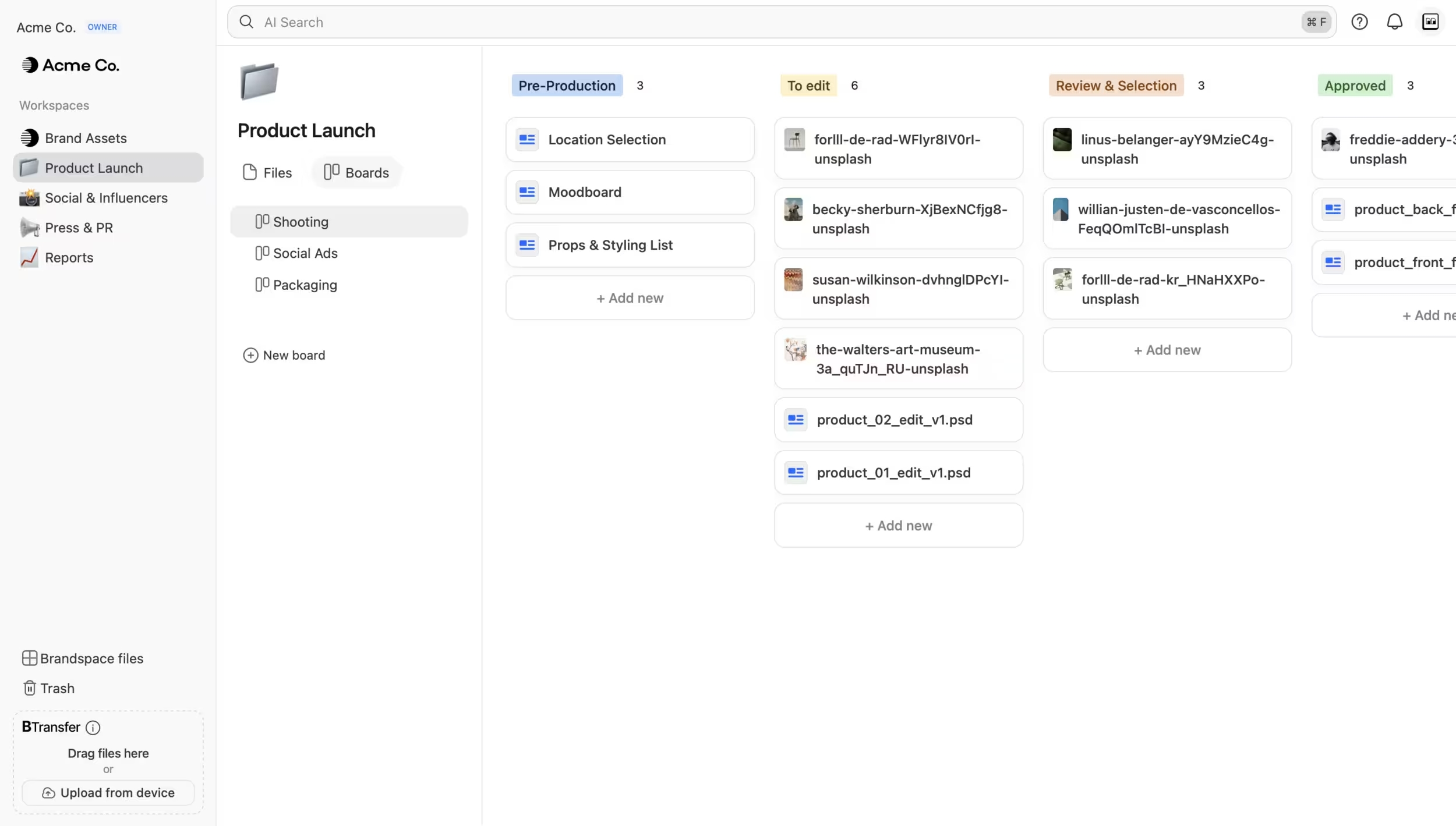
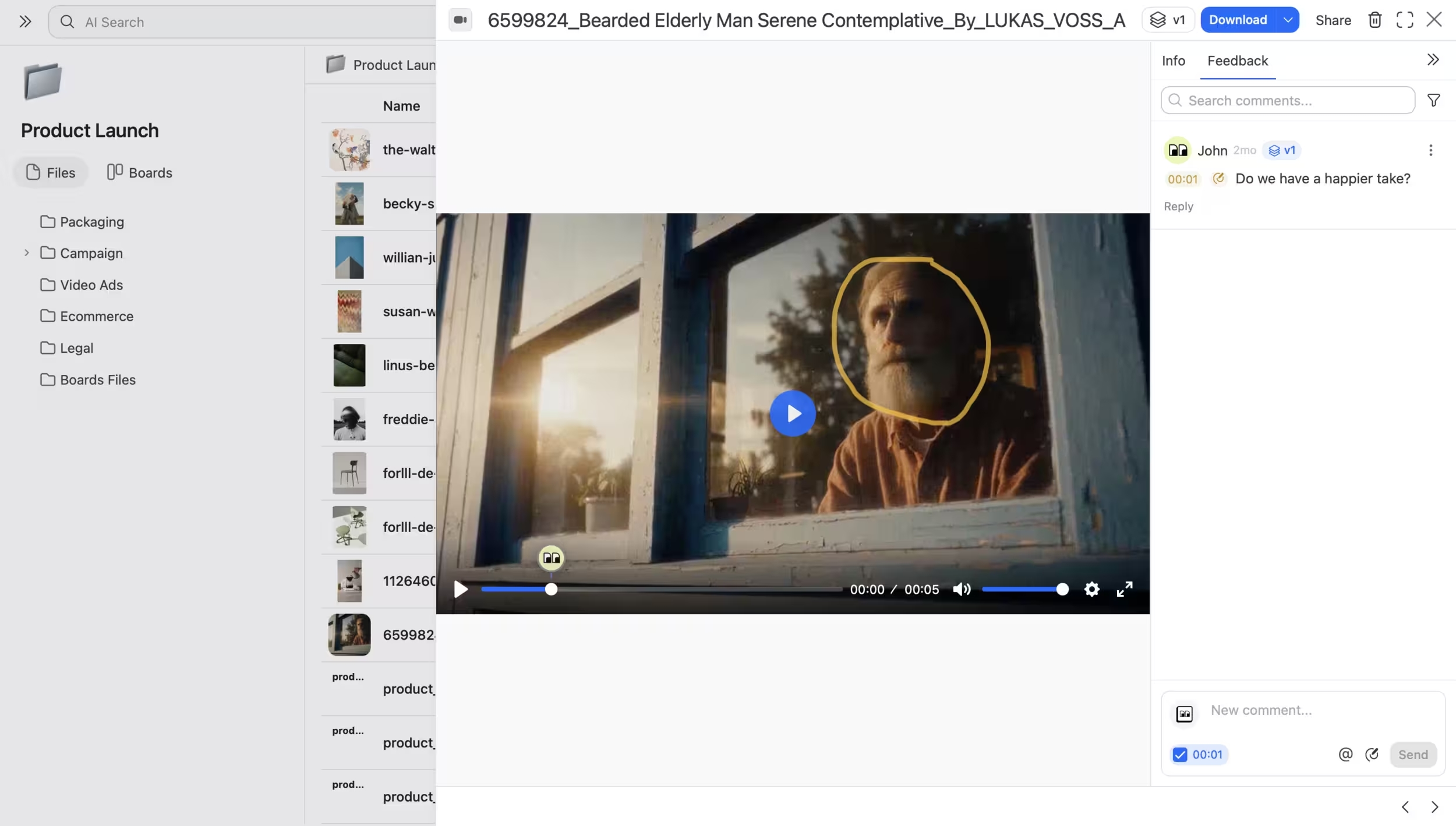
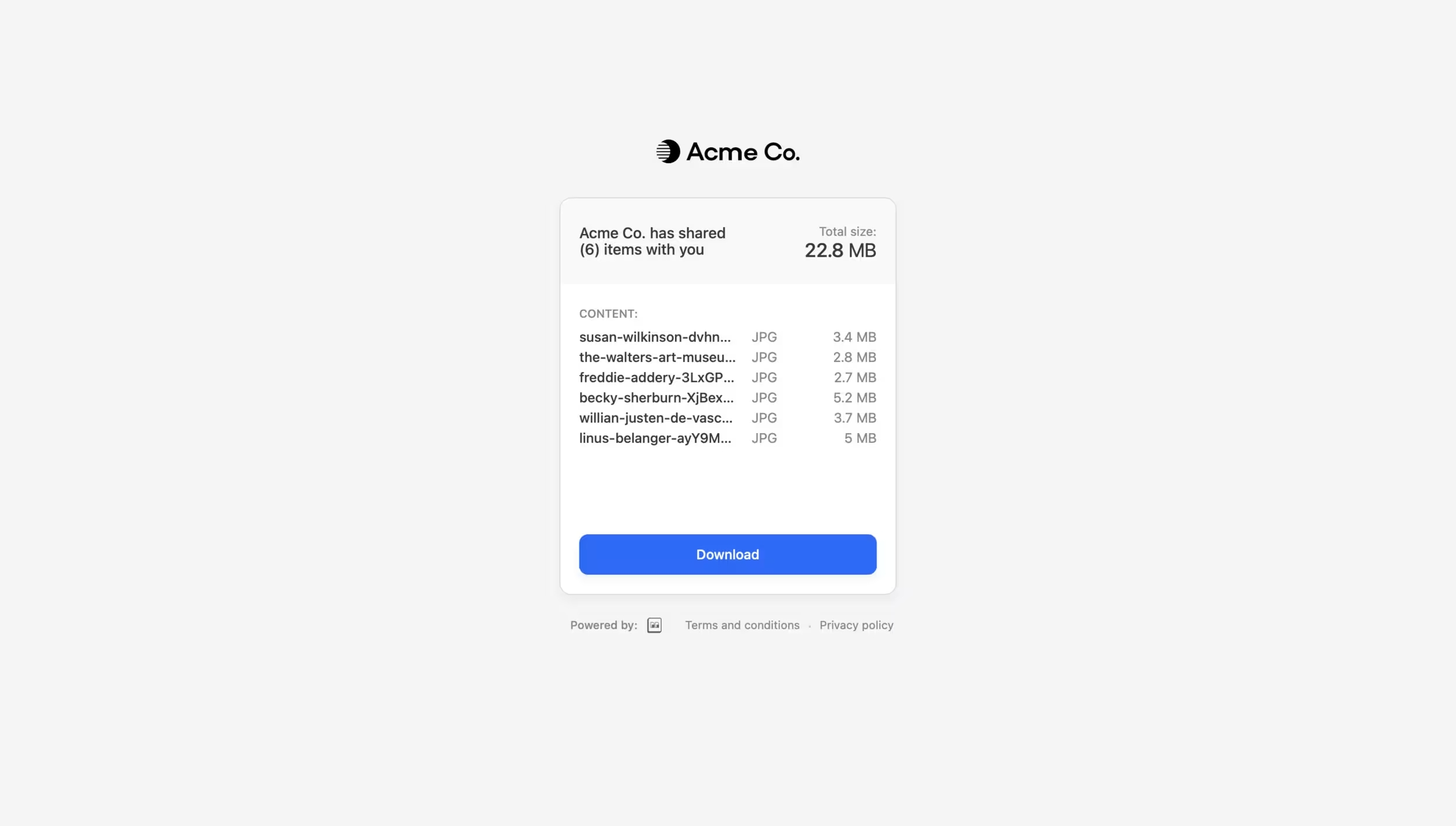
Screenshot of files organized by workspace, project, and campaign. Browse visually with rich previews for images, videos, and design files. AI Search finds any file by describing its content across 50+ formatsScreenshot of the interface to track creative workflows directly on files. Drag assets between custom status columns. Each card is a real file, not a link to one.Screenshot of where to collect feedback directly on files. Leave timestamped comments, annotations, and mentions on videos and other assets.Screenshot of how to send large files without leaving the workspace. Deliver assets through branded download pages with password protection and expiration controls. Upload directly for one-off transfers or send files already stored in Brault.

Frame.io Screenshots

Screenshot of the main home pageScreenshot of a specific projectScreenshot of the mobile appScreenshot of collectionsScreenshot of collections