TrustRadius: an HG Insights company

Save this comparison

Save this comparison

Add Product

Recommended Comparisons

    Overview
    ProductRatingMost Used ByProduct SummaryStarting Price

    ByDesign

    N/AN/AByDesign: AI-Powered Productivity and Planning Platform Overview ByDesign is a productivity and planning platform that helps individuals organize tasks, manage schedules, track habits, take notes, and work toward personal and professional goals in one workspace. It combines task management, calendar planning, goal tracking, and visual organization to help users manage their daily activities more efficiently. Key Features AI-Powered Planning:…

    $8

    per month per user

    Zoho Calendar

    Score6.8 out of 10
    N/AZoho Calendar is an online business calendar designed to make scheduling easy. It can be used to stay on top of a schedule, or to share scheduled events with peers.N/A
    Pricing
    ByDesignZoho Calendar
    Editions & Modules
    Pro
    $8
    per month per user
    AI
    $15
    per month per user
    AI plus
    $20
    per month per user
    No answers on this topic
    Offerings
    Pricing Offerings
    ByDesignZoho Calendar
    Free Trial
    YesNo
    Free/Freemium Version
    YesYes
    Premium Consulting/Integration Services
    NoNo
    Entry-level Setup FeeNo setup feeNo setup fee
    Additional DetailsUp to 33% discount available for annual pricing.—
    More Pricing Information
    Community Pulse
    ByDesignZoho Calendar
    Considered Both Products
    ByDesign
    No answer on this topic
    Zoho
    No answer on this topic
    Key User Insights
    Would buy again
    No answers on this topic
    94%
    Would buy again
    15 Answers
    Delivers good value for the price
    No answers on this topic
    94%
    Delivers good value for the price
    15 Answers
    Happy with the feature set
    No answers on this topic
    88%
    Happy with the feature set
    14 Answers
    Lived up to sales and marketing promises
    No answers on this topic
    100%
    Lived up to sales and marketing promises
    9 Answers
    Implementation went as expected
    No answers on this topic
    100%
    Implementation went as expected
    12 Answers
    Best Alternatives
    ByDesignZoho Calendar
    Small Businesses
    Google Calendar
    Score9.1 out of 10
    Google Calendar
    Score9.1 out of 10
    Medium-sized Companies
    Google Calendar
    Score9.1 out of 10
    Google Calendar
    Score9.1 out of 10
    Enterprises
    Google Calendar
    Score9.1 out of 10
    Google Calendar
    Score9.1 out of 10
    All AlternativesView all alternativesView all alternatives
    User Ratings
    ByDesignZoho Calendar
    Likelihood to Recommend
    -
    (0 ratings)
    7.0
    (16 ratings)
    Likelihood to Renew
    -
    (0 ratings)
    9.0
    (1 ratings)
    Usability
    -
    (0 ratings)
    9.0
    (1 ratings)
    Support Rating
    -
    (0 ratings)
    10.0
    (1 ratings)
    User Testimonials
    ByDesignZoho Calendar
    Likelihood to Recommend
    ByDesign
    No answers on this topic
    Zoho
    It is good for office use for keeping track of meetings and various important events. It is very nice to share a calendar with the whole team and the whole team has access to it, everyone can modify and update events. Furthermore, it is less appropriate when you use it on mobile, and it also cannot record the meetings.
    Incentivized
    Read full review
    Pros
    ByDesign
    No answers on this topic
    Zoho
    • I can see that Zoho Calendar allows for multiple tab use which seemed to be a rare and useful function to have.
    • I like how the search function is advanced and you can put specific info to find what you require.
    • I like the visual freedom the app gives in terms of the day, month, and workdays, 2-month views, and selecting colours as well, etc.
    Incentivized
    Read full review
    Cons
    ByDesign
    No answers on this topic
    Zoho
    • It needs better software integration for use with other services and programs
    • It needs a better source code so that it doesn't crash or lock up as often
    • It should incorporate better customer service for dealing with the issues it creates.
    Incentivized
    Read full review
    Likelihood to Renew
    ByDesign
    No answers on this topic
    Zoho
    I subscribe to Zoho One so I use many of the modules that come with that single subscription. I've had intermittent issues with scheduled Zoho Meetings through Zoho CRM not appearing in my Zoho Calendar. Zoho has been working on the issue but it will be fixed for a while and then I'll miss a meeting because it wasn't appearing.
    Incentivized
    Read full review
    Usability
    ByDesign
    No answers on this topic
    Zoho
    Since there are lots of preference options, it can be a little confusing when setting up. It does integrate with other calendars where you can choose one or two way syncing which is helpful if you keep separate personal and work calendars. You can set your start day of the week which for me I have it set to Monday. There are also time zone options which are great but still a bit confusing to me.
    Incentivized
    Read full review
    Support Rating
    ByDesign
    No answers on this topic
    Zoho
    Support has been excellent. As always, they are quickly responsive, and I feel they genuinely wish to address and fix any issues. It's unfortunate that my issues with meetings created in Zoho CRM don't always appear in my Zoho Calendar. While they mostly appear, my confidence level on any given week that I can see what is on my schedule is decidedly lacking.
    Incentivized
    Read full review
    Alternatives Considered
    ByDesign
    No answers on this topic
    Zoho
    Zoho calendar allows us to schedule, manage and track your appointment, meetings, birthdays, and other important dates. And also collaborate, share and publish your daily activities. Zoho Calendar also provides you to make it more creative by changing the themes. Event reminders are also available on Zoho Calendar, so we can be reminded either via email or through a pop-up about appointments, dates, milestones, and events. Reminders can pop up as early as 30 days before an event.
    Incentivized
    Read full review
    Return on Investment
    ByDesign
    No answers on this topic
    Zoho
    • Once the meeting is created on the Zoho calendar, you don't need to remind invitees to join the meeting at a particular time or day. Zoho calendar does that for you.
    • If any invitees are unable to join the meeting, they can ask for a different time prior to that meeting.
    • Sometimes if many meetings are in the pipeline then there can be overlap.
    Incentivized
    Read full review
    ScreenShots

    ByDesign Screenshots

    Screenshot of ByDesign AI Canvas, which provides a visual planning workspace with Day, Week, Month, Quarter, and Year calendar views. Users can switch between views to manage daily tasks, organize weekly schedules, plan monthly activities, review quarterly goals, and track yearly objectives. By bringing tasks, calendar events, notes, and planning activities together, AI Canvas helps users organize their work and maintain a clear overview of both short-term priorities and long-term plans.Screenshot of The ByDesign AI Assistant, which helps users organize their schedules and productivity tasks using natural language. Users can describe their plans and goals, receive AI-assisted suggestions, and turn ideas into actionable tasks and schedules.Screenshot of Preview Changes, which allows users to review AI-generated scheduling updates before applying them. Users can inspect suggested changes and choose to accept or cancel them, maintaining control over their calendar and planning decisions.Screenshot of The ByDesign Kanban Board, which helps users organize tasks visually across workflow stages. Users can track progress, see outstanding work, and manage tasks in a structured format that supports personal planning and project organization.Screenshot of ByDesign Workspaces. These allow users to organize and manage tasks within specific folders according to their projects, priorities, or personal needs. Users can keep related tasks together, organize their work by folder, and manage tasks within each workspace for better organization and productivity. This folder-based structure helps users keep different activities organized and focus on the tasks associated with each project or area of work.Screenshot of ByDesign AI Goals. This helps users turn their ideas and ambitions into actionable plans. Users can define their goals, break them down into smaller tasks and manageable steps, and organize activities to make progress toward their objectives. By combining AI-assisted goal planning with task and calendar management, ByDesign helps users structure their plans, track their priorities, and work toward personal and professional goals more effectively.

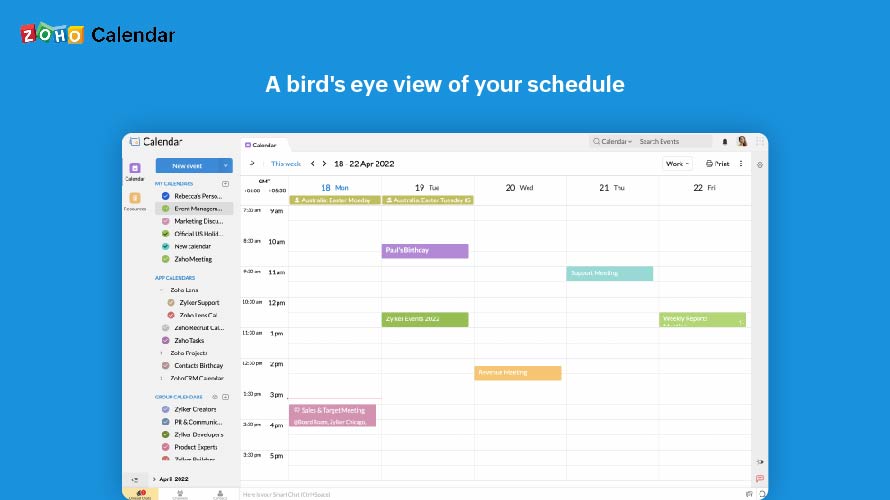
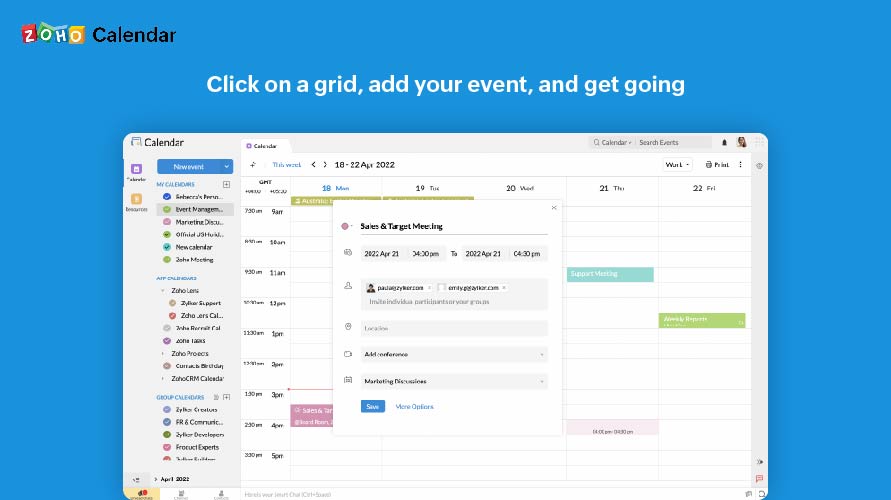
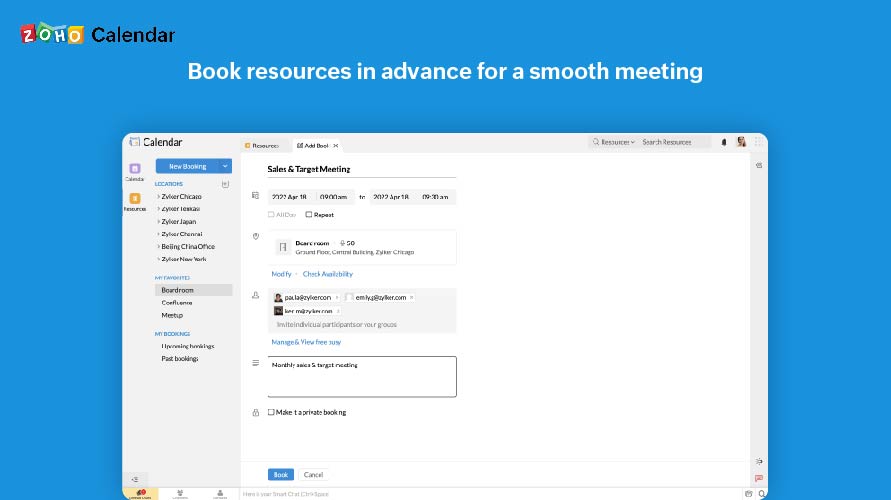
    Zoho Calendar Screenshots

    Screenshot of A bird's eye view of your scheduleScreenshot of Click on a grid, add your event, and get goingScreenshot of Skip the steps, one click is all it takesScreenshot of Book resources in advance for a smooth meetingScreenshot of Know what's available and what's not