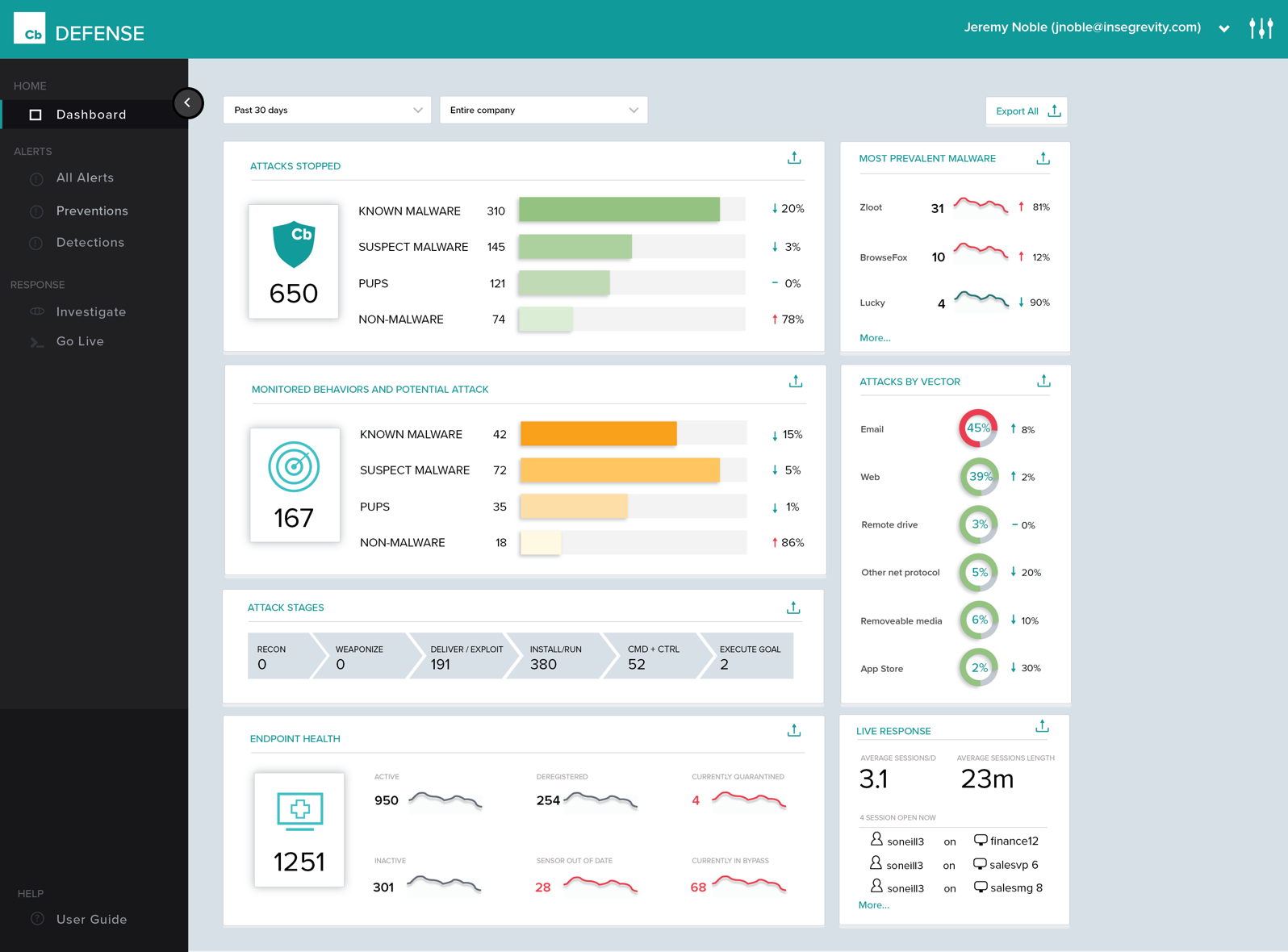
Carbon Black Endpoint is an endpoint security and "next-gen antivirus (NGAV)" that uses machine learning and behavioral models to analyze endpoint data and uncover malicious activity to stop all types of attacks before they reach critical systems.
N/A
Microsoft Defender for Endpoint
Score8.8 out of 10
N/A
Microsoft Defender for Endpoint (formerly Microsoft Defender ATP) is a holistic, cloud delivered endpoint security solution that includes risk-based vulnerability management and assessment, attack surface reduction, behavioral based and cloud-powered next generation protection, endpoint detection and response (EDR), automatic investigation and remediation, managed hunting services, rich APIs, and unified security management.
Honestly, when we started out with BitLocker, there was a lot of pain points and certain "features" that were really bugs for us, if we plugged a laptop into a dock and started it, then starting it without a dock would lock the machine. Those things were eventually fine-tuned …
A de minimis incentive was given to thank the reviewer for their time. The incentive was not used to bias or drive a particular response, nor was the incentive contingent on a positive endorsement. More Info
Cb Defense has been working very well in our organization. It is giving us much better insight into the applications that people are running on their systems (without authorization). This software is also great because it provides visibility into systems that are remote (off the network but still have Internet access). The out of band feature is great to help ensure that the systems are protected even when a user is traveling.
A de minimis incentive was given to thank the reviewer for their time. The incentive was not used to bias or drive a particular response, nor was the incentive contingent on a positive endorsement. More Info
If you have multiple endpoints in your environment, if you're looking to understand what your environment looks like, if you're trying to identify the health of your environment, or identify any risks or vulnerabilities in your environment pertaining to your endpoints and devices.
A de minimis incentive was given to thank the reviewer for their time. The incentive was not used to bias or drive a particular response, nor was the incentive contingent on a positive endorsement. TR verified that a representative sample of customers was invited. More Info
History of Process Execution, really anything that happens in the system is easily seen within the Dashboard. I can determine if a bad actor has infected the system, be it malware, backdoor, rootkit, Trojan, then from that point, I can put the system into Quarantine.
Being able to quarantine the system from the Dashboard. With these type of tools, pulling the power and running a hard drive image is not needed. Put the system in quarantine, start the analysis. A year ago, the network engineer might move the system into a VLAN that has no access to anything, except the system performing the remote analysis... Now I do not have to rely on anyone to move a system, power it down, pull the drive, or image the drive. I can just start the analysis right from my workstation.
The Live Response, again goes hand in hand with the quarantine feature.
By now, I am sure you see a process. Its simple, and easy and all done from a cloud-based console, called the dashboard. .. deploy the agent, create the policy, and active live response, set up email alerts, and monitor your endpoints... you are now ready to perform a triage in the event of an infection. We have step 1, step 2, step 3... but, just remember, things do happen, nothing is perfect, but this product has its advantages.
A de minimis incentive was given to thank the reviewer for their time. The incentive was not used to bias or drive a particular response, nor was the incentive contingent on a positive endorsement. More Info
The big thing for us is on endpoint, it kind of integrates with everything else that we already have because we use Microsoft completely. And so that helps us with being able to integrate, and send things over to Azure Sentinel as we need to as well.
A de minimis incentive was given to thank the reviewer for their time. The incentive was not used to bias or drive a particular response, nor was the incentive contingent on a positive endorsement. More Info
Policy management can be cumbersome. It is simple to set up a single policy but you have no way to apply the rules to multiple groups. If you need to set up the same rule to multiple policies, you need to type it over again.
Agent updates can be very slow to deploy. We use a mix of rolling out updates via the web console and our management appliance. It can take several weeks to update all agents.
We can be confused on why a rule will apply to a file. Sometimes something is blocked but we don't understand why.
A de minimis incentive was given to thank the reviewer for their time. The incentive was not used to bias or drive a particular response, nor was the incentive contingent on a positive endorsement. More Info
I'd say building out summaries and log reviews for analysts reviewing incidents. So, pivoting from the alerts themselves to actually getting the detail underneath. Trying to understand what caused an alert, where they went from there, et cetera, et cetera. And then trying to get into deeper log review to take that investigation further can be a pain point.
A de minimis incentive was given to thank the reviewer for their time. The incentive was not used to bias or drive a particular response, nor was the incentive contingent on a positive endorsement. More Info
Cost add-ons for Security features is nickel and diming the process to keep pace with cybercrime. Limited Education budgets require us to be more pro-active in finding cost-effective measures to protect our devices, staff and students. Defender is a strong, well-featured product that is pricing itself out of the education market
A de minimis incentive was given to thank the reviewer for their time. The incentive was not used to bias or drive a particular response, nor was the incentive contingent on a positive endorsement. TR verified that a representative sample of customers was invited. More Info
The console of the product is very easy to use. It provides great detailed information about all aspects of things occurring on the endpoint. It was easy to deploy and set up. The centralized cloud-based interface has made it easy to add two domains and manage them under a single pane with multiple admins. The only reason I wouldn't give it a higher score is a little bit of lag between updated info from the clients and also the lack of accountability in the deployment process. You set the deployment up for multiple machines and can't easily see if it was successful and/or it takes a while to see if it succeeded or failed.
A de minimis incentive was given to thank the reviewer for their time. The incentive was not used to bias or drive a particular response, nor was the incentive contingent on a positive endorsement. More Info
Because it's hard to find things sometimes. I can find things now because I know where they are. But you have to work with it a little while to figure out how. I'd basically say it was a security tool designed by developers. So you have to get that mindset to find things. So a new hire, a new person in the SOC would have a difficult time. I know that's sitting in here, or that screen is in here somewhere. So it's gotten better.
A de minimis incentive was given to thank the reviewer for their time. The incentive was not used to bias or drive a particular response, nor was the incentive contingent on a positive endorsement. More Info
Microsoft Defender for Endpoint chugs along just fine no matter what we throw at it and what systems it's running on. It doesn't take up a lot of resources either, so that's welcomed.
A de minimis incentive was given to thank the reviewer for their time. The incentive was not used to bias or drive a particular response, nor was the incentive contingent on a positive endorsement. More Info
A de minimis incentive was given to thank the reviewer for their time. The incentive was not used to bias or drive a particular response, nor was the incentive contingent on a positive endorsement. More Info
First, I need to disclose that our support is provided by SecureWorks. We purchased CB Defense from them, and they provide 24x7 monitoring and notification services for the solution and its deployment on our endpoints. To date, we are very pleased with this arrangement
A de minimis incentive was given to thank the reviewer for their time. The incentive was not used to bias or drive a particular response, nor was the incentive contingent on a positive endorsement. More Info
The first time I tried to onboard my macOS endpoints to MDE I struggled for quite a bit. I had to reach out to Microsoft's MDE support team. The tech was very helpful in walking me through the steps during a screen share session
A de minimis incentive was given to thank the reviewer for their time. The incentive was not used to bias or drive a particular response, nor was the incentive contingent on a positive endorsement. More Info
Deployment was handled by our team here and everything went pretty smoothly. We did have a few hiccups in our test group, but that only took a bit to get ironed out.
A de minimis incentive was given to thank the reviewer for their time. The incentive was not used to bias or drive a particular response, nor was the incentive contingent on a positive endorsement. More Info
Cb is cloud-based and has a more advanced policy management. It also has better forensics information. Cost was similar, but Cb added cost savings in terms of IT management resources. We also have the ability to talk directly with engineers and have input on feature updates.
A de minimis incentive was given to thank the reviewer for their time. The incentive was not used to bias or drive a particular response, nor was the incentive contingent on a positive endorsement. More Info
Particularly, we're evaluating Symantec Endpoint Protection, the commercial version. We've looked at eSet, a couple of the others, and it's much too heavy or difficult to manage, things like that. Ease of use, ease of integration. It's already there. It's super easy to update it with the regular OS updates and everything. So we can manage it whether we're using SCCM or Intune or Dato, it's very easy to deploy updates and manage things.
A de minimis incentive was given to thank the reviewer for their time. The incentive was not used to bias or drive a particular response, nor was the incentive contingent on a positive endorsement. More Info
A de minimis incentive was given to thank the reviewer for their time. The incentive was not used to bias or drive a particular response, nor was the incentive contingent on a positive endorsement. More Info
A de minimis incentive was given to thank the reviewer for their time. The incentive was not used to bias or drive a particular response, nor was the incentive contingent on a positive endorsement. More Info
I think the positive impact overall is that we do a lot of sitting in front of assessors- federal assessors, government assessors. And it really comes down to when the assessor has to think about another product that you're bringing in that's not Microsoft, it creates a lot of confusion, more paperwork, more explanation. But the positive impact is that they know it, everybody kind of knows Microsoft. And so when you tell them you have this endpoint for Microsoft Defender for Endpoint, they're like, okay. The questions go away, and it makes the overhead a lot less during an assessment.
A de minimis incentive was given to thank the reviewer for their time. The incentive was not used to bias or drive a particular response, nor was the incentive contingent on a positive endorsement. More Info