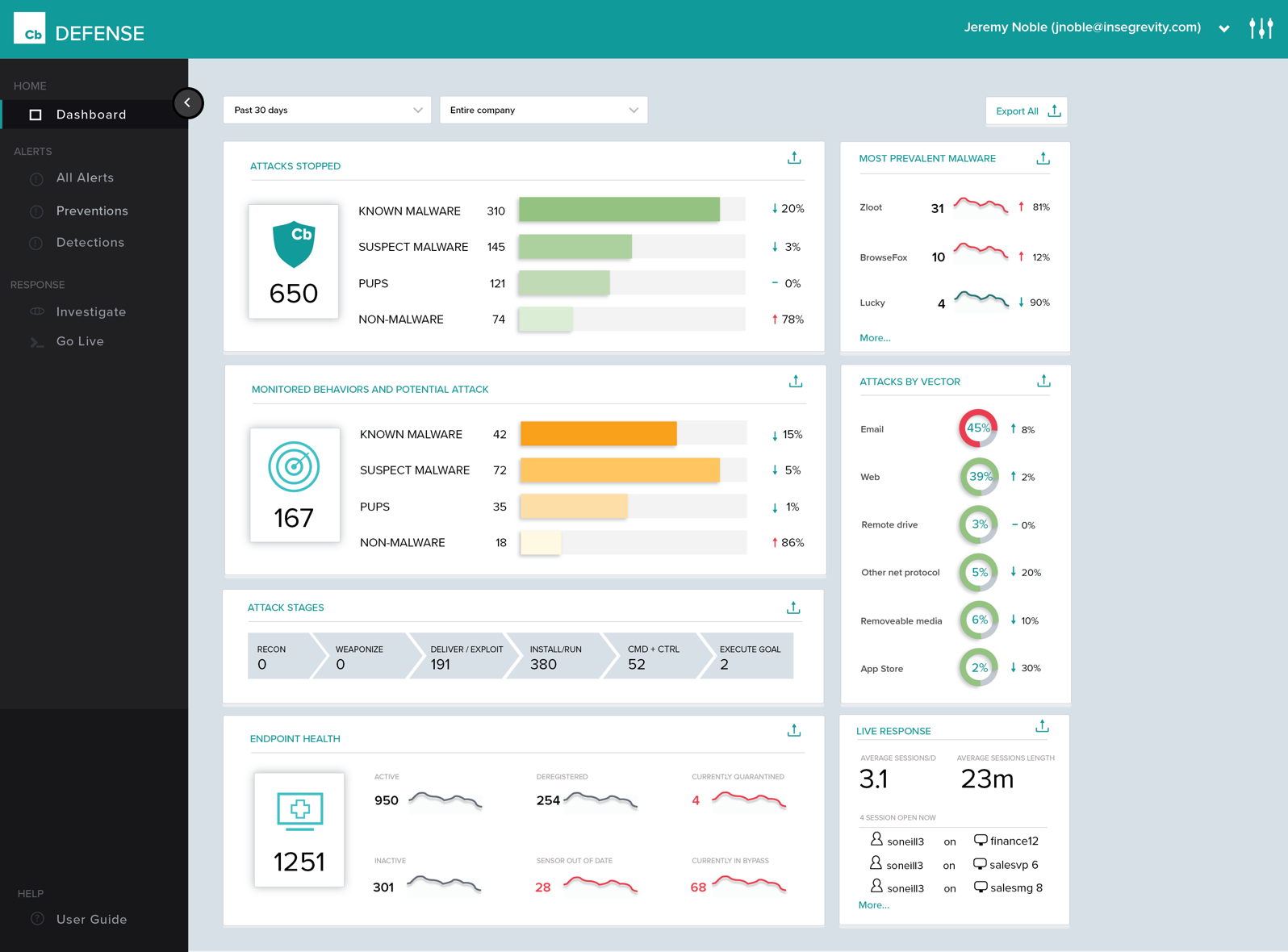
Carbon Black Endpoint is an endpoint security and "next-gen antivirus (NGAV)" that uses machine learning and behavioral models to analyze endpoint data and uncover malicious activity to stop all types of attacks before they reach critical systems.
N/A
ThreatLocker
Score8.8 out of 10
N/A
ThreatLocker Inc. is a security platform used to stop misuse and vulnerable software as well as control application elevation, storage and network traffic.
Cb Defense has been working very well in our organization. It is giving us much better insight into the applications that people are running on their systems (without authorization). This software is also great because it provides visibility into systems that are remote (off the network but still have Internet access). The out of band feature is great to help ensure that the systems are protected even when a user is traveling.
A de minimis incentive was given to thank the reviewer for their time. The incentive was not used to bias or drive a particular response, nor was the incentive contingent on a positive endorsement. More Info
Threatlocker does exactly as it advertises. I would recommend it to anyone seeking a comprehensive solution for managing software approvals. It is also very easy to use with an online support team, or Cyberheros, as they call it, that is very quick and responsive. The preset programs are also a nice touch, making deployment easy.
A de minimis incentive was given to thank the reviewer for their time. The incentive was not used to bias or drive a particular response, nor was the incentive contingent on a positive endorsement. More Info
History of Process Execution, really anything that happens in the system is easily seen within the Dashboard. I can determine if a bad actor has infected the system, be it malware, backdoor, rootkit, Trojan, then from that point, I can put the system into Quarantine.
Being able to quarantine the system from the Dashboard. With these type of tools, pulling the power and running a hard drive image is not needed. Put the system in quarantine, start the analysis. A year ago, the network engineer might move the system into a VLAN that has no access to anything, except the system performing the remote analysis... Now I do not have to rely on anyone to move a system, power it down, pull the drive, or image the drive. I can just start the analysis right from my workstation.
The Live Response, again goes hand in hand with the quarantine feature.
By now, I am sure you see a process. Its simple, and easy and all done from a cloud-based console, called the dashboard. .. deploy the agent, create the policy, and active live response, set up email alerts, and monitor your endpoints... you are now ready to perform a triage in the event of an infection. We have step 1, step 2, step 3... but, just remember, things do happen, nothing is perfect, but this product has its advantages.
A de minimis incentive was given to thank the reviewer for their time. The incentive was not used to bias or drive a particular response, nor was the incentive contingent on a positive endorsement. More Info
A de minimis incentive was given to thank the reviewer for their time. The incentive was not used to bias or drive a particular response, nor was the incentive contingent on a positive endorsement. More Info
Policy management can be cumbersome. It is simple to set up a single policy but you have no way to apply the rules to multiple groups. If you need to set up the same rule to multiple policies, you need to type it over again.
Agent updates can be very slow to deploy. We use a mix of rolling out updates via the web console and our management appliance. It can take several weeks to update all agents.
We can be confused on why a rule will apply to a file. Sometimes something is blocked but we don't understand why.
A de minimis incentive was given to thank the reviewer for their time. The incentive was not used to bias or drive a particular response, nor was the incentive contingent on a positive endorsement. More Info
When running the Unified Audit, I like to use certain filters. I wish there as a way to save those filters, so I don't have to select them every time I do a Unified Audit.
A de minimis incentive was given to thank the reviewer for their time. The incentive was not used to bias or drive a particular response, nor was the incentive contingent on a positive endorsement. More Info
ThreaLocker has done its job and has prevented malware from executing. It has stopped an encryption process once already. It has kept a user from going to a bad website. He tried twice and was wondering why he was getting an error message from ThreatLocker and ESET both.
A de minimis incentive was given to thank the reviewer for their time. The incentive was not used to bias or drive a particular response, nor was the incentive contingent on a positive endorsement. More Info
The console of the product is very easy to use. It provides great detailed information about all aspects of things occurring on the endpoint. It was easy to deploy and set up. The centralized cloud-based interface has made it easy to add two domains and manage them under a single pane with multiple admins. The only reason I wouldn't give it a higher score is a little bit of lag between updated info from the clients and also the lack of accountability in the deployment process. You set the deployment up for multiple machines and can't easily see if it was successful and/or it takes a while to see if it succeeded or failed.
A de minimis incentive was given to thank the reviewer for their time. The incentive was not used to bias or drive a particular response, nor was the incentive contingent on a positive endorsement. More Info
Technician and Analyst alike will love this tool as long as they learn to use it. They have fantastic study material that breaks everything down on it where to find settings and how to best manage the tool. End users are the only complaints we get only because they sometimes don't understand that installing a PDF convertor that is labeled as Free on the internet isn't always in their best interest.
A de minimis incentive was given to thank the reviewer for their time. The incentive was not used to bias or drive a particular response, nor was the incentive contingent on a positive endorsement. More Info
A de minimis incentive was given to thank the reviewer for their time. The incentive was not used to bias or drive a particular response, nor was the incentive contingent on a positive endorsement. More Info
First, I need to disclose that our support is provided by SecureWorks. We purchased CB Defense from them, and they provide 24x7 monitoring and notification services for the solution and its deployment on our endpoints. To date, we are very pleased with this arrangement
A de minimis incentive was given to thank the reviewer for their time. The incentive was not used to bias or drive a particular response, nor was the incentive contingent on a positive endorsement. More Info
You can email, call or do online chat with tech support. I love their online chat. They are quick and friendly. Also, if you need to show them something, you can give the chat technician permission from your Chat box to allow the tech access to your computer. They also can pull out your admin console on their side. They can look at your "Unified Audit" log and see the same thing that you can. They have a good KnowledgeBase that you can look for answers. They have what is called "ThreatLocker University" where you can go through tutorials and take tests.
A de minimis incentive was given to thank the reviewer for their time. The incentive was not used to bias or drive a particular response, nor was the incentive contingent on a positive endorsement. More Info
The owners and co-founders work with you through Zoom Meetings. They walk you through how to use and setup ThreatLocker. They also have webinars. You also can go through ThreatLocker University online training.
A de minimis incentive was given to thank the reviewer for their time. The incentive was not used to bias or drive a particular response, nor was the incentive contingent on a positive endorsement. More Info
Using ThreatLocker University online training is very easy and informative. You take online tests to see how well you learned the material. It is great!
A de minimis incentive was given to thank the reviewer for their time. The incentive was not used to bias or drive a particular response, nor was the incentive contingent on a positive endorsement. More Info
ThreatLocker is a family ran business. The owners, co-founders work with you to ensure you are up and running as quickly as possible. They went to ensure your success with ThreatLocker.
A de minimis incentive was given to thank the reviewer for their time. The incentive was not used to bias or drive a particular response, nor was the incentive contingent on a positive endorsement. More Info
Cb is cloud-based and has a more advanced policy management. It also has better forensics information. Cost was similar, but Cb added cost savings in terms of IT management resources. We also have the ability to talk directly with engineers and have input on feature updates.
A de minimis incentive was given to thank the reviewer for their time. The incentive was not used to bias or drive a particular response, nor was the incentive contingent on a positive endorsement. More Info
Prior to buying ThreatLocker, we evaluated Tanium's whitelisting module. We felt that ThreatLocker's method of baselining existing applications and comparing them to known IoC's made for an easier implementation. To be fair, this was solely based on demonstrations by each vendor and not by actual PoC's. The implementation for ThreatLocker went smoothly and we have very few issues with the product that require support intervention. When support is needed, it is readily available via chat.
A de minimis incentive was given to thank the reviewer for their time. The incentive was not used to bias or drive a particular response, nor was the incentive contingent on a positive endorsement. More Info
ThreatLocker is very easy to add new ThreatLocker agents on computers and servers. It is very easy to do. You can install an agent on a computer or server in about 2 minutes or less.
A de minimis incentive was given to thank the reviewer for their time. The incentive was not used to bias or drive a particular response, nor was the incentive contingent on a positive endorsement. More Info
A de minimis incentive was given to thank the reviewer for their time. The incentive was not used to bias or drive a particular response, nor was the incentive contingent on a positive endorsement. More Info
A de minimis incentive was given to thank the reviewer for their time. The incentive was not used to bias or drive a particular response, nor was the incentive contingent on a positive endorsement. More Info