CARTO vs. IGiS Desktop (Powered by Scanpoint Geomatics Limited)

Overview
ProductRatingMost Used ByProduct SummaryStarting Price
CARTO
Score 9.0 out of 10
N/A
Carto (formerly CartoDB) in Brooklyn, New York offers their location intelligence solution.N/A
IGiS Desktop (Powered by Scanpoint Geomatics Limited)
Score 7.0 out of 10
N/A
IGiS Desktop provides advanced GIS software for GIS mapping and image processing by aiming to use innovative ways of analyzing, visualizing, and processing geographic data. IGiS Desktop aims to redefine the GIS software industry with integrated GIS mapping, and image processing capabilities with advanced analysis extensions on a single platform. It makes collaboration easy with OGC-supported platforms. Standardized UI and ribbon-based navigation make the user-interface intuitive and…N/A
Pricing
CARTOIGiS Desktop (Powered by Scanpoint Geomatics Limited)
Editions & Modules
No answers on this topic
Offerings
Pricing Offerings
CARTOIGiS Desktop (Powered by Scanpoint Geomatics Limited)
Free Trial
NoNo
Free/Freemium Version
NoNo
Premium Consulting/Integration Services
NoNo
Entry-level Setup FeeNo setup feeNo setup fee
Additional Details
More Pricing Information
Community Pulse
CARTOIGiS Desktop (Powered by Scanpoint Geomatics Limited)
Best Alternatives
CARTOIGiS Desktop (Powered by Scanpoint Geomatics Limited)
Small Businesses
ArcGIS
ArcGIS
Score 8.0 out of 10
ArcGIS
ArcGIS
Score 8.0 out of 10
Medium-sized Companies
ArcGIS
ArcGIS
Score 8.0 out of 10
ArcGIS
ArcGIS
Score 8.0 out of 10
Enterprises
ArcGIS
ArcGIS
Score 8.0 out of 10
ArcGIS
ArcGIS
Score 8.0 out of 10
All AlternativesView all alternativesView all alternatives
User Ratings
CARTOIGiS Desktop (Powered by Scanpoint Geomatics Limited)
Likelihood to Recommend
8.1
(4 ratings)
-
(0 ratings)
User Testimonials
CARTOIGiS Desktop (Powered by Scanpoint Geomatics Limited)
Likelihood to Recommend
CARTO
CartoDB is great for generating geographic visualizations of data where the geographies are well-defined. It would be great for analysts to develop visualizations of data with spatial elements. That being said, the software is limited if you want to do any real data munging or analysis, as it can be cumbersome to use and there isn't a great interface for actually saving the results of different manipulations (you can save it as a new file, but it's hard to do version control, etc.). I would recommend preparing the data outside of CartoDB and only using the tool for visualization once the data is well prepared.
Read full review
Scanpoint Geomatics Limited
No answers on this topic
Pros
CARTO
  • It is amazing at allowing control of the visualizations. It takes a little bit to get used to but the combination of full SQL queries and CSS-like styling is very powerful.
  • The services are built on a robust stack of open source software. I was able to build a standalone instance of CartoDB relatively easily (after some research and trial and error).
  • Server side map rendering is key for handling large data sets. The way the images are returned makes them very easy to catch in an HTTP cache to minimize the hits to the server. The interactivity that CartoDB has built in makes this completely transparent to the end user, they can click on parts of the static images and be presented with popups or change map styles. It's a very clever implementation.
Read full review
Scanpoint Geomatics Limited
No answers on this topic
Cons
CARTO
  • I don't like the new Builder UI as it has been tough to explain. Other than that I have no complaints.
Read full review
Scanpoint Geomatics Limited
No answers on this topic
Alternatives Considered
CARTO
CartoDB is more user friendly and quicker to learn than ArcGIS Online and Mapbox
Read full review
Scanpoint Geomatics Limited
No answers on this topic
Return on Investment
CARTO
  • CartoDB definitely saves a lot of time when creating visualizations. Previously, I would use different software and have to make edits manually (or just create the visualizations manually to start with). I would say that the software definitely cuts the time required to create certain visualizations by a half or two-thirds.
Read full review
Scanpoint Geomatics Limited
No answers on this topic
ScreenShots

IGiS Desktop (Powered by Scanpoint Geomatics Limited) Screenshots
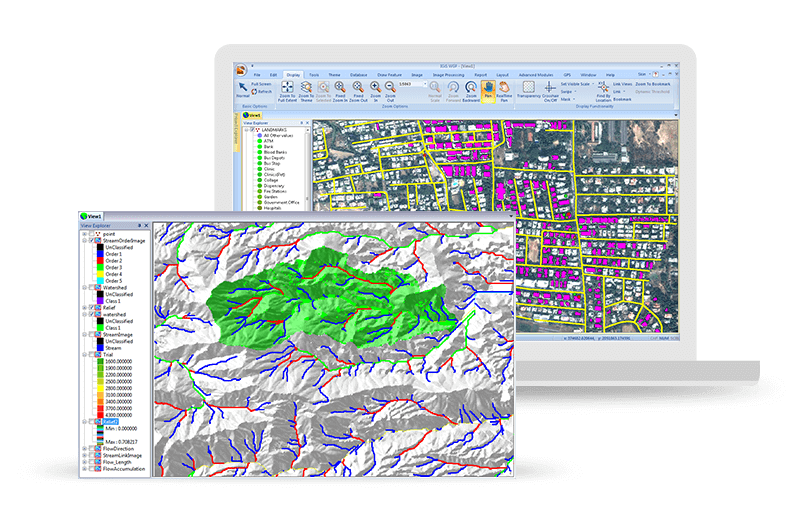
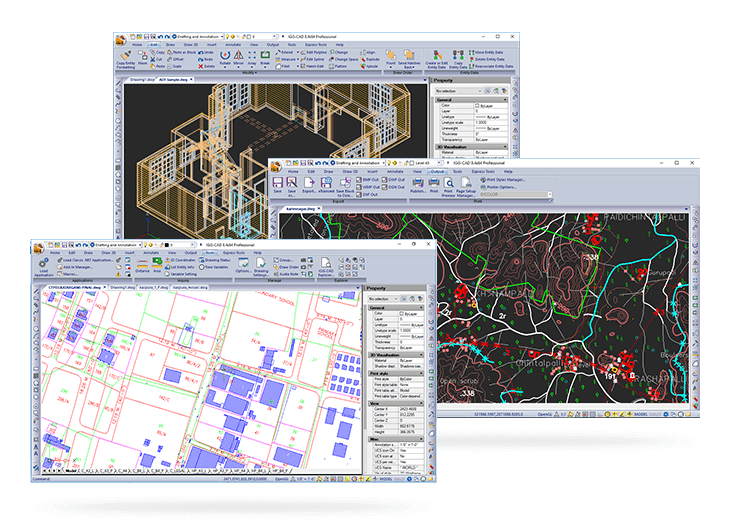
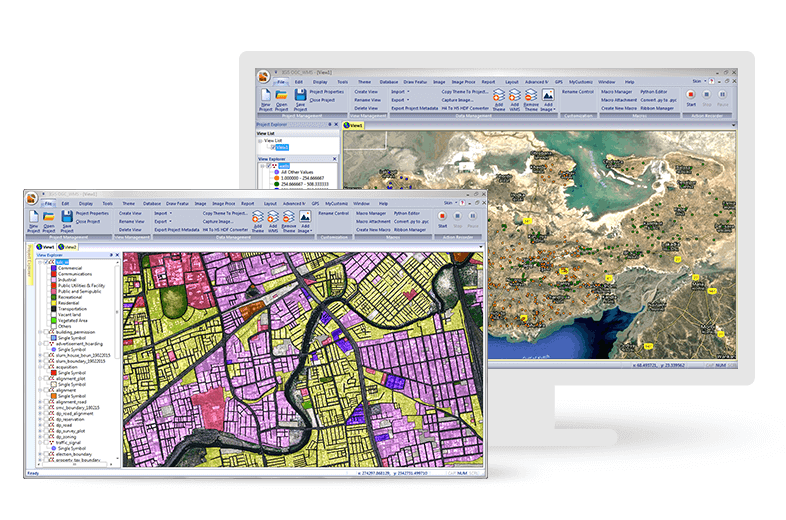
Screenshot of Easily Create, View and Analyse Your Geospatial Data: Next-generation cartographic and visualisation tools for conceptualisation, production, dissemination, and analysis of 2D and 3D maps. It is a 64-bit, Unicode compliant Desktop GIS with an intuitive user interface where data can be viewed in multiple tabs using Multiple Document Interface (MDI).Screenshot of Make Your Life Simpler with Integrated IGiS Software: IGiS aims to redefine the GIS industry with integrated GIS and Image Processing capabilities with advanced analysis extensions on a single platform. Being an OGC compliant platform, makes it easy to collaborate in heterogeneous environment. Standardized UI and ribbon-based navigation makes it easy to use and adapt.Screenshot of Advanced Geo-Processing: IGiS has advanced tools for GIS data conversion, analysis, and visualisation. Advance geospatial users can effectively use tools like Topology creation, Geo-processing, overlay analysis, attribute query builder for desired analysis and output.Screenshot of Efficient Image Processing: IGiS has a rich array of tools and analytical models to analyse and process images. It can manage a multitude of image sources like aerial, satellite, optical, microwave, LIDAR, stereo, GPR, and more. Through smart modelling techniques, IGiS efficiently visualises, analyses, and processes image data, identify patterns, explore changes over time, and carry out scientific analysis to understand spatial relationships.Screenshot of Integrated CAD Tool: IGiS CAD is an extensive mapping tool with cartographic as well as engineering capabilities for mapping real-world objects. IGiS CAD has efficient, fast, user-friendly and feature rich tool to convert and digitize 2D and 3D GIS data. Using Coordinate Geometry (COGO) descriptions, users can accurately create features from any engineering drawing sources and geo-reference them into the GIS database.Screenshot of Manage and Analyse Data Seamlessly: IGiS enables you to store, manage, and edit geospatial data seamlessly. It is a comprehensive tool that supports data integration for a wide range of geospatial data formats including real-time sensor data and big data. Compliance to OGC Standards enables you to store and share data through privileged authentication.