Cisco Catalyst Assurance vs. PingPlotter

Overview
ProductRatingMost Used ByProduct SummaryStarting Price
Cisco Catalyst Assurance
Score 8.2 out of 10
N/A
Replacing the former Cisco DNA Analytics and Assurance, Cisco Catalyst Assurance is an advanced network analytics solution that leverages machine learning and AI to provide insights, proactive issue detection, and accelerated troubleshooting for enterprise networks. It collects streaming telemetry and contextual data from endpoints, devices, users, and applications across the network to create a personalized baseline of normal network behavior. This enables AI-driven anomaly detection, root…N/A
PingPlotter
Score 8.8 out of 10
N/A
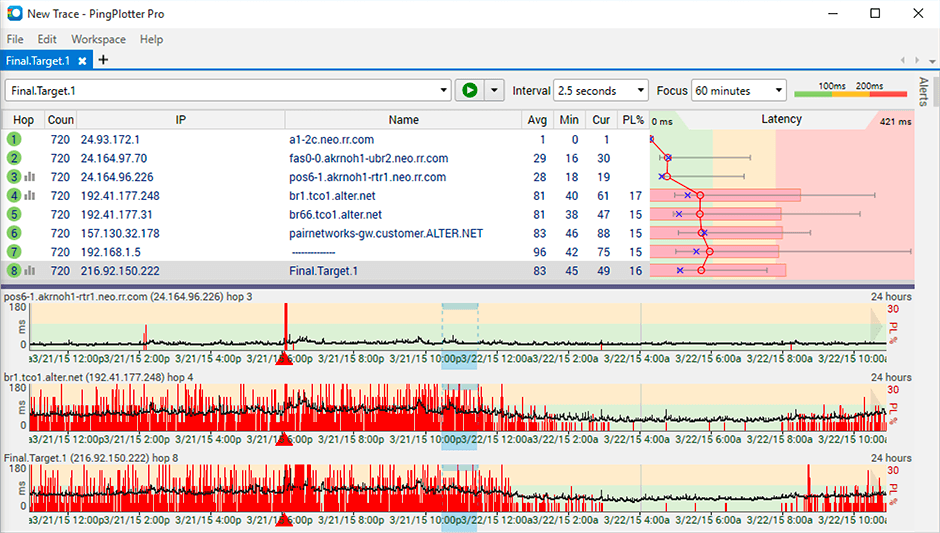
PingPlotter is a graphical traceroute and ping tool that visualizes network performance in a way that makes identifying the source of problems quicker and easier for everyone from online gamers and video streamers to VoIP admins and IT pros. Features for remote deployment, network monitoring, scripting, and a web interface are included along with several additional capabilities.
$0
per user
Pricing
Cisco Catalyst AssurancePingPlotter
Editions & Modules
No answers on this topic
PingPlotter Free
$0.00
per user
PingPlotter Free
$0.00
per user
PingPlotter Standard
$6.99
per user per month
PingPlotter Professional
$29.00
per user per month
PingPlotter Standard
$39.99
per user
PingPlotter Professional
$349.00
per user
Offerings
Pricing Offerings
Cisco Catalyst AssurancePingPlotter
Free Trial
NoYes
Free/Freemium Version
NoYes
Premium Consulting/Integration Services
NoNo
Entry-level Setup FeeNo setup feeNo setup fee
Additional Details
More Pricing Information
Community Pulse
Cisco Catalyst AssurancePingPlotter
Considered Both Products
Cisco Catalyst Assurance
Chose Cisco Catalyst Assurance
Mainly we did have some funding remain and major our network gears are Cisco shop.
Chose Cisco Catalyst Assurance
We moved away from Solarwinds during the breach. Haven't touched them with a 10 foot pole since.We looked at Splunk but decided to stick with a Cisco product since we are a Cisco shop.
PingPlotter
Chose PingPlotter
I used Ping.app and UptimeLog.app on the Mac. These both provided different aspects. These two had a menubar to show me green or red for multiple connections. UptimeLog showed me very clearly when my connectivity was on or off and for exactly how long.
Chose PingPlotter
PingPlotter is much easy to work with
Chose PingPlotter
Okta is a mment in time, PingPlotter is continuous
Chose PingPlotter
There program is unmatched for what it does, I wouldn't even recommend to myself trying another.
Chose PingPlotter
I've tried more products that are not in the list but PingPlotter is the easiest to use and the better one so far because of the interface and function.
Chose PingPlotter
PingPlotter has better visualizations and a stronger ability to capture historical data than other tools I've used. This makes it easier to find the root cause by looking back in the log data to find where latency or packet loss occurred.
Chose PingPlotter
Wireshark doesn't have this functionality and the commandline ping tool built into windows doesn't do plots.
Chose PingPlotter
PingPlotter has a better UI and more customizable features.
Chose PingPlotter
I am not aware of any tools like PingPlotter.
Chose PingPlotter
A balance of a generic tool vs a network equipment product is necessary when investigating network incidents or disruptions. Need to train the engineer to use both tools to perform their analysis and to dive down to the issues as fast as they can. Experience with the tools will …
Chose PingPlotter
PingPlotter stacks up very well to Solarwinds NPM and can provide many of the same benchmark tests that Solarwinds can. PingPlotter is most certianly much better at doing Traceroutes than NPM, and you can run a lot of the same reports.
Chose PingPlotter
PingPlotter is a basic version of Auvik, although it is easier to setup and there is less intrusion in the customers network. This allows us to use PingPlotter as a prospecting tool and allows to accurately gather network information very quickly. Basic troubleshooting is great …
Chose PingPlotter
I have tried a few free products and some paid ones but never really did what I wanted. I just needed a simple, always-on link monitor specifically with a traceroute element and this is what PingPlotter delivers. The others were either overly complex or too expensive, some just …
Features
Cisco Catalyst AssurancePingPlotter
Network Performance Monitoring
Comparison of Network Performance Monitoring features of Product A and Product B
Cisco Catalyst Assurance
-
Ratings
PingPlotter
8.3
Ratings
5% above category average
Automated network device discovery00 Ratings8.10 Ratings
Network monitoring00 Ratings9.20 Ratings
Baseline threshold calculation00 Ratings9.40 Ratings
Alerts00 Ratings7.00 Ratings
Customizable reports00 Ratings7.90 Ratings
Best Alternatives
Cisco Catalyst AssurancePingPlotter
Small Businesses
Auvik
Auvik
Score 8.7 out of 10
NinjaOne
NinjaOne
Score 9.0 out of 10
Medium-sized Companies
SolarWinds NetFlow Traffic Analyzer (NTA)
Score 9.3 out of 10
SolarWinds NetFlow Traffic Analyzer (NTA)
Score 9.3 out of 10
Enterprises
SolarWinds NetFlow Traffic Analyzer (NTA)
Score 9.3 out of 10
SolarWinds NetFlow Traffic Analyzer (NTA)
Score 9.3 out of 10
All AlternativesView all alternativesView all alternatives
User Ratings
Cisco Catalyst AssurancePingPlotter
Likelihood to Recommend
8.0
(0 ratings)
8.9
(0 ratings)
Usability
7.7
(0 ratings)
9.1
(0 ratings)
Support Rating
-
(0 ratings)
9.0
(0 ratings)
User Testimonials
Cisco Catalyst AssurancePingPlotter
Likelihood to Recommend
So not everyone is in need of a smart AI checking their network metrics looking for issues before they happen or finding and alerting on problems that the network staff may not have noticed, but if you have the budget for it, it could be a huge time saver for your whole department.
Read full review
It is well suited for performing monitoring and testing from a single device. It is less appropriate if you have to monitor from multiple different endpoints. That type of deployment would be more of an enterprise application. If you are looking for an end user monitoring solution then PingPlotter is the one for you.
Read full review
Pros
  • Push configs to new floors or during switch upgrades
  • Assurance to troubleshoot issues
  • Inventory
  • Keep track of infrastructure OS levels
Read full review
  • Monitor traffic in network
  • Measure stops when contacting network locations such as websites
  • Measures the lag and latency it takes to contact network locations
  • Gives you both induvidual measurements as well as good oversight
  • identifies when network lag or disconnect occurs
Read full review
Cons
  • May require an implementer to get this set up and running.
  • For a software based service that you can run on your own VM's, price is still very high.
  • The first setup can be a bear and you will need much help from TAC.
Read full review
  • Its a little confusing to see which targets are currently running pings and which ones are displayed in the plots.
  • Starting and stopping pings requires a right click and that would be better with a play/pause button I think.
  • Ability to drag and drop the graphs to reorder them.
  • more columns to show which targets are running and which are displayed. Currently this is done with symbols so you cant sort by just the running targets for example I've found.
Read full review
Usability
Cisco DNA Analytics and Assurance definitely has a steep learning curve. While it's had an upgrade to its onboarding, it's still a very technically heavy application that requires knowledge of Cisco networking and terminology. I think keeping that in mind helps with the expectations, but anyone can use the application with a little training and experience.
Read full review
I installed it and it just started working. I realized I could then tweak it to show what I needed but didn't have to spend a long time configuring it before use, editing YAML files etc. Maybe that's fine for a network professional, but I only need this software if something goes wrong, and then need it to work quickly out of the box.
Read full review
Support Rating
No answers on this topic
I have not had much contact with the PingPlotter support, only one time have I went to them and it was a positive experience. The questions I had were answered quickly and professionally. I have no issue with the experience I had with the Support team. This was from before and after the purchase of the product.
Read full review
Alternatives Considered
Mainly we did have some funding remain and major our network gears are Cisco shop.
Read full review
I used Ping.app and UptimeLog.app on the Mac. These both provided different aspects. These two had a menubar to show me green or red for multiple connections. UptimeLog showed me very clearly when my connectivity was on or off and for exactly how long
Read full review
Return on Investment
  • I thinkCisco DNA Analytics and Assurance can have a positive ROI as it frees up labor resources to do other things.
  • We've saved countless hours of troubleshooting with our end user device team using it as well.
Read full review
  • Great ROI, troubleshooting time has been reduced by 90%
  • Network Discoveries used to take 2 to 3 hours and were inconsistent - now it is a matter of minutes
  • lacks integration into our MSP toolkit, and we now use it as a stand alone product
Read full review
ScreenShots

PingPlotter Screenshots

Screenshot of Screenshot of Screenshot of