Citywide Maintenance vs. eMaint CMMS

Overview
ProductRatingMost Used ByProduct SummaryStarting Price
Citywide Maintenance
Score 0.0 out of 10
Enterprise companies (1,001+ employees)
Citywide Maintenance is a Computerized Maintenance Management System (CMMS) with built-in service request, work order, and preventative maintenance applications. It is specifically designed to empower municipal departments to prioritize, schedule, and track maintenance projects. Whether in the office or out in the field, users can access and manage service requests and work orders, streamlining day-to-day maintenance operations. Built from the ground up to meet the…N/A
eMaint CMMS
Score 6.7 out of 10
N/A
eMaint offers computerized maintenance management software with features for inventory management, asset management, maintenance scheduling, etc. eMaint is now owned and supported by Fluke Corp since the September 2016 acquisition.
$69
per month per user
Pricing
Citywide MaintenanceeMaint CMMS
Editions & Modules
No answers on this topic
Team
$69
per month per user
Professional
$85
per month per user
Enterprise
$120
per month per user
Offerings
Pricing Offerings
Citywide MaintenanceeMaint CMMS
Free Trial
YesYes
Free/Freemium Version
NoNo
Premium Consulting/Integration Services
YesYes
Entry-level Setup FeeNo setup feeNo setup fee
Additional Details
More Pricing Information
Community Pulse
Citywide MaintenanceeMaint CMMS
User Ratings
Citywide MaintenanceeMaint CMMS
Likelihood to Recommend
-
(0 ratings)
6.2
(6 ratings)
Support Rating
-
(0 ratings)
5.5
(2 ratings)
User Testimonials
Citywide MaintenanceeMaint CMMS
Likelihood to Recommend
PSD Citywide
No answers on this topic
Fluke Corporation
eMaint is well suited to larger facilities with dedicated scheduler/planners. Learning to navigate the database and create reports requires a dedicated resource. Part-time users often forget the process for entering data and navigating the database. In smaller organizations where multiple users enter assets, planned maintenance (PM) tasks and vendors, keeping standardization in the system formatting was difficult.
Read full review
Pros
PSD Citywide
No answers on this topic
Fluke Corporation
  • We like that eMaint is highly configurable. You can customize fields to meet your needs
  • You can store and track documents and photos assigned to your assets
  • You can run custom reports.
  • Great customer service
Read full review
Cons
PSD Citywide
No answers on this topic
Fluke Corporation
  • Functionality not delivered as promised - on usage of tab.
  • QR code functionality.
  • Friction between implementation team and marketing team that sold this to us.
Read full review
Support Rating
PSD Citywide
No answers on this topic
Fluke Corporation
Customer support was always readily available, even when natural disasters were taking place.
Read full review
Alternatives Considered
PSD Citywide
No answers on this topic
Fluke Corporation
eMaint was by far most the most comprehensive and customizable solution we looked at. The eMaint team was also extremely responsive and available during the selection process. The product training and conferences were very helpful for new user orientation and best practice learning. The customizable reports also allowed us to provide data to management in an easy to digest format
Read full review
Return on Investment
PSD Citywide
No answers on this topic
Fluke Corporation
  • We easily track service events over multiple locations so we are able to save on costs
  • Able to run asset lists for inspections
  • Able to keep up with contracts' renewals and service costs
Read full review
ScreenShots

Citywide Maintenance Screenshots

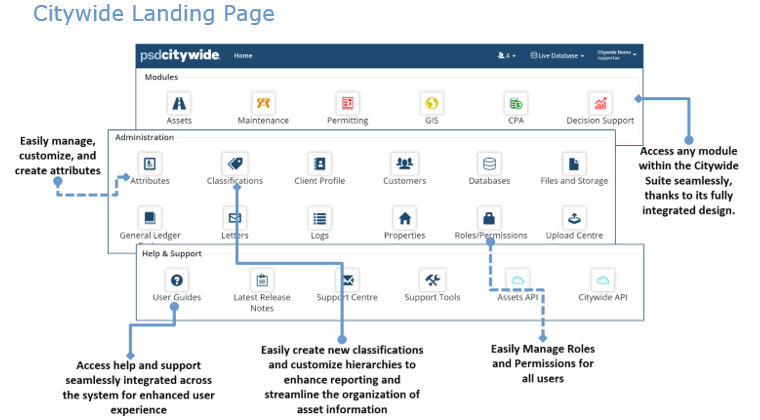
Screenshot of a Citywide Landing Page, a centralized dashboard designed for the PSD Citywide software suite. The interface is organized into three distinct, layered sections—Modules, Administration, and Help & Support—highlighting the platform's integrated and user-friendly design.Screenshot of the Maintenance Management Dashboard within the PSD Citywide software platform, highlighting a centralized system for managing daily operational tasks and data. The interface is divided into three primary functional areas and features an overlaid view of a live Work Order tracking list.