CoConstruct vs. Field Complete

Overview
ProductRatingMost Used ByProduct SummaryStarting Price
CoConstruct
Score 7.0 out of 10
N/A
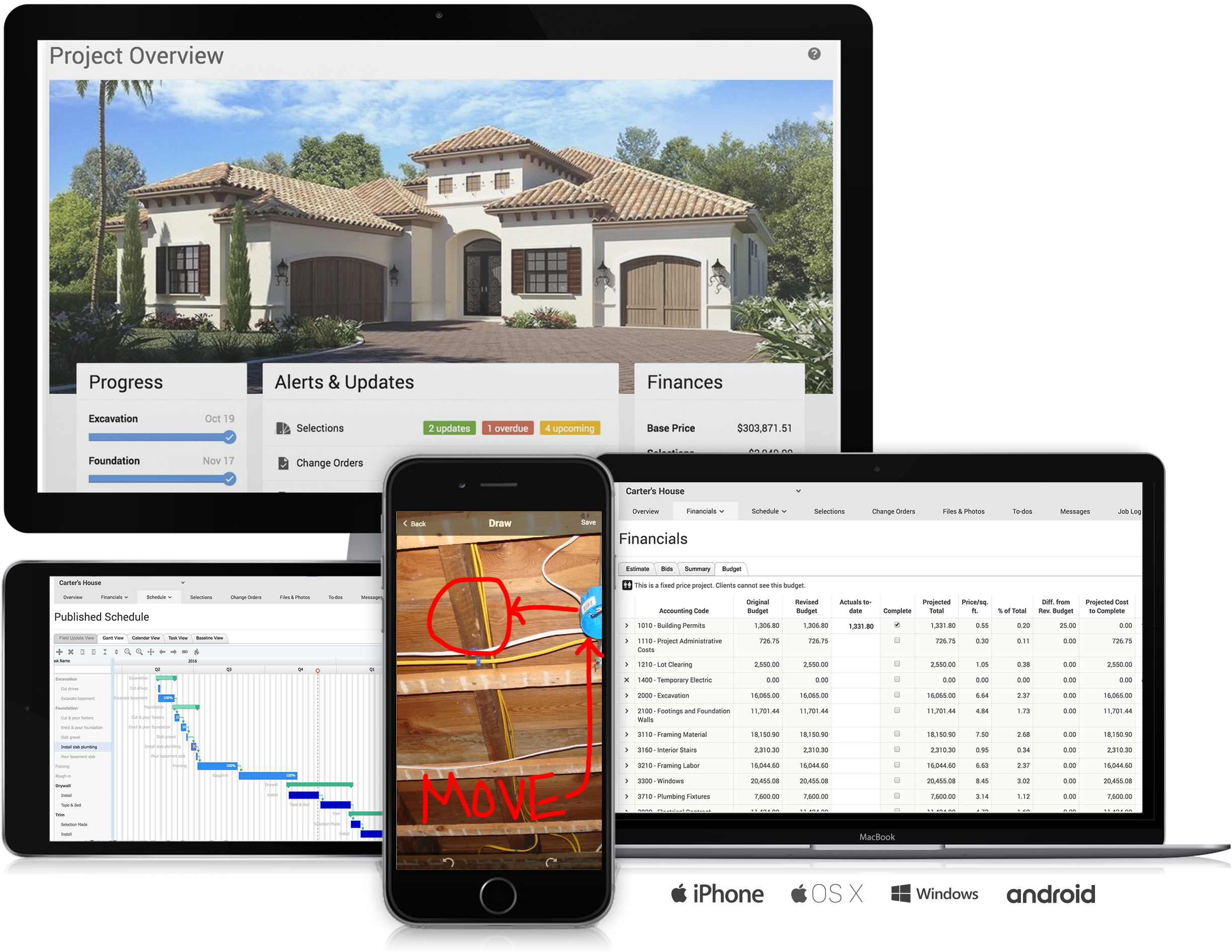
CoConstruct, from Buildertrend since the November 2021 acquisition, is a custom builder & remodeler software. It allows users to enter data once and have that information flow through the estimate, specs, selections, bids, proposals, change orders, and budgets, including to and from QuickBooks. In addition, CoConstruct includes scheduling and 3-way communication between builder, client, and trade partners. Everything is captured via email and texting. Login isn't required for…
$49
per month
Field Complete
Score 0.0 out of 10
N/A
Field Complete is an app for contractors to run their business used to create estimates, manage schedules, and collect payments. It can be used to run jobs with homeowners and property managers in one place. The billing system allows for on-site charging or billing at a later date. Also, portions of work orders can be sub-contracted, while maintaining the same level of visibility into the jobs. Field Complete is available free for up to 10 users.
$0
Pricing
CoConstructField Complete
Editions & Modules
Ramp
$49
per month
Plus 5
$299
per month
Plus 10
$399
per month
Plus 15
$499
per month
No answers on this topic
Offerings
Pricing Offerings
CoConstructField Complete
Free Trial
NoNo
Free/Freemium Version
NoYes
Premium Consulting/Integration Services
NoYes
Entry-level Setup FeeNo setup fee$11 per year
Additional DetailsCoConstruct pricing is based on active job sites that have client access online, which means it is adaptable to builders & remodelers businesses. This means that there are an unlimited amount of projects available for estimates and proposals, so that customers only pay when they win a contract. Also built into the pricing are a myriad of services: a dedicated implementation coach, free estimate & scheduling templates based on industry best practices from successful builders and the NAHB, unlimited storage and users, software branded with the customer's logo, unlimited amount of warranty projects, and unlimited phone & email support. The vendor offers a money-back guarantee that is good for the first 90 days of service.
More Pricing Information
Community Pulse
CoConstructField Complete
Best Alternatives
CoConstructField Complete
Small Businesses
Procore
Procore
Score 8.8 out of 10
Method:CRM
Method:CRM
Score 9.3 out of 10
Medium-sized Companies
Procore
Procore
Score 8.8 out of 10
Oracle Service
Oracle Service
Score 8.2 out of 10
Enterprises
Oracle Aconex
Oracle Aconex
Score 6.6 out of 10
Oracle Service
Oracle Service
Score 8.2 out of 10
All AlternativesView all alternativesView all alternatives
User Ratings
CoConstructField Complete
Likelihood to Recommend
8.0
(14 ratings)
-
(0 ratings)
Support Rating
9.8
(10 ratings)
-
(0 ratings)
User Testimonials
CoConstructField Complete
Likelihood to Recommend
Buildertrend
Having the ability to completely manage a project from start to finish with one app is super helpful. The time reporting feature (when it works correctly) is a nice added bonus as it allows employees to switch from one task to another on the same project or to another project and task with ease, aiding in the accounting process of the total project. This was helpful for running analytics to see where we were spending too much time on certain tasks, thus allowing us to assess any training needs.
Read full review
Field Complete
No answers on this topic
Pros
Buildertrend
  • The integration of all aspects needed to run a remodeling company efficiently: project scheduling and management, financial planning and customer service. Since it’s an all-in-one suite and cloud-based, it enables our team to keep track of all our projects in real-time. Communication breakdown is the last thing we want, so being on the same page is not only desirable but makes for the best possible relationship with our clients.
  • Product education - We like how CoConstruct helps new users and get them to start using the tool right away. The dashboard resource materials are incredibly useful. We don’t have to spend a lot of time training new hires on the system and onboarding new clients.
Read full review
Field Complete
No answers on this topic
Cons
Buildertrend
  • Internal Communication - CoConstruct lacks the ability to tag-team members for internal communication using @mentions or any other means. This has been crippling for us and forced us to use alternative software for communicating among our team members.
  • Pipeline Management - CoConstruct's lead-tracking system feels clunky and hard to navigate and doesn't provide a pipeline view that's easy to navigate. We have moved our Pipeline Management outside of CoConstruct to make it easier for our sales team to track leads.
  • CRM - CoConstruct doesn't offer anything for customer follow-up after projects are completed. This, in addition to the lack of an effective pipeline system, has led to our decision to use Hubspot as our CRM. Moving projects into CoConstruct for Design and back our after Production.
Read full review
Field Complete
No answers on this topic
Support Rating
Buildertrend
The support staff is brilliant; they don't operate on Australian time, so you can't just dial up support when you need it. The response times are quick, and the staff is knowledgeable. They are also well versed in most of the differences between buildings in the US and the building in Australasia. Despite their funny accents and strange use of the English language, we get by just fine!
Read full review
Field Complete
No answers on this topic
Alternatives Considered
Buildertrend
Products like Procore and PlanGrid are geared towards projects with huge projects teams, multiple stakeholders and dozens of subcontractors. CoConstruct can be used for projects big and small (value) and also with small project teams or large projects teams. For small partial renovation or addition projects CoConstruct is a good more cost effective option.
Read full review
Field Complete
No answers on this topic
Return on Investment
Buildertrend
  • It made time recording much easier and much more reliable
  • With its GPS feature, we would be able to track when an employee left a job to help ensure accurate time recording
  • Having the ability to give the homeowners their own custom home building app to watch the progress helped to put us ahead of the game in the industry
  • Running job cost reports as easily as CoConstruct allows helped to curb some of our administrative fees
Read full review
Field Complete
No answers on this topic
ScreenShots

CoConstruct Screenshots

Screenshot of Screenshot of Screenshot of Screenshot of Screenshot of Screenshot of

Field Complete Screenshots

Screenshot of Scheduling & Dispatching
For task assignment and matching the right job with the right tech in a single click.
Helps users:

- Always know who’s available
- Quickly dispatch and schedule technicians
- Track team’s location in real-time to make sure they arrived on site
- Plan routes to save time for travel and delight your customers
- Set priorities and emergency status
- Browse order and customer details
- Eliminate overbookingScreenshot of Job Sharing
Shares jobs with contractors and eases complex collaboration. Additionally:
- Sends alerts on the jobs available
- Displays customer and job details
- Sends updates on change orders
- Maintains and organizes invoices
- Keeps track of what’s been paid and what’s outstandingScreenshot of Job Management
Supports job scheduling from any device and keeps users informed about the jobs, statuses, deadlines, and assigned techs. Also allows users to:
- Create and change orders
- Convert estimates into jobs
- Set priority and emergency status
- Attach photos and technical documentation