
Coda by Grammarly vs. Freedcamp
Coda by Grammarly vs. Freedcamp
| Product | Rating | Most Used By | Product Summary | Starting Price |
|---|---|---|---|---|
 Coda by Grammarly | N/A | Coda, acquired by Grammarly in early 2025, is a template-based document creation and collaboration solution, supporting a variety of use cases. | $0 per month | |
 Freedcamp | N/A | The vendor states Freedcamp helps tens of thousands of teams around the world manage their work. Their free plan contains tasks(in list and kanban view), milestones, discussions, calendar, time-tracking and password management. On their premium plans, they also offer Gantt charts, Wikis, Issue Tracking, CRM and Invoices+. | $2.49 per month |
| Coda by Grammarly | Freedcamp | |||||||||||||||
|---|---|---|---|---|---|---|---|---|---|---|---|---|---|---|---|---|
| Editions & Modules |
|
| ||||||||||||||
| Offerings |
| |||||||||||||||
| Entry-level Setup Fee | No setup fee | No setup fee | ||||||||||||||
| Additional Details | With Coda, you only pay for Doc Makers. Often one person creates a doc, others edit it, and some simply observe from afar. Instead of charging for everyone, we only charge for the people who create docs. Interested in enterprise pricing? Visit coda.io/enterprise | — | ||||||||||||||
| More Pricing Information | ||||||||||||||||
| Coda by Grammarly | Freedcamp |
|---|
| Coda by Grammarly | Freedcamp | ||||||||||||||||||||||||
|---|---|---|---|---|---|---|---|---|---|---|---|---|---|---|---|---|---|---|---|---|---|---|---|---|---|
| Project Management |
| ||||||||||||||||||||||||
| Professional Services Automation |
|
| Coda by Grammarly | Freedcamp | |
|---|---|---|
| Small Businesses |  Stackby Score 9.0 out of 10 | Stackby Score 9.0 out of 10 |
| Medium-sized Companies |  Troop Messenger Score 9.8 out of 10 |  InEight Score 8.5 out of 10 |
| Enterprises |  HCL Connections Score 9.0 out of 10 | InEight Score 8.5 out of 10 |
| All Alternatives | View all alternatives | View all alternatives |
| Coda by Grammarly | Freedcamp | |
|---|---|---|
| Likelihood to Recommend | 8.0 (26 ratings) | 10.0 (3 ratings) |
| Likelihood to Renew | 9.1 (2 ratings) | 10.0 (1 ratings) |
| Usability | 7.6 (3 ratings) | 10.0 (2 ratings) |
| Availability | 9.1 (1 ratings) | - (0 ratings) |
| Performance | 9.1 (1 ratings) | - (0 ratings) |
| Support Rating | 7.8 (2 ratings) | 10.0 (1 ratings) |
| Implementation Rating | 8.2 (1 ratings) | - (0 ratings) |
| Configurability | 8.2 (1 ratings) | - (0 ratings) |
| Ease of integration | 4.5 (1 ratings) | - (0 ratings) |
| Product Scalability | 9.1 (1 ratings) | - (0 ratings) |
| Vendor post-sale | 7.3 (1 ratings) | - (0 ratings) |
| Coda by Grammarly | Freedcamp | |
|---|---|---|
| Likelihood to Recommend | Grammarly
| Freedcamp
 John Hawker Senior Network Architect |
| Pros | Grammarly
 Matt Woods Growth Product Manager | Freedcamp
|
| Cons | Grammarly
 Pearl Cheah Physics & Application Manager | Freedcamp No answers on this topic |
| Likelihood to Renew | Grammarly
Pearl Cheah Physics & Application Manager | Freedcamp
John Hawker Senior Network Architect |
| Usability | Grammarly
| Freedcamp
|
| Reliability and Availability | Grammarly
Pearl Cheah Physics & Application Manager | Freedcamp No answers on this topic |
| Performance | Grammarly
Pearl Cheah Physics & Application Manager | Freedcamp No answers on this topic |
| Support Rating | Grammarly
Pearl Cheah Physics & Application Manager | Freedcamp
John Hawker Senior Network Architect |
| Implementation Rating | Grammarly
Pearl Cheah Physics & Application Manager | Freedcamp No answers on this topic |
| Alternatives Considered | Grammarly
 Camille Hidalgo Nussbaum, CSM® Project Manager, Creative Technologies | Freedcamp
|
| Scalability | Grammarly
Pearl Cheah Physics & Application Manager | Freedcamp No answers on this topic |
| Return on Investment | Grammarly
| Freedcamp
John Hawker Senior Network Architect |
| ScreenShots | Coda by Grammarly Screenshots      | Freedcamp Screenshots 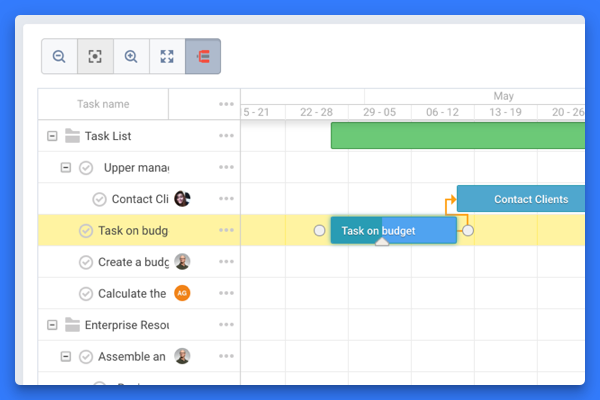   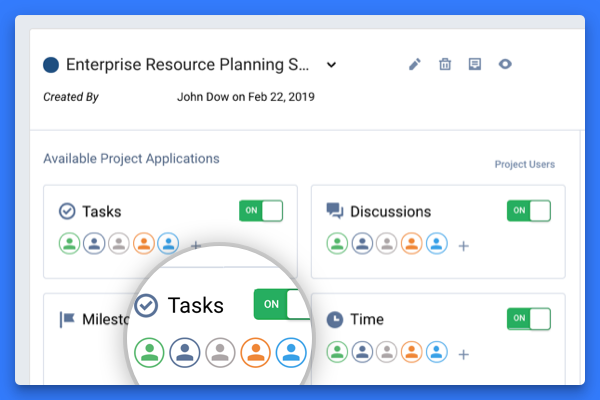 |