TrustRadius: an HG Insights company

Save this comparison

Save this comparison

Add Product

Recommended Comparisons

    Overview
    ProductRatingMost Used ByProduct SummaryStarting Price

    Commvault Cloud

    Score7.7 out of 10
    N/ACommvault® Cloud is a cyber resilience platform built to meet the demands of hybrid enterprises. It delivers data security and recovery in the cloud, powered by advanced AI, to help organizations see, manage, and recover data wherever it lives.N/A

    Hornetsecurity 365 Total Protection

    Score10 out of 10
    N/AWith 365 Total Protection, Hornetsecurity offers users enterprise security management in conjunction with Microsoft Office 365. The Enterprise version gives users enhanced functionality and protection, and covers legally compliant email archiving with advanced features such as eDiscovery and 10-year email retention. It also offers protection against advanced persistent threats through the use of AI-based analysis mechanisms.N/A
    Pricing
    Commvault CloudHornetsecurity 365 Total Protection
    Editions & Modules
    No answers on this topic
    No answers on this topic
    Offerings
    Pricing Offerings
    Commvault CloudHornetsecurity 365 Total Protection
    Free Trial
    YesNo
    Free/Freemium Version
    NoNo
    Premium Consulting/Integration Services
    YesNo
    Entry-level Setup FeeOptionalOptional
    Additional Details
    More Pricing Information
    Community Pulse
    Commvault CloudHornetsecurity 365 Total Protection
    Considered Both Products
    Commvault
    No answer on this topic
    Hornetsecurity Inc.
    No answer on this topic
    Key User Insights
    Would buy again
    100%
    Would buy again
    60 Answers
    No answers on this topic
    Delivers good value for the price
    100%
    Delivers good value for the price
    55 Answers
    No answers on this topic
    Happy with the feature set
    100%
    Happy with the feature set
    60 Answers
    No answers on this topic
    Lived up to sales and marketing promises
    94%
    Lived up to sales and marketing promises
    47 Answers
    No answers on this topic
    Implementation went as expected
    94%
    Implementation went as expected
    50 Answers
    No answers on this topic
    Features
    Commvault CloudHornetsecurity 365 Total Protection
    Data Center Backup
    Comparison of Data Center Backup features of Commvault Cloud and Hornetsecurity 365 Total Protection
    Feature
    Commvault Cloud
    7.2
    77 Ratings
    15% below category average
    Hornetsecurity 365 Total Protection
    -
    Ratings
    Universal recovery8.067 Ratings00 Ratings
    Instant recovery7.064 Ratings00 Ratings
    Recovery verification7.068 Ratings00 Ratings
    Business application protection7.572 Ratings00 Ratings
    Multiple backup destinations5.371 Ratings00 Ratings
    Incremental backup identification7.077 Ratings00 Ratings
    Backup to the cloud7.559 Ratings00 Ratings
    Deduplication and file compression7.575 Ratings00 Ratings
    Snapshots7.571 Ratings00 Ratings
    Flexible deployment6.166 Ratings00 Ratings
    Management dashboard7.567 Ratings00 Ratings
    Platform support7.067 Ratings00 Ratings
    Retention options8.065 Ratings00 Ratings
    Encryption7.564 Ratings00 Ratings
    Best Alternatives
    Commvault CloudHornetsecurity 365 Total Protection
    Small Businesses
    BDRShield
    Score6.5 out of 10
    Backupify
    Score5.6 out of 10
    Medium-sized Companies
    Bacula Enterprise
    Score8.6 out of 10
    Spanning Backup
    Score7.4 out of 10
    Enterprises
    Bacula Enterprise
    Score8.6 out of 10
    Veeam Data Cloud for Azure
    Score7.9 out of 10
    All AlternativesView all alternativesView all alternatives
    User Ratings
    Commvault CloudHornetsecurity 365 Total Protection
    Likelihood to Recommend
    6.5
    (79 ratings)
    -
    (0 ratings)
    Likelihood to Renew
    9.0
    (8 ratings)
    -
    (0 ratings)
    Usability
    7.0
    (16 ratings)
    -
    (0 ratings)
    Availability
    9.1
    (1 ratings)
    -
    (0 ratings)
    Performance
    9.1
    (1 ratings)
    -
    (0 ratings)
    Support Rating
    8.6
    (52 ratings)
    -
    (0 ratings)
    In-Person Training
    9.1
    (1 ratings)
    -
    (0 ratings)
    Online Training
    9.1
    (1 ratings)
    -
    (0 ratings)
    Implementation Rating
    9.1
    (4 ratings)
    -
    (0 ratings)
    Ease of integration
    9.1
    (1 ratings)
    -
    (0 ratings)
    Product Scalability
    9.1
    (1 ratings)
    -
    (0 ratings)
    Vendor post-sale
    9.1
    (1 ratings)
    -
    (0 ratings)
    Vendor pre-sale
    9.1
    (1 ratings)
    -
    (0 ratings)
    User Testimonials
    Commvault CloudHornetsecurity 365 Total Protection
    Likelihood to Recommend
    Commvault
    Commvault works well in a large environments with a variety of client types and data classes. With its policy-based configurations, it makes administration of large environments easier when configuring storage and retention, copies, schedules, client configs, etc. Commvault also backs up just about everything you can think of, and works with almost all storage and compute platforms, so there are rarely any cases where Commvault cannot accommodate.
    Incentivized
    Read full review
    Hornetsecurity Inc.
    No answers on this topic
    Pros
    Commvault
    • Commvault is the Swiss Army knife for data protection in an Enterprise environment. You name the environment and Commvvault has something to protect it. Very helpful in this on-prem/off-prem world that is developing into a DevOps world.
    • Improves our Disaster Recovery
    • Starting to utilize for data migration for VMware in places where Zerto is too expensive
    Incentivized
    Read full review
    Hornetsecurity Inc.
    No answers on this topic
    Cons
    Commvault
    • For database restores, it has to restore the entire database in order to recover just one table.
    • Backups of virtual machines with direct attached storage is difficult.
    • I wish it covered cloud assets more thoroughly, like AWS ELBs and Security Groups.
    Incentivized
    Read full review
    Hornetsecurity Inc.
    No answers on this topic
    Likelihood to Renew
    Commvault
    It is serving it's purpose and for companies that have a smaller IT staff, it is not time consuming to manage. Support for the product when needed has been very good and they are responsive when tickets are opened for support. The product is scalable so as we grow we can easily increase the resources as needed on the backend.
    Incentivized
    Read full review
    Hornetsecurity Inc.
    No answers on this topic
    Usability
    Commvault
    Have a interface very user friendly. You do not need a lot of training, or any formal training really, to get up and going and use nearly all of the functionality of the product. This facilitates the post-implementation company as it reduces costs with backup specialists and any trained analyst can take care of its infrastructure. One negative point is not all the options and features are in the HTML view.
    Incentivized
    Read full review
    Hornetsecurity Inc.
    No answers on this topic
    Reliability and Availability
    Commvault
    Commvault Complete Backup & Recovery is designed to provide organizations with flexible and scalable software.
    Incentivized
    Read full review
    Hornetsecurity Inc.
    No answers on this topic
    Performance
    Commvault
    Commvault Complete Backup & Recovery is designed and provide to organizations with flexible and scalable software
    Incentivized
    Read full review
    Hornetsecurity Inc.
    No answers on this topic
    Support Rating
    Commvault
    I would rate Commvault's support as an 'average' support. Now that we have a very experienced guy working with Commvault, most of the time we can fix or do anything by ourselves. We had some issues with their support taking a really long time to respond and fix some issues in the past. In most cases we ended up appealing to the community, other peers, or Commvault's SE team.
    Incentivized
    Read full review
    Hornetsecurity Inc.
    No answers on this topic
    In-Person Training
    Commvault
    Traning is very easy very helpful
    Incentivized
    Read full review
    Hornetsecurity Inc.
    No answers on this topic
    Online Training
    Commvault
    Commvault training is very important and very helpful full for immplementation.
    Incentivized
    Read full review
    Hornetsecurity Inc.
    No answers on this topic
    Implementation Rating
    Commvault
    Plan well and make sure you collect all the required information and details before going for implementation. Organize it in step by step or break the setup into different modules to make it simple.
    Incentivized
    Read full review
    Hornetsecurity Inc.
    No answers on this topic
    Alternatives Considered
    Commvault
    In the past it has been necessary to leverage multiple products to provide a complete data protection solution. Commvault Complete Backup & Recovery has been able to mirror the functions of competitive products while increasing functionality and management. Commvault Complete Backup & Recovery works cleanly in disparate environments that leverage dissimilar technologies and products.
    Incentivized
    Read full review
    Hornetsecurity Inc.
    No answers on this topic
    Scalability
    Commvault
    Commvault Complete Backup & Recovery is designed to provide organizations with flexible and scalable software
    Incentivized
    Read full review
    Hornetsecurity Inc.
    No answers on this topic
    Return on Investment
    Commvault
    • I am not privy to ROI, but just having confidence and trust that Commvault will back up whatever needs backing up, and that we will always be able to restore it quickly, allows our technical people to concentrate on the problem at hand, knowing that we do not have to worry about the safety of the data. This saves time for some very expensive human resources and shortens schedules by eliminating a whole class of data safety and disaster recovery issues.
    Incentivized
    Read full review
    Hornetsecurity Inc.
    No answers on this topic
    ScreenShots

    Hornetsecurity 365 Total Protection Screenshots
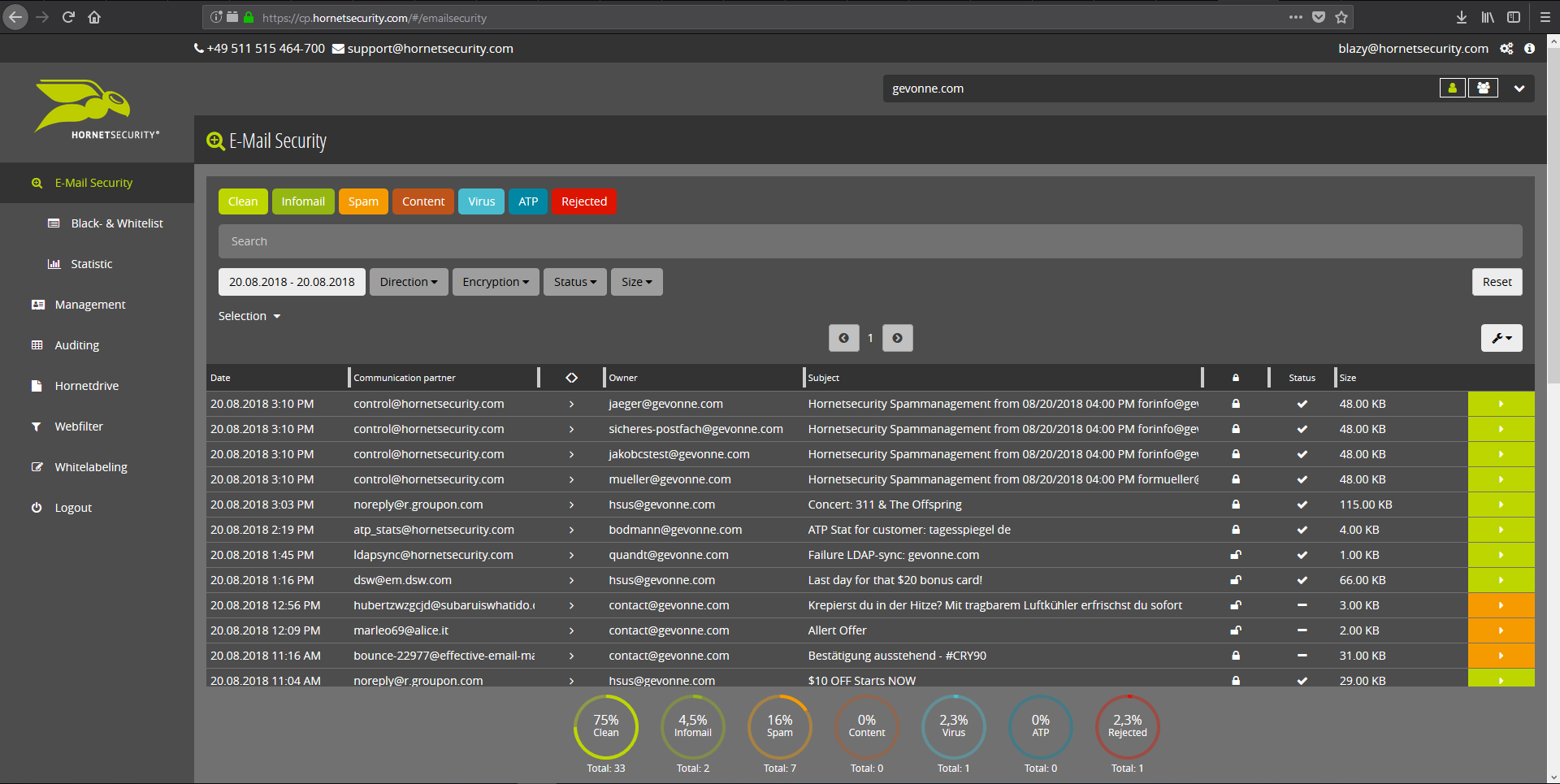
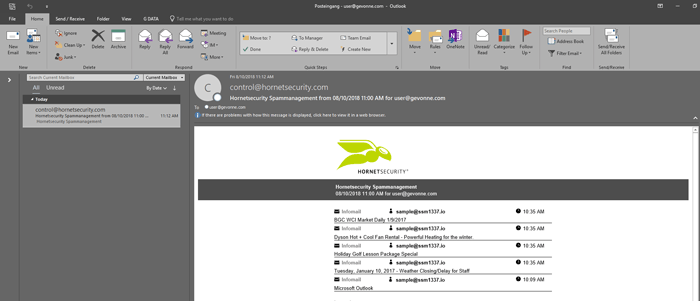
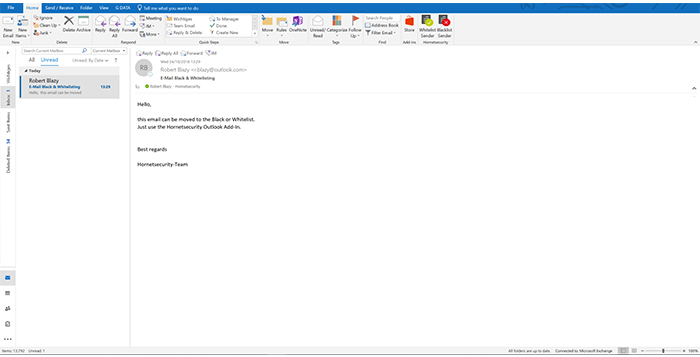
    Screenshot of Email Live Tracking with user-defined settings offers users a complete overview of all Emails addressed to them. If an incoming Email has, for example, been classified as spam, you will receive comprehensive information and can individually determine any further interaction. This means that you can always quickly find any email you are searching for and delivery options can be defined for the future.Screenshot of With the help of Infomail Handlings, the inboxes or smartphones of your users will no longer be flooded with newsletters and ad mails. Users are no longer distracted by the constant arrival of unimportant emails, thus making it easier for them to keep track of relevant business matters.Screenshot of Content Control protects your email communication from receiving or sending unwanted or unauthorized file attachments in keeping with your company policy. When running Content Control, umbrella terms and categories (e.g., .docmacro or .executable) may be blocked, for example in the default group (mailboxes that are not allocated to any particular group). For a department such as Marketing, however, the receipt of media files and macros can, on the other hand, be necessary for daily business: In this respect, one can create, for example, a group for the Marketing department and adjust the settings in Content Control so that only potentially dangerous, e.g. executable, file formats are blocked for this group.Screenshot of If an incoming email (e.g. phishing or spam mail) constitutes a threat, the attack is immediately detected by the multi-stage filter systems of 365 Total Protection. Unwanted emails are directly rejected by the Threat Blocking function or detected in later analyses by Threat Intelligence and sent straight to Quarantine. In both cases, these emails will not be delivered to your mailbox.Screenshot of If you do not want to receive emails from one or several specific senders, you can put these on your personal Blacklist. With just one click directly in your in-box the selected senders can be added to the Blacklist to prevent emails from the same sender from being delivered to you in future. If an email from a generally unobjectionable sender lands in Quarantine by mistake, thus appearing in the spam report, the “Whitelist” function can be used. Emails from senders on your Whitelist will always be delivered to your in-box in future.Screenshot of Every email sent out by a company is not only relevant to the business, but is also your company’s business card. In terms of content, a company-wide standardized structure and the completeness of signature datasets are essential. In this context, all email signatures also have the same visual design and layout. This task can also be allocated to the Marketing department or office management via the “What You See is What You Get” editor.