CoSchedule Marketing Suite vs. eClerx Digital FLUiiD 4

Overview
ProductRatingMost Used ByProduct SummaryStarting Price
CoSchedule Marketing Suite
Score 10.0 out of 10
N/A
CoSchedule provides a content calendar, content optimization, and contentmarketing products, with users among 50,000 marketers worldwide, helping them organize their work, deliver projects on time, and prove marketing team value.N/A
eClerx Digital FLUiiD 4
Score 0.0 out of 10
N/A
eClerx Digital, a division of eClerx headquartered in Mumbai, offers FLUiiD 4, a digital asset management technology solution for managing media to market workflow, providing a centralized database and collaboration space, as well as workflow and approval management system, for marketing assets.N/A
Pricing
CoSchedule Marketing SuiteeClerx Digital FLUiiD 4
Editions & Modules
No answers on this topic
Offerings
Pricing Offerings
CoSchedule Marketing SuiteeClerx Digital FLUiiD 4
Free Trial
NoNo
Free/Freemium Version
YesNo
Premium Consulting/Integration Services
NoNo
Entry-level Setup FeeNo setup feeNo setup fee
Additional Details
More Pricing Information
Community Pulse
CoSchedule Marketing SuiteeClerx Digital FLUiiD 4
Considered Both Products
CoSchedule Marketing Suite
Chose CoSchedule Marketing Suite
Hootsuite has gotten soooooo expensive in relation to the functionality it provides. The value is just not there compared to when prices were lower for SMBs.

In contrast, CoSchedule Marketing Suite provides huge value for the price and the tiered pricing based on users, number …
Chose CoSchedule Marketing Suite
CoSchedule is definitely a more powerful marketing tool than Loomly or Buffer, which are more dedicated to straight social media scheduling. I preview the calendar overview offered by CoSchedule, which makes it easy to see everything at a glance. PromoRepublic is similar but …
Chose CoSchedule Marketing Suite
CoSchedule offers a lot more than some of its competitors, but you have to evaluate what your organization needs and doesn't need. For some organizations, they only need a content planner for social media, and CoSchedule might not be the best fit due to price compared to some …
Chose CoSchedule Marketing Suite
CoSchedule provides collaborative planning of projects. The calendar view is very well designed. Meetings and tasks can be scheduled and tracked easily. Whatever is being done, no matter how big the task/project is, it gives a bird-eye view of everything. Additionally, it also …
Chose CoSchedule Marketing Suite
After trying other social media scheduling tools, CoSchedule is my favorite. Like I said previously, it fills the gaps I've found in other tools. I feel more organized with CoSchedule and prefer their mobile app as well.
Chose CoSchedule Marketing Suite
CoSchedule better supports the content creation and redistribution of content activities. The best thing was that you can get it all automated here, while other tools do not provide with support. I would say CoSchedule is one of the best tools for managing both content and …
Chose CoSchedule Marketing Suite

Crescendo has some very powerful features such as a built in editor that provides a simpler editing suite than Wordpress, especially valuable for contributors. The fact that it has multiple levels of contributor/author/editor is a real plus. There is also a comments box that …

eClerx Digital FLUiiD 4

No answer on this topic

Features
CoSchedule Marketing SuiteeClerx Digital FLUiiD 4
Content Creation
Comparison of Content Creation features of Product A and Product B
CoSchedule Marketing Suite
7.3
Ratings
7% below category average
eClerx Digital FLUiiD 4
-
Ratings
Ideation5.00 Ratings00 Ratings
Content collaboration7.00 Ratings00 Ratings
Content calendar10.00 Ratings00 Ratings
Content Publishing
Comparison of Content Publishing features of Product A and Product B
CoSchedule Marketing Suite
10.0
Ratings
24% above category average
eClerx Digital FLUiiD 4
-
Ratings
Content distribution10.00 Ratings00 Ratings
Content promotion10.00 Ratings00 Ratings
Content automation10.00 Ratings00 Ratings
Content Reporting & Analytics
Comparison of Content Reporting & Analytics features of Product A and Product B
CoSchedule Marketing Suite
10.0
Ratings
29% above category average
eClerx Digital FLUiiD 4
-
Ratings
Closed-loop tracking and reporting10.00 Ratings00 Ratings
Content performance analytics10.00 Ratings00 Ratings
Best Alternatives
CoSchedule Marketing SuiteeClerx Digital FLUiiD 4
Small Businesses
Vyond
Vyond
Score 8.7 out of 10
CoSchedule Marketing Suite
Score 10.0 out of 10
Medium-sized Companies
Vyond
Vyond
Score 8.7 out of 10
CoSchedule Marketing Suite
Score 10.0 out of 10
Enterprises
Vyond
Vyond
Score 8.7 out of 10
MediaValet
MediaValet
Score 8.8 out of 10
All AlternativesView all alternativesView all alternatives
User Ratings
CoSchedule Marketing SuiteeClerx Digital FLUiiD 4
Likelihood to Recommend
10.0
(0 ratings)
-
(0 ratings)
Usability
10.0
(0 ratings)
-
(0 ratings)
Support Rating
9.0
(0 ratings)
-
(0 ratings)
User Testimonials
CoSchedule Marketing SuiteeClerx Digital FLUiiD 4
Likelihood to Recommend
CoSchedule does more than just content planning, it helps you organize your content, betters your content with headline analyzers, and allows you to organize your work and marketing calendars as well. If your organization is in a spot where you need a well-rounded tool to help with content, marketing, or even task organization, CoSchedule might be the right fit.
Read full review
No answers on this topic
Pros
  • Best time to post is great at updating to when we get the most engagement by platform
  • Requeue tool to slate out additional posts for a given piece of content is a huge time saver
  • Aggregate analytics tool shows us a peek across our posts on a given platform that's actually easier to read than the platform itself
Read full review
No answers on this topic
Cons
  • The import Google Doc to WordPress functionality never worked successfully or reliably for me. So I just manually copy and paste Google Docs to the WordPress editor instead.
  • The social sharing counter was not that helpful, because it only counted Facebook and Google+. Who uses Google+ anymore? Plus, now they don't even show the social counter in the monthly calendar view. so you can't see the numbers without doing some extra digging.
  • In the monthly calendar view, some titles get cut off if they don't wrap cleanly in the day's box. So I would make it look cleaner instead of having words broken up by a hyphen.
Read full review
No answers on this topic
Usability
The interface is very intuitive, from setting up social profiles, to posting, to tags, to optimizing for best day/time to post. It's super easy to scan the aggregate analytics. The calendar is very easy to grok at a glance, and the more advanced functionality is intuitive to set up.
Read full review
No answers on this topic
Support Rating
I didn't have to use their official support, but I can say that they put out a lot of content online to help users. Their YouTube page has quite an array of tutorial videos explaining how things work and how to get the most out of their tools. If you're struggling, before picking up a phone or blasting off an email, try searching for your problem on YouTube or their forums.
Read full review
No answers on this topic
Alternatives Considered
CoSchedule is definitely a more powerful marketing tool than Loomly or Buffer, which are more dedicated to straight social media scheduling. I preview the calendar overview offered by CoSchedule, which makes it easy to see everything at a glance. PromoRepublic is similar but has the added Canva-type integration, which makes it more appealing to our clients who want to be able to easily put together their own images. CoSchedule is a bit pricy, which can be prohibitive for clients who don't pay in dollars.
Read full review
No answers on this topic
Return on Investment
  • Operationally, it is easier and faster to train new staff and get them comfortable in their roles and with their projects.
  • We are producing more content, faster.
  • We are more aware of what everyone else in the department is working on.
Read full review
No answers on this topic
ScreenShots

CoSchedule Marketing Suite Screenshots

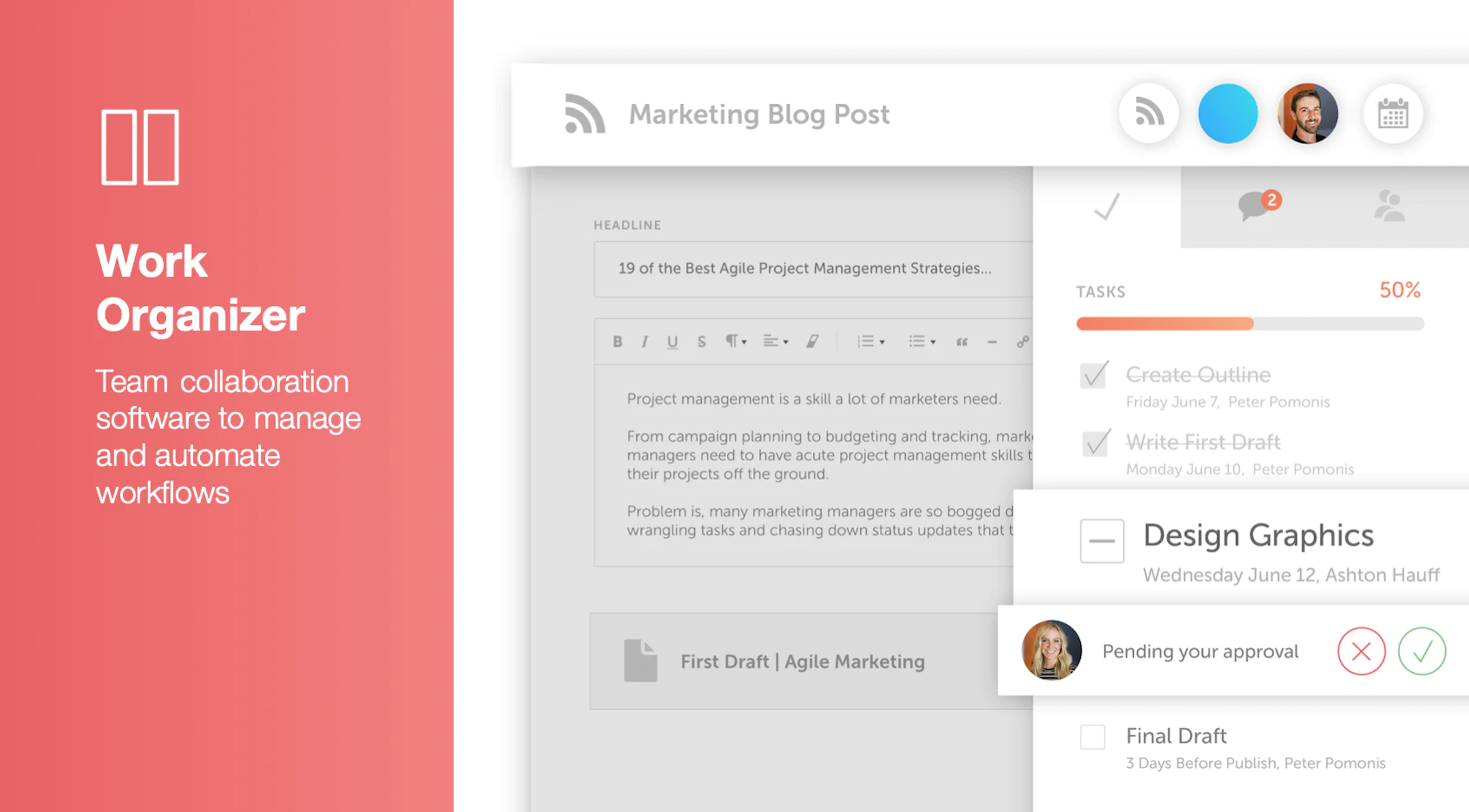
Screenshot of Calendar Organizer: Visualizes everything in real time, and shows every project on a unified calendar of record. Helps to keep stakeholders in the know and pivot quickly when priorities change.Screenshot of Content Organizer: Eliminates content bottlenecks from idea to promotion. Optimizes the editorial process, and centralizes publishing and promotion by connecting marketing tools.Screenshot of Work Organizer: Maximizes resources by implementing consistent, defined workflows to speed up production and identify how urgent changes impact proactively planned work.Screenshot of Asset Organizer: Catalogs and maintains control of brand assets with customized taxonomies to find, update, and share files. Folders and files can be shared with stakeholders to make sure work is up-to-date.Screenshot of Idea Board: Used to write down ideas, take in requests, and prioritize the projects that are up-next, before giving them a publish date and putting them on the calendar organizer.Screenshot of An AI-powered Marketing Intelligence Assistant that can be used to write first-draft copy, complete work faster, and generate new ideas.