TrustRadius: an HG Insights company

Save this comparison

Save this comparison

Add Product

Recommended Comparisons

    Overview
    ProductRatingMost Used ByProduct SummaryStarting Price

    CoSchedule

    Score10 out of 10
    N/ACoSchedule provides a content calendar, content optimization, and contentmarketing products, with users among 50,000 marketers worldwide, helping them organize their work, deliver projects on time, and prove marketing team value.

    $39

    per month

    Stockpress

    N/AN/AStockpress is a Digital Asset Management (DAM) platform that helps organizations organize, find, and share digital content from one centralized workspace. With unlimited users on every plan, AI search that finds content by what's actually in it, automatic tagging, and enterprise-grade security, Stockpress aims to make content easy to manage without the complexity — or cost — of traditional DAM software.

    $99

    per month

    Pricing
    CoScheduleStockpress
    Editions & Modules
    Starter
    $39
    per month
    Professional
    $59
    per month
    Custom
    Starting at $69
    per month
    Essential
    $99
    per month
    Pro
    $175
    per month
    Premium
    $225
    per month
    Offerings
    Pricing Offerings
    CoScheduleStockpress
    Free Trial
    NoYes
    Free/Freemium Version
    YesYes
    Premium Consulting/Integration Services
    NoNo
    Entry-level Setup FeeNo setup feeNo setup fee
    Additional Details—Stockpress is priced by storage, not by the number of users. Every paid plan includes unlimited users, unlimited admins, unlimited teams, and unlimited user roles at no additional cost. Pricing displayed is for an annual commitment, billed monthly. Pro and Premium plans offer multiple storage tiers (500 GB to 3 TB for Pro, 500 GB to 10 TB for Premium), so teams can choose the storage that fits their library size. There are no setup fees, no onboarding charges, and no per-seat licensing fees at any tier. Stockpress also offers a free plan with unlimited users and 3 GB of storage — no credit card required — so teams can evaluate the platform before committing to a paid plan. Nonprofit organizations qualify for a 30% discount across all paid plans.
    More Pricing Information
    Best Alternatives
    CoScheduleStockpress
    Small Businesses
    Sendible
    Score6.8 out of 10
    Adobe Bridge
    Score8.7 out of 10
    Medium-sized Companies
    Emplifi
    Score8.9 out of 10
    Cloudinary
    Score9 out of 10
    Enterprises
    Salesforce Marketing Cloud Social Studio (discontinued)
    Score8.2 out of 10
    Acquia DAM (Widen)
    Score8.2 out of 10
    All AlternativesView all alternativesView all alternatives
    User Ratings
    CoScheduleStockpress
    Likelihood to Recommend
    10.0
    (11 ratings)
    -
    (0 ratings)
    Usability
    10.0
    (1 ratings)
    -
    (0 ratings)
    Support Rating
    9.0
    (2 ratings)
    -
    (0 ratings)
    User Testimonials
    CoScheduleStockpress
    Likelihood to Recommend
    CoSchedule
    CoSchedule is great for businesses or agencies who need an overview of all their marketing efforts, and who want to establish collaboration between multiple departments. The calendar view is one of the best we've worked with and makes it easy to see exactly what's happening. There is some slight clunkiness when it comes to admin-related tasks, and a few things aren't easy to find, but there's great support.
    Incentivized
    Read full review
    Stockpress
    No answers on this topic
    Pros
    CoSchedule
    • Best time to post is great at updating to when we get the most engagement by platform
    • Requeue tool to slate out additional posts for a given piece of content is a huge time saver
    • Aggregate analytics tool shows us a peek across our posts on a given platform that's actually easier to read than the platform itself
    Incentivized
    Read full review
    Stockpress
    No answers on this topic
    Cons
    CoSchedule
    • The platform seems sluggish as of late, likely as a result of the robust amount of data we are entering and the number of filters we're creating.
    • Social media scheduling exists, but we do run into publishing errors more often then we'd like.
    • Task templates when updated are not retroactive, so when you create projects for an entire year and then change a template, you need to go back and change them manually.
    Incentivized
    Read full review
    Stockpress
    No answers on this topic
    Usability
    CoSchedule
    The interface is very intuitive, from setting up social profiles, to posting, to tags, to optimizing for best day/time to post. It's super easy to scan the aggregate analytics. The calendar is very easy to grok at a glance, and the more advanced functionality is intuitive to set up.
    Incentivized
    Read full review
    Stockpress
    No answers on this topic
    Support Rating
    CoSchedule
    I didn't have to use their official support, but I can say that they put out a lot of content online to help users. Their YouTube page has quite an array of tutorial videos explaining how things work and how to get the most out of their tools. If you're struggling, before picking up a phone or blasting off an email, try searching for your problem on YouTube or their forums.
    Incentivized
    Read full review
    Stockpress
    No answers on this topic
    Alternatives Considered
    CoSchedule
    CoSchedule provides collaborative planning of projects. The calendar view is very well designed. Meetings and tasks can be scheduled and tracked easily. Whatever is being done, no matter how big the task/project is, it gives a bird-eye view of everything. Additionally, it also integrated very well with WordPress. Their customer service team is also very helpful.
    Incentivized
    Read full review
    Stockpress
    No answers on this topic
    Return on Investment
    CoSchedule
    • It has saved me about 1 hour per day to keep things organized from Asana to WordPress.
    • By not having a functioning Google Doc import feature, it costs me about 30 minutes for each blog post to copy paste all the content, images, etc.
    • By bundling too many features into their plans, many of which we don't use (e.g. social media scheduling), we lose a little ROI because we are not using the full feature set. We use and prefer Buffer for social media, so when CoSchedule raised their price $40+ per month on features we would not be using, that hurt.
    Incentivized
    Read full review
    Stockpress
    No answers on this topic
    ScreenShots

    CoSchedule Screenshots

    Screenshot of The calendar shows blog posts, emails, social messages, events and tasks together, color coded by sub-calendar.Screenshot of The social composer, with a preview of how the post will appear on Instagram.Screenshot of A blog project with its social campaign. Messages are scheduled relative to the post’s publish date.Screenshot of Social Inbox collects comments, direct messages and mentions from connected social profiles, with tags and internal discussions for the team.Screenshot of ReQueue groups evergreen posts and reshares them to fill open slots in the schedule.Screenshot of An analytics dashboard showing engagement over time, engagement by network and impressions by content type.

    Stockpress Screenshots

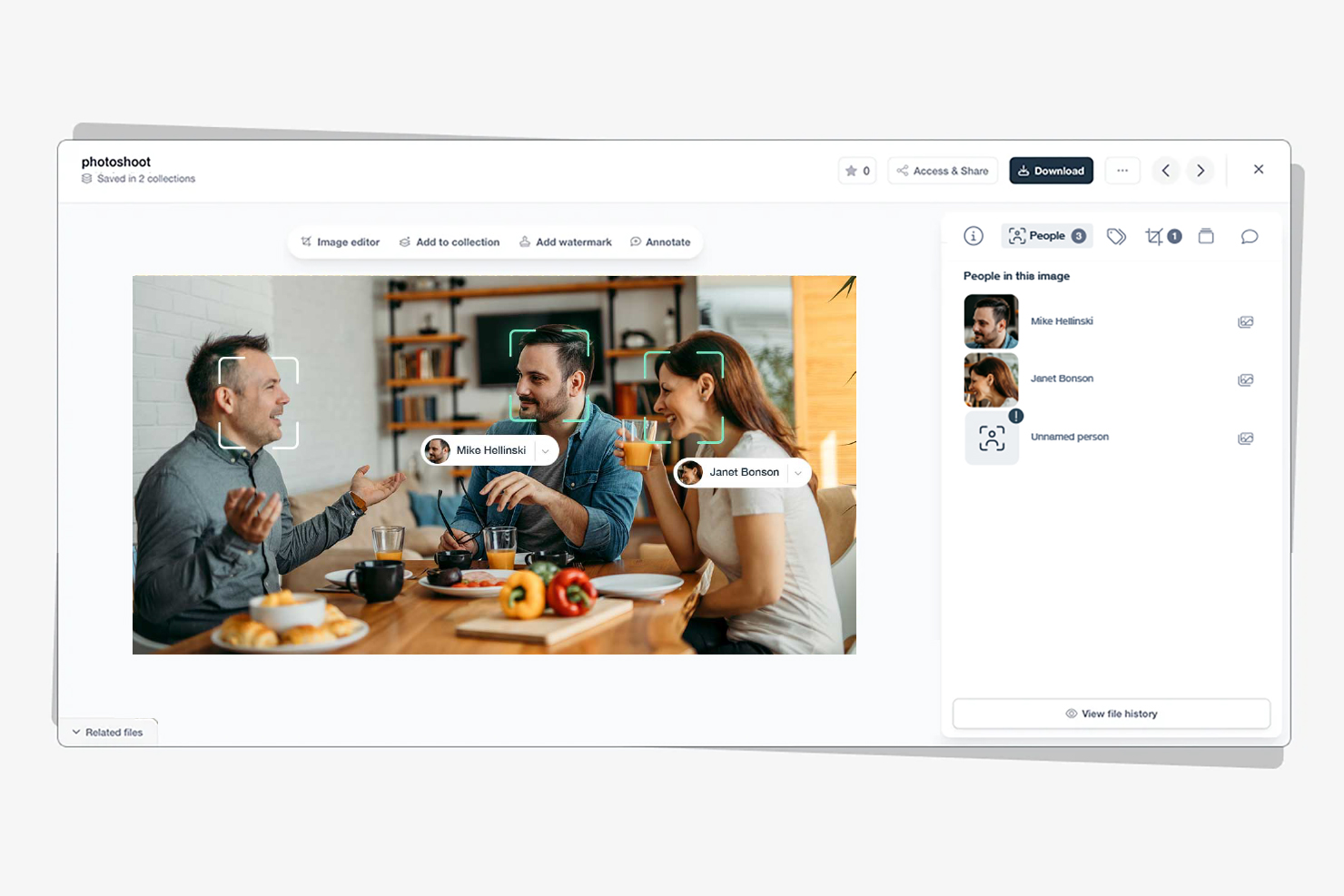
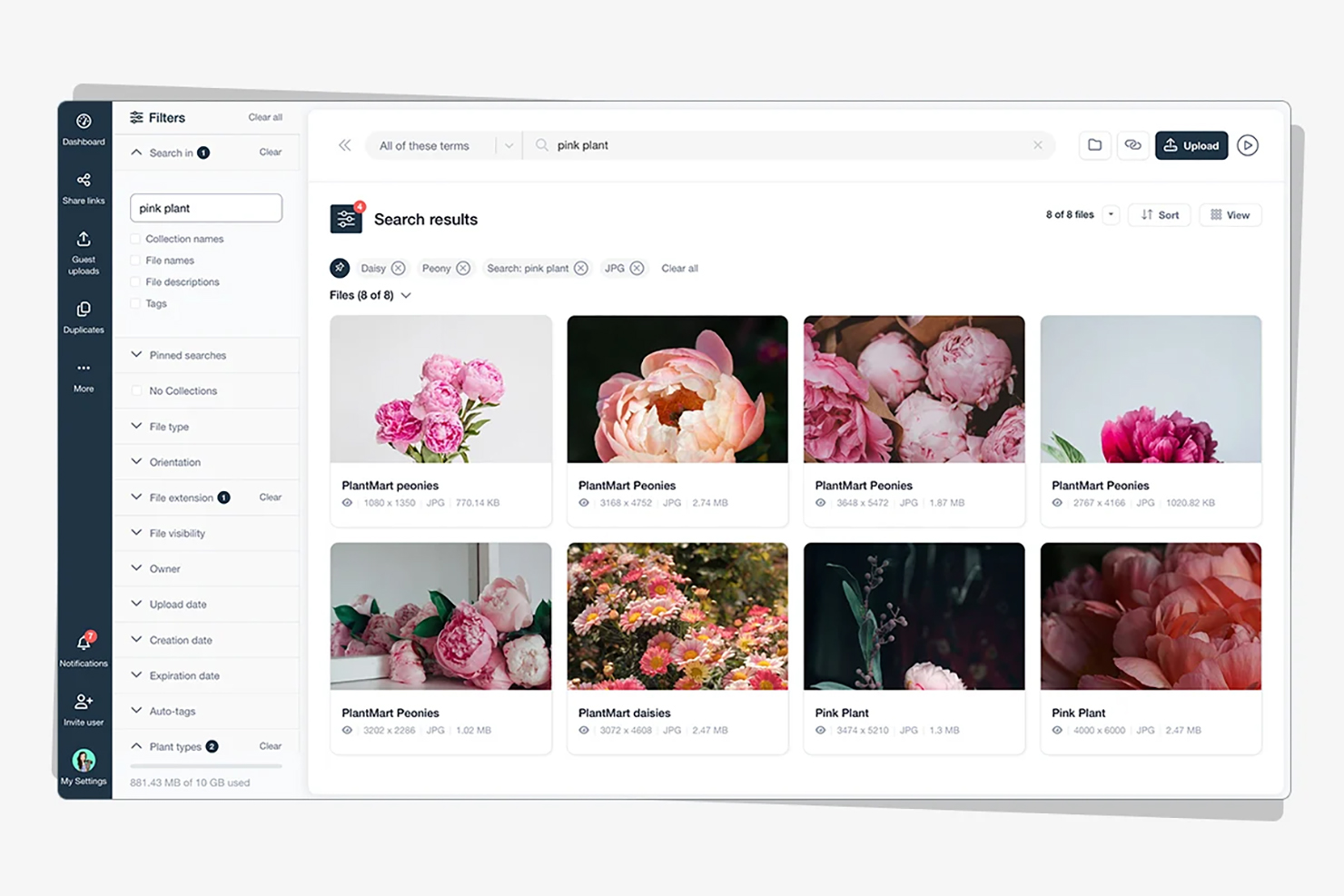
    Screenshot of where to organize assets into Collections to keep a library structured, accessible, and easy to navigate for every team member and external partner.Screenshot of Dashboard: A personalized workspace overview — recent files, favorite Collections, notifications, and quick access to everything your team needs.Screenshot of Facial recognition: Tag a face once and Stockpress finds that person across your entire photo library — instantly, across thousands of images.Screenshot of Image editor: Remove backgrounds, resize for any channel, and make quick edits without leaving Stockpress or opening external software.Screenshot of Search: Find any asset by describing what you're looking for — AI-powered search understands content, not just filenames or tags.