Datto Autotask PSA vs. Projectworks

Overview
ProductRatingMost Used ByProduct SummaryStarting Price
Autotask PSA
Score 8.0 out of 10
N/A
Autotask PSA is designed as a complete IT Business Management Platform for MSPs, now from Datto (resulting from the Autotask merger with Datto in 2017).N/A
Projectworks
Score 9.0 out of 10
N/A
Projectworks is professional services automation software built for consulting firms. As a project intelligence platform, Projectworks connects pipeline, resourcing, time tracking, invoicing, and reporting in one live system. It is designed specifically for engineering, architecture, software development, and management consulting. The cloud-based PSA…
$190
per month for 10 users (minimum)
Pricing
Datto Autotask PSAProjectworks
Editions & Modules
No answers on this topic
Build
$19
per month per user
Scale
$27
per month per user
Unleash
$45
per month per user
Offerings
Pricing Offerings
Autotask PSAProjectworks
Free Trial
NoYes
Free/Freemium Version
NoNo
Premium Consulting/Integration Services
NoNo
Entry-level Setup FeeNo setup fee$1,000 (starting cost for implementation)
Additional DetailsThe minimum number of users is 10. There is a 10% discount for annual pricing.
More Pricing Information
Community Pulse
Datto Autotask PSAProjectworks
Best Alternatives
Datto Autotask PSAProjectworks
Small Businesses
Teamwork.com
Teamwork.com
Score 8.8 out of 10
Teamwork.com
Teamwork.com
Score 8.8 out of 10
Medium-sized Companies
Teamwork.com
Teamwork.com
Score 8.8 out of 10
Teamwork.com
Teamwork.com
Score 8.8 out of 10
Enterprises
Planview AdaptiveWork
Score 8.0 out of 10
Planview AdaptiveWork
Score 8.0 out of 10
All AlternativesView all alternativesView all alternatives
User Ratings
Datto Autotask PSAProjectworks
Likelihood to Recommend
10.0
(30 ratings)
-
(0 ratings)
Likelihood to Renew
9.0
(1 ratings)
-
(0 ratings)
Usability
9.0
(2 ratings)
-
(0 ratings)
Support Rating
8.4
(4 ratings)
-
(0 ratings)
User Testimonials
Datto Autotask PSAProjectworks
Likelihood to Recommend
Kaseya
In my opinion, Datto Autotask is exceptionally complicated to set up, manage, and use on a daily basis. I would think the target market for this product would be someone managing a team of 20 - 50 people, possibly more. In my experience, for it to run properly you will need to dedicate at least half an FTE to running this product in an organization of that size per month. I would not recommend it for companies with less than 10 people or for companies that value quick communication with their clients. I would not recommend it for companies using Datto's RMM product. The integration exists, but it is clearly a bolt-on. They were not developed together and they are slow to talk to each other. Frequently you cannot add details from RMM sessions into the PSA without manually copying the ticket number, and if the ticket is more than a week old, then you can't even find it with the ticket number.
Read full review
Spiderworks
No answers on this topic
Pros
Kaseya
  • The graphical calculations on time spent on requests, how long they were open for, who worked on a ticket last.
  • Grouping by priority so you can determine easier what needs to be addressed sooner rather then later. This also helps if Account Management has conversations a technician is not aware of so they can prioritize efficiently.
  • The email updates that are sent out to the technicians so they are aware of upcoming or stale tickets.
Read full review
Spiderworks
No answers on this topic
Cons
Kaseya
  • The GUI is a little dated.
  • Some integrations are limited for not being a Datto product.
  • While not as complex to set up as Connectwise, it definitely requires some serious thought during the initial setup.
  • Email processing could offer more options for parsing keywords and allow for more automation.
  • The mobile app is just not worth using in my experience.
Read full review
Spiderworks
No answers on this topic
Likelihood to Renew
Kaseya
After using multiple products on the market, Autotask was intuitive and easy to manage.
Read full review
Spiderworks
No answers on this topic
Usability
Kaseya
Datto Autotask PSA is a full featured product that can do almost anything you need. There is a significant learning curve to get started which requires several hours spent in product training. Additionally, several hours / days are needed to get clients imported, contracts configured, and integrations implemented. Once the setup and user training is complete, the product is very functional, but it's imperative to not get overwhelmed when starting out.
Read full review
Spiderworks
No answers on this topic
Support Rating
Kaseya
They are fairly quick at returning a response to a problem and have been able to fix all issues for the most part.
Read full review
Spiderworks
No answers on this topic
Alternatives Considered
Kaseya
The portion of Autotask that we've used other companies for prior to using Autotask is the Endpoint Management. The Autotask Endpoint Management (AEM) portal integrates perfectly with their PSA/CRM tools. It's alerting features are much better than the above software as there aren't a bunch of superfluous and unneeded alerts. Instead, it only alerts for things that you specify that you want. Alerts aside, for the PSA/CRM, I don't have much to compare it to as Autotask was the first PSA we tried. It's hard to imagine a PSA having more features or doing a better job than Autotask.
Read full review
Spiderworks
No answers on this topic
Return on Investment
Kaseya
  • We were able to identify the profitability of our entire client base.
  • We identified a loss of over 1 million dollars for time unbilled consultancy fees using metrics derived from Autotask.
  • Autotask helped us serve our client base in a professional manner, it's like having an entire department at your finger tips.
  • Autotask is the heartbeat of our operation.
Read full review
Spiderworks
No answers on this topic
ScreenShots

Projectworks Screenshots

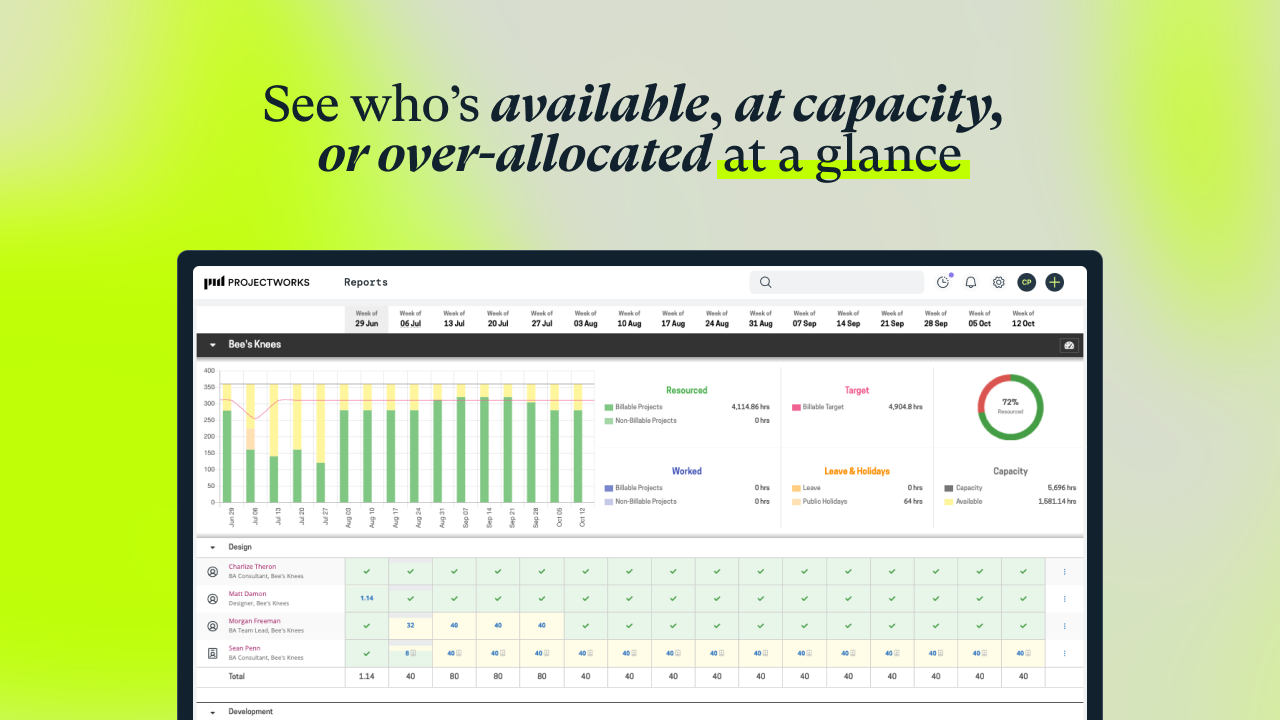
Screenshot of a visualization that helps to understand capacity, who is available, and when more staff will be needed for work coming down the pipeline. Tag and filter staff by skills and certifications to help make the right staffing decisions.Screenshot of an example timesheet built for professional services firms. The timecode setup is flexible, to enable users to track how time is spent on projects at any level of detail.Screenshot of the interface for tracking project financials in real-time. This helps prevent projects from going over budget by always knowing their current financial status.Screenshot of a display showing how much of the budget has been burned through actual time spent, as well as what is planned. This lets users know when a project is going over budget. These forecasts can be used to set a billing schedule for fixed-price projects, and a percentage mode to support percentage-based billing. Invoicing runs can be started from the forecasts screen.Screenshot of an example invoice, which can be based on a timesheet (time and material / T&M), fixed price engagements, or percentage-based billing. It integrates with accounting systems.Screenshot of where to track actuals and see where a project will land against the project budget.