DbVisualizer is a universal database client and SQL tool for developers, analysts, DBAs, data engineers, and anyone who works with data, from beginner developers and startups to professional teams managing complex database environments. It provides a graphical interface for exploring database structures, managing schemas and database objects, and running SQL queries across multiple database systems through JDBC drivers, including MySQL, PostgreSQL, SQL Server,…
$0
Jedox
Score8.8 out of 10
N/A
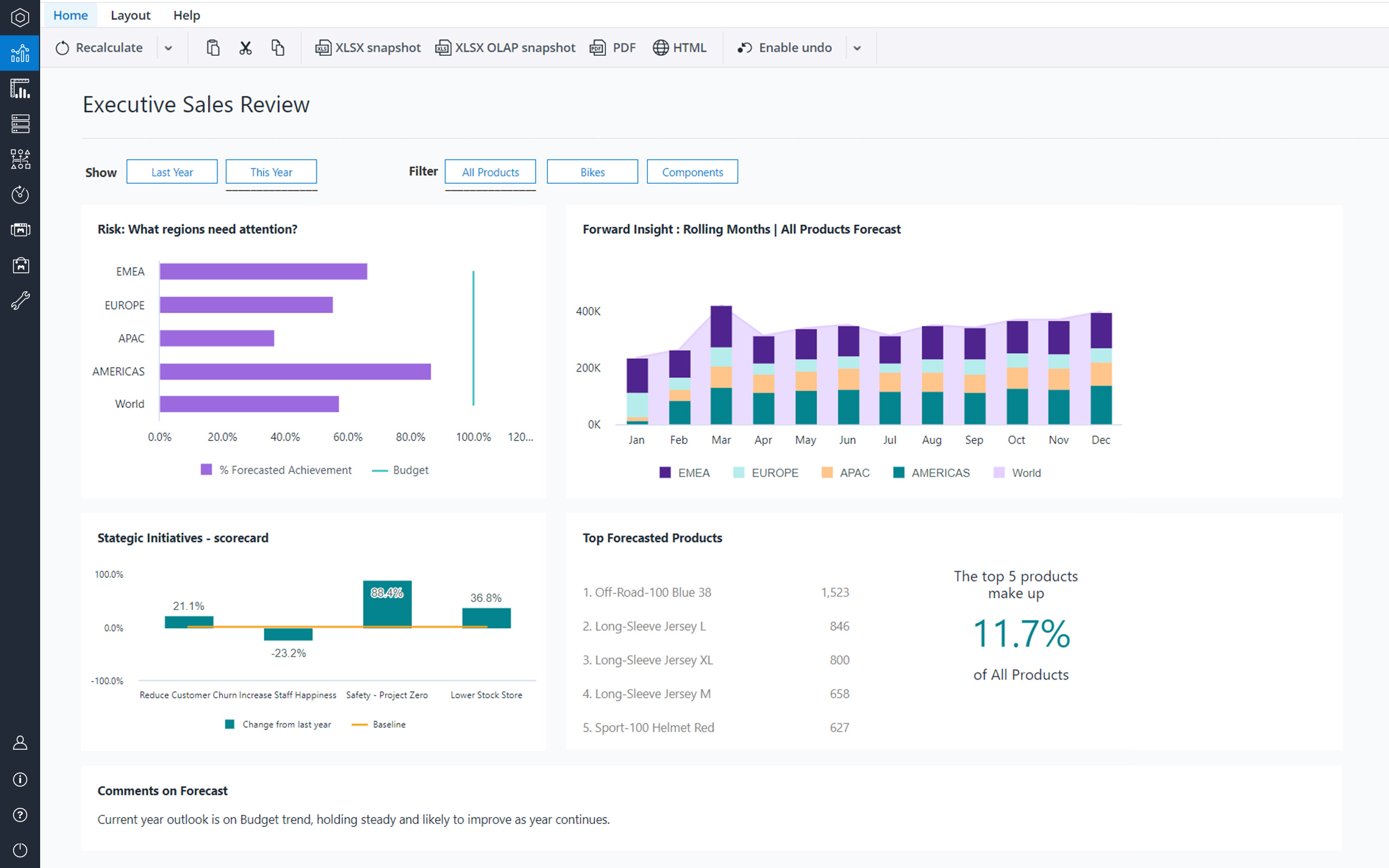
Jedox is a Business Intelligence and Corporate Performance Management solution. According to the vendor, their solution’s unified planning, analysis and reporting empowers decision makers from finance, sales, purchasing and marketing. Additionally, the vendor says this solution helps business users work smarter, streamline business collaboration, and make insight-based decisions with confidence. The vendor also says 1,900 organizations in 127 countries are using Jedox for real-time planning…
N/A
Pricing
DbVisualizer
Jedox
Editions & Modules
DbVisualizer Free
$0
DbVisualizer Pro with Basic support - Renewal
$89
per year per user
DbVisualizer Pro with Premium support - Renewal
$119
per year per user
DbVisualizer Pro with Basic support
$199
per year per user
DbVisualizer Pro with Premium support
$229
per year per user
No answers on this topic
Offerings
Pricing Offerings
DbVisualizer
Jedox
Free Trial
Yes
Yes
Free/Freemium Version
Yes
Yes
Premium Consulting/Integration Services
No
Yes
Entry-level Setup Fee
Optional
No setup fee
Additional Details
New license cost includes a perpetual license, software upgrades and support for the length of the term. 1, 2 & 3 year terms are offered. Once license expires the user may access all Pro versions released before the license expiry indefinitely. To gain access to Pro versions released after the license expired, license renewal is offered. Volume discounts apply to both new and renewal licenses.
Seamlessly querying PostgreSQL/PostGIS, Oracle, SQL Server, and SQLite from one interface without switching tools. The intelligent autocomplete and schema browsing make it ideal for writing queries and understanding unfamiliar databases. Complex performance tuning, deep monitoring, and automated backup/recovery require specialized DBA tools. Performance degrades with tens or hundreds of thousands of rows; command-line tools or ETL solutions are better suited to bulk data processing.
A de minimis incentive was given to thank the reviewer for their time. The incentive was not used to bias or drive a particular response, nor was the incentive contingent on a positive endorsement. More Info
Best suited for financial consolidation and / or as a highly customized and compact EPM / BI solution (up to 100 CCU) with individual workflows, planning and reporting functionalities, with moderate number of users (no restrictions for any industry, all industries are covered well). It also has advanced reporting & data analysis requirements and provides an integration and reporting layer of imported data from different external systems (via ETL). It can help with migrating your legacy Excel-based business models to the Web. It is not well suited for Enterprise BI applications with expecting >500 CCU (users at the same time working with the system) - this may cause serious performance issues, as all data is kept in RAM. Jedox is also less suited for applications with heavy document management requirements (document management is not an out of the box functionality in Jedox and rather requires custom development through custom widgets etc.).
A de minimis incentive was given to thank the reviewer for their time. The incentive was not used to bias or drive a particular response, nor was the incentive contingent on a positive endorsement. More Info
Small, but noticeable: it would be nice to be able to highlight just one column of a data output for copy/paste by clicking on the column header (a feature some of us are accustomed to from SQL Server Management Studio)
Is there an ability to bulk import an excel file to a table in a connected SQL Server in DbVis? If so, I haven't figured that out yet. I still largely use Microsoft SSMS to import data to our team's personal SQL Server, but can easily query that server via DbVis)
(I really don't have any major complaints - our company has tried to steer users toward DBeaver for YEARS, which I cannot stand. DbVis knocks the beaver out of the water)
Diversity. Jedox can be applied to many different use cases from small to large deployments and from budgeting to enterprise class BI solutions. But rarely is one tool able to fulfill all of these requirements in one organisation. This value proposition can be complicated for prospective users.
Awareness. Jedox punches above its weight in capability and scalability, but not enough people have heard about it and therefore procurement processes can be drawn out as a result.
A de minimis incentive was given to thank the reviewer for their time. The incentive was not used to bias or drive a particular response, nor was the incentive contingent on a positive endorsement. More Info
It does what we need it for, which is manipulate data, check connections, visualize database structures, check on user rights, or even just version checks on the used databases. The 'type to get to table name' feature is often irrational in behaviour, which leads to frustration. The start-up time could be much better, and the UI changes between versions are sometimes a hassle for us when buttons are suddenly moved or their appearance changes. We use a wide variety of DBVis versions on customer installations (which use the once-bought version), and differences in the look and feel between versions sometimes slow us down.
To me Jedox deserves 10/10 because it is a consistent one-in-all platform with a modern look and feel. It is intuitive to use and allows you to make intuitive applications integrating traditional business intelligence with performance management functionality. It certainly has a short learning curve, especially for those that are familiar with MS Excel. An example: I've lost count but Jedox it is available in more than 25 languages. Another: Jedox does not require programming skills... it is developed to be used by the business.
Jedox has very few bugs. Reports are available through an Excel add-in, the web and/or mobile device (IOS/Android). In my opinion, availability also means high performance, not having to wait for the system to give you the required reports, analysis, dashboards instantly.
A de minimis incentive was given to thank the reviewer for their time. The incentive was not used to bias or drive a particular response, nor was the incentive contingent on a positive endorsement. More Info
Jedox support in general is a professional and fast responding team. An easy-to-use ticketing system is in place. Bug-related questions are solved fast (responses come usually in a few hours after the question), but some questions / tickets, that are not Jedox-related bugs (for example some advanced questions about Jedox functionality), may be forwarded to Application Management team for further processing and then it may take several days or even weeks to get a response here -> there is room for improvement here.
The implementation of SSO, SAML Authentication, HTTPS, Server splitting (Frontend / Backend servers) could be more standardized and made more user friendly to set up (e.g. via setup guide). Otherwise the implementation of Jedox is quick and simple when compared to other similar technologies.
[DbVisualizer] is pretty easy to use compared to IntelliJ because of it's simplicity. The performance is very good, it feels as good as a native application compared to the other two softwares I used for the same purpose. It's very cheaper compared to the other two tools and that's a big selling point.
A de minimis incentive was given to thank the reviewer for their time. The incentive was not used to bias or drive a particular response, nor was the incentive contingent on a positive endorsement. More Info
Calumo is similar product to Jedox. I have used it extensively in my previous role. It was a major contender when we evaluated a BI platform for NIDA. Calumo is a great product as well and it was a very close call. Where we found Jedox to be a better fit for NIDA was the ability to prepare dynamic reports with ease without the need to learn MDX which was used extensively by Calumo to make dynamic reports which expand or shrink based on the underlying data. Another major benefit we saw in Jedox was the whole ETL process could be managed within Jedox instead of doing it in SQL server which negates having a dedicated SQL specialist role when the scale expands.
A de minimis incentive was given to thank the reviewer for their time. The incentive was not used to bias or drive a particular response, nor was the incentive contingent on a positive endorsement. More Info
Scalability is often another word for speed. Given enough data, enough users or enough calculations, the tool becomes slower and slower. You will find that Jedox has a very high performance that can even be increased by the use of grafical cards. Other thaen that it does not only offer BI (looking back based on historical ERP data) but also allows you to look forward through integrated budgetting, planning, forecasting, workflow and collaboration. Not easy to find a tool that can support so much business functionality. So, also pretty scalable in that respect.
Financial budgeting and Forecasting are done in a centralized fashion in Jedox now instead of a decentralized excel based approach. A lot of cost savings and improved reliability
Easy to use self-help Dashboards and detailed reports
A de minimis incentive was given to thank the reviewer for their time. The incentive was not used to bias or drive a particular response, nor was the incentive contingent on a positive endorsement. More Info