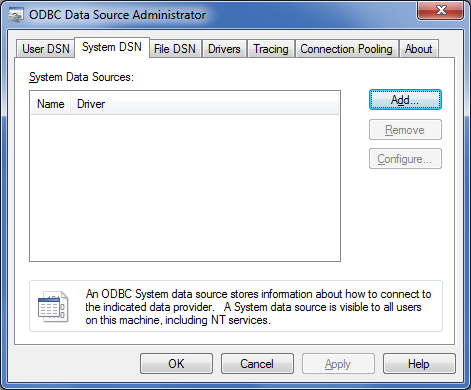
Devart ODBC Driver for Oracle provides a high-performance and feature-rich connectivity solution for ODBC-based applications to access Oracle databases from Windows, both 32-bit and 64-bit. Its full support for standard ODBC API functions and data types implemented in their driver makes the interaction of database applications with Oracle faster, easier and handy.
$349.95
Azure SQL Database
Score8.5 out of 10
N/A
Azure SQL Database is Microsoft's relational database as a service (DBaaS).
It is appropriate in all scenarios. It is perfect to connect with the database. Actually, nothing to dislike in functionality and performance. It is stand-alone and doesn't need any additional application to be installed.
A de minimis incentive was given to thank the reviewer for their time. The incentive was not used to bias or drive a particular response, nor was the incentive contingent on a positive endorsement. More Info
We have found it's a great alternative for making older legacy applications work with online databases instead of only on-premises databases. We've converted over a dozen applications this way, and it has allowed our clients to have a distributed workforce using their applications without incurring the expense of a complete application rewrite.
A de minimis incentive was given to thank the reviewer for their time. The incentive was not used to bias or drive a particular response, nor was the incentive contingent on a positive endorsement. More Info
A de minimis incentive was given to thank the reviewer for their time. The incentive was not used to bias or drive a particular response, nor was the incentive contingent on a positive endorsement. More Info
Maintenance is always an issue, so using a cloud solution saves a lot of trouble.
On premise solutions always suffer from fragmented implementations here and there, where several "dba's" keep track of security and maintenance. With a cloud database it's much easier to keep a central overview.
Security options in SQL database are next level... data masking, hiding sensitive data where always neglected on premise, whereas you'll get this automatically in the cloud.
A de minimis incentive was given to thank the reviewer for their time. The incentive was not used to bias or drive a particular response, nor was the incentive contingent on a positive endorsement. More Info
A de minimis incentive was given to thank the reviewer for their time. The incentive was not used to bias or drive a particular response, nor was the incentive contingent on a positive endorsement. More Info
One needs to be aware that some T-SQL features are simply not available.
The programmatic access to server, trace flags, hardware from within Azure SQL Database is taken away (for a good reason).
No SQL Agent so your jobs need to be orchestrated differently.
The maximum concurrent logins maybe an unexpected problem.
Sudden disconnects.
The developers and admin must study the capacity and tier usage limits https://docs.microsoft.com/en-us/azure/azure-subscription-service-limits otherwise some errors or even transaction aborts never seen before can occur.
Only one Latin Collation choice.
There is no way to debug T-SQL ( a big drawback in my point of view).
A de minimis incentive was given to thank the reviewer for their time. The incentive was not used to bias or drive a particular response, nor was the incentive contingent on a positive endorsement. More Info
A de minimis incentive was given to thank the reviewer for their time. The incentive was not used to bias or drive a particular response, nor was the incentive contingent on a positive endorsement. More Info
The interfaces are intuitive once you are familiar with all the functions. The ability to use different tools to interact with the platform, such as directly via a browser or code editors such as VS Code or Visual Studio is a great option and allows for integrating withn the project and other testing and developing tools.
A de minimis incentive was given to thank the reviewer for their time. The incentive was not used to bias or drive a particular response, nor was the incentive contingent on a positive endorsement. More Info
A de minimis incentive was given to thank the reviewer for their time. The incentive was not used to bias or drive a particular response, nor was the incentive contingent on a positive endorsement. More Info
We give the support a high rating simply because every time we've had issues or questions, representatives were in contact with us quickly. Without fail, our issues/questions were handled in a timely matter. That kind of response is integral when client data integrity and availability is in question. There is also a wealth of documentation for resolving issues on your own.
A de minimis incentive was given to thank the reviewer for their time. The incentive was not used to bias or drive a particular response, nor was the incentive contingent on a positive endorsement. More Info
Devart Driver ODBC for MySQL is best with no known issues. It is stand-alone. It supports SSH/SSL communication. supports HTTP / HTTPS tunneling. It is available for a variety of operating systems like Windows, Mac, and Linux. It is available for 32-bit and 64-bit environments. It supports all renowned programming languages. it supports multiple languages. It allows various data types.
A de minimis incentive was given to thank the reviewer for their time. The incentive was not used to bias or drive a particular response, nor was the incentive contingent on a positive endorsement. More Info
We moved away from Oracle and NoSQL because we had been so reliant on them for the last 25 years, the pricing was too much and we were looking for a way to cut the cord. Snowflake is just too up in the air, feels like it is soon to be just another line item to add to your Azure subscription. Azure was just priced right, easy to migrate to and plenty of resources to hire to support/maintain it. Very easy to learn, too.
A de minimis incentive was given to thank the reviewer for their time. The incentive was not used to bias or drive a particular response, nor was the incentive contingent on a positive endorsement. More Info
Our organization has been largely moving into agile development life cycle and continuous integration is a key towards agile success. Automation is the first step towards continuous integration. We are really happy using Devart as a part of our automation engineering. It definitely contributes towards overall success.
We are trying to extend the usage. The development team has also shown interest towards the usage.
This is a cost effective tool. It is worth the price.
A de minimis incentive was given to thank the reviewer for their time. The incentive was not used to bias or drive a particular response, nor was the incentive contingent on a positive endorsement. More Info