Device42 vs. Microsoft System Center vs. vRealize Operations (discontinued)

Overview
ProductRatingMost Used ByProduct SummaryStarting Price
Device42
Score 6.4 out of 10
N/A
Device42 is a comprehensive, agentless discovery system for Hybrid IT. Device42 can continuously discover, map, and optimize infrastructure and applications across data centers and cloud, in order to provide an accurate views of the IT ecosystem. Device42 intelligently groups discovered workloads by application affinities, so as to reduce the effort required to create move groups, capturing all communications. The vendor boasts customers in more than 60 countries including Global 2000…
$1,449
1-1K IPs
Microsoft System Center
Score 8.3 out of 10
N/A
Microsoft System Center Suite is a family of IT management software for network monitoring, updating and patching, endpoint protection with anti-malware, data protection and backup, ITIL- structured IT service management, remote administration and more. It is available in two editions: standard and datacenter. Datacenter provides unlimited virtualization for high density private clouds, while standard is for lightly or non-virtualized private cloud workloads.
$1,323
per month
vRealize Operations (discontinued)
Score 9.1 out of 10
N/A
vRealize Operations, or Aria Operations, provided simplified and automated IT Operations Management across private, hybrid, and multi-cloud environments, and visibility into the entire tech stack, including all physical, virtual, and cloud infrastructure components. The product is no longer available for sale.N/A
Pricing
Device42Microsoft System CentervRealize Operations (discontinued)
Editions & Modules
Core 1-100 Devices
$1,449
1-1K IPs
Core 101-500 Devices
$2,999
1K-5K IPs
Core 501-1000 Devices
$4,999
5K-10K IPs
Core 1001-2500 Devices
$9,999
10K-25K IPs
Core 2500+ Devices
Request Quote
25K+ IPs
Standard Edition
$1323
Datacenter Edition
$3607
No answers on this topic
Offerings
Pricing Offerings
Device42Microsoft System CentervRealize Operations (discontinued)
Free Trial
YesNoNo
Free/Freemium Version
NoNoNo
Premium Consulting/Integration Services
NoNoNo
Entry-level Setup FeeNo setup feeNo setup feeNo setup fee
Additional DetailsPricing for each customer requesting a SaaS installation/deployment is negotiated on a case by case basis, and depends on many factors
More Pricing Information
Community Pulse
Device42Microsoft System CentervRealize Operations (discontinued)
Considered Multiple Products
Device42
Chose Device42
The mean features that we can talk is that Device42 is agentless, and the another software requires the agent instalation in every assets.
Microsoft System Center

No answer on this topic

vRealize Operations (discontinued)
Chose vRealize Operations (discontinued)
SCOM was quite overwhelming when we first set up a POC for it. There was just too much for one person to handle. With vROPs I can manage the product and provide the support needed for my environment. We also have a Solarwinds environment that provides us with a level of detail …
Best Alternatives
Device42Microsoft System CentervRealize Operations (discontinued)
Small Businesses

No answers on this topic

No answers on this topic

Hyper-V
Hyper-V
Score 8.4 out of 10
Medium-sized Companies
Microsoft System Center
Score 8.3 out of 10

No answers on this topic

Red Hat OpenShift
Red Hat OpenShift
Score 9.2 out of 10
Enterprises
Microsoft System Center
Score 8.3 out of 10

No answers on this topic

Red Hat OpenShift
Red Hat OpenShift
Score 9.2 out of 10
All AlternativesView all alternativesView all alternativesView all alternatives
User Ratings
Device42Microsoft System CentervRealize Operations (discontinued)
Likelihood to Recommend
9.6
(11 ratings)
9.0
(21 ratings)
10.0
(6 ratings)
Usability
-
(0 ratings)
9.0
(2 ratings)
8.0
(1 ratings)
Support Rating
-
(0 ratings)
8.0
(1 ratings)
8.0
(3 ratings)
User Testimonials
Device42Microsoft System CentervRealize Operations (discontinued)
Likelihood to Recommend
Device42
1. Installbase management feature allows us to retire our old spreadsheet methods for tracking the data in favour of a singular database with some excellent reporting.2. We are also providing data connectivity from the WAN Providers and keeping all connections in Device42 gives us the ability have documentation of all connection that are made. 3. Ever changing and growing inventory that needs to be carefully tracked and inventoried. We find this so simple to use that we spend much less time than we used to on tracking these items.
Read full review
Microsoft
For companies with more than 10 Windows devices and needing to standardize the OS, AV, access, share resources, and install software. SCCM is the way to go. This software is unnecessary if the business is all remote users and not in an office-type setting. There are cloud offerings or none to accomplish what a business needs.
Read full review
Discontinued Products
With the introduction of API-based event alerts, there is no need for a proxy, which is a good option. Its ability to manage infra on a real-time basis is a good option that helps monitor, administer and troubleshoot virtual machines.
Read full review
Pros
Device42
  • Device42 can discover physical and virtual servers as well as your network devices
  • Device42 can give resource utilization details like CPU, Memory and Storage
  • Device42 can give dependency mapping
  • Device42 can give inbound and outbound communication details
  • Device42 can create Affinity Groups (Move Groups)
  • Device42 can recommend the Cloud platform to which you can migrate your infrastructure.
Read full review
Microsoft
  • Allows the grouping of devices by user.
  • Allows controlling updates being deployed to user devices.
  • Allows for the repurposing of machines by being able to load new or updated software on machines that already are in the system.
  • Allows us the ability to wipe a machine clean and restore it back to the configuration that was assigned the machine.
Read full review
Discontinued Products
  • Shows us where we can save on cost of keeping machines running, or boosting resources on VM's
  • the ability to plan deployments with scenario plans that can be customized over a specific timeline
  • reports that can be sent and shared with different teams or departments
Read full review
Cons
Device42
  • UI/UX is not up to the standards.
  • Can't mass update everything.
  • No export option for the sub components that have changed linked to the device they are assigned to
  • Plugins options are limited
  • Sometimes randomly times out my login forcing me to log in again.
Read full review
Microsoft
  • Needs web based storefront for requesting new software
  • Needs ability to manage the packaging work flow better
  • Sometimes is slow to download and there is no indication the entire catalog is being loaded, resulting in confused users not being able to find common software in the available list.
Read full review
Discontinued Products
  • There are less space for customization.
  • Cannot use for OS monitoring.
  • Some option are very complex like getting an ideal VM report.
Read full review
Usability
Device42
No answers on this topic
Microsoft
It is not user-friendly for the most part. With IT infrastructure, sometimes it cannot handle excess requests. Every few months, you will need an upgrade in terms of server resources to keep up with incoming alerts and requests. This does not happen all of the time, but it does happen when there are too many requests.
Read full review
Discontinued Products
It has a good GUI to monitor real-time logs for cloud applications. This is quite a useful tool and preferred over most of the competitive applications in the market.
Read full review
Support Rating
Device42
No answers on this topic
Microsoft
If I had to dislike something about the system it would be how much it changes once you upgrade. This could be more of a problem of mine since I get used to one way and don't like it when it changes so much. I am enjoying the newest update, but it is a mess when you are actually going through the upgrades.
Read full review
Discontinued Products
The support is pretty good however some of the KB articles still reference different versions of the product so it can be hard to find answers to common questions
Read full review
Alternatives Considered
Device42
What I appreciate and love about Device42 is how everything links together from room layout,to server rack organisation,down to all VMs and Business applications. We are also able to get full value of our money and full visibility of our assets management process.
Read full review
Microsoft
We previously used a mix of FOG and Clonezilla to image machines. The biggest issues with these products is that changing one piece of the image required you to rebuild the entire image itself. These pieces of software also did not allow you to manage applications and Windows Updates, causing IT to have to constantly touch machines after they were imaged and update or manage them with a much more hands on approach.
Read full review
Discontinued Products
SCOM was quite overwhelming when we first set up a POC for it. There was just too much for one person to handle. With vROPs I can manage the product and provide the support needed for my environment. We also have a Solarwinds environment that provides us with a level of detail and alerting we have come to rely upon. vROPS takes it to another level because it links directly into vCenter to provide you with a complete picture of your virtual environment.
Read full review
Contract Terms and Pricing Model
Device42
No answers on this topic
Microsoft
No answers on this topic
Discontinued Products
Not involved in purchasing.
Read full review
Return on Investment
Device42
  • We use it for the mass updates. Because of which we save lots of time
  • It helps in making everything documented
  • With this system you can get any information about the location of the device, connected cables, additional information and statuses.
  • Inventory Management
Read full review
Microsoft
  • We have been able to automate our patch management, firmware and other security concerns.
  • We have a standardized "image" ensuring our setup is consistent across the enterprise. This alone has saved us in time to support and time to understand how to use our desktops.
Read full review
Discontinued Products
  • We believe that the ability to preplan deployments with vRealize has proven its return on investments.
  • Our troubleshooting time has been reduced with vrealize because its constantly collecting performance data. typically vrealize will tell us cause of fault before we can determine it ourselves.
Read full review
ScreenShots

Device42 Screenshots

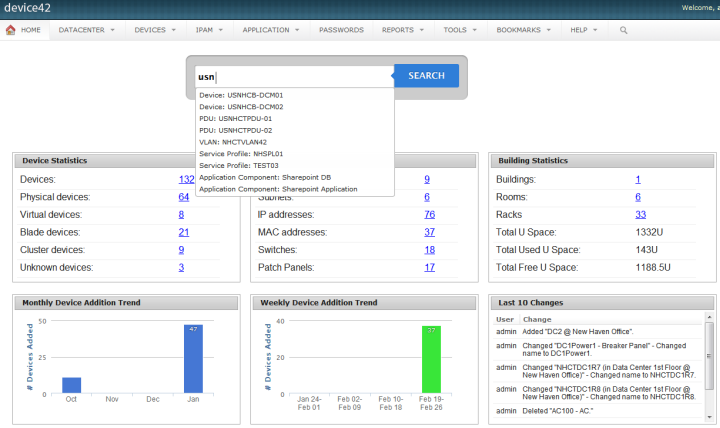
Screenshot of Drag and drop room layoutsScreenshot of Super easy search