Displayr is a survey data discovery and visualization tool, with free tools for publishing dashboards, reports and infographics (e.g. charts, and graphs) to the web or other repositories for sharing and demonstration, as well as support for analysis of large datasets (more than 1,000 rows and 100 column) on paid plans.
N/A
SAS Visual Analytics
Score7.8 out of 10
Enterprise companies (1,001+ employees)
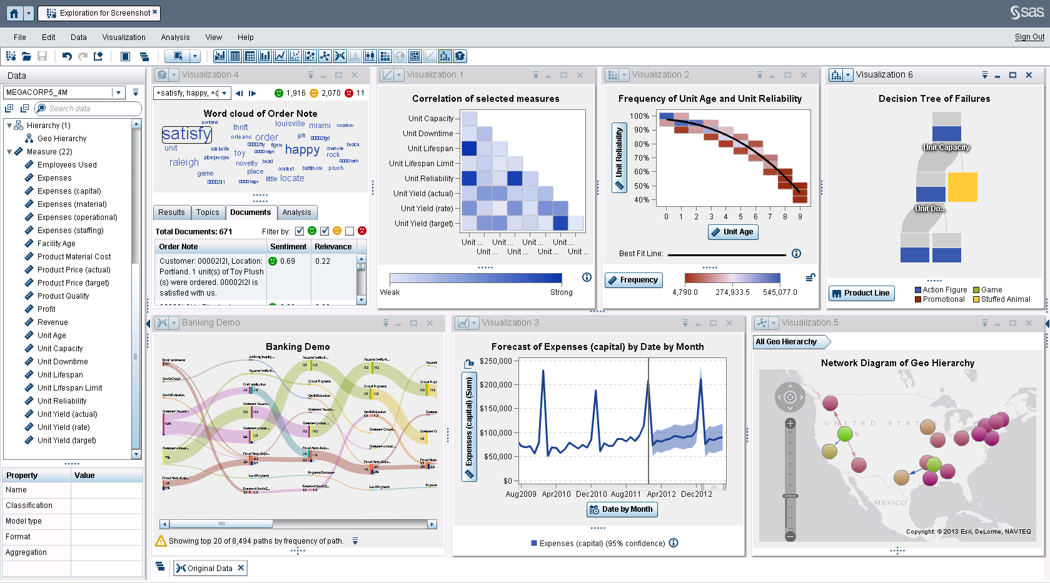
SAS Visual Analytics provides a complete platform for analytics visualization, enabling users to identify patterns and relationships in data that weren't initially evident. Interactive, self-service BI and reporting capabilities are combined with out-of-the-box advanced analytics so everyone can discover insights from any size and type of data, including text.
N/A
Pricing
Displayr
SAS Visual Analytics
Editions & Modules
No answers on this topic
SAS Visual Analytics for SAS Cloud
$0
Annual By Users: 5, 10, 20
Offerings
Pricing Offerings
Displayr
SAS Visual Analytics
Free Trial
No
Yes
Free/Freemium Version
No
No
Premium Consulting/Integration Services
No
Yes
Entry-level Setup Fee
No setup fee
No setup fee
Additional Details
—
SAS Visual Statistics and SAS Office Analytics are also available as add-ons.
More Pricing Information
Features
Displayr
SAS Visual Analytics
Ad-hoc Reporting
Comparison of Ad-hoc Reporting features of Displayr and SAS Visual Analytics
Feature
Displayr
8.8
1 Ratings
12% above category average
SAS Visual Analytics
8.8
12 Ratings
9% above category average
Drill-down analysis
9.01 Ratings
9.012 Ratings
Formatting capabilities
8.01 Ratings
8.012 Ratings
Integration with R or other statistical packages
10.01 Ratings
8.010 Ratings
Report sharing and collaboration
8.01 Ratings
10.011 Ratings
Report Output and Scheduling
Comparison of Report Output and Scheduling features of Displayr and SAS Visual Analytics
Feature
Displayr
10.0
1 Ratings
20% above category average
SAS Visual Analytics
9.2
12 Ratings
11% above category average
Publish to Web
10.01 Ratings
9.011 Ratings
Publish to PDF
10.01 Ratings
9.012 Ratings
Report Versioning
10.01 Ratings
9.09 Ratings
Report Delivery Scheduling
00 Ratings
10.011 Ratings
Delivery to Remote Servers
00 Ratings
9.06 Ratings
Data Discovery and Visualization
Comparison of Data Discovery and Visualization features of Displayr and SAS Visual Analytics
Displayr is perfectly suited for any insights or data people that understand the type of analysis they want to do, but don't know R code - or just want to get to results more quickly than coding themselves. It's probably not the best learning ground, if you've never done any quantitative analysis before, but then neither are traditional tools like SPSS or Q.
A de minimis incentive was given to thank the reviewer for their time. The incentive was not used to bias or drive a particular response, nor was the incentive contingent on a positive endorsement. More Info
I was in a meeting with the client and there I have to show them some analytic data to them. But I was confused about how I will manage to show big data to clients with accuracy. But then the SAS Visual Analytics software helps me in presenting accurate data at the moment and it was very presentable and through that, I got the deal for that business.
A de minimis incentive was given to thank the reviewer for their time. The incentive was not used to bias or drive a particular response, nor was the incentive contingent on a positive endorsement. More Info
The intuitive interface and menus make it easy to quickly learn Displayr and find the types of data transformation or analysis that we're looking to do.
The support level from Displayr's team is FIRST CLASS. Where othe platforms force you to an FAQ or AI chat bot, Displayr's team will jump in first hand, into our data, or on a live call, and help us run a new type of analysis or troubleshoot a problem.
The ability to work collaboratively, asynchronously and remotely, on the same data set and report is a really huge plus for us.
The in-built options for multivariate analysis cover 99.9% of anything we have - or will - ever need to run.
A de minimis incentive was given to thank the reviewer for their time. The incentive was not used to bias or drive a particular response, nor was the incentive contingent on a positive endorsement. More Info
Provides the flexibility to the end user to slice and dice the data.
Anyone can make predictive models with the help of in-built algorithms without the need to write a single line of code or knowledge of what's under the hood of algorithms.
The feature to simply ask a question related to data and getting a response in form of text, chart or graph is amazing.
A de minimis incentive was given to thank the reviewer for their time. The incentive was not used to bias or drive a particular response, nor was the incentive contingent on a positive endorsement. More Info
The new "glow-up" on the interface has helped make it a bit easier on the eye, but there are some features of working in the "three pane" browser that are a bit frustrating: especially having to 'rearrange' when resizing the window to look at another app simultaneously.
Such a small point, but being able to drag and move multiple elements in a table (eg drag two rows to the top) SIMULTANEOUSLY would help a bunch.
I don't think we take advantage of all the visualisation capabilities in Displayr, and perhaps an AI 'recommendation' engine that sees the data I'm working with and prompts either a specific visualisation, or additional analysis option I might use, would be great.
A de minimis incentive was given to thank the reviewer for their time. The incentive was not used to bias or drive a particular response, nor was the incentive contingent on a positive endorsement. More Info
SAS is relatively expensive when compared to other BI tools and requires a large amount of upfront fee which becomes an issue for smaller organizations.
UI for the dashboards looks a little date in comparison to competitors like Tableau and Microstrategy.
Integration with other open source software like Python needs to be built in.
A de minimis incentive was given to thank the reviewer for their time. The incentive was not used to bias or drive a particular response, nor was the incentive contingent on a positive endorsement. More Info
SAS really is the cutting edge in Business Intelligence. That is all they do! They are constantly coming out with new products, product upgrades, and their tech support is second to none. In addition, their support of Education has made our ability to acquire their product possible.
It's really quite intuitive, but the visual interface could be made a bit more easy to use (window/pane rescaling etc) and I think there could be more 'proactive prompts' to suggest features we're underutilising.
A de minimis incentive was given to thank the reviewer for their time. The incentive was not used to bias or drive a particular response, nor was the incentive contingent on a positive endorsement. More Info
SAS BI is good for creating reports and dashboards and then sharing it with the users. It also has ability to manage access to the reports and dashboards but somehow with most of the world moving to open source languages R, Python and Julia, SAS BI feels to be archaic in terms of feature set and integrations it allow[s]. Also, comparing it with other Business Intelligence tools like Tableau and Microsoft BI, the functionality of SAS BI is very limited and doesn't justify the pricing.
A de minimis incentive was given to thank the reviewer for their time. The incentive was not used to bias or drive a particular response, nor was the incentive contingent on a positive endorsement. More Info
When you call tech support, you are immediately routed to a person who can answer your question. Often they can answer on the spot. However, if they cannot, you are given a track number and then followed up with. There have been times when I have had multiple track numbers open and they will actually TRACK YOU DOWN to ensure that your problem has been resolved. Issues do not fall into black holes with SAS. They are also willing to do a WebEx with you to diagnose the problem by seeing your environment, which is always helpful.
SPSS (the last version I looked at) still requires much more underlying knowledge and coding ability to get where we want to be. That's not where we add value, so the speed and simplicity with which Displayr allows us to get the data analysis done, and move onto developing insight and delivering value is why I chose Displayr.
A de minimis incentive was given to thank the reviewer for their time. The incentive was not used to bias or drive a particular response, nor was the incentive contingent on a positive endorsement. More Info
I have used Crystal Reports, Jaspersoft and SQL Server Reporting Services (SSRS). I would recommended Business Intelligence over SSRS and Crystal Reports. SSRS is very SQL-centric and Crystal Reports is more of an end-user tool. I would recommend Jaspersoft over Business Intelligence for developing a seamless web-based reporting interface but I highly recommend Business Intelligence for end-user ad-hoc reporting.
A de minimis incentive was given to thank the reviewer for their time. The incentive was not used to bias or drive a particular response, nor was the incentive contingent on a positive endorsement. More Info
I think Displayr is quite expensive, but has the biggest impact on our P&L of any of our subscriptions, because it has unlocked our ability to deliver bigger, more complex analytic projects for clients - and hence grow our topline.
The ability to scale the license between years has also been a god-send as our team has gone up or down to deliver the level of quant work available to us.
There's also a bottom line efficiency driven by some of the speed of analysis that Displayr enables.
A de minimis incentive was given to thank the reviewer for their time. The incentive was not used to bias or drive a particular response, nor was the incentive contingent on a positive endorsement. More Info
A de minimis incentive was given to thank the reviewer for their time. The incentive was not used to bias or drive a particular response, nor was the incentive contingent on a positive endorsement. More Info