Eclipse is a free and open source integrated development environment (IDE).
N/A
Jedox
Score8.8 out of 10
N/A
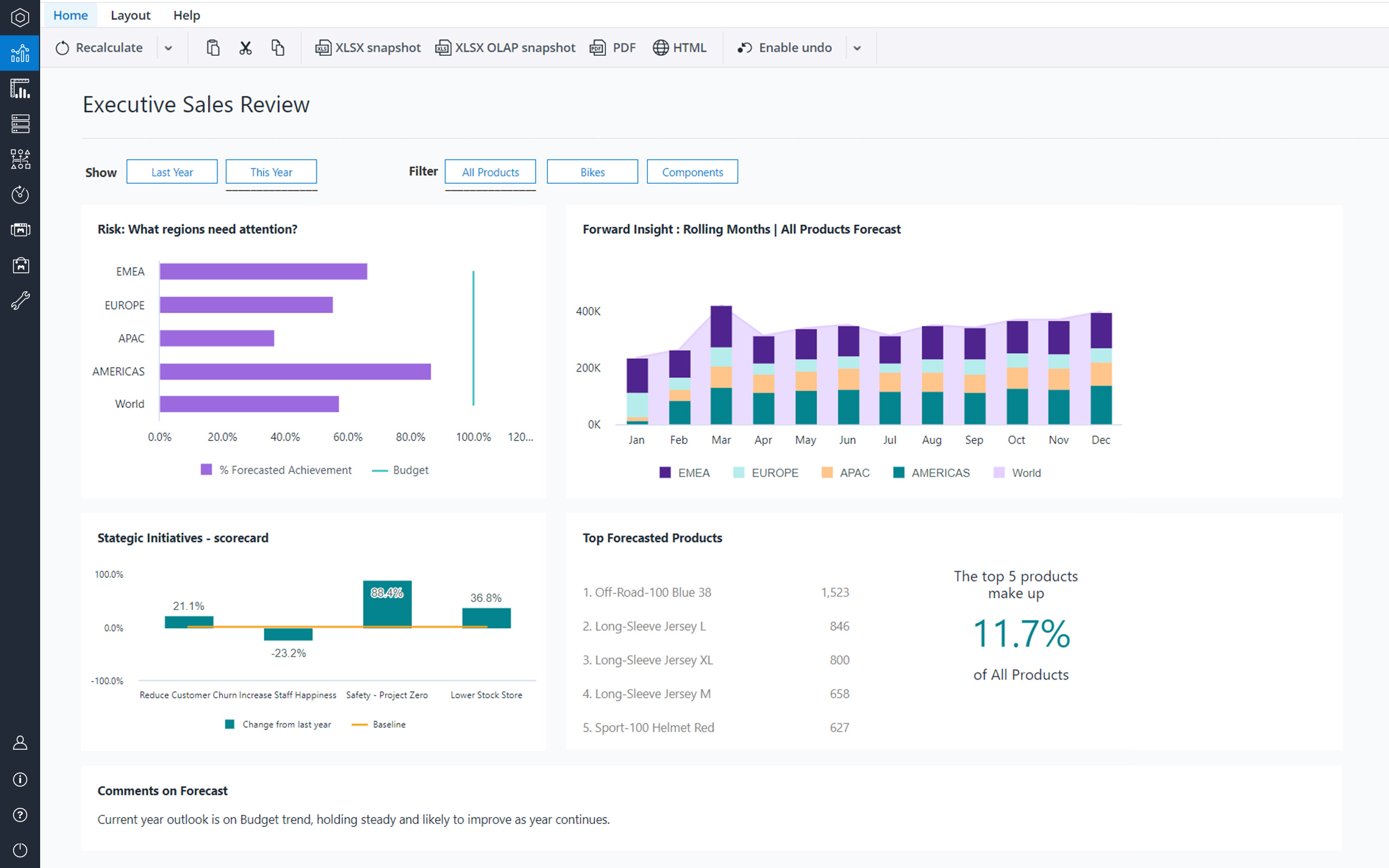
Jedox is a Business Intelligence and Corporate Performance Management solution. According to the vendor, their solution’s unified planning, analysis and reporting empowers decision makers from finance, sales, purchasing and marketing. Additionally, the vendor says this solution helps business users work smarter, streamline business collaboration, and make insight-based decisions with confidence. The vendor also says 1,900 organizations in 127 countries are using Jedox for real-time planning…
I think that if someone asked me for an IDE for Java programming, I would definitely recommend Eclipse as is one of the most complete solutions for this language out there. If the main programming language of that person is not Java, I don't think Eclipse would suit his needs[.]
A de minimis incentive was given to thank the reviewer for their time. The incentive was not used to bias or drive a particular response, nor was the incentive contingent on a positive endorsement. More Info
Best suited for financial consolidation and / or as a highly customized and compact EPM / BI solution (up to 100 CCU) with individual workflows, planning and reporting functionalities, with moderate number of users (no restrictions for any industry, all industries are covered well). It also has advanced reporting & data analysis requirements and provides an integration and reporting layer of imported data from different external systems (via ETL). It can help with migrating your legacy Excel-based business models to the Web. It is not well suited for Enterprise BI applications with expecting >500 CCU (users at the same time working with the system) - this may cause serious performance issues, as all data is kept in RAM. Jedox is also less suited for applications with heavy document management requirements (document management is not an out of the box functionality in Jedox and rather requires custom development through custom widgets etc.).
A de minimis incentive was given to thank the reviewer for their time. The incentive was not used to bias or drive a particular response, nor was the incentive contingent on a positive endorsement. More Info
A de minimis incentive was given to thank the reviewer for their time. The incentive was not used to bias or drive a particular response, nor was the incentive contingent on a positive endorsement. More Info
While the DB integration is broad (many connectors) it isn't particularly deep. So if you need to do serious DB work on (for example) SQL Server, it is sometimes necessary to go directly to the SQL Server Studio. But for general access and manipulation, it is ok.
The syntax formatting is sometimes painful to set up and doesn't always support things well. For example, it doesn't effectively support SCSS.
Using it for remote debugging in a VM works pretty well, but it is difficult to set up and there is no documentation I could find to really explain how to do it. When remote debugging, the editor does not necessarily integrate the remote context. So, for example, things like Pylint don't always find the libraries in the VM and display spurious errors.
The debugging console is not the default, and my choice is never remembered, so every time I restart my program, it's a dialog and several clicks to get it back. The debugging console has the same contextual problems with remote debugging that the editor does.
A de minimis incentive was given to thank the reviewer for their time. The incentive was not used to bias or drive a particular response, nor was the incentive contingent on a positive endorsement. More Info
Diversity. Jedox can be applied to many different use cases from small to large deployments and from budgeting to enterprise class BI solutions. But rarely is one tool able to fulfill all of these requirements in one organisation. This value proposition can be complicated for prospective users.
Awareness. Jedox punches above its weight in capability and scalability, but not enough people have heard about it and therefore procurement processes can be drawn out as a result.
I love this product, what makes it one of the best tool out in the market is its ability to function with a wide range of languages. The online community support is superb, so you are never stuck on an issue. The customization is endless, you can keep adding plugins or jars for more functionalities as per your requirements. It's Free !!!
A de minimis incentive was given to thank the reviewer for their time. The incentive was not used to bias or drive a particular response, nor was the incentive contingent on a positive endorsement. More Info
It has everything that the developer needs to do the job. Few things that I have used in my day-to-day development 1. Console output. 2. Software flash functionality supporting multiple JTAG vendors like J-LINK. 3. Debugging capabilities like having a breakpoint, looking at the assembly, looking at the memory etc. this also applies to Embedded boards. 4. Plug-in like CMake, Doxygen and PlantUML are available.
A de minimis incentive was given to thank the reviewer for their time. The incentive was not used to bias or drive a particular response, nor was the incentive contingent on a positive endorsement. More Info
To me Jedox deserves 10/10 because it is a consistent one-in-all platform with a modern look and feel. It is intuitive to use and allows you to make intuitive applications integrating traditional business intelligence with performance management functionality. It certainly has a short learning curve, especially for those that are familiar with MS Excel. An example: I've lost count but Jedox it is available in more than 25 languages. Another: Jedox does not require programming skills... it is developed to be used by the business.
Jedox has very few bugs. Reports are available through an Excel add-in, the web and/or mobile device (IOS/Android). In my opinion, availability also means high performance, not having to wait for the system to give you the required reports, analysis, dashboards instantly.
I gave this rating because Eclipse is an open-source free IDE therefore no support system is available as far as I know. I have to go through other sources to solve my problem which is very tough and annoying. So if you are using Eclipse then you are on your own, as a student, it is not a big issue for me but for developers it is a need.
Jedox support in general is a professional and fast responding team. An easy-to-use ticketing system is in place. Bug-related questions are solved fast (responses come usually in a few hours after the question), but some questions / tickets, that are not Jedox-related bugs (for example some advanced questions about Jedox functionality), may be forwarded to Application Management team for further processing and then it may take several days or even weeks to get a response here -> there is room for improvement here.
The implementation of SSO, SAML Authentication, HTTPS, Server splitting (Frontend / Backend servers) could be more standardized and made more user friendly to set up (e.g. via setup guide). Otherwise the implementation of Jedox is quick and simple when compared to other similar technologies.
The installation, adaptability, and ease of usage for Eclipse are pretty high and simple compared to some of the other products. Also, the fact that it is almost a plug and play once the connections are established and once a new user gets the hang of the system comes pretty handy.
A de minimis incentive was given to thank the reviewer for their time. The incentive was not used to bias or drive a particular response, nor was the incentive contingent on a positive endorsement. More Info
Calumo is similar product to Jedox. I have used it extensively in my previous role. It was a major contender when we evaluated a BI platform for NIDA. Calumo is a great product as well and it was a very close call. Where we found Jedox to be a better fit for NIDA was the ability to prepare dynamic reports with ease without the need to learn MDX which was used extensively by Calumo to make dynamic reports which expand or shrink based on the underlying data. Another major benefit we saw in Jedox was the whole ETL process could be managed within Jedox instead of doing it in SQL server which negates having a dedicated SQL specialist role when the scale expands.
A de minimis incentive was given to thank the reviewer for their time. The incentive was not used to bias or drive a particular response, nor was the incentive contingent on a positive endorsement. More Info
Scalability is often another word for speed. Given enough data, enough users or enough calculations, the tool becomes slower and slower. You will find that Jedox has a very high performance that can even be increased by the use of grafical cards. Other thaen that it does not only offer BI (looking back based on historical ERP data) but also allows you to look forward through integrated budgetting, planning, forecasting, workflow and collaboration. Not easy to find a tool that can support so much business functionality. So, also pretty scalable in that respect.
This development environment offers the possibility of improving the productivity time of work teams by supporting the integration of large architectures.
It drives constant change and evolution in work teams thanks to its constant versioning.
It works well enough to develop continuous server client integrations, based on solid or any other programming principle.
A de minimis incentive was given to thank the reviewer for their time. The incentive was not used to bias or drive a particular response, nor was the incentive contingent on a positive endorsement. More Info
Financial budgeting and Forecasting are done in a centralized fashion in Jedox now instead of a decentralized excel based approach. A lot of cost savings and improved reliability
Easy to use self-help Dashboards and detailed reports
A de minimis incentive was given to thank the reviewer for their time. The incentive was not used to bias or drive a particular response, nor was the incentive contingent on a positive endorsement. More Info