elapseit vs. Stackby

Overview
ProductRatingMost Used ByProduct SummaryStarting Price
elapseit
Score 0.0 out of 10
N/A
elapseit is a web-based resource management software solution. It helps businesses match their resources with the upcoming needs and deadlines, as an integrated solution with modules for resource planning, financial management, and project management. The product comes with smart automation, especially for invoicing. It is presented as an ideal choice for medium and large companies, designed to cover most part of their need in resources and project management, but it can also be used by…
$14
per month per user
Stackby
Score 9.0 out of 10
N/A
Stackby is designed to bring together the simplicity of spreadsheets, the functionality of databases and integrations with best business APIs to let anyone build their own tools, the way they want. No coding needed. Users can build a database from scratch, import data from pre-existing sources like spreadsheets or Google Sheets, or choose from over 100 pre-built templates across multiple categories. Stackby offers over 25 unique column types like text,…
$5
per month per user
Pricing
elapseitStackby
Editions & Modules
Resourcing
$14
per month per user
Complete
$21
per month per user
Personal
$6
per month per user
Economy
$10
per month per user
Business
$20
per month per user
Business Plus
$35
per month per user
Enterprise
Custom
Offerings
Pricing Offerings
elapseitStackby
Free Trial
YesYes
Free/Freemium Version
YesYes
Premium Consulting/Integration Services
YesNo
Entry-level Setup FeeNo setup feeNo setup fee
Additional DetailsThere is also the 3rd pricing plan - Enterprise, which offers integrated and customised solution as specific features, customised integrations, dedicated support, isolated environment and custom URL. There is no fixed price for this plan, the client receiving an offered price after discussions, when we have a clear image of what the client needs.20% discount for annual pricing.
More Pricing Information
Community Pulse
elapseitStackby
Best Alternatives
elapseitStackby
Small Businesses
Stackby
Stackby
Score 9.0 out of 10
Microsoft Excel
Microsoft Excel
Score 8.9 out of 10
Medium-sized Companies
InEight
InEight
Score 9.5 out of 10
Microsoft Excel
Microsoft Excel
Score 8.9 out of 10
Enterprises
InEight
InEight
Score 9.5 out of 10
Microsoft Excel
Microsoft Excel
Score 8.9 out of 10
All AlternativesView all alternativesView all alternatives
User Ratings
elapseitStackby
Likelihood to Recommend
-
(0 ratings)
9.0
(15 ratings)
Usability
-
(0 ratings)
7.3
(1 ratings)
Support Rating
-
(0 ratings)
10.0
(1 ratings)
User Testimonials
elapseitStackby
Likelihood to Recommend
Elapse IT SRL
No answers on this topic
Stackby
Based on my experience, I can provide specific scenarios where Stackby is well suited and others where it may be less appropriate: Project Management: Stackby is an excellent choice for project management scenarios. Its ability to create custom databases, track tasks, assign responsibilities, and collaborate in real-time makes it highly effective for managing and monitoring project progress. CRM and Sales: Stackby is well suited for managing customer relationships and sales processes. Its customizable database structure allows for organizing customer information, tracking leads, managing deals, and generating reports. The ability to integrate with other tools further enhances its usefulness in CRM and sales workflows. Content Planning: Stackby is a great fit for content planning scenarios. Users can create databases to manage editorial calendars, track content ideas, assign tasks to team members, and monitor content performance. Collaboration features facilitate seamless content collaboration and ensure timely publishing.
Read full review
Pros
Elapse IT SRL
No answers on this topic
Stackby
  • Ability to collaborate with team members on the same spreadsheet
  • Ability to integrate multiple tools for centralized utilization (i.e. Facebook, Google Analytics, project management, etc.)
  • Ability to send SMS and messages using integration with Twillio and Whatsapp
  • All spreadsheets/databases securely saved in the cloud instead of on local hard drive(s)
Read full review
Cons
Elapse IT SRL
No answers on this topic
Stackby
  • Implement the same views available on desktop into the mobile app
  • Internal automations (like Airtable)
  • Ability to implement and display info as a dashboard (like Airtable)
  • Polish up the formatting of formulas, inputting them causes user frustration due to the formula input cursor jumping around
  • Better intelligence and ease of inputting data in bulk i.e have the fields automatically identify what data is being input and format appropriately (like Airtable does)
Read full review
Usability
Elapse IT SRL
No answers on this topic
Stackby
Stackby is overall pretty easy to use, especially if you're used to something like Airtable or SmartSuite. Some of the pages seem like near exact clones (though they put their own creative spin on things). I'd prefer a slighty fresher interface (like SmartSuite), but I'm willing to sacrifice that for the better price and great customer service.
Read full review
Support Rating
Elapse IT SRL
No answers on this topic
Stackby
Extremely responsive, helpful, and friendly support (unlike many other SAAS teams out there).
Read full review
Alternatives Considered
Elapse IT SRL
No answers on this topic
Stackby
I have also tried Ora.Pm. Infinity has better graphical interface, but nowhere near as many features and the UI isn't as effective (i.e, moving around with keys). Grist has a much more technical interface and it comes from being more of a database/interactive spreadsheet vs Stackby. Grist has much more functionality in terms of formulas, but is much harder to learn to use and less other functionalities. Ora.PM is more of a test at a task management app, and doesn't compare - Stackby is much better.
Read full review
Return on Investment
Elapse IT SRL
No answers on this topic
Stackby
  • Positive impact on organising my marketing so I contact advertisers in an appropriate time frame and don't lose hours figuring out what's happening.
  • Positive impact on organising challenges so that people feel more connected and supported, leading to future sales.
  • Positive impact on understanding data so that I can use it more effectively.
Read full review
ScreenShots

elapseit Screenshots

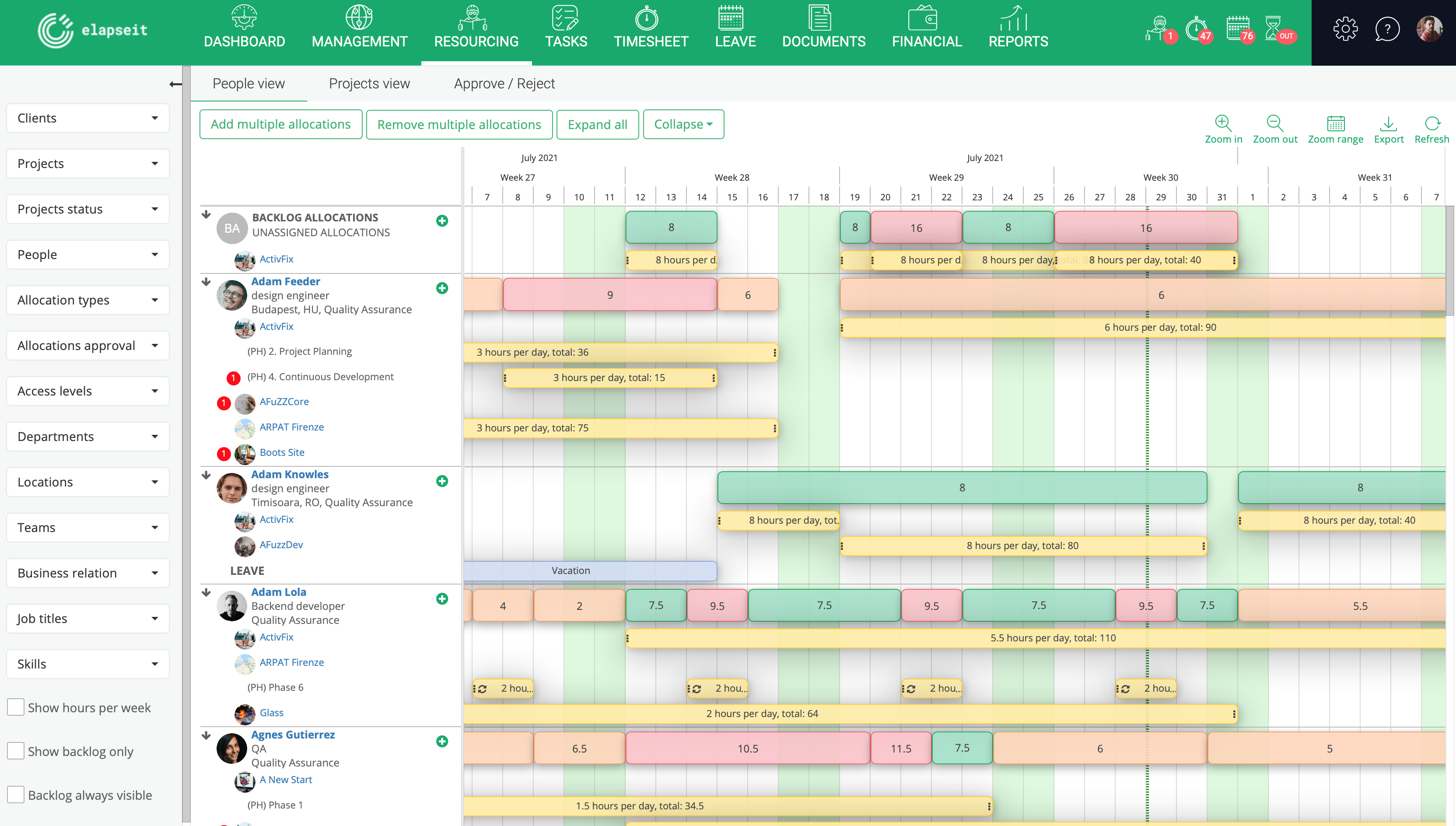
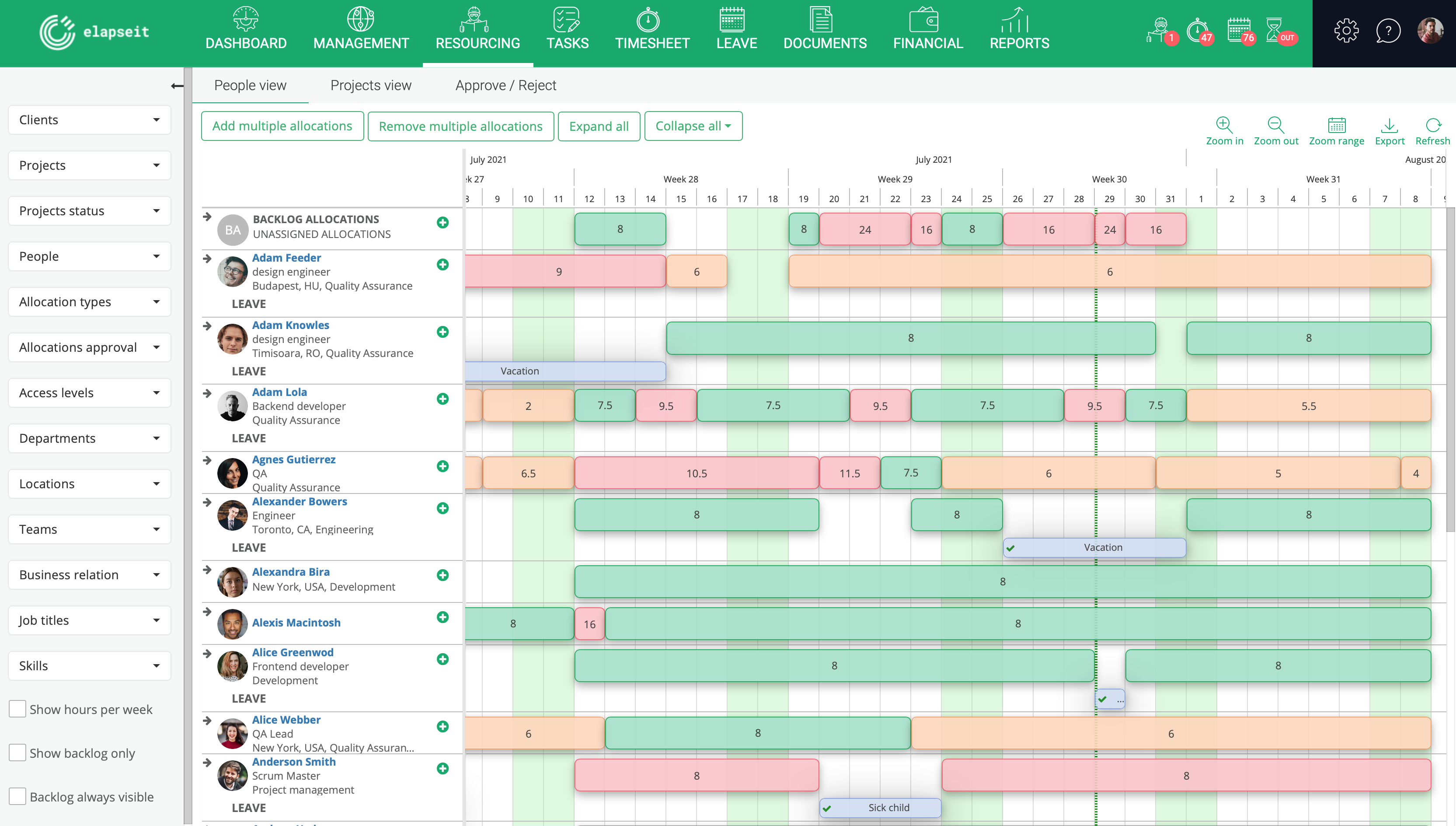
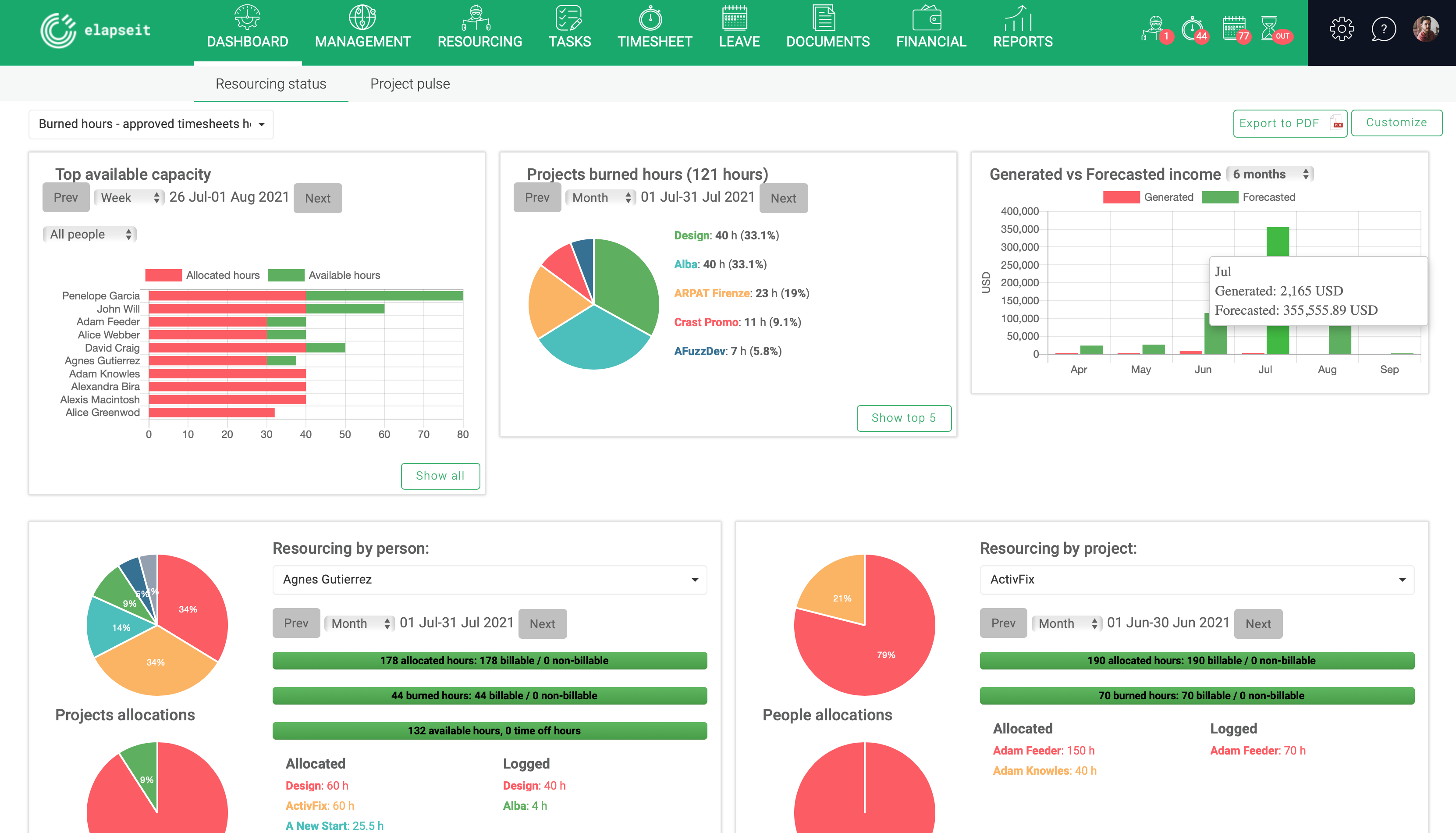
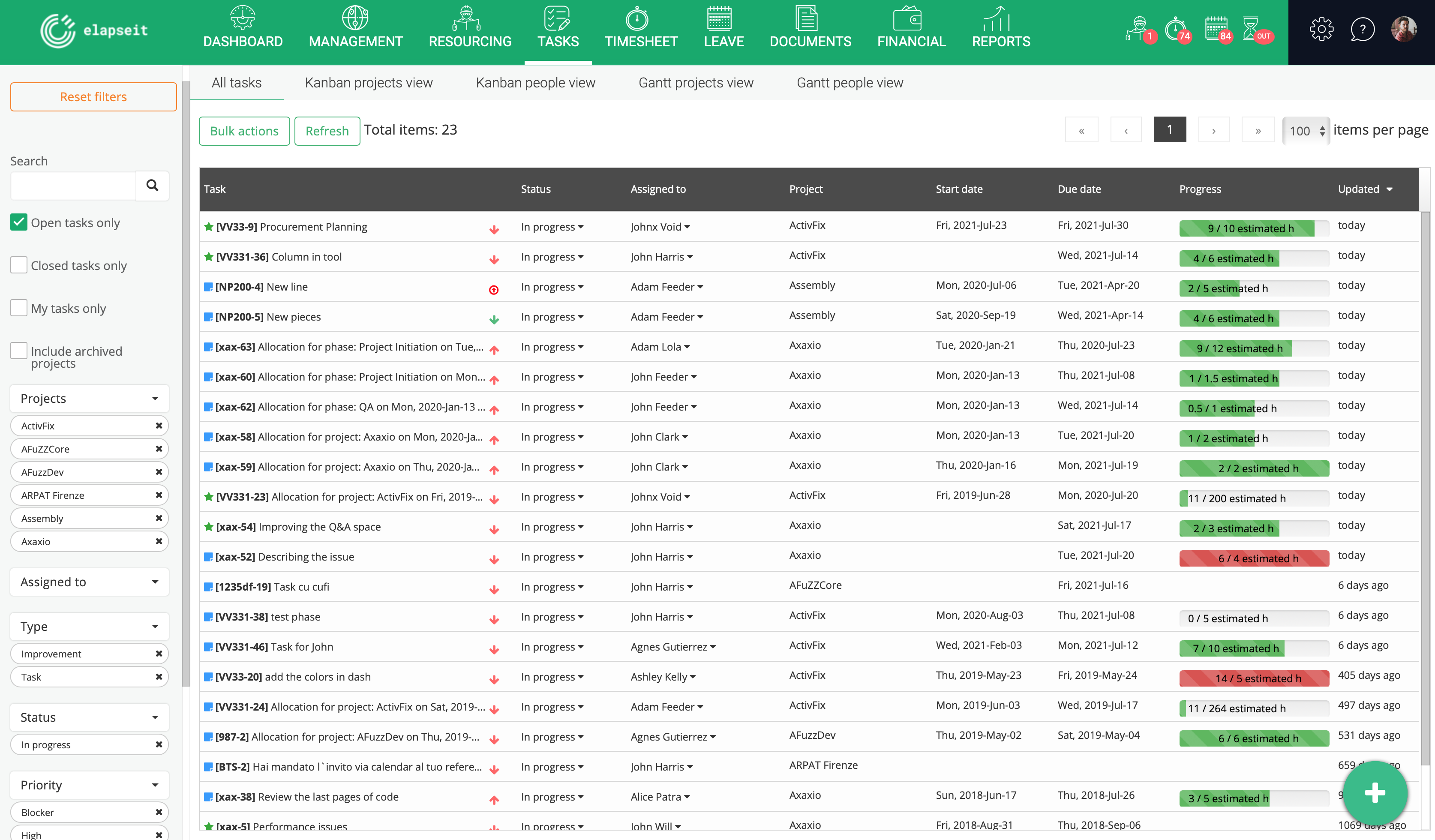
Screenshot of Resource planner expanded, where you can see the availability of all your resources, and who is working on what project, how many hours, etcScreenshot of Resource planner collapsed, which gives you a very clear image of who is under allocated (orange), fully allocated (green) and over allocated (red). Having this view, a project manager can rearrange the allocations, so that all the resources can work a normal schedule.Screenshot of Resourcing dashboard is showing you the state of your business in one page, from resourcing information (availability, leave, tasks allocations) to financial information (revenue forecasted vs generate, invoices, expenses)Screenshot of Tasks list, where are listed all the tasks with statistics about the logged hours, and basic information about the status, project and resource assigned to the task.Screenshot of KanBan board for a project, with the statuses (columns) for each taskScreenshot of Gantt view, with tasks assigned and dependencies for each one

Stackby Screenshots

Screenshot of the Grid ScreenScreenshot of some of the 25 column typesScreenshot of the Calendar ViewScreenshot of a Kanban ViewScreenshot of a Custom Form