Lightning Tools Data Viewer vs. Logi Symphony

Overview
ProductRatingMost Used ByProduct SummaryStarting Price
Lightning Tools Data Viewer
Score 9.1 out of 10
Mid-Size Companies (51-1,000 employees)
The Data Viewer provides data visualization in the form of reports or charts that can be created and customized to suit a business's needs. Silos of data exist in most organizations and yet contain valuable insights into how well the organization is performing and where action is needed. Those silos often include Microsoft Excel workbooks, Microsoft SQL Azure databases, On-Premises data sources accessible through OData or Business Connectivity Services and even SharePoint Lists. These data…
$2,200
per year per installation
Logi Symphony
Score 8.9 out of 10
N/A
Logi Symphony is a business intelligence and data visualization software that includes customizable dashboards, reporting, and visual data analytics. It can be integrated into users’ existing business applications and its visualization and reporting tools can be customized.N/A
Pricing
Lightning Tools Data ViewerLogi Symphony
Editions & Modules
Data Viewer OnPrem
$1,000
per year Per installation, 1 x WFE
Data Viewer Online
$2,200
per year per installation
Data Viewer OnPrem Enterprise Edition
POA
per year Per installation, 4+ WFE
Data Viewer Online Enterprise Edition
POA
per year per installation
No answers on this topic
Offerings
Pricing Offerings
Lightning Tools Data ViewerLogi Symphony
Free Trial
YesYes
Free/Freemium Version
NoNo
Premium Consulting/Integration Services
YesYes
Entry-level Setup FeeNo setup feeNo setup fee
Additional DetailsPrices stated are minimum per installation for "stock" products. $2.20 per user / year on top of base price. Enterprise editions can be amended to suit business needs if deemed necessary, additional costs incurred and TBD. All packages include free technical support. Free upgrades available to latest versions of tool as they are released. (online version)
More Pricing Information
Community Pulse
Lightning Tools Data ViewerLogi Symphony
Features
Lightning Tools Data ViewerLogi Symphony
BI Standard Reporting
Comparison of BI Standard Reporting features of Product A and Product B
Lightning Tools Data Viewer
9.1
1 Ratings
12% above category average
Logi Symphony
8.4
51 Ratings
3% above category average
Customizable dashboards9.11 Ratings8.651 Ratings
Report Formatting Templates9.11 Ratings8.139 Ratings
Pixel Perfect reports00 Ratings8.443 Ratings
Ad-hoc Reporting
Comparison of Ad-hoc Reporting features of Product A and Product B
Lightning Tools Data Viewer
8.2
1 Ratings
5% above category average
Logi Symphony
8.1
51 Ratings
1% above category average
Drill-down analysis6.41 Ratings7.951 Ratings
Formatting capabilities9.11 Ratings8.250 Ratings
Report sharing and collaboration9.11 Ratings8.645 Ratings
Integration with R or other statistical packages00 Ratings7.633 Ratings
Data Discovery and Visualization
Comparison of Data Discovery and Visualization features of Product A and Product B
Lightning Tools Data Viewer
3.6
1 Ratings
73% below category average
Logi Symphony
7.8
49 Ratings
2% below category average
Pre-built visualization formats (heatmaps, scatter plots etc.)3.61 Ratings8.148 Ratings
Location Analytics / Geographic Visualization00 Ratings7.941 Ratings
Predictive Analytics00 Ratings7.432 Ratings
Report Output and Scheduling
Comparison of Report Output and Scheduling features of Product A and Product B
Lightning Tools Data Viewer
-
Ratings
Logi Symphony
7.9
49 Ratings
4% below category average
Publish to Web00 Ratings8.442 Ratings
Publish to PDF00 Ratings7.845 Ratings
Report Versioning00 Ratings7.838 Ratings
Report Delivery Scheduling00 Ratings8.337 Ratings
Delivery to Remote Servers00 Ratings7.23 Ratings
Access Control and Security
Comparison of Access Control and Security features of Product A and Product B
Lightning Tools Data Viewer
-
Ratings
Logi Symphony
8.2
49 Ratings
3% below category average
Multi-User Support (named login)00 Ratings8.648 Ratings
Role-Based Security Model00 Ratings8.045 Ratings
Multiple Access Permission Levels (Create, Read, Delete)00 Ratings8.246 Ratings
Single Sign-On (SSO)00 Ratings8.25 Ratings
Mobile Capabilities
Comparison of Mobile Capabilities features of Product A and Product B
Lightning Tools Data Viewer
-
Ratings
Logi Symphony
8.2
45 Ratings
5% above category average
Responsive Design for Web Access00 Ratings8.344 Ratings
Dashboard / Report / Visualization Interactivity on Mobile00 Ratings8.140 Ratings
Application Program Interfaces (APIs) / Embedding
Comparison of Application Program Interfaces (APIs) / Embedding features of Product A and Product B
Lightning Tools Data Viewer
-
Ratings
Logi Symphony
7.8
7 Ratings
1% above category average
REST API00 Ratings8.25 Ratings
Javascript API00 Ratings8.66 Ratings
iFrames00 Ratings7.05 Ratings
Themeable User Interface (UI)00 Ratings7.76 Ratings
Customizable Platform (Open Source)00 Ratings7.52 Ratings
Best Alternatives
Lightning Tools Data ViewerLogi Symphony
Small Businesses
Supermetrics
Supermetrics
Score 9.9 out of 10
Yellowfin
Yellowfin
Score 8.8 out of 10
Medium-sized Companies
Supermetrics
Supermetrics
Score 9.9 out of 10
Reveal
Reveal
Score 10.0 out of 10
Enterprises
IBM Analytics Engine
Score 8.5 out of 10
Kyvos Semantic Layer
Score 9.5 out of 10
All AlternativesView all alternativesView all alternatives
User Ratings
Lightning Tools Data ViewerLogi Symphony
Likelihood to Recommend
9.1
(1 ratings)
8.3
(52 ratings)
Likelihood to Renew
-
(0 ratings)
7.0
(1 ratings)
Usability
-
(0 ratings)
8.0
(6 ratings)
Support Rating
-
(0 ratings)
8.8
(11 ratings)
Implementation Rating
-
(0 ratings)
7.3
(1 ratings)
User Testimonials
Lightning Tools Data ViewerLogi Symphony
Likelihood to Recommend
Lightning Tools
Lightning Tools Data Viewer is well suited for re-surfacing data and customizing its look and feel.
Read full review
Insightsoftware, Inc
For all the scenarios I have so far worked on or I am currently working on, Dundas BI has proved to be more than adequate and apt to handle all of those. It is a very easy-to-use tool with quick shortcuts enabling you to prepare ad-hoc reports or dashboards in a matter of minutes.
Read full review
Pros
Lightning Tools
  • Shows Lists created on different sites to be seen and controlled on another site in a Tenant
  • Allows selection of layouts and coloring way beyond what other programs do.
  • Easy to learn and very functional.
Read full review
Insightsoftware, Inc
  • Project organization from Development to Production, you get a production and development license but I think the best way to do it is with DEV and Prod project in the Production box. Use the development box for testing updates and really crazy things. With the Dev and Prod projects on the same box, you just publish from Dev to Prod and you are done. Users only have access to the Prod projects so no one can mess up what you are working on.
  • Security - If you have a hierarchy (subsidiaries, divisions, department, teams) and you want each group to see only their data, then Security hierarchies are for you!
  • Dependent filters! What's this you ask? Here is an example of how it can be used, in your company you have departments and who works for what department is in your database. You make a dashboard that has a department filter (only show these departments), a managers filter, and employee filter. Not every manager or employee is in multiple departments usually only one. With dependent filters you can say that the manager and employee filter are dependent on what is selected in the departments filter so when you go to filter them they only show the managers or employees that are part of that department, and you can even it do so employees are not only dependent on department but on manager as well. Then it gets even better as it can be done in reverse as well so when you select a manager then go to the department it only shows the departments he works for (there are better situations where this is more useful).
  • It is scriptable! From calculate columns, null replacements, button actions, load actions, hover over events there a way to do what you want.
  • They are constantly improving and listens to your suggestions.
Read full review
Cons
Lightning Tools
  • Data Viewer has a graph feature that is old school flat design. We loved the In House real 3D graph Lightning Tools program.
Read full review
Insightsoftware, Inc
  • Not too many cons for how we use the application. It really is easy and powerful. Very powerful.
  • Licensing is one thing that could be looked into. It is simple, but a little confusing. For example, if I get a license today, but a new release comes out tomorrow, it seems that the license doesn't work with the new release. Maybe that is by design, but it would be nice to clearly understand.
Read full review
Usability
Lightning Tools
No answers on this topic
Insightsoftware, Inc
We are still in the implementation phase, but so far we are finding it to be easy to use and learn. The eLearning courses that they have made available for free, as well as User Forums and other training videos have made even difficult concepts easier to understand.
Read full review
Support Rating
Lightning Tools
No answers on this topic
Insightsoftware, Inc
We have bi-weekly calls with our Success Manager, as well as access to support as needed. Any question that I have had, multiple people have been willing and able to jump on a call to talk me through it, or send an email with the solution
Read full review
Implementation Rating
Lightning Tools
No answers on this topic
Insightsoftware, Inc
Providing that you have the client's needs well known, creating BI content using Dundas BI is a walk in the park!
Read full review
Alternatives Considered
Lightning Tools
Lightning Tools Data Viewer is much easier and more powerful than Infowise similar viewer in their lineup. In this case, we use Data Viewer over the one offered by Infowise.
Read full review
Insightsoftware, Inc
Per dollar spent, it offers the widest range of features of the tools that we evaluated. It offers lots of options for how to configure your environment, though they are not always intuitive to figure out. Having an ETL layer was a must have for us, as well as the ability to host to secure HIPAA compliance. It is not a replacement for ad hoc reporting, but does a great job of creating parameterized reports and dashboards that look great.
Read full review
Return on Investment
Lightning Tools
  • It allows us to do things that would take a great deal more time to duplicate in SharePoint
  • It cuts down on ugly looking built in SP list layouts
  • Users find it easy to access, thus this product is more productive
Read full review
Insightsoftware, Inc
  • Coming from an SQL based standard delivery model, Dundas BI has provided a fantastic rate of ROI.
  • The preparation and delivery time has reduced from weeks to just a few hours.
Read full review
ScreenShots

Lightning Tools Data Viewer Screenshots
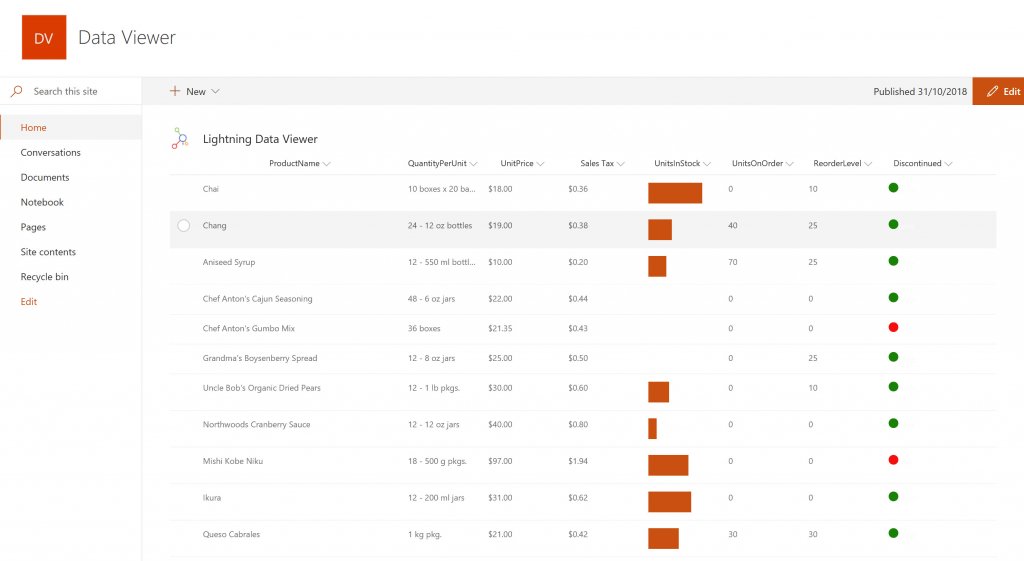
Screenshot of DISPLAYING EXTERNAL DATA WITHIN SHAREPOINT OR MICROSOFT TEAMS
The Data Viewer Client Side Web Part can be configured by Business Users within a few minutes to display Line of Business Data from Data Sources such as Excel,  SQL Azure, Business Connectivity Services, OData and SharePoint Lists.  Connections to an organizations data such as Customer Relationship Management Systems, Accounting Systems, or Custom Databases can be connected, giving business users a live up-to-date view of business information within the context of their SharePoint Team Sites or Microsoft Teams Tabs.Screenshot of HIGHLIGHTING KEY BUSINESS DATA (NO CODE)
Conditional formatting can be used to highlight key business data. Overdue Tasks, Low Stock, Currency Exchange Rates, Sales Revenue are examples of data to highlight visually allowing for a quick reaction time. Key Financial Indicators and Key Performance Indicators can be configured with a simple dialog and no need to write any code. Choose colours, icons or data bars to highlight key data.Screenshot of SELECTING AND STYLING ICONS
Icons can be chosen as part of the conditional formatting to make data stand out. The Office 365 Fabric icons can be selected and styled and applied to cell values. Pepper pots, Smileys, Envelopes and more icons are available. There are hundreds of options to choose from to highlight data that needs to be acted upon.Screenshot of DATA VIEWER CAN BE A GRID OF DATA OR A CHART IN SHAREPOINT OR MICROSOFT TEAMS
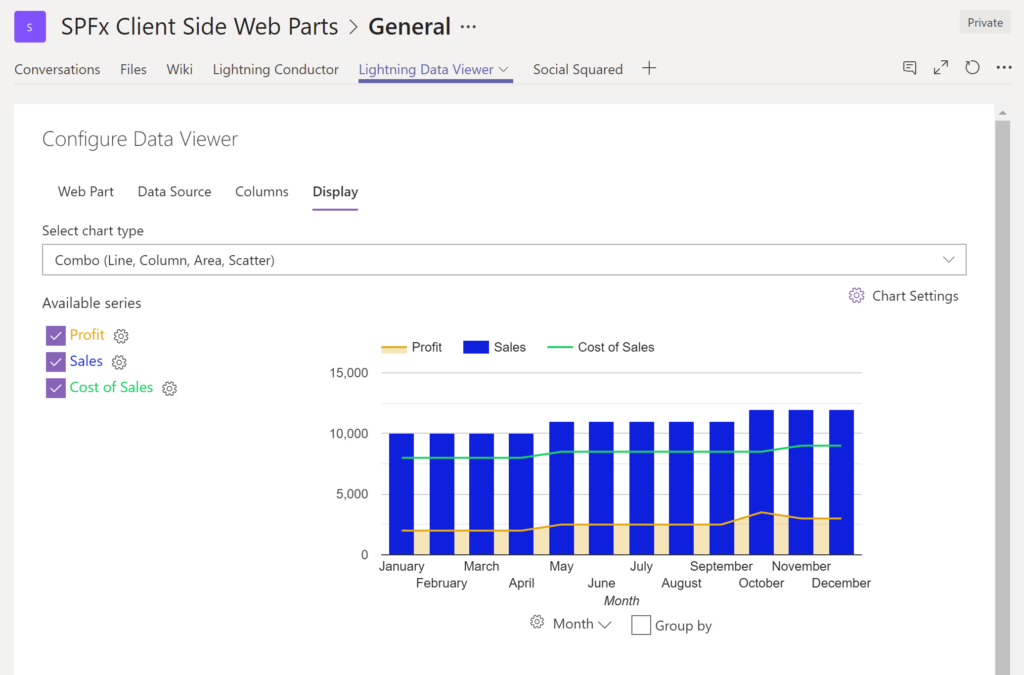
The Data Viewer can be used within Microsoft SharePoint Modern Sites or Microsoft Teams Tabs as a Grid of Data with styling or as a Chart which can be configured. The Charting Feature allows for Pie, Donut, Column, Line, Area, and Scatter Charts which can all be configured and displayed in 2D or 3D.Screenshot of TREEMAPS
summary information can be displayed within a TreeMap next to the detail. Users will be able to see trends, and how the business is performing  using the TreeMap view of data.Screenshot of CHARTS AND GAUGES
The Data Viewer is used to represent data in multiple ways using Gauges, TreeMaps, Multiple Series Charts, and Pie Charts.

Logi Symphony Screenshots

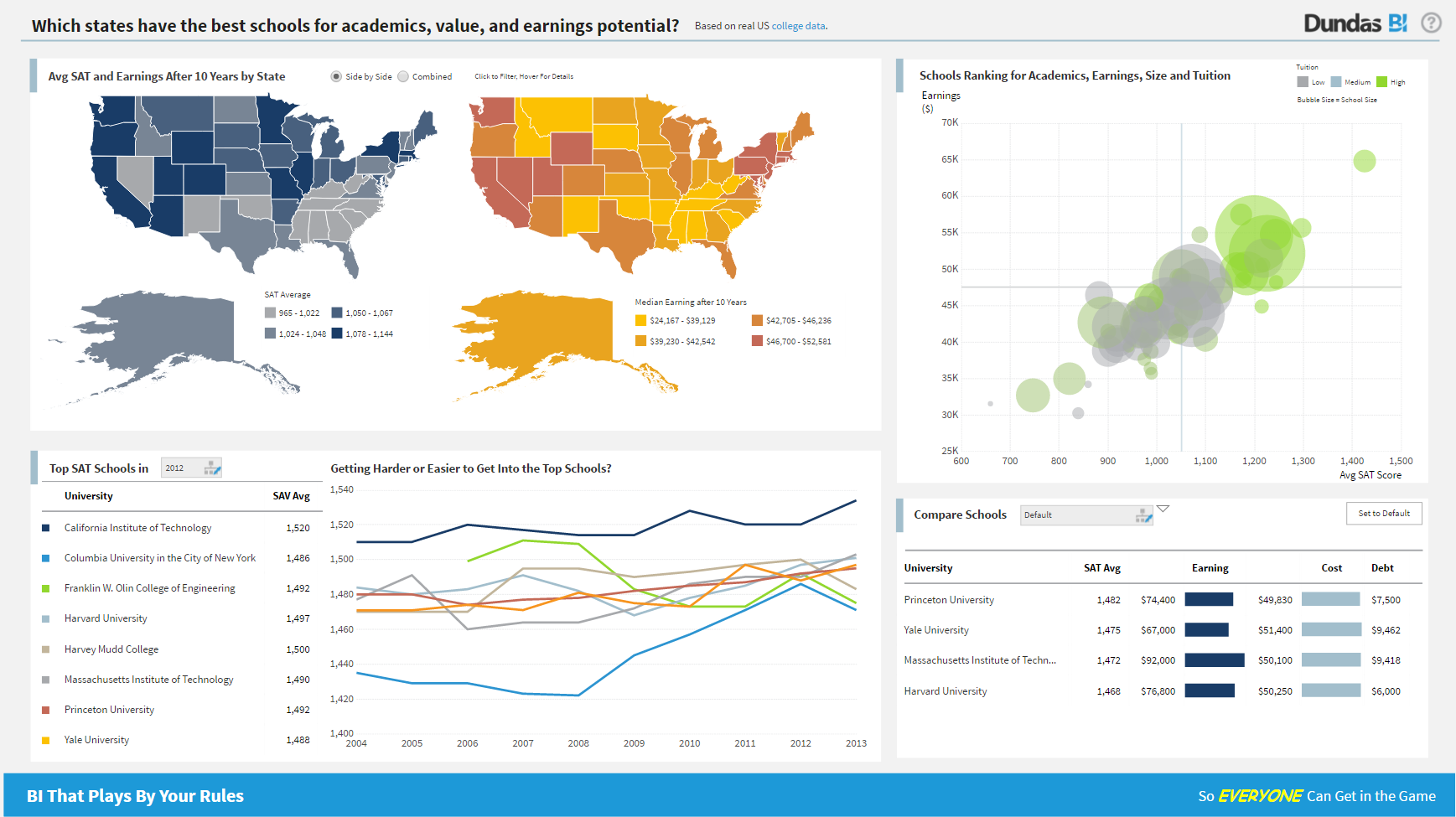
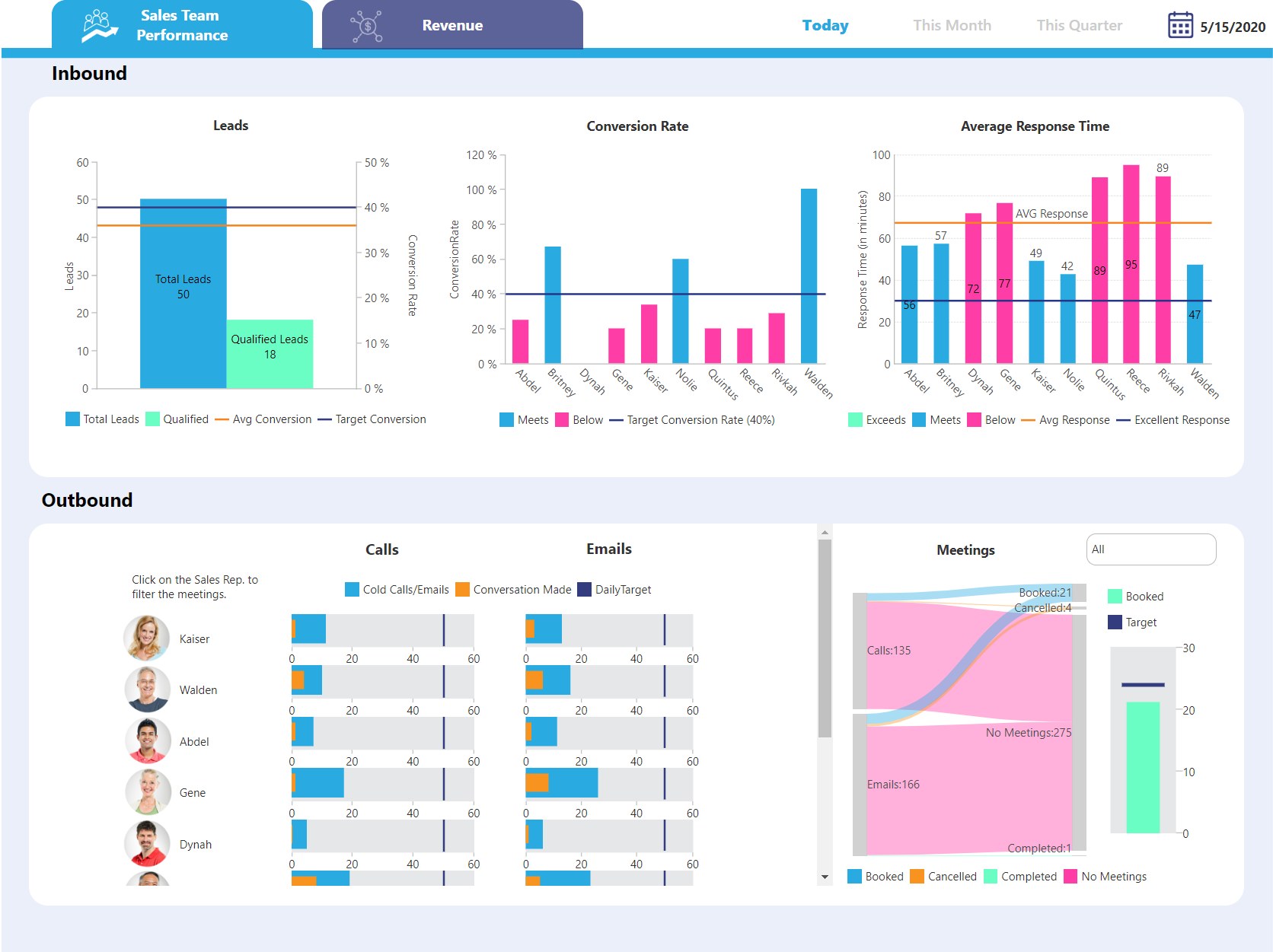
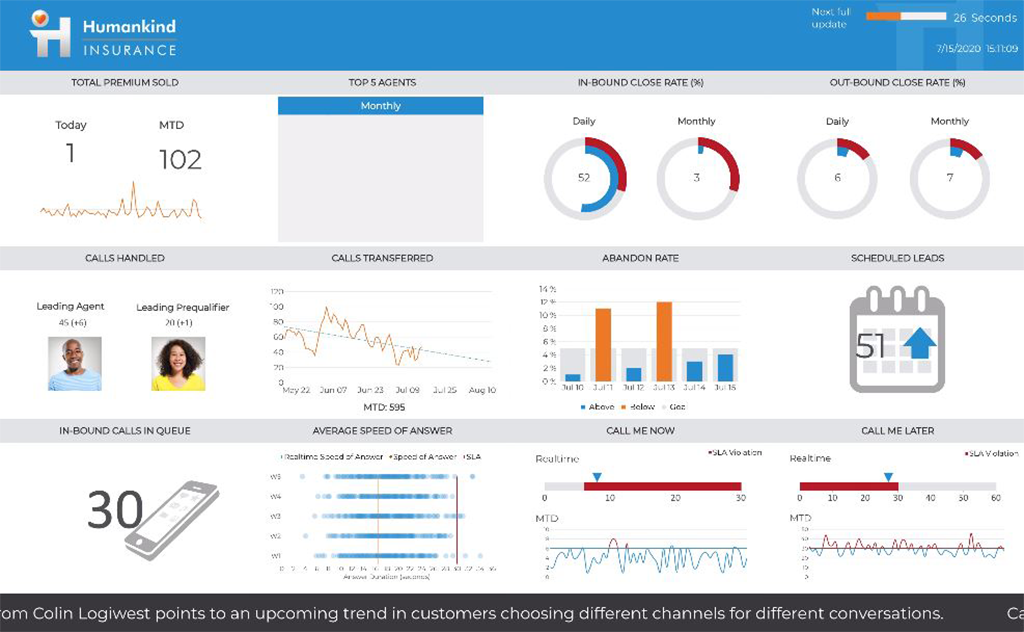
Screenshot of Dundas BI Dashboard Sample - EducationScreenshot of Dundas BI Dashboard Sample - Sales Team PerformanceScreenshot of Dundas BI Dahsboard Sample - Sales PerformanceScreenshot of Dundas BI Dashboard Sample - InsuranceScreenshot of Dundas BI Dashboard Sample - EmbeddedScreenshot of Dundas BI Dashboard Sample - Sales and Marketing