Lightning Tools Lightning Conductor vs. Microsoft Viva Engage

Overview
ProductRatingMost Used ByProduct SummaryStarting Price
Lightning Tools Lightning Conductor
Score 9.0 out of 10
Mid-Size Companies (51-1,000 employees)
The Lightning Conductor is a content aggregation tool for Microsoft SharePoint Online and Microsoft Teams. Users can build rich, modern content reports based upon SharePoint lists, SharePoint Search, Microsoft Graph or Microsoft 365 Groups. Content can be aggregated from lists and libraries, and other applications such as Planner, To Do, OneDrive, and Teams.
$2,200
per year per installation
Microsoft Viva Engage
Score 8.5 out of 10
N/A
Microsoft Viva Engage, formerly Yammer, is used for private communication within organizations or between organizational members and pre-designated groups.
$24
per year per user
Pricing
Lightning Tools Lightning ConductorMicrosoft Viva Engage
Editions & Modules
Lightning Conductor WSP
From 1950
per year One WFE
Lightning Conductor Enterprise Edition
POA
per year Four or more WFE
Lightning Conductor Online
From 2200
per year per installation
Lightning Conductor Plus (Includes Data Viewer)
From 2500
per year per installation
Lightning Conductor Online Enterprise Edition (>10,000 users)
POA
per year per installation
Microsoft Viva Employee Communications and Communities
$24
per year per user
Microsoft Viva Suite
$144
per year per user
Offerings
Pricing Offerings
Lightning Tools Lightning ConductorMicrosoft Viva Engage
Free Trial
YesNo
Free/Freemium Version
NoNo
Premium Consulting/Integration Services
YesNo
Entry-level Setup FeeNo setup feeNo setup fee
Additional DetailsPrices stated are minimum per installation for "stock" products. $2.20 per user/year on top of base price. Enterprise editions can be amended to suit business needs if deemed necessary, additional costs incurred and TBD. All packages include free technical support. Free upgrades available to latest versions of tool as they are released. (online version)Microsoft Viva Engage is also available in some Microsoft 365 packages.
More Pricing Information
Community Pulse
Lightning Tools Lightning ConductorMicrosoft Viva Engage
Features
Lightning Tools Lightning ConductorMicrosoft Viva Engage
Project Management
Comparison of Project Management features of Product A and Product B
Lightning Tools Lightning Conductor
8.6
2 Ratings
10% above category average
Microsoft Viva Engage
8.2
46 Ratings
6% above category average
Task Management8.82 Ratings8.628 Ratings
Search8.42 Ratings8.043 Ratings
Gantt Charts00 Ratings8.415 Ratings
Scheduling00 Ratings7.823 Ratings
Workflow Automation00 Ratings7.323 Ratings
Mobile Access00 Ratings8.843 Ratings
Visual planning tools00 Ratings8.226 Ratings
Communication
Comparison of Communication features of Product A and Product B
Lightning Tools Lightning Conductor
-
Ratings
Microsoft Viva Engage
8.5
49 Ratings
6% above category average
Chat00 Ratings9.244 Ratings
Notifications00 Ratings8.349 Ratings
Discussions00 Ratings9.548 Ratings
Surveys00 Ratings9.138 Ratings
Internal knowledgebase00 Ratings9.338 Ratings
Integrates with GoToMeeting00 Ratings7.314 Ratings
Integrates with Gmail and Google Hangouts00 Ratings6.713 Ratings
Integrates with Outlook00 Ratings8.632 Ratings
File Sharing & Management
Comparison of File Sharing & Management features of Product A and Product B
Lightning Tools Lightning Conductor
-
Ratings
Microsoft Viva Engage
8.6
42 Ratings
7% above category average
Versioning00 Ratings9.728 Ratings
Video files00 Ratings8.836 Ratings
Audio files00 Ratings8.634 Ratings
Document collaboration00 Ratings8.135 Ratings
Access control00 Ratings8.235 Ratings
Advanced security features00 Ratings8.233 Ratings
Integrates with Google Drive00 Ratings8.014 Ratings
Device sync00 Ratings9.328 Ratings
Best Alternatives
Lightning Tools Lightning ConductorMicrosoft Viva Engage
Small Businesses
Stackby
Stackby
Score 9.0 out of 10
Stackby
Stackby
Score 9.0 out of 10
Medium-sized Companies
Troop Messenger
Troop Messenger
Score 9.8 out of 10
Troop Messenger
Troop Messenger
Score 9.8 out of 10
Enterprises
HCL Connections
HCL Connections
Score 9.0 out of 10
HCL Connections
HCL Connections
Score 9.0 out of 10
All AlternativesView all alternativesView all alternatives
User Ratings
Lightning Tools Lightning ConductorMicrosoft Viva Engage
Likelihood to Recommend
9.0
(4 ratings)
8.4
(55 ratings)
Likelihood to Renew
9.1
(1 ratings)
9.0
(11 ratings)
Usability
-
(0 ratings)
8.0
(5 ratings)
Availability
-
(0 ratings)
8.0
(1 ratings)
Performance
-
(0 ratings)
9.0
(1 ratings)
Support Rating
9.1
(1 ratings)
7.0
(12 ratings)
Online Training
-
(0 ratings)
7.0
(2 ratings)
Implementation Rating
-
(0 ratings)
8.0
(1 ratings)
User Testimonials
Lightning Tools Lightning ConductorMicrosoft Viva Engage
Likelihood to Recommend
Lightning Tools
Having experience of SharePoint On Premise and also SharePoint Online, there isn't an out of the box app/webpart that enables you to 'roll up content' from a variety of source's (in my case SP Lists, but there are many other data sources it works with) across site collections with an easy to use and intuitive interface which is what Lightning tools excels at.
Read full review
Microsoft
Yammer is great when you have a company culture that encourages friendly collaboration and communication. It can be a great supplement (but certainly not a substitute) for bonding and sharing ideas and thoughts. Certain channels can be really successful, too, like a channel where people can post dog pictures or something fun like that!
Read full review
Pros
Lightning Tools
  • Aggregate documents across SharePoint site & libraries
  • Filtering for owner/person responsible & due dates
  • Ease of end-user filtering on columns
  • Color-coding & other formatting
Read full review
Microsoft
  • Providing a platform for social news in the company where "bottom up" topics can percolate freely across department
  • Social networking across the company where folks can divide their work into topics instead of teams
  • Basic collaboration within a group including document sharing with ability to pin documents to a team
Read full review
Cons
Lightning Tools
  • Mobile Friendly
  • Calendar/Gantt views
  • Complex/Custom Logic
Read full review
Microsoft
  • Although the social enterprise network works very well, there is room for some slight improvement - such as the ability to attract users. By being part of the Microsoft Office Suite, it is offered as an "add-on" and many overlook it and see it as unnecessary at first. It would be smart for Microsoft to sell it as its own product so it could gather more popularity as a "social network".
  • Giving an option to filter results could be better as well as giving an option to turn off the "recent activity" bar on the home page.
Read full review
Likelihood to Renew
Lightning Tools
No answers on this topic
Microsoft
Microsoft is dedicated to continual improvement on Yammer. They realize the value that Yammer brings to the table with their clients. In the short time that we have had Yammer implemented, we are just now beginning to see the strong impact it has on becoming more effective and efficient around collaboration.
Read full review
Usability
Lightning Tools
No answers on this topic
Microsoft
Overall easy to use and intuitive, although limited in the possibility to personalize layout and look & feel of a site. Some functionalities are not easy to use, like document editing, but some others are quick and effective (posts and tagging above all). Performance and responsiveness of the Yammer site is typically acceptable, in my experience.
Read full review
Reliability and Availability
Lightning Tools
No answers on this topic
Microsoft
Very available
Read full review
Performance
Lightning Tools
No answers on this topic
Microsoft
It's a simple product but it does provide value.
Read full review
Support Rating
Lightning Tools
The Lightning Tools support team responds quickly, and team members are very friendly and helpful.
Read full review
Microsoft
We have never had to use the support for Yammer. The tool works well and we have not come across any bugs. User Interface is simple and easy to use, similar to other forum type products, thereby removing the need for any extensive training. Team members are invited in and immediately are able to start using the tool.
Read full review
Online Training
Lightning Tools
No answers on this topic
Microsoft
The training that Microsoft provides is very generic training for Yammer. I like the fact the training is short and easy to understand
Read full review
Implementation Rating
Lightning Tools
No answers on this topic
Microsoft
We organically implemented the product
Read full review
Alternatives Considered
Lightning Tools
I haven't found another product to compare this one to. Only in SharePoint Online which has a similar App 'Highlight Webpart' ... it's far too complicated to set up and requires learning yet another language and exporting and importing via PowerShell to get any real results that would be useful.
Read full review
Microsoft
Our team briefly used Salesforce.com's Chatter product before switching over to Yammer in 2012. While Chatter is essentially the same product as Yammer, it left much to be desired. Chatter's design was (and remains) clunky and difficult to navigate. Yammer is a simple, easy-to-use product that offers similar functionality as Salesforce's Chatter.
Read full review
Return on Investment
Lightning Tools
  • Policies easier to portray
Read full review
Microsoft
  • My company is pleased with the positive impact Yammer has created departmentally and on an individual basis with work flow efficiency.
  • Adversely, most old and new employees are more familiar with SharePoint, causing the company to pay for training for all current and incoming employees.
  • As Yammer becomes more widely used, the need for training may diminish, which is where we will see our return on investment, as the product clearly provides a more effective form of file sharing and communication between employees and their department.
Read full review
ScreenShots

Lightning Tools Lightning Conductor Screenshots

Screenshot of MODERN SHAREPOINT LIST ROLLUP
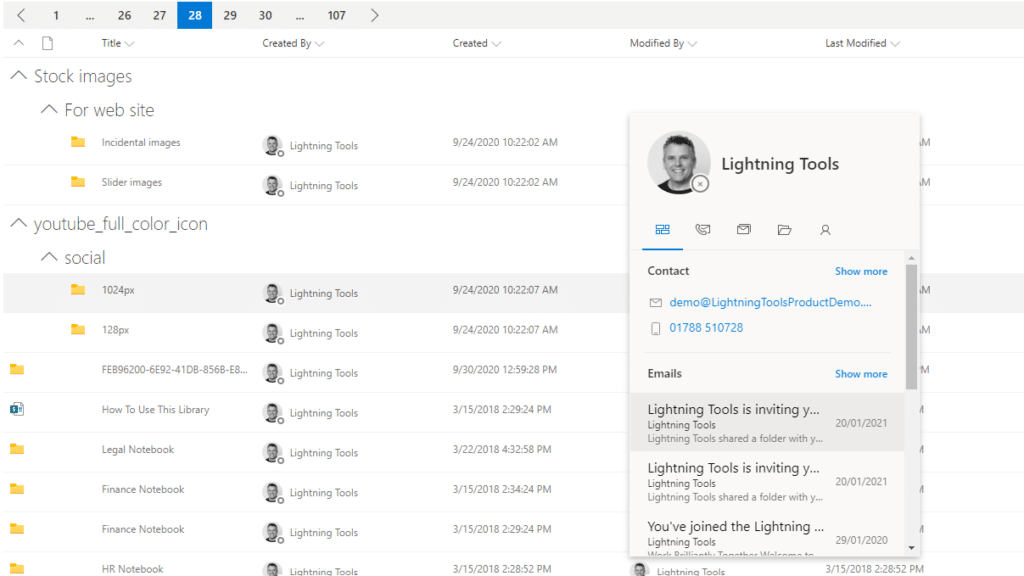
The Lightning Conductor is a SharePoint Content Aggregator that can be configured quickly by business users. The Lightning Conductor can be used to aggregate content from SharePoint Lists such as Tasks, Document Libraries, Contact Lists, and Custom Lists making it easy to view content in one place even if it is distributed across many sites and site collections. Key data can be highlighted using conditional formatting and data-bars as shown. Content from Search and Microsoft Graph can also be aggregated with the Lightning Conductor.Screenshot of CONTENT AGGREGATION WITHIN MICROSOFT TEAMS
The Lightning Conductor Web Part can be used within Microsoft SharePoint or Microsoft Teams. Even if content is stored within SharePoint sites, it is useful to have aggregated Documents, Tasks, Announcements, Calendars or Custom Lists from multiple sites displayed in a single handy view in Microsoft Teams. The Lightning Conductor can be added as a Teams Tab in any Microsoft Teams Channel.Screenshot of BUILDING REPORTS ON MICROSOFT GRAPH
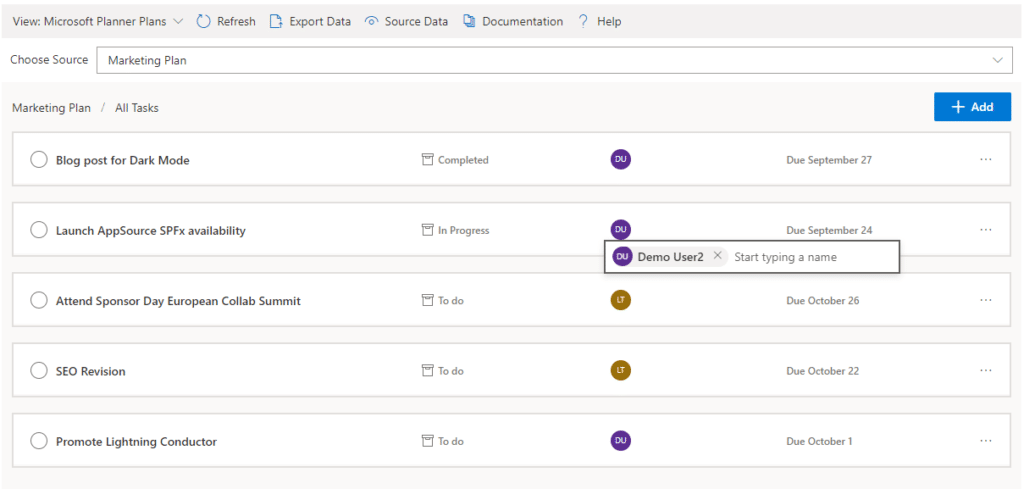
The Lightning Conductor can be used (without code) to aggregate content from Microsoft Graph as well as Search and SharePoint Lists. This example displays Microsoft Planner Plans and Microsoft Planner Tasks where users can Add new Tasks, Assign Users to Planner Tasks, Delete Tasks, and Complete Tasks. The same can be performed on Microsoft To Do items and displayed within Modern SharePoint pages or Microsoft Teams Tabs. The Lighting Conductor can also contain multiple views of content, making it ideal to display all of your tasks from SharePoint Task lists, Microsoft To Do and Microsoft Planner in a single web part or Teams Tab.

*Microsoft Graph Reports are only available for SharePoint Online and not SharePoint 2019.Screenshot of BUILDING REPORTS ON MICROSOFT 365 GROUPS
Powered by Microsoft Graph, the Microsoft 365 Group Rollup Provider enables users to aggregate content by browsing and selecting Microsoft 365 Groups. Within Microsoft 365 Groups, you’ll be able to select entities such as Drive Items, Owners, Members, Planner Plans, Planner Tasks, Events, Posts,  Sites, Lists, and Calendars.

*Microsoft Graph Reports are only available for SharePoint Online and not SharePoint 2019.Screenshot of AGGREGATING USING SEARCH
When performance is critical, search can be used for rollups. The Lightning Conductor offers three data source configurations to get to content. Object Model (Real Time Aggregation from SharePoint Lists), Microsoft Graph (Aggregation from Graph Entities such as Planner, OneDrive, Outlook), and Search. The Search Data Source enables the aggregation of content from large SharePoint lists and libraries when performance is critical. Thousands of documents can be displayed in under a second using Search.Screenshot of HIGHLIGHTING KEY BUSINESS DATA WITHIN VIEWS
End users and Site Owners can highlight the data that is important to them, the data that they need to prioritize. Using conditional formatting, data bars, and icons, conditions can be configured to highlight the data that is most important. Icons and Data Bars can be any color or size desired. Examples include highlighting High Priority tasks, Showing data bars for the completion progress of Tasks, or indicating which tasks are assigned to any particular user.