TrustRadius: an HG Insights company

Save this comparison

Save this comparison

Add Product

Recommended Comparisons

    Overview
    ProductRatingMost Used ByProduct SummaryStarting Price

    LinkPoint Connect

    Score9 out of 10
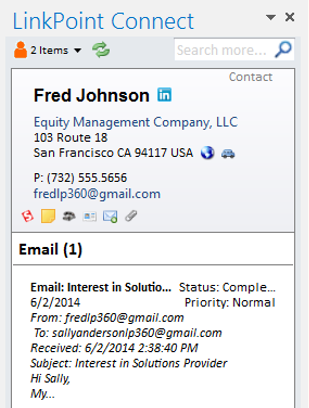
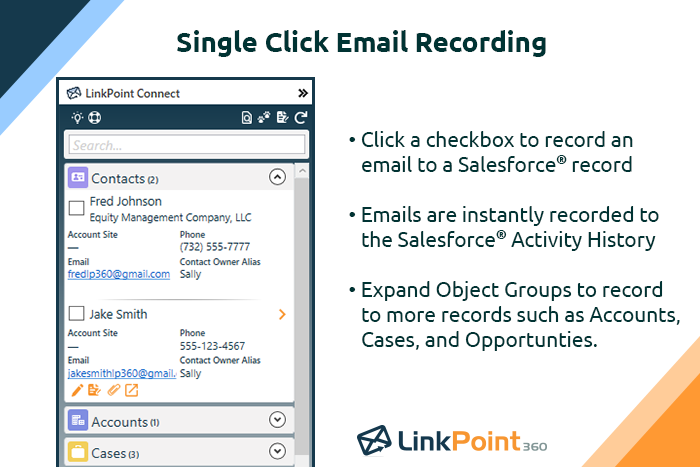
    N/ALinkPoint Connect promises to streamline data entry and access by enabling users to instantly view CRM data within their email client. This sales intelligence solution integrates Salesforce and Microsoft Dynamics CRM data in Outlook or IBM Notes. According to the vendor, key capabilities include: View real-time Salesforce data without ever leaving your email. Click on an email, and the LinkPoint Connect Side Panel instantly displays that contact’s information directly from…

    $192

    per user, per year

    RO Innovation

    Score7.1 out of 10
    N/AUpland RO Innovation automatically serves up the best customer references to elevate brand awareness and win more deals.N/A
    Pricing
    LinkPoint ConnectRO Innovation
    Editions & Modules
    LinkPoint Connect for Outlook + Salesforce
    $192
    per user, per year
    LinkPoint Connect for Outlook + Microsoft Dynamics CRM
    $192
    per user, per year
    LinkPoint Connect for IBM Notes + Salesforce
    $228
    per user, per year
    LinkPoint Connect for IBM Notes + Microsoft Dynamics CRM
    $228
    per user, per year
    No answers on this topic
    Offerings
    Pricing Offerings
    LinkPoint ConnectRO Innovation
    Free Trial
    YesNo
    Free/Freemium Version
    NoNo
    Premium Consulting/Integration Services
    YesNo
    Entry-level Setup Fee$16 per user per yearNo setup fee
    Additional DetailsSubscriptions are billed annually. Discounts available for non-profits. Volume discounts available. LinkPoint Connect Solutions are available for Outlook and IBM Notes users. These include preconfigured implementations for Advologix, Apto, Apttus, FinancialForce.com, Jobscience, Navatar, Pardot, Salesforce Shield, and TaskRay.—
    More Pricing Information
    Best Alternatives
    LinkPoint ConnectRO Innovation
    Small Businesses
    Mailtrack
    Score9.7 out of 10
    No answers on this topic
    Medium-sized Companies
    Mailtrack
    Score9.7 out of 10
    Influitive
    Score8 out of 10
    Enterprises
    No answers on this topic
    Influitive
    Score8 out of 10
    All AlternativesView all alternativesView all alternatives
    User Ratings
    LinkPoint ConnectRO Innovation
    Likelihood to Recommend
    9.0
    (3 ratings)
    1.0
    (4 ratings)
    Likelihood to Renew
    -
    (0 ratings)
    10.0
    (2 ratings)
    Availability
    -
    (0 ratings)
    9.0
    (1 ratings)
    Performance
    -
    (0 ratings)
    9.0
    (1 ratings)
    Support Rating
    10.0
    (1 ratings)
    -
    (0 ratings)
    User Testimonials
    LinkPoint ConnectRO Innovation
    Likelihood to Recommend
    LinkPoint360
    LinkPoint is well suited to any situation where Outlook is used for email correspondence and calendar items and there is need to have a record of those items and/or perform connected actions (schedule tasks, follow up reminders, etc.) in Salesforce. Automating this process and removing as much duplication of work as possible is the primary goal and the primary benefit that LinkPoint provides. In addition to efficiency, automating the process also provides a pretty substantial increase in accuracy, removing ca. 50% of the chance for human error. It's pretty simple functionality in concept, but extremely valuable in execution.
    Incentivized
    Read full review
    Upland Software
    BL is great is you're going from a manual process to something more sophisticated. I'm not sure what the competitive landscape looks like with regards to Reference Software nowadays, but when we were evaluating a few years ago, BL was ahead of all other vendors in terms of functionality and integrations with SFDC
    Incentivized
    Read full review
    Pros
    LinkPoint360
    • Adding emails is a breeze.
    • Creating contacts/leads from outlook is as simple as highlight, drag and drop.
    • Additional customization to allow you to bring in associates custom objects.
    Incentivized
    Read full review
    Upland Software
    • The system provides more visibility into available references and prevents references from being over-used. It allows the client (reference) to choose how often they can be contacted in a given time period and provides a closed-loop feedback mechanism to make sure the client is providing positive responses.
    • Allows account executives (sales people) to easily request references based on: product Used, customer vertical, location, account size, expertise, etc.
    • Uses a “Five Star” method to show how relevant the answers are when a results are returned from a search.
    Read full review
    Cons
    LinkPoint360
    • The plug-in for Outlook needs to be reset every couple of months.
    • It does not tag e-mails sent from mobile devices (or we haven't figured out how to do that yet).
    Incentivized
    Read full review
    Upland Software
    • Unintuitive user interface
    • Defensive meetings with Upland RO Innovation staff when requests for improvements are shared
    • Searching features are clunky, outdated, and unhelpful
    Incentivized
    Read full review
    Likelihood to Renew
    LinkPoint360
    No answers on this topic
    Upland Software
    Boulder Logic is just so easy and is in Salesforce
    Incentivized
    Read full review
    Reliability and Availability
    LinkPoint360
    No answers on this topic
    Upland Software
    No known issues
    Read full review
    Performance
    LinkPoint360
    No answers on this topic
    Upland Software
    No known issues
    Read full review
    Support Rating
    LinkPoint360
    Never had to use the support team, which probably means the product works well!
    Incentivized
    Read full review
    Upland Software
    No answers on this topic
    Implementation Rating
    LinkPoint360
    No answers on this topic
    Upland Software
    The process of asking each reference how often they’d be willing to be contacted was the biggest task.
    We made assumptions for current clients, and ask each new client once they become a customer.
    Along with which specific skill-set they’d be willing to be a reference
    Read full review
    Alternatives Considered
    LinkPoint360
    Prior to our move to LinkPoint, we used the Salesforce add-in for Outlook. This required manual syncing of email and calendar items and no easy to use interface between the two programs. It was very cumbersome for me to use, to the point where I quit using it altogether some time ago. I found it far less frustrating to just switch back and forth between Outlook and Salesforce and manually perform the requisite actions, create tasks or other items, enter the required data, etc.
    Incentivized
    Read full review
    Upland Software
    While I was one of the decision makers in this process, I didn't sit on the demos for the other providers (I was brought in further in the sales process). My understanding from my team was that BL was much more configurable and support more robust integrations that the competitors
    Incentivized
    Read full review
    Return on Investment
    LinkPoint360
    • Activity history tracking. Our users send most of their emails from outlook.
    • Contact and lead creation.
    • Visibility of all associated records.
    Incentivized
    Read full review
    Upland Software
    • Lack of ability to implement references program
    • Stalled deployment of program
    Incentivized
    Read full review
    ScreenShots

    LinkPoint Connect Screenshots

    Screenshot of Record emails to your CRM when sending messages via your email application. LinkPoint Connect makes it easy to associate emails with the right contacts and opportunities with just a few clicks in your email.Screenshot of View real-time CRM data without ever leaving your email. Click on an email, and the LinkPoint Connect Side Panel instantly displays that contact’s information directly from the CRM.Product screenshotProduct screenshotProduct screenshotProduct screenshot