LT Browser vs. Perfecto by Perforce vs. WAVE Web Accessibility Evaluation Tool

Overview
ProductRatingMost Used ByProduct SummaryStarting Price
LT Browser
Score 9.5 out of 10
N/A
LT Browser allows users to test the mobile view of a website on different screen sizes and resolutions. With over 50+ devices to choose from, LT Browser aims to make mobile website testing easier, and ensure that a website is mobile responsive. Users can create their own custom devices and save it for future uses. Create new mobile, tablet or desktop devices and test a website on various devices, screen resolution and perform screen resolution test for website on different screen…N/A
Perfecto by Perforce
Score 6.2 out of 10
N/A
Perfecto by Perforce offers mobile app functional and performance testing, and automation testing. Perfecto was acquired by Perforce in October 2018. The Perfecto product line, now supported by Perforce, includes Perfecto Mobile, and Perfecto Web.N/A
WAVE Web Accessibility Evaluation Tool
Score 5.0 out of 10
N/A
WAVE is a suite of evaluation tools that helps authors make their web content more accessible to individuals with disabilities. WAVE can identify many accessibility and Web Content Accessibility Guideline (WCAG) errors, but also facilitates human evaluation of web content. The vendor, WebAIM who offers WAVE as a free suite of tools, states their philosophy is to focus on issues that they know impact end users, facilitate human evaluation, and to educate about web…
$0
Pricing
LT BrowserPerfecto by PerforceWAVE Web Accessibility Evaluation Tool
Editions & Modules
No answers on this topic
WAVE API Credits 10000+
$0.25
per credit
WAVE API Credits 1000-9999
$0.3
per credit
WAVE API Credits 250-999
$0.4
per credit
Offerings
Pricing Offerings
LT BrowserPerfecto by PerforceWAVE Web Accessibility Evaluation Tool
Free Trial
YesNoNo
Free/Freemium Version
YesNoYes
Premium Consulting/Integration Services
NoNoNo
Entry-level Setup FeeNo setup feeNo setup feeNo setup fee
Additional DetailsUnlimited Access To LT Browser For Everyone
More Pricing Information
Community Pulse
LT BrowserPerfecto by PerforceWAVE Web Accessibility Evaluation Tool
Features
LT BrowserPerfecto by PerforceWAVE Web Accessibility Evaluation Tool
Accessibility Testing
Comparison of Accessibility Testing features of Product A and Product B
LT Browser
-
Ratings
Perfecto by Perforce
-
Ratings
WAVE Web Accessibility Evaluation Tool
5.7
1 Ratings
17% below category average
Accessibility Scanning and Assessment00 Ratings00 Ratings7.01 Ratings
Issue Ranking00 Ratings00 Ratings8.01 Ratings
Manual Auditing Services00 Ratings00 Ratings5.01 Ratings
Compliance Reporting and Tracking00 Ratings00 Ratings2.01 Ratings
HTML and CSS scanning00 Ratings00 Ratings6.01 Ratings
Color/Contrast Analysis00 Ratings00 Ratings6.01 Ratings
Best Alternatives
LT BrowserPerfecto by PerforceWAVE Web Accessibility Evaluation Tool
Small Businesses
BrowserStack
BrowserStack
Score 8.5 out of 10
BrowserStack
BrowserStack
Score 8.5 out of 10
BrowserStack
BrowserStack
Score 8.5 out of 10
Medium-sized Companies
Selenium
Selenium
Score 8.3 out of 10
Selenium
Selenium
Score 8.3 out of 10
Siteimprove
Siteimprove
Score 9.0 out of 10
Enterprises
Selenium
Selenium
Score 8.3 out of 10
Selenium
Selenium
Score 8.3 out of 10
BrowserStack
BrowserStack
Score 8.5 out of 10
All AlternativesView all alternativesView all alternativesView all alternatives
User Ratings
LT BrowserPerfecto by PerforceWAVE Web Accessibility Evaluation Tool
Likelihood to Recommend
9.5
(10 ratings)
9.0
(3 ratings)
5.0
(4 ratings)
User Testimonials
LT BrowserPerfecto by PerforceWAVE Web Accessibility Evaluation Tool
Likelihood to Recommend
LambdaTest, Inc.
I think LT Browser is one of the best programs I know to perform performance, usability, and experience tests on websites because it has a wide range of tools for this purpose; in addition, I consider that its price is affordable for professionals or freelancers with little income as well as for large companies that want the best tools, best of all, is that Lamdatest offers a free plan for students and I think LT Browser is also a very good tool for learning. On the other hand, and being quite honest, I can't find scenarios where LT Browser is not suitable in its area of application or what this software is specialized in.
Read full review
Perforce Software
Same test case scripts can be executed on different mobiles irrespective of operating systems and language it supports. This covers a wide range of devices (Android, iOS, Blackberry etc) on which automated testing can be performed in very less time. The test scripts are written written using keyword-based Script Once Technology. The creation of scripts are easy. It saves time and effort. Repetitive testing on each iteration would be now be less tedious. This would also allow QA to focus on quality. It would expand test case coverage in the application and finally release reliable/robust application. In all, improving the app quality.
Read full review
WebAIM
This is pretty middle of the road. It does a good job of picking out some of the low-hanging fruit, but it's not going properly evaluate semantic structure and will pop several false positives. Additionally, the tools are incomplete. For instance, the contrast editor will allow you to test your colors with sliders so you can get the closest color that passes; however, that isn't how color palettes work, you generally don't get to change a companies palette without a lot of pain; furthermore, there is no ability to adjust the font-size and both font-size AND color are used to determine contrast requirements. Oh, and they use points VS pixels...nobody is using points on the web even if the ADA uses them in their fairly dated guidelines. Text from the actual contrast editor "Text is present that has a contrast ratio less than 4.5:1, or large text (larger than 18 point or 14 point bold) has a contrast ratio less than 3:1.". 14pt = 18.66 pixels, so I can see their logic even if I don't agree with it
Read full review
Pros
LambdaTest, Inc.
  • LT Browser is to create, test and debug multiple web and mobile sites.
  • Ideal for finding code errors and share bugs through our favorite project management/bug tracking tools, like Jira, Asana, GitHub, etc.
  • LT Browser works fine, saves a lot of time in testing.
Read full review
Perforce Software
  • Impressive UI
  • Strong support system
  • Wide variety of devices
Read full review
WebAIM
  • Provides report of errors for you
  • Explains what needs to be fixed so you know why
  • Shows the errors next to each item on your website so you can see which one they mean
Read full review
Cons
LambdaTest, Inc.
  • Geolocation feature is not present
  • We can test on only two devices side by side. It should be more than two.
  • Only 30 minutes access in free plan
Read full review
Perforce Software
  • It has a lot of room for improvements in terms of reporting and integration with other reporting and defect tools.
  • It should have the capability of capturing charts data.
  • It should be able to do some scenarios that only manual testers can do. Like - use of camera and touch ID features.
Read full review
WebAIM
  • Sometimes the automated functions miss things or are mis-triggered
  • I would like it to link out to more in-depth reading on issues and resolving them
  • I would love it if it generated a PDF report to send people.
Read full review
Alternatives Considered
LambdaTest, Inc.
One such product that my team eagerly anticipates testing for responsiveness is the LT Browser. The team has discovered that it is a straightforward process to test on the newest mobile devices utilizing the LT Browser. We may start testing our web pages on local systems by simply adding the URL. LT Browser's native developer tools enable us to make modifications to our code right away. It has a pre-installed selection of well-known devices and can operate in simulated mode.
Read full review
Perforce Software
Perfecto has a wide array of mobile devices we can chose from. Automation is easier using OCR technology. The test script generated detailed report of the executed test script at the end with vast variety of information such as actual results, screen captures in digital format, continuous video recording of the entire script and graphs showing statistics about the execution
Read full review
WebAIM
For this, I'm speaking specifically to the Siteimprove browser plugin. The Siteimprove plugin: Allows to filter on guideline level Catches a few more errors than WAVE Web Accessibility Evaluation Tool, but comes pretty close But, both do a great job in all other aspects WebAIM shines in its simplicity of overlaying of errors and warnings on the page. I think its real benefit is a lower learning curve on understanding how to use the tool
Read full review
Return on Investment
LambdaTest, Inc.
  • Too many updates. And whenever you update you have to log in again
  • I remember it used to crash one or twice in a week initially. Though it is much less frequent now.
Read full review
Perforce Software
  • Since the devices are over cloud, it saves a lot of investment on mobile testing.
  • Can be used by testers across the globe.
Read full review
WebAIM
  • It has led us to be more inclusive and accessible in our website
  • We have more website visitors
  • We have had positive comments about our website in terms of being accessible
Read full review
ScreenShots

LT Browser Screenshots

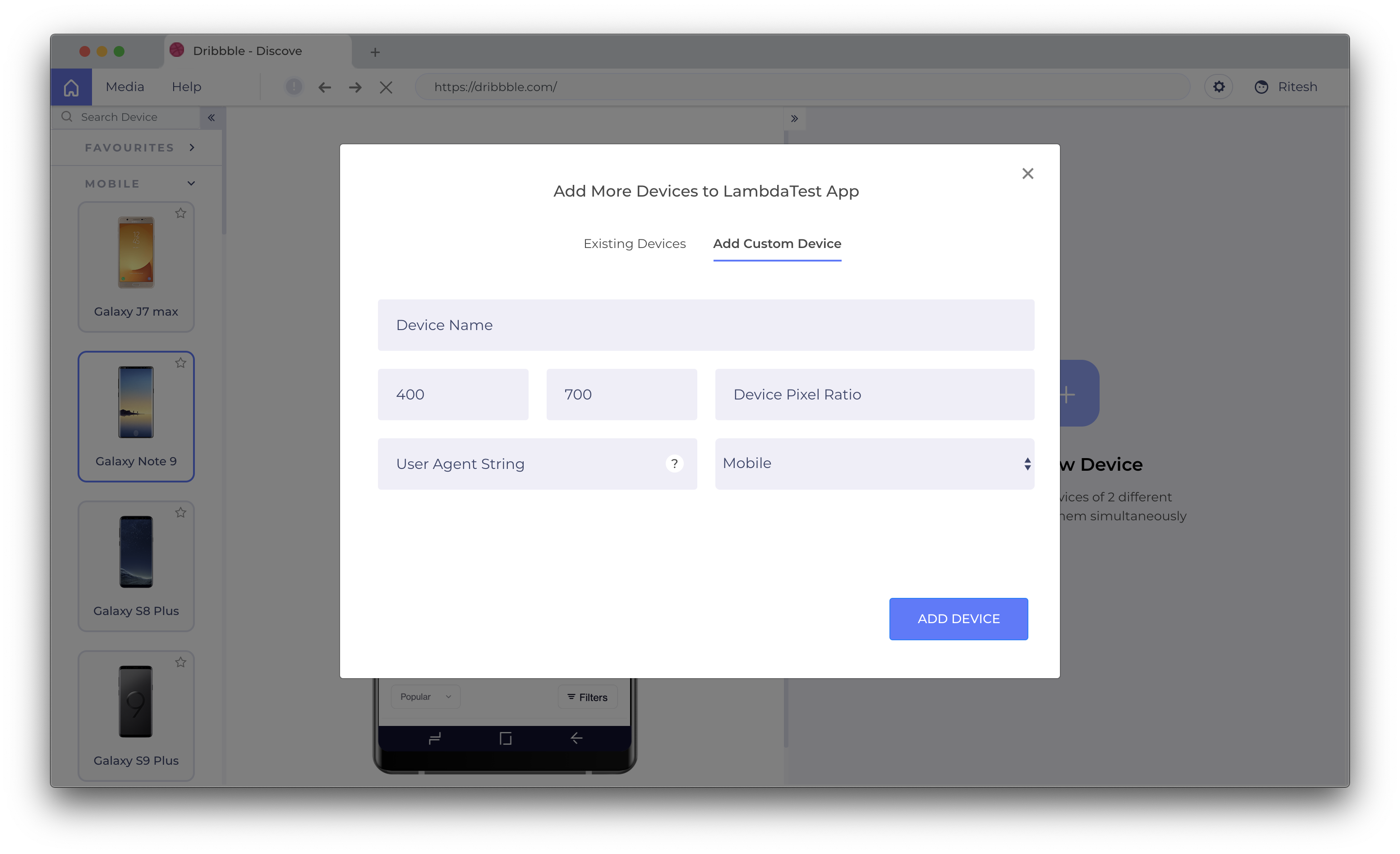
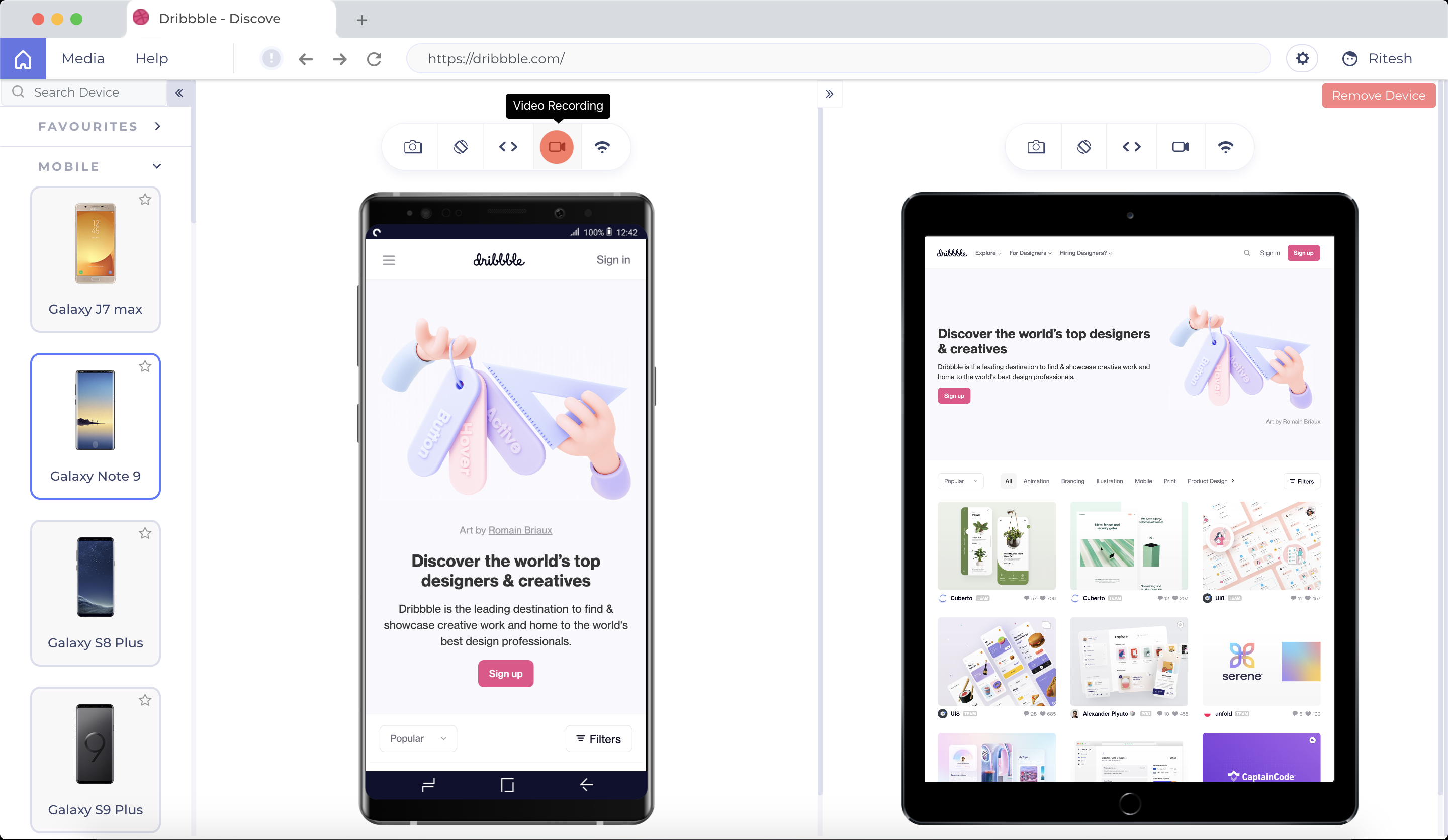
Screenshot of LT Browser Application Main ScreenScreenshot of Select Devices to compare and start testingScreenshot of Create custom device with a desired resolution to test onScreenshot of Scroll Sync to compare your websiteScreenshot of Simulate different network profilesScreenshot of Record videos and share across the team