TrustRadius: an HG Insights company

Microsoft BI (MSBI) vs. SolarWinds Database Performance Monitor

Save this comparison

Save this comparison

Add Product

Recommended Comparisons

    Overview
    ProductRatingMost Used ByProduct SummaryStarting Price

    Microsoft BI (MSBI)

    Score8.5 out of 10
    N/AMicrosoft BI is a business intelligence product used for data analysis and generating reports on server-based data. It features unlimited data analysis capacity with its reporting engine, SQL Server Reporting Services alongside ETL, master data management, and data cleansing.

    $14

    per month per user

    SolarWinds Database Performance Monitor

    Score9 out of 10
    N/AVividCortex, acquired by SolarWinds in December 2019, provides database performance monitoring designed to increase system performance, team efficiency, and infrastructure cost savings. The GDPR- and SOC 2-compliant platform offers visibility into major open-source databases—MySQL, PostgreSQL, Amazon Aurora, MongoDB, and Redis—for the engineering team at scale. Industry leaders like Etsy, GitHub, SendGrid, and Yelp rely on Database Performance Monitor for all-query monitoring and drill…N/A
    Pricing
    Microsoft BI (MSBI)SolarWinds Database Performance Monitor
    Editions & Modules
    Power BI Pro
    $14
    per month per user
    Power BI Premium
    $24
    per month per user
    No answers on this topic
    Offerings
    Pricing Offerings
    Microsoft BI (MSBI)SolarWinds Database Performance Monitor
    Free Trial
    NoYes
    Free/Freemium Version
    YesNo
    Premium Consulting/Integration Services
    NoYes
    Entry-level Setup FeeNo setup feeNo setup fee
    Additional Details——
    More Pricing Information
    Community Pulse
    Microsoft BI (MSBI)SolarWinds Database Performance Monitor
    Considered Both Products
    Microsoft
    No answer on this topic
    SolarWinds
    No answer on this topic
    Key User Insights
    Would buy again
    100%
    Would buy again
    15 Answers
    No answers on this topic
    Delivers good value for the price
    100%
    Delivers good value for the price
    15 Answers
    No answers on this topic
    Happy with the feature set
    100%
    Happy with the feature set
    15 Answers
    No answers on this topic
    Lived up to sales and marketing promises
    100%
    Lived up to sales and marketing promises
    13 Answers
    No answers on this topic
    Implementation went as expected
    100%
    Implementation went as expected
    11 Answers
    No answers on this topic
    Features
    Microsoft BI (MSBI)SolarWinds Database Performance Monitor
    BI Standard Reporting
    Comparison of BI Standard Reporting features of Microsoft BI (MSBI) and SolarWinds Database Performance Monitor
    Feature
    Microsoft BI (MSBI)
    9.0
    53 Ratings
    10% above category average
    SolarWinds Database Performance Monitor
    -
    Ratings
    Pixel Perfect reports8.546 Ratings00 Ratings
    Customizable dashboards9.653 Ratings00 Ratings
    Report Formatting Templates8.951 Ratings00 Ratings
    Ad-hoc Reporting
    Comparison of Ad-hoc Reporting features of Microsoft BI (MSBI) and SolarWinds Database Performance Monitor
    Feature
    Microsoft BI (MSBI)
    8.5
    53 Ratings
    6% above category average
    SolarWinds Database Performance Monitor
    -
    Ratings
    Drill-down analysis8.548 Ratings00 Ratings
    Formatting capabilities8.253 Ratings00 Ratings
    Integration with R or other statistical packages8.342 Ratings00 Ratings
    Report sharing and collaboration8.953 Ratings00 Ratings
    Report Output and Scheduling
    Comparison of Report Output and Scheduling features of Microsoft BI (MSBI) and SolarWinds Database Performance Monitor
    Feature
    Microsoft BI (MSBI)
    8.5
    52 Ratings
    3% above category average
    SolarWinds Database Performance Monitor
    -
    Ratings
    Publish to Web9.348 Ratings00 Ratings
    Publish to PDF9.148 Ratings00 Ratings
    Report Versioning7.444 Ratings00 Ratings
    Report Delivery Scheduling8.547 Ratings00 Ratings
    Delivery to Remote Servers8.426 Ratings00 Ratings
    Data Discovery and Visualization
    Comparison of Data Discovery and Visualization features of Microsoft BI (MSBI) and SolarWinds Database Performance Monitor
    Feature
    Microsoft BI (MSBI)
    8.7
    52 Ratings
    9% above category average
    SolarWinds Database Performance Monitor
    -
    Ratings
    Pre-built visualization formats (heatmaps, scatter plots etc.)9.651 Ratings00 Ratings
    Location Analytics / Geographic Visualization8.748 Ratings00 Ratings
    Predictive Analytics7.745 Ratings00 Ratings
    Pattern Recognition and Data Mining8.76 Ratings00 Ratings
    Access Control and Security
    Comparison of Access Control and Security features of Microsoft BI (MSBI) and SolarWinds Database Performance Monitor
    Feature
    Microsoft BI (MSBI)
    9.3
    53 Ratings
    9% above category average
    SolarWinds Database Performance Monitor
    -
    Ratings
    Multi-User Support (named login)9.449 Ratings00 Ratings
    Role-Based Security Model9.347 Ratings00 Ratings
    Multiple Access Permission Levels (Create, Read, Delete)8.949 Ratings00 Ratings
    Report-Level Access Control9.36 Ratings00 Ratings
    Single Sign-On (SSO)9.431 Ratings00 Ratings
    Mobile Capabilities
    Comparison of Mobile Capabilities features of Microsoft BI (MSBI) and SolarWinds Database Performance Monitor
    Feature
    Microsoft BI (MSBI)
    8.0
    42 Ratings
    4% above category average
    SolarWinds Database Performance Monitor
    -
    Ratings
    Responsive Design for Web Access8.239 Ratings00 Ratings
    Mobile Application8.030 Ratings00 Ratings
    Dashboard / Report / Visualization Interactivity on Mobile7.839 Ratings00 Ratings
    Application Program Interfaces (APIs) / Embedding
    Comparison of Application Program Interfaces (APIs) / Embedding features of Microsoft BI (MSBI) and SolarWinds Database Performance Monitor
    Feature
    Microsoft BI (MSBI)
    8.5
    24 Ratings
    9% above category average
    SolarWinds Database Performance Monitor
    -
    Ratings
    REST API9.221 Ratings00 Ratings
    Javascript API8.821 Ratings00 Ratings
    iFrames8.820 Ratings00 Ratings
    Java API8.718 Ratings00 Ratings
    Themeable User Interface (UI)8.021 Ratings00 Ratings
    Customizable Platform (Open Source)7.319 Ratings00 Ratings
    Best Alternatives
    Microsoft BI (MSBI)SolarWinds Database Performance Monitor
    Small Businesses
    Cyfe
    Score4 out of 10
    No answers on this topic
    Medium-sized Companies
    Qlik Cloud Analytics (Qlik Sense)
    Score8.1 out of 10
    SolarWinds Database Performance Analyzer
    Score5.6 out of 10
    Enterprises
    Sisense
    Score6.9 out of 10
    Foglight
    Score10 out of 10
    All AlternativesView all alternativesView all alternatives
    User Ratings
    Microsoft BI (MSBI)SolarWinds Database Performance Monitor
    Likelihood to Recommend
    8.9
    (77 ratings)
    9.0
    (2 ratings)
    Likelihood to Renew
    8.0
    (25 ratings)
    -
    (0 ratings)
    Usability
    8.9
    (19 ratings)
    9.0
    (1 ratings)
    Availability
    9.5
    (2 ratings)
    -
    (0 ratings)
    Performance
    7.0
    (2 ratings)
    -
    (0 ratings)
    Support Rating
    8.9
    (15 ratings)
    -
    (0 ratings)
    In-Person Training
    6.9
    (3 ratings)
    -
    (0 ratings)
    Online Training
    8.5
    (2 ratings)
    -
    (0 ratings)
    Implementation Rating
    9.6
    (7 ratings)
    -
    (0 ratings)
    Configurability
    10.0
    (2 ratings)
    -
    (0 ratings)
    Data Sharing and Collaboration
    8.5
    (42 ratings)
    -
    (0 ratings)
    Data Sources
    8.4
    (41 ratings)
    -
    (0 ratings)
    User Testimonials
    Microsoft BI (MSBI)SolarWinds Database Performance Monitor
    Likelihood to Recommend
    Microsoft
    Microsoft BI has a lot of features and is a very powerful tool, especially if you have folks on your team that know how to utilize all of its capabilities. To truly unlock all that it can do, it does require people to have a deep understanding of its capabilities. That's where the software really shines. If you are looking for a simpler, more basic reporting tool, there are other programs available that do not require such a steep learning curve.
    Incentivized
    Read full review
    SolarWinds
    Computing resources consumed by the DB instance, DPA queries & wait time, deadlock conditions, virtual infrastructure resources. The addition of NPM & DPA integration as well as cross-correlation in the identification of issues with the network or server or DB is all stupid-proof. Monitoring is more than just health and resource consumption, it's also performance. DB performance analysis is key to maintaining healthy DB instances.
    Incentivized
    Read full review
    Pros
    Microsoft
    • Comparatively easy to use compared to other data analytics solutions, collaborating with other colleagues on data work is simple.
    • Using Visual Studio for database, ETL, reporting, and analytics development save time and money.
    • Transfer of data from one application to another via Excel and comparison of data attributes between applications
    • Dashboard functionality, as well as Python support, are available, allowing you to add additional charts and graphs.
    Incentivized
    Read full review
    SolarWinds
    • Simple to use and very easy to learn.
    • The execution engines run in parallel, can execute any syntax or query.
    • DPN can run all queries for both Oracle and SQL with no additional support.
    Incentivized
    Read full review
    Cons
    Microsoft
    • MSBI designs can work on increasing data processing capabilities enough to handle the huge datasets etc.
    • It would be a lot better if it is a little low on cost.
    • it needs to create opportunities little more than they do regarding customization of some very unique visualization effects
    Read full review
    SolarWinds
    • The Reporting feature currently doesn't allow customization.
    Incentivized
    Read full review
    Likelihood to Renew
    Microsoft
    Microsoft BI is fundamental to our suite of BI applications. That being said, Northcraft Analytics is focused on delighting our customers, so if the underlying factors of our decision change, we would choose to re-write our BI applications on a different stack. Luckily, mathematics are the fundamental IP of our technology... and is portable across all BI platforms for the foreseeable future.
    Read full review
    SolarWinds
    No answers on this topic
    Usability
    Microsoft
    The Microsoft BI tools have great usability for both developers and end users alike. For developers familiar with Visual Studio, there is little learning curve. For those not, the single Visual Studio IDE means not having to learn separate tools for each component. For end-users, the web interface for SSRS is simple to navigate with intuitive controls. For ad-hoc analysis, Excel can connect directly to SSAS and provide a pivot table like experience which is familiar to many users. For database development, there is beginning to be some confusion, as there are now three tool choices (VS, SSMS, Azure Data Studio) for developers. I would like to see Azure Data Studio become the superset of SSMS and eventually supplant it.
    Incentivized
    Read full review
    SolarWinds
    I would say it is a very good tool from overall perspective compared to what I have used till now, still I will give it like 9 just for the sake of the interface and the integration which they should be doing soon with the main module which is SAM , NPM etc.
    Incentivized
    Read full review
    Reliability and Availability
    Microsoft
    The product has been reliable.
    Read full review
    SolarWinds
    No answers on this topic
    Performance
    Microsoft
    SQL Server Reporting Services (SSRS) can drag at times. We created two report servers and placed them under an F5 load balancer. This configuration has worked well. We have seen sluggish performance at times due to the Windows Firewall.
    Read full review
    SolarWinds
    No answers on this topic
    Support Rating
    Microsoft
    MSBI natively has a site that allows you to vote on user enhancements and bug fixes. This allows the largest nagging issues to float to the top and the development team can prioritize accordingly. As mentioned earlier, the large community base of MSBI developers assist technical resources in handling technical questions.
    Incentivized
    Read full review
    SolarWinds
    No answers on this topic
    In-Person Training
    Microsoft
    This training was more directed toward what the product was capable of rather than actual programming.
    Read full review
    SolarWinds
    No answers on this topic
    Online Training
    Microsoft
    I have used on-line training from Microsoft and from Pragmatic Works. I would recommend Pragmatic Works as the best way to get up to speed quickly, and then use the Microsoft on-line training to deep dive into specific features that you need to get depth with.
    Read full review
    SolarWinds
    No answers on this topic
    Implementation Rating
    Microsoft
    We are a consulting firm and as such our best resources are always billing on client projects. Our internal implementation has weaknesses, but that's true for any company like ours. My rating is based on the product's ease of implementation.
    Read full review
    SolarWinds
    No answers on this topic
    Alternatives Considered
    Microsoft
    We have used the built in ConnectWise Manager reports and custom reports. The reports provide static data. PowerBI shows us live data we can drill down into and easily adjust parameters. It's much more useful than a static PDF report.
    Incentivized
    Read full review
    SolarWinds
    SolarWinds DPA gives you a very deep analysis and monitoring of the devices which these tools will not give you neither Datadog or ManageEngine. It even gives you job rate , db locks and all other parameters to monitor which we usually do manually by going in to the DB and not from the tools. It also creates a dashboard out of the same.
    Incentivized
    Read full review
    Return on Investment
    Microsoft
    • As a SaaS provider we see being able to provide self-service BI to our client users as a competitive advantage. In fact the MSSQL enabled BI is a contributing factor to many winning RFPs we have done for prospective client organisations.
    • However MSSQL BI requires extensive knowledge and skills to design and develop data warehouses & data models as a foundation to support business analysts and users to interrogate data effectively and efficiently. Often times we find having strong in-house MSSQL expertise is a bless.
    Incentivized
    Read full review
    SolarWinds
    • What is the cost of a downed DB instance? That's your ROI. DPM lets you see issues before they become critical.
    Incentivized
    Read full review
    ScreenShots

    SolarWinds Database Performance Monitor Screenshots

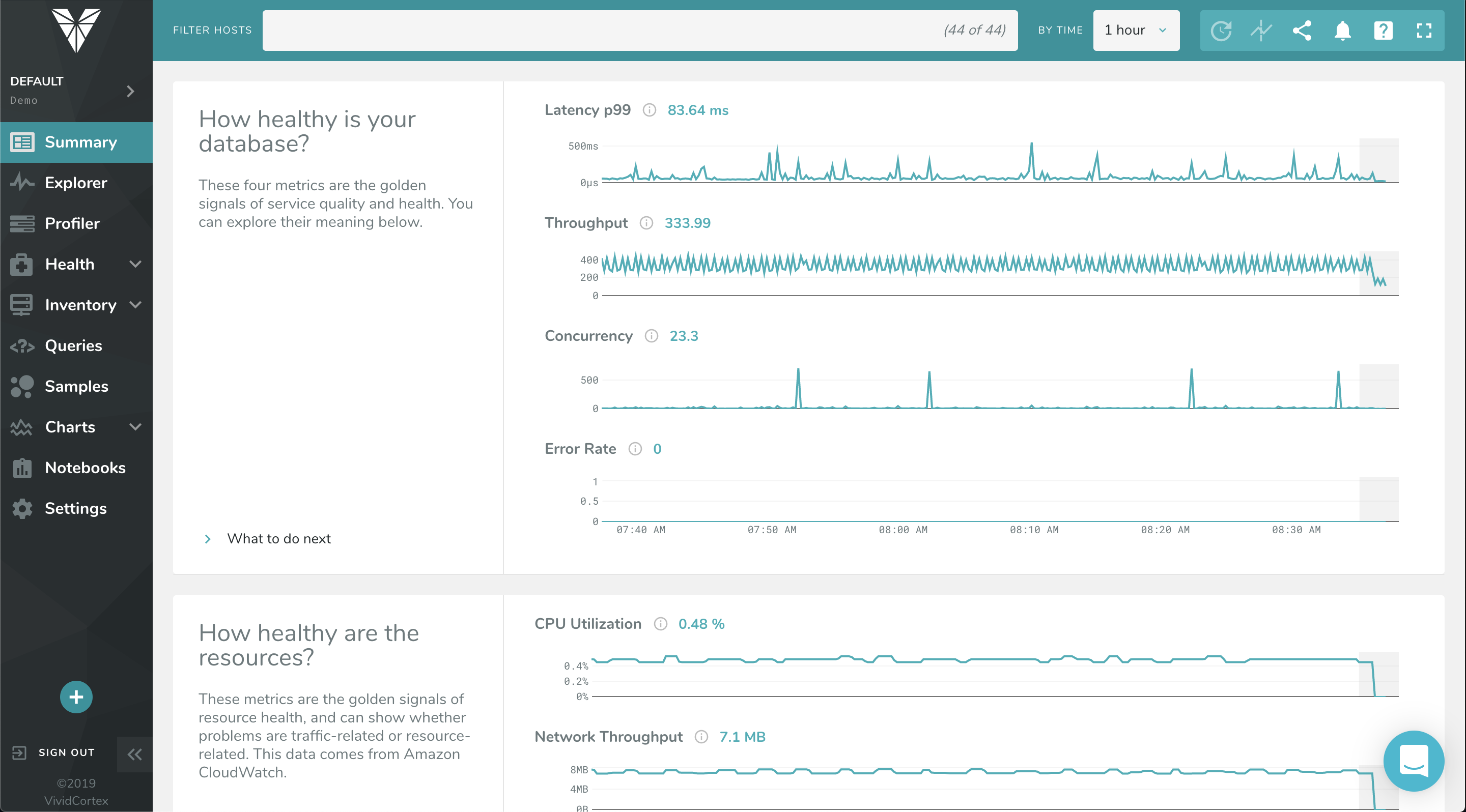
    Screenshot of The Profiler Dashboard is a powerful, dynamic dashboard for ranking and filtering activity on your servers: It can instantly show you what needs attention and it provides a unified view of all your database types that VividCortex monitors. It enables you to view and understand your system by profiling it according to its most significant attributes—customized and selected by you.Screenshot of This dashboard displays a list of queries and allows you to filter them with powerful specificity. Filters can be set according to query text, host, and timeframe when the query was first seen / last active.Screenshot of VividCortex captures an enormous amount of data, and the Summary Dashboard helps users make sense of it, reducing their time-to-insight. It features widgets with automatic displays for Top 5 Queries by Total Time, Top 5 Queries by User CPU, Application Overview, Critical Events, and more.Screenshot of VividCortex monitors thousands of metrics in your system, and the Charts and Dashboard’s navigation pane allows you to toggle, customize, and enable various categories of generated charts. You can then easily navigate and examine the charts’ metrics with mouseover and zoom capabilities.