Microsoft System Center vs. Red Hat CodeReady Workspaces vs. SolarWinds Kiwi CatTools

Overview
ProductRatingMost Used ByProduct SummaryStarting Price
Microsoft System Center
Score 8.3 out of 10
N/A
Microsoft System Center Suite is a family of IT management software for network monitoring, updating and patching, endpoint protection with anti-malware, data protection and backup, ITIL- structured IT service management, remote administration and more. It is available in two editions: standard and datacenter. Datacenter provides unlimited virtualization for high density private clouds, while standard is for lightly or non-virtualized private cloud workloads.
$1,323
per month
Red Hat CodeReady Workspaces
Score 9.9 out of 10
N/A
Red Hat CodeReady Workspaces uses Kubernetes and containers to provide any member of the development or IT team with a consistent, secure, and zero-configuration development environment. It is the next stage of the former Codenvy.io, owned and supported by Red Hat since the May 2017 acquisition, which was presented as a customizable containerized developer workspace that handles provisioning, scaling, and stopping.N/A
SolarWinds Kiwi CatTools
Score 8.1 out of 10
N/A
SolarWinds® Kiwi CatTools® is network automation tool designed to manage configurations on network devices such as routers, switches, and firewalls. It helps users work more efficiently by scheduling automatic backup activities and rolling out configuration changes to multiple devices at the same time. With native support for devices from dozens of manufacturers, Kiwi CatTools is designed to simplify network administration, configuration change alerting, and backup management.
$852
Per Instance
Pricing
Microsoft System CenterRed Hat CodeReady WorkspacesSolarWinds Kiwi CatTools
Editions & Modules
Standard Edition
$1323
Datacenter Edition
$3607
No answers on this topic
One Time Price
$852
Per Instance
Offerings
Pricing Offerings
Microsoft System CenterRed Hat CodeReady WorkspacesSolarWinds Kiwi CatTools
Free Trial
NoNoYes
Free/Freemium Version
NoNoNo
Premium Consulting/Integration Services
NoNoNo
Entry-level Setup FeeNo setup feeNo setup feeNo setup fee
Additional Details
More Pricing Information
Community Pulse
Microsoft System CenterRed Hat CodeReady WorkspacesSolarWinds Kiwi CatTools
Features
Microsoft System CenterRed Hat CodeReady WorkspacesSolarWinds Kiwi CatTools
Configuration Management
Comparison of Configuration Management features of Product A and Product B
Microsoft System Center
-
Ratings
Red Hat CodeReady Workspaces
-
Ratings
SolarWinds Kiwi CatTools
7.2
1 Ratings
11% below category average
Infrastructure Automation00 Ratings00 Ratings6.01 Ratings
Automated Provisioning00 Ratings00 Ratings9.01 Ratings
Parallel Execution00 Ratings00 Ratings5.01 Ratings
Node Management00 Ratings00 Ratings7.01 Ratings
Reporting & Logging00 Ratings00 Ratings8.01 Ratings
Version Control00 Ratings00 Ratings8.01 Ratings
Best Alternatives
Microsoft System CenterRed Hat CodeReady WorkspacesSolarWinds Kiwi CatTools
Small Businesses

No answers on this topic

HashiCorp Vagrant
HashiCorp Vagrant
Score 10.0 out of 10
HashiCorp Vagrant
HashiCorp Vagrant
Score 10.0 out of 10
Medium-sized Companies

No answers on this topic

Ansible
Ansible
Score 9.1 out of 10
Ansible
Ansible
Score 9.1 out of 10
Enterprises

No answers on this topic

Ansible
Ansible
Score 9.1 out of 10
Ansible
Ansible
Score 9.1 out of 10
All AlternativesView all alternativesView all alternativesView all alternatives
User Ratings
Microsoft System CenterRed Hat CodeReady WorkspacesSolarWinds Kiwi CatTools
Likelihood to Recommend
9.0
(21 ratings)
10.0
(1 ratings)
8.0
(2 ratings)
Usability
9.0
(2 ratings)
-
(0 ratings)
7.0
(2 ratings)
Support Rating
8.0
(1 ratings)
-
(0 ratings)
10.0
(1 ratings)
User Testimonials
Microsoft System CenterRed Hat CodeReady WorkspacesSolarWinds Kiwi CatTools
Likelihood to Recommend
Microsoft
For companies with more than 10 Windows devices and needing to standardize the OS, AV, access, share resources, and install software. SCCM is the way to go. This software is unnecessary if the business is all remote users and not in an office-type setting. There are cloud offerings or none to accomplish what a business needs.
Read full review
Red Hat
We have a team of 500 people so it's most reliable and scalable if any new joinees. That way user's can directly create their own workspace and start working and share the work stack throughout development teams securely, to update and modify any upcoming events. The best thing about Red Hat Workspace is it's simple, with all Runtime libraries pre-installed, so no need to request a platform from Azure or any other platform provider just log in and start creating a workspace. It has version control so can easily import GIT projects can start work without worrying we don't have Java, Python or any other platform not installed just select the platform needed and start working.
Read full review
SolarWinds
Large-Scale Networks with Thousands of Devices that permit our enterprise with thousands of devices across multiple locations need a highly scalable solution, and A security-focused organization requires real-time monitoring of device configurations to detect and alert on unauthorized changes. and CatTools is lightweight and easy to set up, making it ideal for managing and resetting device configurations in a lab setting.
Read full review
Pros
Microsoft
  • Allows the grouping of devices by user.
  • Allows controlling updates being deployed to user devices.
  • Allows for the repurposing of machines by being able to load new or updated software on machines that already are in the system.
  • Allows us the ability to wipe a machine clean and restore it back to the configuration that was assigned the machine.
Read full review
Red Hat
No answers on this topic
SolarWinds
  • Network device backups.
  • Identify configuration changes from prior backup.
  • Automated email notifications.
Read full review
Cons
Microsoft
  • Needs web based storefront for requesting new software
  • Needs ability to manage the packaging work flow better
  • Sometimes is slow to download and there is no indication the entire catalog is being loaded, resulting in confused users not being able to find common software in the available list.
Read full review
Red Hat
  • Can improve UI like Visual studio so that VS user's can switch without any difficulty.
Read full review
SolarWinds
  • Enhanced Reporting Capabilities.
  • More Intuitive User Interface.
  • Scalability for Large Networks.
Read full review
Usability
Microsoft
It is not user-friendly for the most part. With IT infrastructure, sometimes it cannot handle excess requests. Every few months, you will need an upgrade in terms of server resources to keep up with incoming alerts and requests. This does not happen all of the time, but it does happen when there are too many requests.
Read full review
Red Hat
No answers on this topic
SolarWinds
CatTools is simple to set up and administer. Anyone who can install a Windows application can quickly set up an automated backup of one or more devices. It does what it was designed to do.
Read full review
Support Rating
Microsoft
If I had to dislike something about the system it would be how much it changes once you upgrade. This could be more of a problem of mine since I get used to one way and don't like it when it changes so much. I am enjoying the newest update, but it is a mess when you are actually going through the upgrades.
Read full review
Red Hat
No answers on this topic
SolarWinds
The software is easy enough to set up and configure that even after using the product for years, we never had to contact support. We used some open source products before utilizing CatTools and could have used a speed dial to try and figure out the intricacies of the products.
Read full review
Alternatives Considered
Microsoft
We previously used a mix of FOG and Clonezilla to image machines. The biggest issues with these products is that changing one piece of the image required you to rebuild the entire image itself. These pieces of software also did not allow you to manage applications and Windows Updates, causing IT to have to constantly touch machines after they were imaged and update or manage them with a much more hands on approach.
Read full review
Red Hat
No answers on this topic
SolarWinds
Strengths:Cost-Effectiveness: CatTools is significantly more affordable than enterprise-grade tools like SolarWinds Network Configuration Manager (NCM) or Infoblox NetMRI. It is ideal for small to medium-sized businesses with tight budgets. Ease of Deployment: Kiwi CatTools is lightweight and easier to set up, while enterprise solutions often require substantial infrastructure and longer deployment times. Focus on Essentials: CatTools excels in its core functions, such as automated configuration backups, scheduled tasks, and essential compliance checks.
Read full review
Return on Investment
Microsoft
  • We have been able to automate our patch management, firmware and other security concerns.
  • We have a standardized "image" ensuring our setup is consistent across the enterprise. This alone has saved us in time to support and time to understand how to use our desktops.
Read full review
Red Hat
  • No need to request for any platform again and again.
Read full review
SolarWinds
  • Compliance and Risk Reduction.
  • Reduced Downtime.
  • Ease of Deployment and Low Licensing Costs.
Read full review
ScreenShots

SolarWinds Kiwi CatTools Screenshots

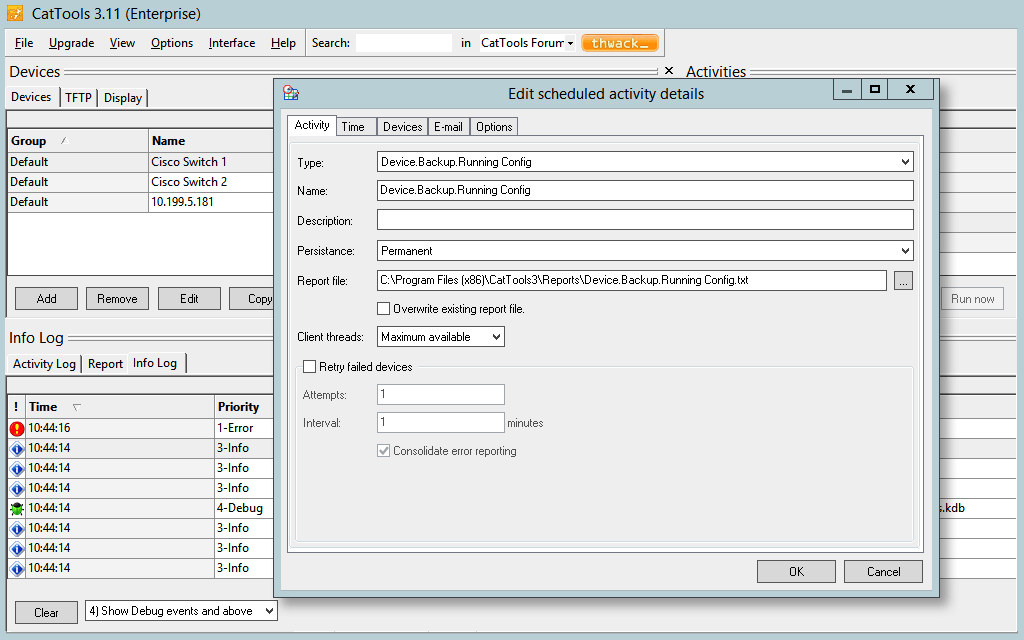
Screenshot of Schedule automated backups of network device configuration from routers, switches, firewalls, etc.Screenshot of Simultaneously perform or schedule configuration changes across multiple network devices with great ease.Screenshot of Receive real-time alerts when unauthorized configuration changes occur on network devices.Screenshot of Maintain a complete configuration history, and facilitate rollbacks to the last good configuration.Screenshot of Generate configuration and device information reports related to port, MAC, ARP, version details, and more.Screenshot of Get out-of-the-box support for both IPv4 and IPv6 devices from vendors, such as Cisco, HP, Huawei, 3Com and more.