Microsoft offers Visual Studio Code, an open source text editor that supports code editing, debugging, IntelliSense syntax highlighting, and other features.
$0
Skyvia
Score10 out of 10
Mid-Size Companies (51-1,000 employees)
Skyvia is a no-code cloud data integration platform for ETL, ELT, Reverse ETL, data migration, one-way and bi-directional data sync, workflow automation, and real-time connectivity. Benefits of Using Skyvia: • Cost efficiency: With flexible pricing plans for each product, Skyvia suites for businesses of any size. • Flexibility: Skyvia provides adaptable, no-code integration tools for both basic and advanced business…
As a general workhorse IDE, Microsoft Visual Studio Codee is unmatched. Building on the early success of applications such as Atom, it has long been the standard for electron based IDEs. It can be outshone using IDEs that are dedicated to particular platforms, such as Microsoft Visual Studio Code for .net and the Jetbrains IDEs for Java, Python and others. For remote collaborative development, something like Zed is ahead of VSCode live share, which can be quite flakey.
A de minimis incentive was given to thank the reviewer for their time. The incentive was not used to bias or drive a particular response, nor was the incentive contingent on a positive endorsement. More Info
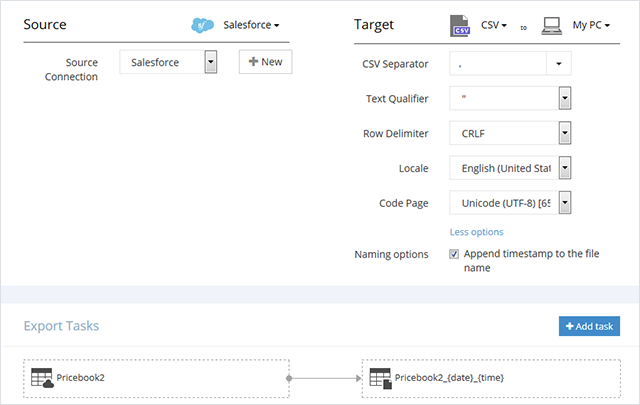
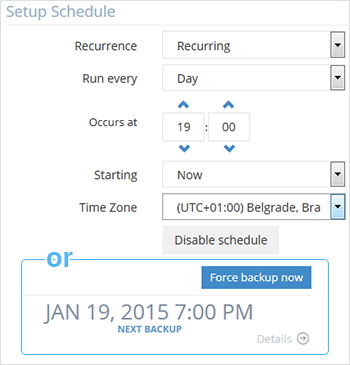
Skyvia is easy to use and set up automated backups. It was one of several tools that we vetted for this purpose – and had the most favorable pricing and integrations to suit our needs. We wanted to have multiple CRM instances backed up daily and allow non-technical team members to manage this, as well as restore them in times of need. Skyvia has allowed us to do this with ease.
A de minimis incentive was given to thank the reviewer for their time. The incentive was not used to bias or drive a particular response, nor was the incentive contingent on a positive endorsement. More Info
A de minimis incentive was given to thank the reviewer for their time. The incentive was not used to bias or drive a particular response, nor was the incentive contingent on a positive endorsement. More Info
A de minimis incentive was given to thank the reviewer for their time. The incentive was not used to bias or drive a particular response, nor was the incentive contingent on a positive endorsement. More Info
The customization of key combinations should be more accessible and easier to change
The auxiliary panels could be minimized or as floating tabs which are displayed when you click on them
A monitoring panel of resources used by Microsoft Visual Studio Code or plugins and extensions would help a lot to be able to detect any malfunction of these
A de minimis incentive was given to thank the reviewer for their time. The incentive was not used to bias or drive a particular response, nor was the incentive contingent on a positive endorsement. More Info
Solid tool that provides everything you need to develop most types of applications. The only reason not a 10 is that if you are doing large distributed teams on Enterprise level, Professional does provide more tools to support that and would be worth the cost.
A de minimis incentive was given to thank the reviewer for their time. The incentive was not used to bias or drive a particular response, nor was the incentive contingent on a positive endorsement. TR verified that a representative sample of customers was invited. More Info
A de minimis incentive was given to thank the reviewer for their time. The incentive was not used to bias or drive a particular response, nor was the incentive contingent on a positive endorsement. More Info
Microsoft Visual Studio Code earns a 10 for its exceptional balance of power and simplicity. Its intuitive interface, robust extension ecosystem, and integrated terminal streamline development. With seamless Git integration and highly customizable settings, it adapts perfectly to any workflow, making complex coding tasks feel effortless for beginners and experts alike.
A de minimis incentive was given to thank the reviewer for their time. The incentive was not used to bias or drive a particular response, nor was the incentive contingent on a positive endorsement. More Info
Loved using Skyvia for our projects, it saved time, allowed us to reach the desired outcome quickly and was easy to maintain. When we first used it we weren't sure we would be able achieve the outcome desired but during the trial it was quickly obvious we would be able to achieve what we needed for data connection and reporting.
Overall, Microsoft Visual Studio Code is pretty reliable. Every so often, though, the app will experience an unexplained crash. Since it is a stand-alone app, connectivity or service issues don't occur in my experience. Restarting the app seems to always get around the problem, but I do make sure to save and backup current work.
A de minimis incentive was given to thank the reviewer for their time. The incentive was not used to bias or drive a particular response, nor was the incentive contingent on a positive endorsement. More Info
Microsoft Visual Studio Code is pretty snappy in performance terms. It launches quickly, and tasks are performed quickly. I don't have a lot of integrations other than CoPilot, but I suspect that if the integration partner is provisioned appropriately that any performance impact would be pretty minimal. It doesn't have a lot of bells and whistles (unless you start adding plugins left and right).
A de minimis incentive was given to thank the reviewer for their time. The incentive was not used to bias or drive a particular response, nor was the incentive contingent on a positive endorsement. More Info
Active development means filing a bug on the GitHub repo typically gets you a response within 4 days. There are plugins for almost everything you need, whether it be linting, Vim emulation, even language servers (which I use to code in Scala). There is well-maintained official documentation. The only thing missing is forums. The closest thing is GitHub issues, which typically has the answers but is hard to sift through -- there are currently 78k issues.
A de minimis incentive was given to thank the reviewer for their time. The incentive was not used to bias or drive a particular response, nor was the incentive contingent on a positive endorsement. More Info
A de minimis incentive was given to thank the reviewer for their time. The incentive was not used to bias or drive a particular response, nor was the incentive contingent on a positive endorsement. More Info
Visual Studio Code stacks up nicely against Visual Studio because of the price and because it can be installed without admin rights. We don't exclusively use Visual Studio Code, but rather use Visual Studio and Visual Studio code depending on the project and which version of source control the given project is wired up to.
A de minimis incentive was given to thank the reviewer for their time. The incentive was not used to bias or drive a particular response, nor was the incentive contingent on a positive endorsement. More Info
Compared to similar user-friendly data integration systems like Integrate.io, Stitch, or Azure, Skyvia still wins in the number of connectors and pricing policy. Skyvia is a tool for companies like ours, starving for simple but, at the same time, robust and cost-effective data transfer solutions. It doesn't require additional knowledge for implementation and usage because it's no code. We'd recommend Skyvia as the best solution for non-technical staff.
A de minimis incentive was given to thank the reviewer for their time. The incentive was not used to bias or drive a particular response, nor was the incentive contingent on a positive endorsement. More Info
It is easily deployed with our Jamf Pro instance. There is actually very little setup involved in getting the app deployed, and it is fairly well self-contained and does not deploy a large amount of associated files. However, it is not particularly conducive to large project, multi-developer/department projects that involve some form of central integration.
A de minimis incentive was given to thank the reviewer for their time. The incentive was not used to bias or drive a particular response, nor was the incentive contingent on a positive endorsement. More Info
A de minimis incentive was given to thank the reviewer for their time. The incentive was not used to bias or drive a particular response, nor was the incentive contingent on a positive endorsement. More Info
The core of our business lies in analyzing data from various sources, and while ETL itself is not our primary focus, it is a necessary process to achieve our goals. Thanks to Skyvia, we are able to streamline the ETL process at a reasonable price, allowing us to dedicate our efforts to data analysis without the burden of ETL complexities.
A de minimis incentive was given to thank the reviewer for their time. The incentive was not used to bias or drive a particular response, nor was the incentive contingent on a positive endorsement. More Info