MSP360 Backup for M365/Google vs. Spanning Backup

Overview
ProductRatingMost Used ByProduct SummaryStarting Price
MSP360 Backup for M365/Google
Score 0.0 out of 10
Mid-Size Companies (51-1,000 employees)
MSP360 Backup for Microsoft 365 and Google Workspace offers cloud-to-cloud data protection and recovery. The solution boasts a simple setup and maintenance that supports all core M365/GW components.
$24
per year
Spanning Backup
Score 9.9 out of 10
N/A
Spanning, a Kaseya company, is a provider of backup and recovery for SaaS applications including G Suite, Salesforce and Office 365.N/A
Pricing
MSP360 Backup for M365/GoogleSpanning Backup
Editions & Modules
MSP360 Managed Backup for Microsoft 365 and Google Workspace
$1.10
per month per user
MSP360 Backup for Microsoft 365 and Google Workspace
$3
per month per user
MSP360 Backup for Microsoft 365 and Google Workspace
$24
per year per user
No answers on this topic
Offerings
Pricing Offerings
MSP360 Backup for M365/GoogleSpanning Backup
Free Trial
YesNo
Free/Freemium Version
NoNo
Premium Consulting/Integration Services
YesNo
Entry-level Setup FeeNo setup feeNo setup fee
Additional DetailsThere is "Cyber Starter Pack Offer" for new customers.
More Pricing Information
Community Pulse
MSP360 Backup for M365/GoogleSpanning Backup
Features
MSP360 Backup for M365/GoogleSpanning Backup
Data Center Backup
Comparison of Data Center Backup features of Product A and Product B
MSP360 Backup for M365/Google
-
Ratings
Spanning Backup
9.0
1 Ratings
5% above category average
Management dashboard00 Ratings8.01 Ratings
Retention options00 Ratings9.01 Ratings
Encryption00 Ratings10.01 Ratings
Enterprise Backup
Comparison of Enterprise Backup features of Product A and Product B
MSP360 Backup for M365/Google
-
Ratings
Spanning Backup
9.7
1 Ratings
20% above category average
Operational reporting and analytics00 Ratings9.01 Ratings
Malware protection00 Ratings10.01 Ratings
Ransomware Recovery00 Ratings10.01 Ratings
SaaS Backup
Comparison of SaaS Backup features of Product A and Product B
MSP360 Backup for M365/Google
-
Ratings
Spanning Backup
10.0
1 Ratings
15% above category average
SaaS Product Integration00 Ratings10.01 Ratings
Multiple Data Restoration Options00 Ratings10.01 Ratings
Data Auditing and Search00 Ratings10.01 Ratings
Data Storage in the Cloud or On-Premises00 Ratings10.01 Ratings
Best Alternatives
MSP360 Backup for M365/GoogleSpanning Backup
Small Businesses
Cove Data Protection
Score 9.1 out of 10
Cove Data Protection
Score 9.1 out of 10
Medium-sized Companies
Druva Security Cloud
Score 9.4 out of 10
Druva Security Cloud
Score 9.4 out of 10
Enterprises
Druva Security Cloud
Score 9.4 out of 10
Druva Security Cloud
Score 9.4 out of 10
All AlternativesView all alternativesView all alternatives
User Ratings
MSP360 Backup for M365/GoogleSpanning Backup
Likelihood to Recommend
-
(0 ratings)
10.0
(9 ratings)
Likelihood to Renew
-
(0 ratings)
10.0
(1 ratings)
Usability
-
(0 ratings)
10.0
(2 ratings)
Support Rating
-
(0 ratings)
9.0
(1 ratings)
User Testimonials
MSP360 Backup for M365/GoogleSpanning Backup
Likelihood to Recommend
MSP360
No answers on this topic
Kaseya
The only issue we have is when we remove the user from the integrated AD group we need to manually go back and remove the licensing, but there is the option to have archived accounts as well for temporary holds in case we want to disable the account in 365/AD, but need to hold on to the backups for a little longer.
Read full review
Pros
MSP360
No answers on this topic
Kaseya
  • Set it and forget it. Easy set up and it runs daily behind the scenes.
  • Restore holds record relationships.
  • Restore can merge records easily.
Read full review
Cons
MSP360
No answers on this topic
Kaseya
  • Better support/phone support
  • The ability to checkmark JUST a single OU and then any new members in just THAT OU would be automatically backed up. Currently, you can just auto add new members but not per OU.
Read full review
Usability
MSP360
No answers on this topic
Kaseya
It was hands down, one of the easiest solutions to implement overall and has some of the best features also compared to other similar products from many SaaS backup companies. We also integrated the Dark Web monitoring too and it has helped us secure accounts we didn't know had issues, so has improved our security posture too.
Read full review
Support Rating
MSP360
No answers on this topic
Kaseya
I would like a retention option on the data, but since this feature does not currently exist, I give it a 9. Everything has met our standards and needs and we are now freed up from the manual efforts it was taking for backing up Salesforce using the out-of-the-box features of Salesforce.
Read full review
Alternatives Considered
MSP360
No answers on this topic
Kaseya
Spanning is superior to Veritas Backup Exec. Often Backup Exec would fail due to the software itself or the premise-based backup media or drive. Veritas Tech Support/Knowledgebase was not helpful in troubleshooting the failures. Also, Veritas was unable to back up our then Microsoft Exchange Server without an additional add-on cost. Barracuda was more reliable, but also required additional expenses for backing up Exchange and Microsoft SQL.
Read full review
Return on Investment
MSP360
No answers on this topic
Kaseya
  • Allowed us to restore our data various times with minimal costs
  • Gives us great piece of mind with the regular scheduled backing up
  • Pretty simple to set up and configure. Easy integration with SFDC
Read full review
ScreenShots

MSP360 Backup for M365/Google Screenshots
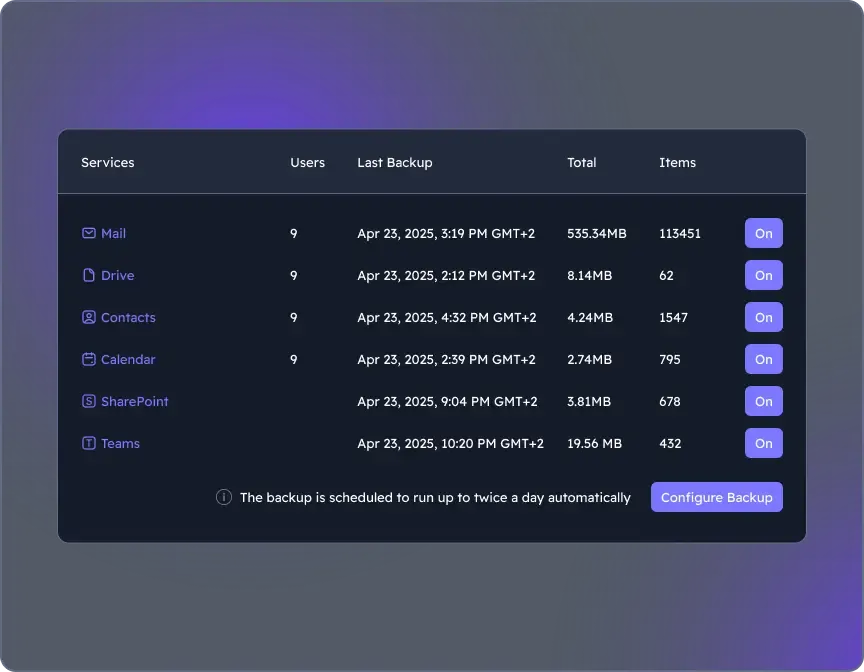
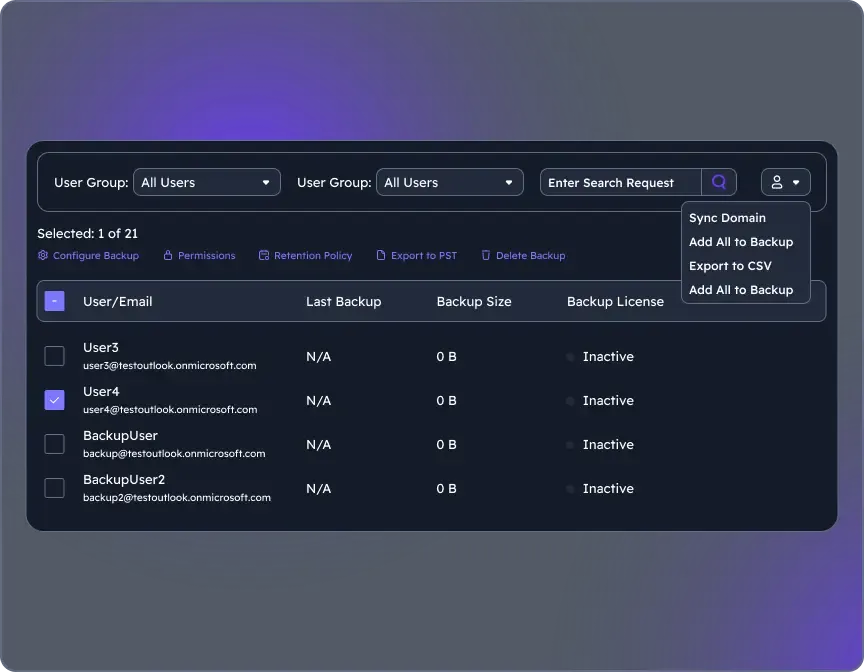
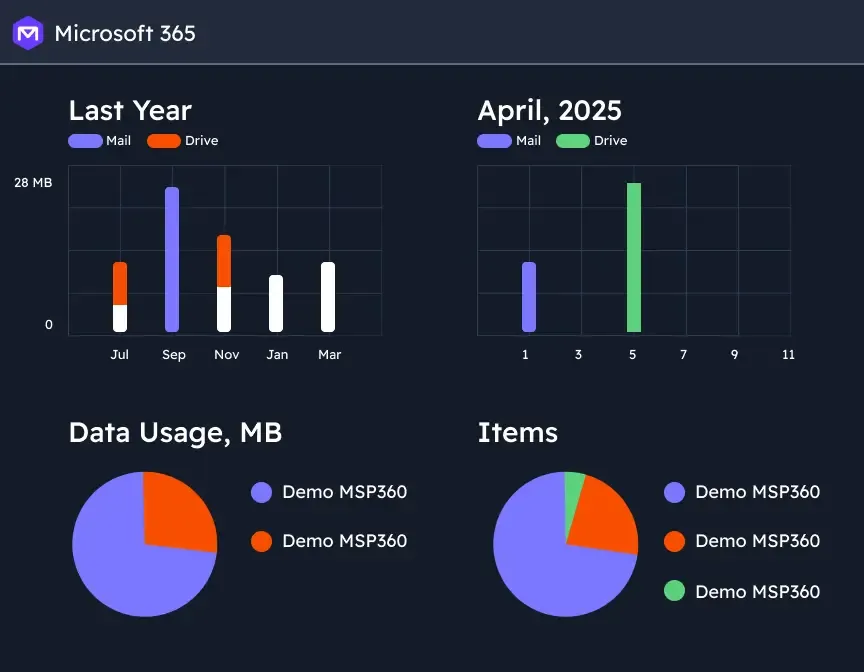
Screenshot of where to choose M365 components to back up through the Microsoft 365 Backup dashboard.Screenshot of the user management interface. To add new users/groups (Office 365 groups) to users' grid and synchronize changes for existing users, on Users click the action menu, then select Sync Domain. Users will be added to the grid automatically.Screenshot of backup reports, with insights. Backup statistics provide visibility into usage, success rates, and storage trends, supporting audit-readiness, retention optimization, and planning.