Altium Develop vs. Ultiboard

Overview
ProductRatingMost Used ByProduct SummaryStarting Price
Altium Develop
Score 9.0 out of 10
N/A
Altium Develop is a platform that unifies multidisciplinary teams across engineering, sourcing, and manufacturing to support seamless co-creation. It provides real-time visibility into designs, requirements, and supply chain data, enabling contributors to work together concurrently rather than in silos.N/A
Ultiboard
Score 0.0 out of 10
N/A
Ultiboard is printed circuit board design and layout software that integrates seamlessly with Multisim to accelerate PCB prototype development.
$778
per year
Pricing
Altium DevelopUltiboard
Editions & Modules
No answers on this topic
Education Version
$778
per year
Full Version
$1,205
per year
Professional Version
$1,701
per year
Offerings
Pricing Offerings
Altium DevelopUltiboard
Free Trial
YesNo
Free/Freemium Version
NoNo
Premium Consulting/Integration Services
NoNo
Entry-level Setup FeeNo setup feeNo setup fee
Additional DetailsAltium Develop is offered as an annual subscription starting at $1,990 per year, which includes one Altium Designer ECAD Design Author and a shared workspace for projects, libraries, and collaboration. The subscription provides unlimited workspace users at no additional cost, enabling broad participation in reviews, commenting, task management, BOM access, and change workflows. Teams can add up to four additional Altium Designer ECAD Design Authors for $995 per Author per year, allowing organizations to scale active design capacity while keeping contributors and collaborators included at no extra charge.
More Pricing Information
Community Pulse
Altium DevelopUltiboard
Considered Both Products
Altium Develop
Chose Altium Develop
I have used other software's in the past, but I feel altium is very comprehensive. I am unable to do a fair comparison now, since I don't use them now
Chose Altium Develop
Much better. I transitioned my previous company from Orcad to Altium Develop and it really helped development efficiency once everyone got on board and trained and all our libraries got converted over which was pretty easy to do.
Chose Altium Develop
KiCAD and EasyEDA are much better for simple designs with only one engineer. EasyEDA works well especially if you are using a service like JLCPCB or LCSC since the integrate seamlessly and can be run in the web browser. That being said, they have a lot of limitations in …
Chose Altium Develop
Altium has the best feature set among EDA software suites, but it is a bit harder to use out of the box than EasyEDA. KiCAD is powerful, but it takes a lot more effort to get working well.
Chose Altium Develop
Altium is considered "professional" software and has a better narrative when delivering eCAD artifacts and projects to end clients.
Chose Altium Develop
Altium Develop gave the most cohesive experience compared to other platforms. Most others feel like several pieces of software kludged together (and often are). Altium Develop was clearly a unified system and felt like a much more modern piece of software. At the time it was …
Chose Altium Develop
Previously used both products listed. When selecting a product at this company, I decided upon Altium Develop as it appeared to be the most common platform utilized in this area by other companies. This would mean that new-hires were more likely to be familiar with the software.
Chose Altium Develop
Altium Develop seems like it will be much better for library management, schematic capture, and 3D file generation. However, it is not as intuitive and easy to use when creating layouts. We chose Altium Develop because we believe the time savings of the areas where Altium is …
Chose Altium Develop
It's better for collaboration and version control
Chose Altium Develop
Much more professional, the library management is much easier on Altium
Chose Altium Develop
Altium definitely has a more rounded capability than KiCad and a better pricepoint than Cadence, but that gap is closing with KiCad.
Chose Altium Develop
There is no comparison between Altium Develop and Autodesk Fusion. Altium Develop is light years ahead of Autodesk Fusion in every aspect.
There is no way I would ever go back to Autodesk Fusion after switching to Altium Develop.
Chose Altium Develop
Generally, KiCad is missing the component management system that Altium has. It really is very useful.

Chose Altium Develop
We were already using Altium Designer with all of the libraries andprijects in Altium, so it will take too much time to convert to other software at this point.
Chose Altium Develop
PADS feels like Solidworks - the legacy system that works well but hasn't moved forward with everything else.

Altium Develop feels like OnShape - another large provider but much effort spent on modernization and upkeep of the technology.
Chose Altium Develop
Altium Develop is more user friendly and allows enterprises to quickly set up their design workflow on one pane of glass.
Chose Altium Develop
The advantage of KiCAD and EasyEDA versus Altium Designer is that KiCAD and EasyEDA are free. Even so, Altium Designer is more powerful than competitors in terms of integrability, easy of use and powerful tools. For example, in Siemens EDA software there is no tool for …
Chose Altium Develop
Other tools are open source and free to use, which often means its easier to use but has limited abilities. With using Altium Designer compared to the other tools I have found the review process a lot better and its workspace environment a big plus because I can find …
Chose Altium Develop
Altium Designer is a more mature, feature complete product. However, in 2025 it has become EXTERMELY expensive. KiCAD is quickly catching up and focusing on the core PCB design tools. We are likely to switch over in 2-3 years if things progress like they have.
Chose Altium Develop
For some reason Autodesk Eagle wasn't showing up, but personally the cross team aspect of Altium Designer is much better, as well as the schematic editing and PCB editing, especially on a board level with placing constraints and editing layers. Fusion360 with its new schematic …
Chose Altium Develop
I used Eagle for a long time, then switched to Altium Designer around 2014. Eagle was rather basic comparatively, but also comparatively dirt cheap and capable for modestly complex designs. But the future was clear - Altium Designer was required for stepping up my design game.
Ultiboard

No answer on this topic

Best Alternatives
Altium DevelopUltiboard
Small Businesses
SOLIDWORKS
SOLIDWORKS
Score 8.8 out of 10
SOLIDWORKS
SOLIDWORKS
Score 8.8 out of 10
Medium-sized Companies
SOLIDWORKS
SOLIDWORKS
Score 8.8 out of 10
SOLIDWORKS
SOLIDWORKS
Score 8.8 out of 10
Enterprises
Autodesk Fusion
Autodesk Fusion
Score 7.8 out of 10
Autodesk Fusion
Autodesk Fusion
Score 7.8 out of 10
All AlternativesView all alternativesView all alternatives
User Ratings
Altium DevelopUltiboard
Likelihood to Recommend
9.2
(0 ratings)
-
(0 ratings)
Likelihood to Renew
7.0
(0 ratings)
-
(0 ratings)
Usability
8.2
(0 ratings)
-
(0 ratings)
Availability
6.4
(0 ratings)
-
(0 ratings)
Performance
7.3
(0 ratings)
-
(0 ratings)
Support Rating
4.6
(0 ratings)
-
(0 ratings)
Online Training
9.1
(0 ratings)
-
(0 ratings)
Implementation Rating
7.1
(0 ratings)
-
(0 ratings)
Product Scalability
2.7
(0 ratings)
-
(0 ratings)
User Testimonials
Altium DevelopUltiboard
Likelihood to Recommend
It's the most approachable "professional" package for small to medium-sized businesses, given the price point. It's fairly mature feature-wise and has improved stability enough over the last 5 years that it no longer constantly crashes. But it feels like there's a push to constantly increase prices until it's no longer an obvious choice. That, coupled with the insistence on subscription models and the terrible user experience when on poorly connected mobile data plans, means it's still my CAD package of choice, but I'm now a reluctant user rather than a fan.
Read full review
No answers on this topic
Pros
  • BOM management - with just a little bit of extra care any designer produces a usable bom along with their pcb design ready to be ordered
  • 365 - being able to view and review (placing comments) projects without the need to have the software installed locally
  • Multi-pcb projects
Read full review
No answers on this topic
Cons
  • It is difficult to create new components while reusing existing footprints/symbols. For example, reuse a 1206 package footprint, create a variant for resistors with an appropriate 3D model, and then a variant for capacitors with an appropriate 3D model.
  • The software's overall responsiveness seems slow, and it does not update properly in all instances. For example, clicking a component in the schematic will not always show its properties; it usually shows the properties of the last selected component. Clicking the blank space in the schematic first, then selecting the component, seems to load some of the correct data. But the 3D model in the properties view would still show the last EDITED part.
  • Saving components to the server would not always register correctly, requiring the component editor to be closed 'without saving' to close the part out, even though no changes were made since the last save to the server.
  • It is unclear where a list of footprints/symbols can be managed. For example, deleting a deprecated footprint so that it does not appear as a valid option in the future.
  • BOM part choice data has an NRFND component selected as in use, causing the status to be yellow. There is no apparent way to select a different manufacturer part as the 'in use' part to resolve the warning.
  • Updating from the library does not pull the most up-to-date symbol/footprint data for a given component. So far, there does not appear to be a way to do this, even though the component itself has been updated to use the correct references. This may be related to the general delays and consistency/reliability issues with the online link.
Read full review
No answers on this topic
Likelihood to Renew
ALTIUM DESIGNER is the reference tool in the electronic circuit design sector, its use is widespread worldwide. Although there are other alternatives, some of them free do not rival ALTIUM DESIGNER in terms of features and reliability. It is also very practical to request quotes with ALTIUM DESIGNER BOM reports since all suppliers are accustomed to using the tool.
Read full review
No answers on this topic
Usability
Very easy and very good documentation, but it does take experience and practice to find all the tips and tricks that solve common problems. Usually, if I get stuck with a problem, the solution is just a Google search away. I would like a better way to manage non-standard pad shapes with non-standard footprints.
Read full review
No answers on this topic
Reliability and Availability
Not very stable. Sudden lack of functionality when the license expires is not indicated clearly and can lead to loss of work.
Read full review
No answers on this topic
Support Rating
I use the educational Program. And so far is the best technical support. Every time that I need one or I have a question. They respond so far and with excellent advice.
Read full review
No answers on this topic
Online Training
easy to follow, Good technical materials. good videos The platform is easy to use.
Read full review
No answers on this topic
Implementation Rating
Overly complex, not designed for small organizations, core functionality poorly implemented to focus on flashy features.
Read full review
No answers on this topic
Alternatives Considered
Altium Develop gave the most cohesive experience compared to other platforms. Most others feel like several pieces of software kludged together (and often are). Altium Develop was clearly a unified system and felt like a much more modern piece of software. At the time it was competitively priced while having features open-source alternatives couldn't match.
Read full review
No answers on this topic
Scalability
Because, in my opinion, usage for small organization is poor, it is difficult to set up initial configuration to support scaling.
Read full review
No answers on this topic
Return on Investment
  • Quick PCB design allows for quick sales, thus generating a large ROI for a company
  • Altium Designer's built in BOM price tracker allows the user to have a general idea of the cost of their PCB, so they can plan accordingly when budgeting
  • In addition to the BOM, Altium Designer provides different manufacturers and their part numbers for different components so the user can choose the cheapest option to move forward with
Read full review
No answers on this topic
ScreenShots

Altium Develop Screenshots

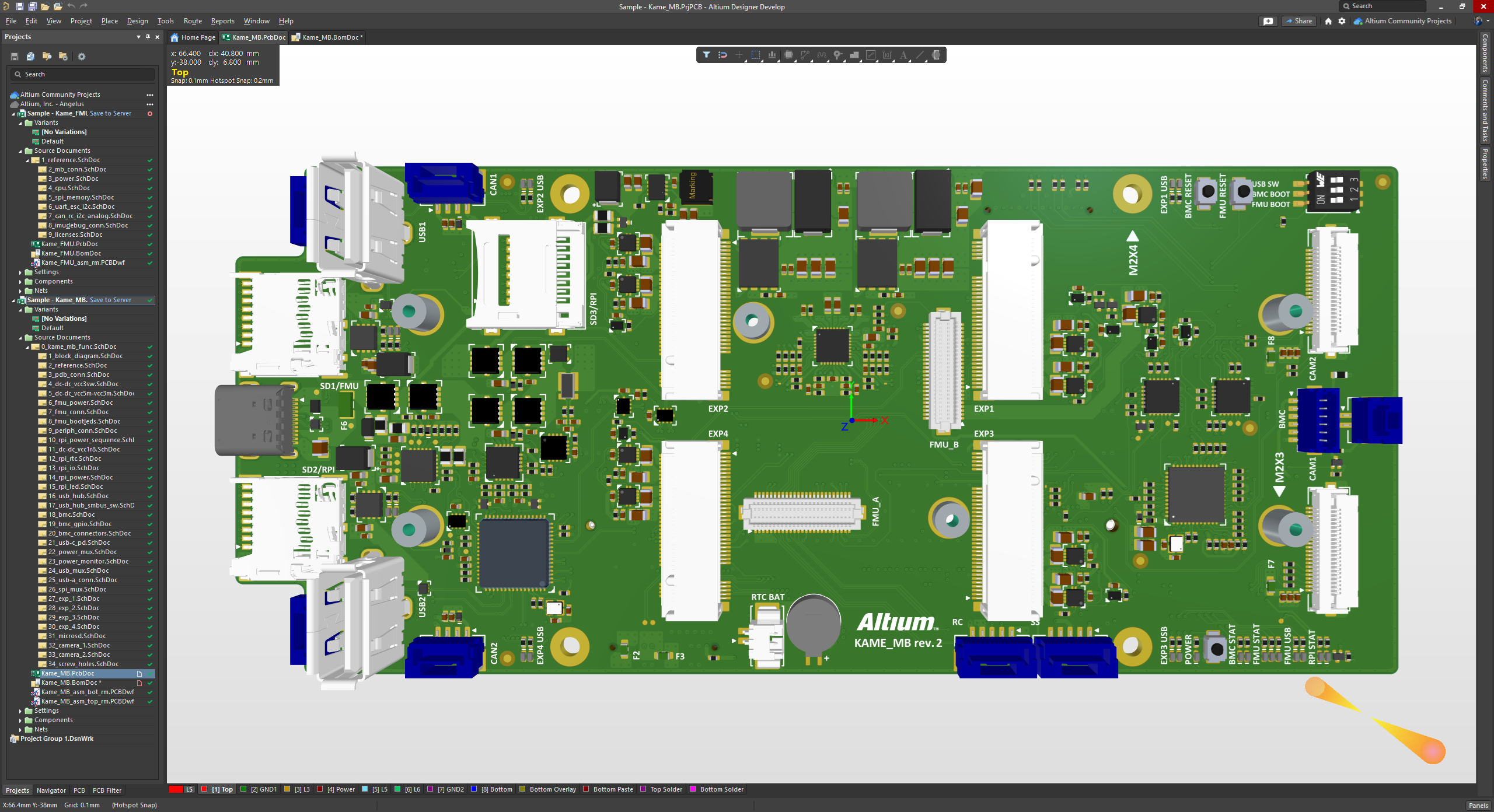
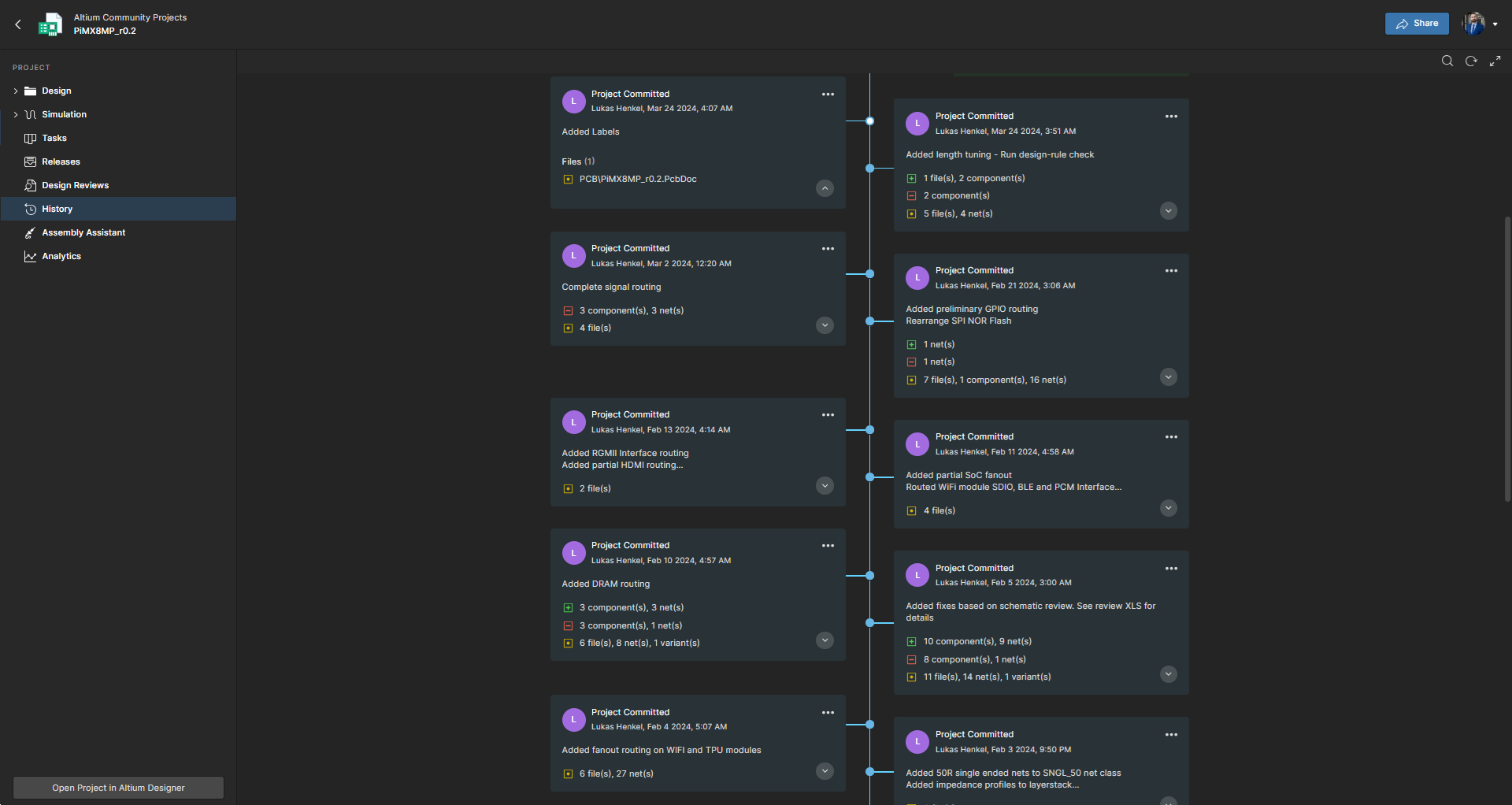
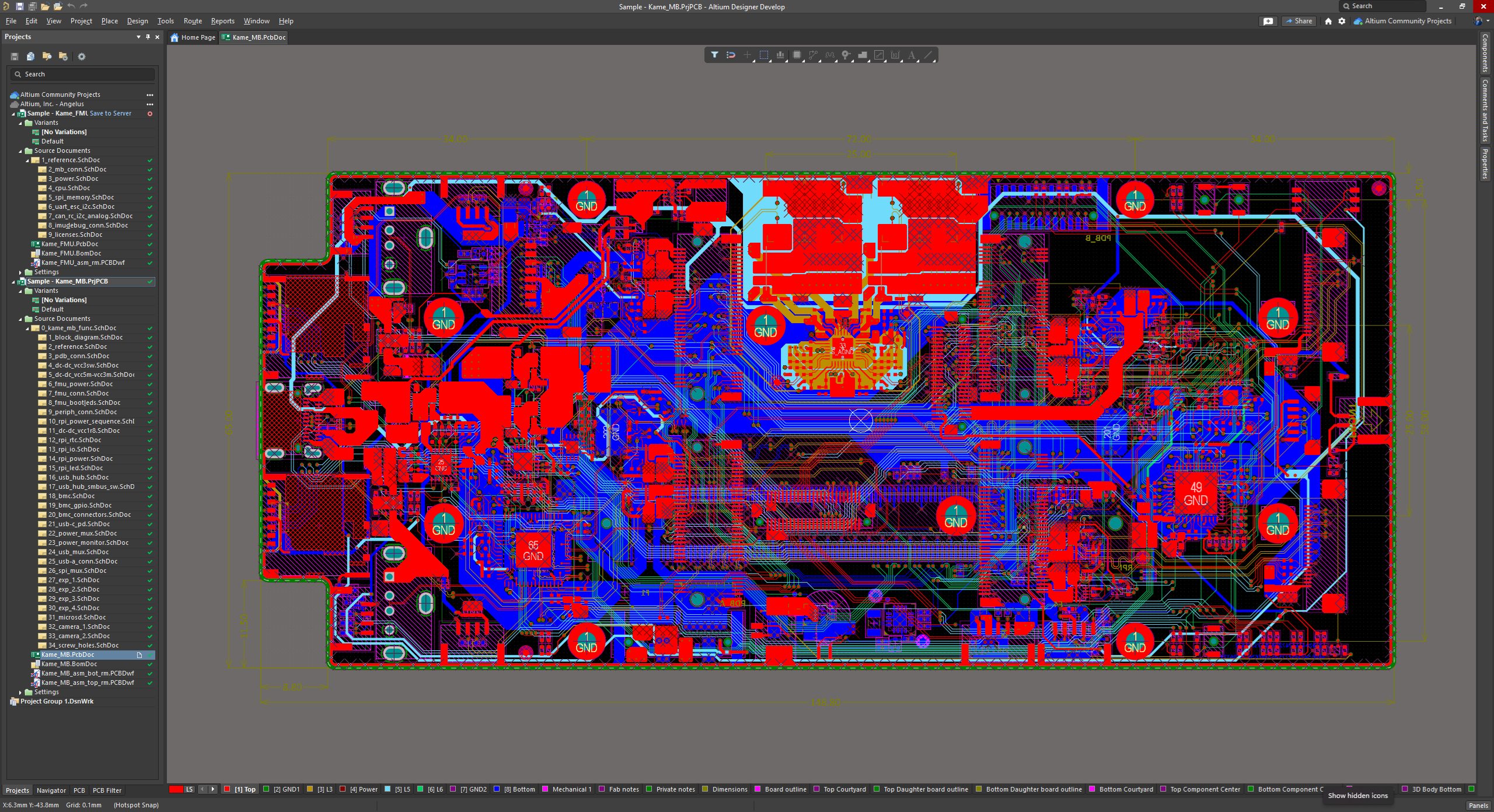
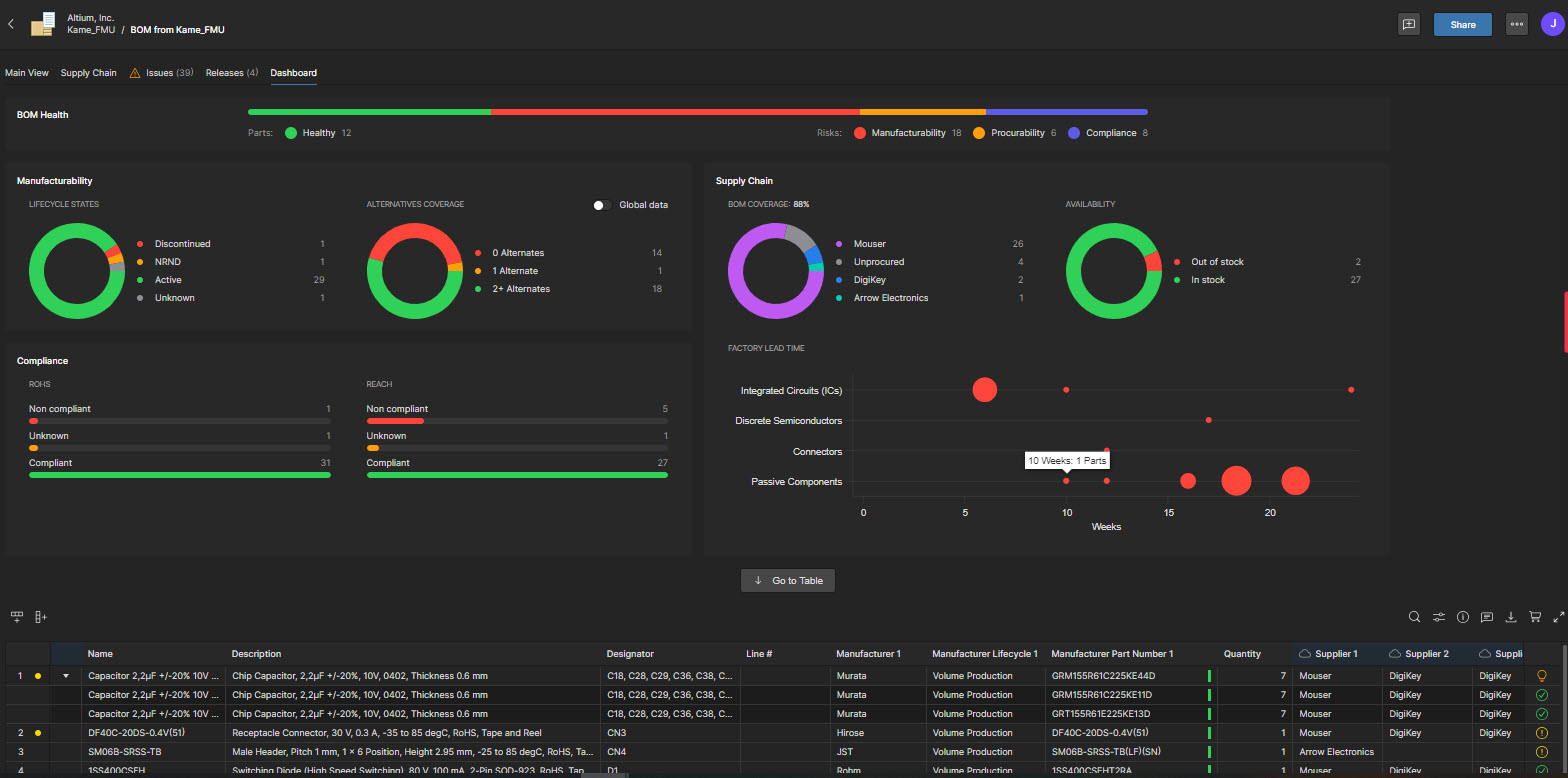
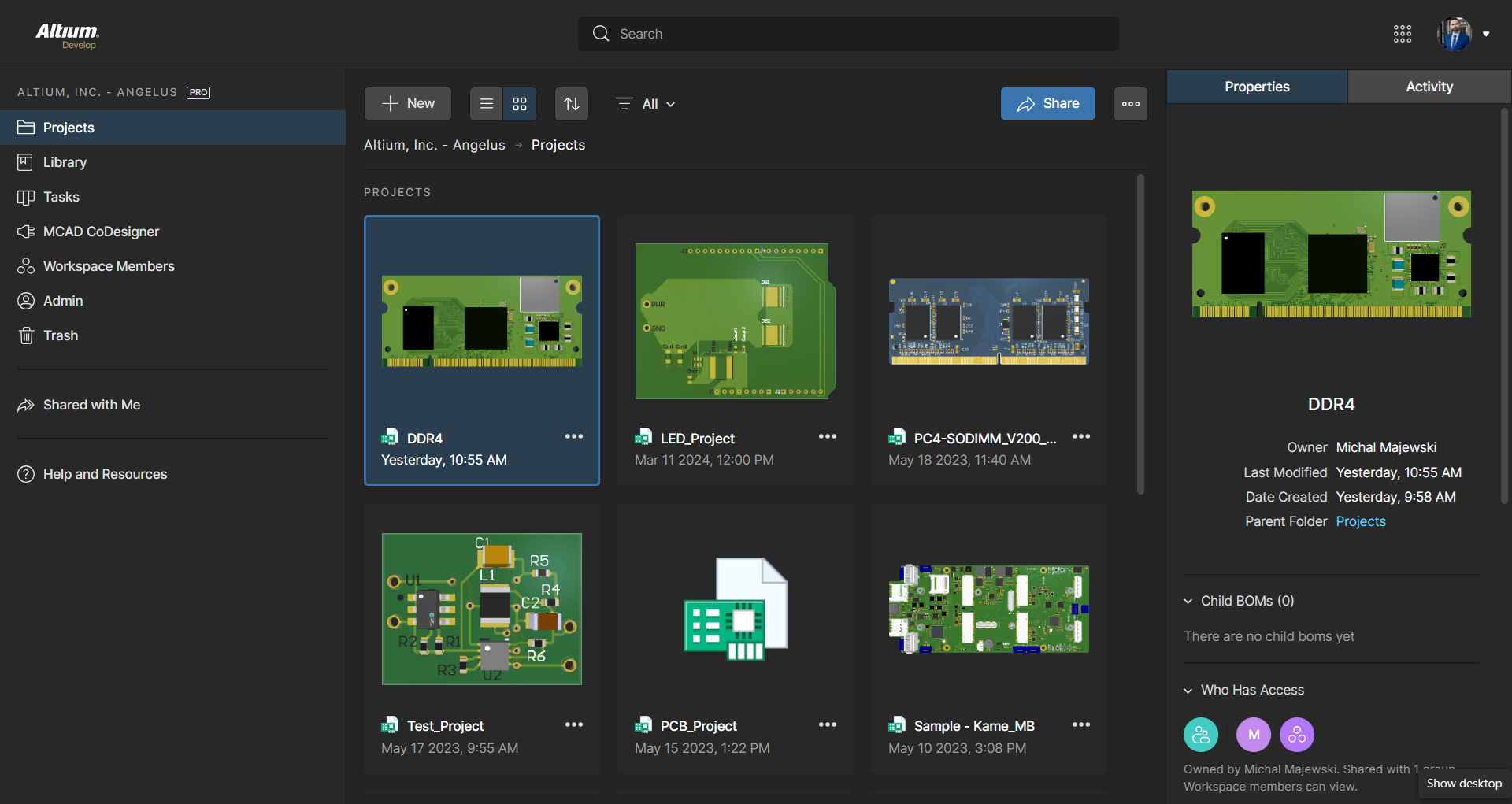
Screenshot of The 3D View Editor in Altium Develop that transforms the standard 2D PCB workspace into a fully interactive, three‑dimensional design environment. Users can toggle between 2D and 3D modes, then zoom, pan, and rotate the board freely using tools like a directional sphere for precise pivot control and adjust display settings (such as transparency or coloring) via the View Configuration panel to visually explore and inspect PCB layouts in realistic detail.Screenshot of Project History in Altium Develop, which provides a browser-based, visually chronological timeline of a project's key events such as: creation, commits, releases, clones, and MCAD exchanges offering version control transparency directly within workspace.Screenshot of Altium Develop's unified design environment built on a single data model. From schematic capture to PCB layout, routing, and assembly preparation, every step flows seamlessly. Smart placement and routing features make complex designs faster, easier, and more reliable.Screenshot of ActiveBOM, which is a dynamic, table-based Bill of Materials (BOM) editor integrated into Altium Develop that elevates component management to a real-time, design-aware process. It automatically aggregates supply chain data such as pricing, stock, lifecycle status, and lead times - from sources like Octopart and IHS Markit, enabling parts selection, alternates, cost calculation, rule-based verification, and traceability - within the same environment as the schematic and PCB design.Screenshot of BOM Portal, which is a cloud-native, procurement-focused tool within Altium Develop that transforms traditional Excel-like Bill of Materials (BOM) workflows by integrating live supply chain, compliance, and pricing data. It enables collaboration between engineering and procurement, helps identify supply risks like obsolescence or shortages, supports BOM consolidation and alternates, and ensures thorough version control and traceability bridging design to manufacturing with real-time visibility and control.Screenshot of Workspace Projects, which provide a cloud-native, version-controlled hub within Altium Develop that simplifies electronic project management with centralized storage, collaboration, and built-in Git-based version control. This interface enables real-time design navigation (including schematic, 2D/3D PCB, BOM, and Draftsman views), task tracking, release and manufacturing management, historical timeline review, and sharing.

Ultiboard Screenshots

Screenshot of Ultiboard