TrustRadius: an HG Insights company

Save this comparison

Save this comparison

Add Product

Recommended Comparisons

    Overview
    ProductRatingMost Used ByProduct SummaryStarting Price

    OneNote

    Score7.8 out of 10
    N/AMicrosoft's OneNote is a digital note-taking app, supporting photos, annotating, web page clipping, emailing, and synchronizing notes across devices.N/A

    Zenreader

    N/AN/AZenreader is a desktop software used by students, researchers and professionals to collect, organise and combine knowledge to produce great work in less time. Zenreader is used to rapidly build a body of knowledge and evidence from PDF documents and webpages. With Zenreader users read documents, highlight text and images, capture thoughts and draft evidence-based notes. With one click users then export all of your work to your favourite writing software. Zenreader is designed with…N/A
    Pricing
    OneNoteZenreader
    Editions & Modules
    Microsoft OneNote
    Free
    No answers on this topic
    Offerings
    Pricing Offerings
    OneNoteZenreader
    Free Trial
    NoYes
    Free/Freemium Version
    YesYes
    Premium Consulting/Integration Services
    NoYes
    Entry-level Setup FeeNo setup feeNo setup fee
    Additional Details
    More Pricing Information
    Community Pulse
    OneNoteZenreader
    Considered Both Products
    Microsoft
    No answer on this topic
    Leapian
    No answer on this topic
    Key User Insights
    Would buy again
    96%
    Would buy again
    25 Answers
    No answers on this topic
    Delivers good value for the price
    100%
    Delivers good value for the price
    25 Answers
    No answers on this topic
    Happy with the feature set
    96%
    Happy with the feature set
    25 Answers
    No answers on this topic
    Lived up to sales and marketing promises
    100%
    Lived up to sales and marketing promises
    14 Answers
    No answers on this topic
    Implementation went as expected
    94%
    Implementation went as expected
    16 Answers
    No answers on this topic
    Best Alternatives
    OneNoteZenreader
    Small Businesses
    Google Keep
    Score9.2 out of 10
    No answers on this topic
    Medium-sized Companies
    Google Keep
    Score9.2 out of 10
    No answers on this topic
    Enterprises
    Google Keep
    Score9.2 out of 10
    No answers on this topic
    All AlternativesView all alternativesView all alternatives
    User Ratings
    OneNoteZenreader
    Likelihood to Recommend
    8.3
    (74 ratings)
    -
    (0 ratings)
    Likelihood to Renew
    10.0
    (13 ratings)
    -
    (0 ratings)
    Usability
    7.7
    (14 ratings)
    -
    (0 ratings)
    Availability
    10.0
    (2 ratings)
    -
    (0 ratings)
    Performance
    8.8
    (3 ratings)
    -
    (0 ratings)
    Support Rating
    8.7
    (10 ratings)
    -
    (0 ratings)
    User Testimonials
    OneNoteZenreader
    Likelihood to Recommend
    Microsoft
    In my opinion OneNote is a must for anyone who does business. It’s versatile, stable and sustainable. It can keep private information private - like passwords. It can be used for collaborative work - like standard operating procedures. It is fairly easy to use and far superior to pen and paper. When used for meeting notes, it can be flagged with icons that are searchable - like ideas or important items. You can even create Outlook tasks on the fly
    Incentivized
    Read full review
    Leapian
    No answers on this topic
    Pros
    Microsoft
    • Because of its flexibility and ability to hold different types of content (text, images, tables), it is a great tool for collecting content from different resources and organizing it in one place.
    • Technical support analysts are using sections for their support case analysis; they paste pieces of logs, screen-shots, document their steps in troubleshooting etc., all in one section, to get the full picture yet stay organized.
    • The logic of content structure; Notebook>Section>Page>Paragraph, allows you to manage and collect all needed information by the areas of the user's responsibility. For example; each of my projects has its own section, in which each page is a task.
    Incentivized
    Read full review
    Leapian
    No answers on this topic
    Cons
    Microsoft
    • The table editing tools are too simplistic and lack the features found in other Office products.
    • Some content loses its rich text formatting when being pasted into OneNote. A workaround is to paste the content first into Outlook or Word and then copy/pasting that into OneNote.
    • Microsoft is moving away from a local install of OneNote, which means notebooks have to be in the cloud in Office 2019. This will actually reduce the usefulness of OneNote in some environments and opens the door to competitor products.
    • Update: Microsoft has now announced that it will continue to support OneNote 2016 through 2023. https://techcommunity.microsoft.com/t5/Office-365-Blog/Your-OneNote/ba-p/954922
    Incentivized
    Read full review
    Leapian
    No answers on this topic
    Likelihood to Renew
    Microsoft
    As this is not a compulsory tool in our organization, I would say all depends on the decision makers, however since this is a part of MS Office, I am sure we will have it for as long as we will possibly need it. However, I would not be so sure, if it was a separate product
    Read full review
    Leapian
    No answers on this topic
    Usability
    Microsoft
    I find OneNote incredibly usable. I'm fairly middle of the road when it comes to tech savvy-ness. The platform was very easy to learn and explore. I like that OneNote is no clunky and offers a clean interface. This is important when it comes to deciding if a tool is usable for multiple people.
    Incentivized
    Read full review
    Leapian
    No answers on this topic
    Performance
    Microsoft
    Overall, I rate OneNote's performance highly. In general, notebooks, sections and pages load quickly. OneNote integrates with other apps and info ca easily be shared/copied to and from the tool to other tools. Moreover, Notebooks tend to sync quickly meaning shared notebooks are up to date almost immediately provided there are no syncing issues.
    Incentivized
    Read full review
    Leapian
    No answers on this topic
    Support Rating
    Microsoft
    Since it is part of Microsoft Office and used across the globe there are a lot of support options available. It's quickest to just do a google search which will have plenty of articles to help you since there are so many OneNote users but as an Office customer you also have access to Microsoft support and I have had good experiences with their support (probably because I'm with a large company who is a large customer to them).
    Incentivized
    Read full review
    Leapian
    No answers on this topic
    Alternatives Considered
    Microsoft
    I tried using Evernote and it is an equally usable tool, however, I prefer the interface and capabilities of OneNote. OneNote seems much easier to use and understand. I think that may primarily be because OneNote is a Microsoft application and I am very used to using Microsoft applications such as Word, Excel, etc. I also use OneNote to keep my grocery list. It does as good of a job as the grocery list applications out there, only I like the flexibility I have with OneNote and how I specifically do my shopping.
    Incentivized
    Read full review
    Leapian
    No answers on this topic
    Return on Investment
    Microsoft
    • OneNote has become our organizational standard method of taking electronic notes (though some still prefer pen and paper.) It has been a zero cost outlay due to its freely available nature.
    • Its integration with other Microsoft Office products makes it easy to share notes and content between products, allowing for easy collaboration where needed.
    • OneNote's integration with OneDrive ensures that individual's notes are always safe and secure, taking away the tedious responsibility of backup from the user, and makes it happen seamlessly in the background.
    Incentivized
    Read full review
    Leapian
    No answers on this topic
    ScreenShots

    Zenreader Screenshots

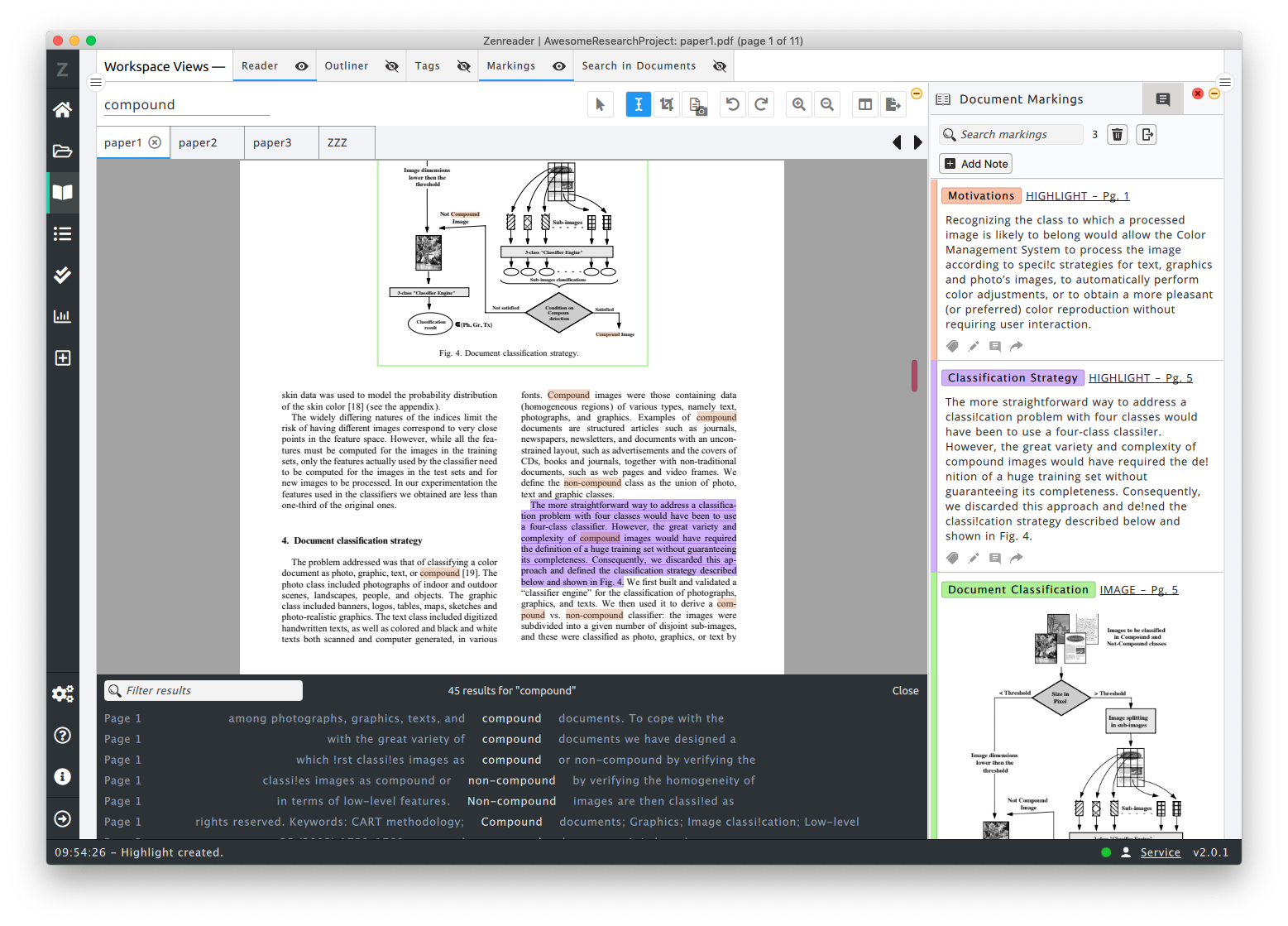
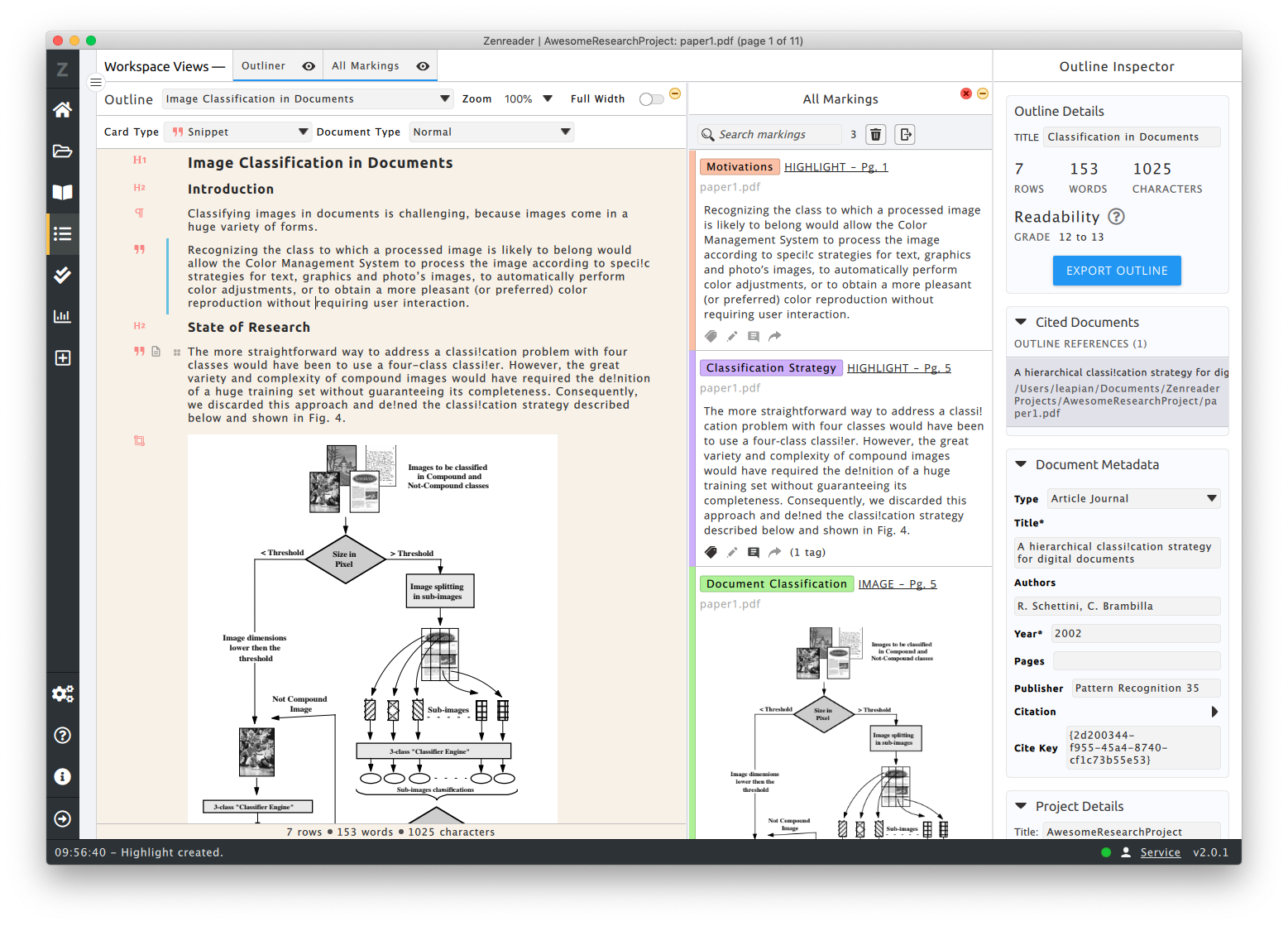
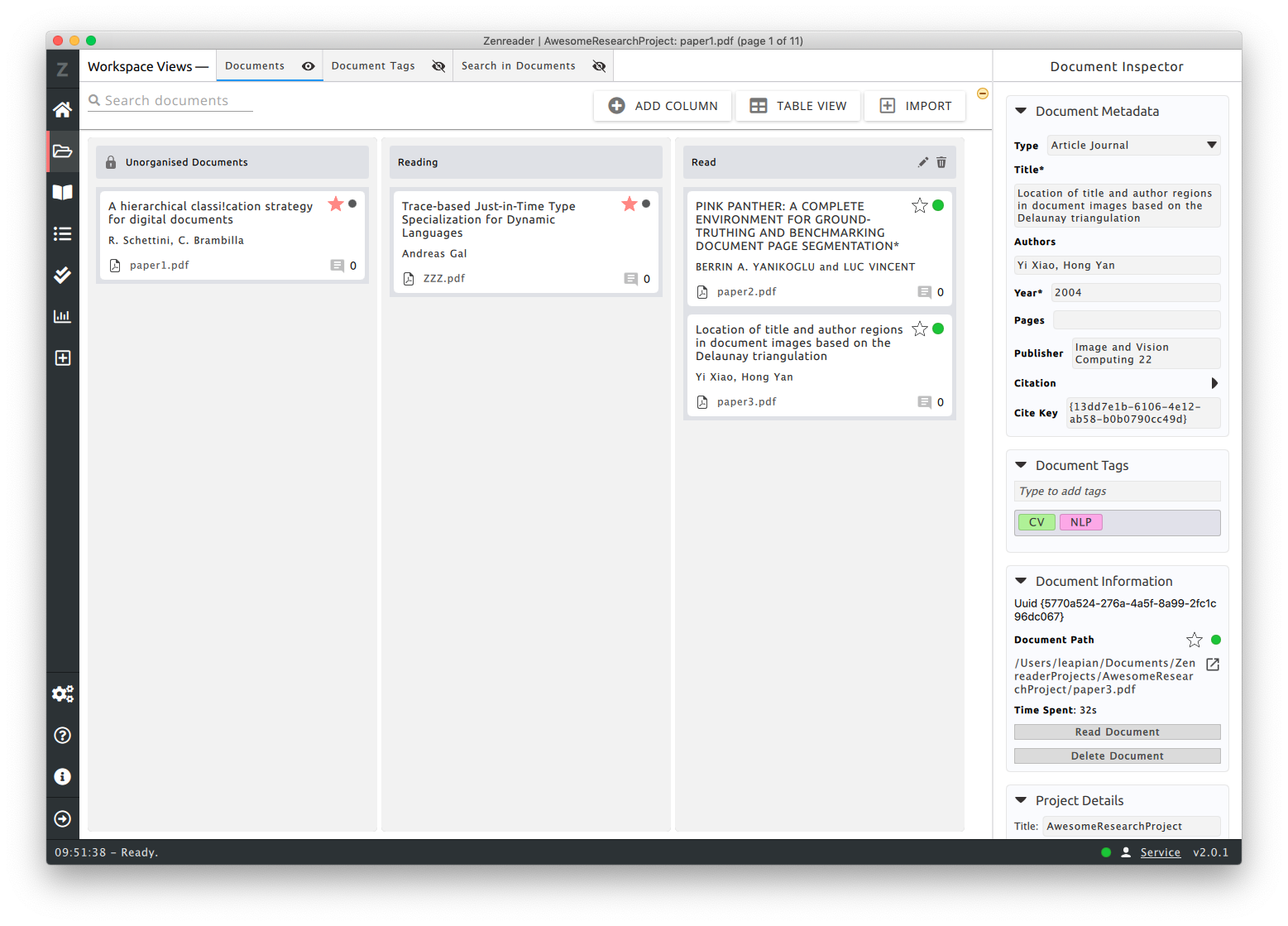
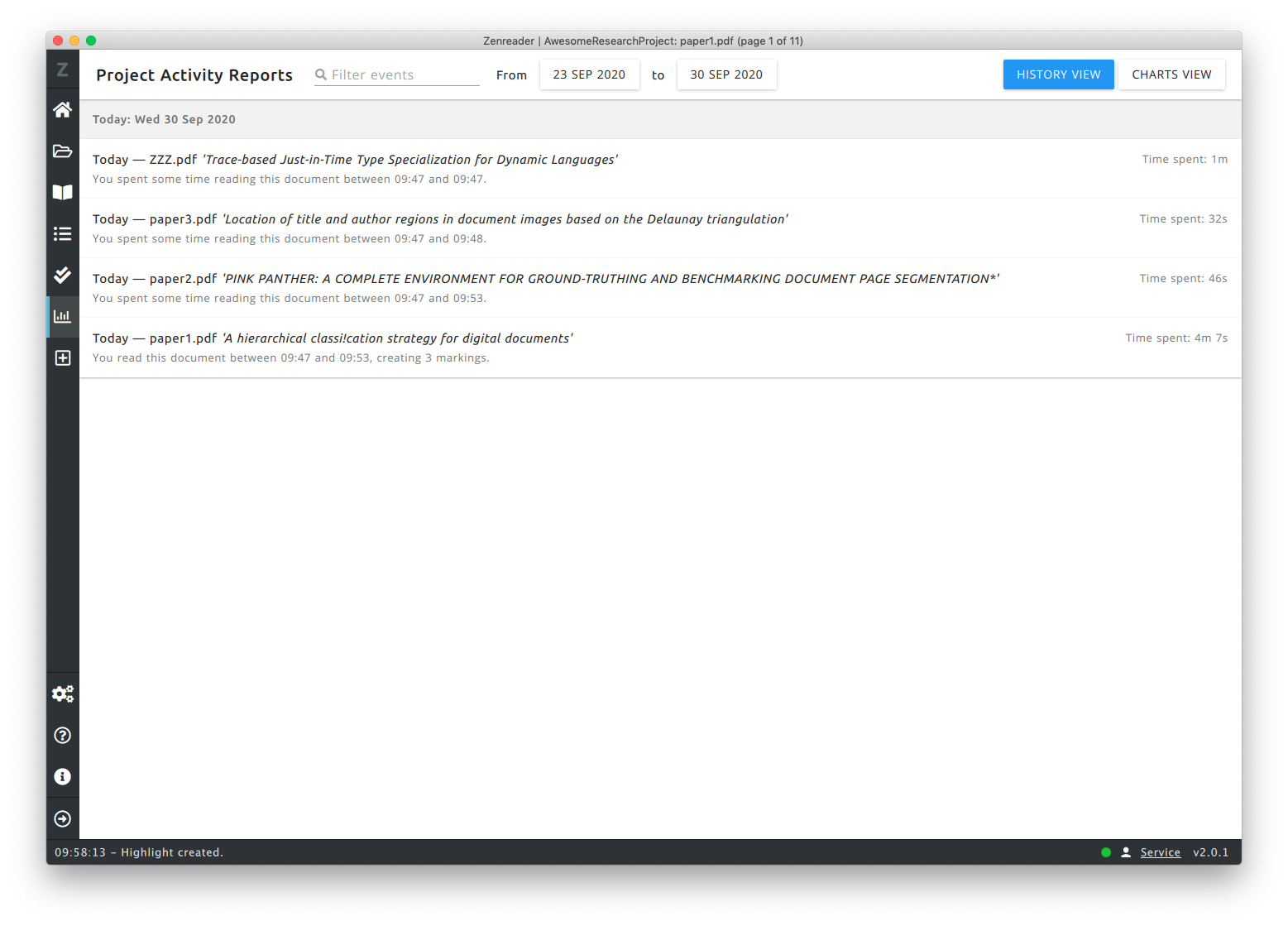
    Screenshot of PDF Reader with Tagged image and text highlights. The text search panel is open, showing matched words with their surrounding context.Screenshot of Zenreader's Outliner used for creating drafts. Drag and drop highlights directly into the outlines and then export everything. The references engine takes care of the citations and bibliography.Screenshot of Document Kanban Boards: manage your project's work by organising the documents by tags or by moving them to the relevant kanban columns.Screenshot of Zenreader comes with a project history: showing you what you worked on and when. This is great to be able to trace back how much time you have spent and when you reviewed a particular document.