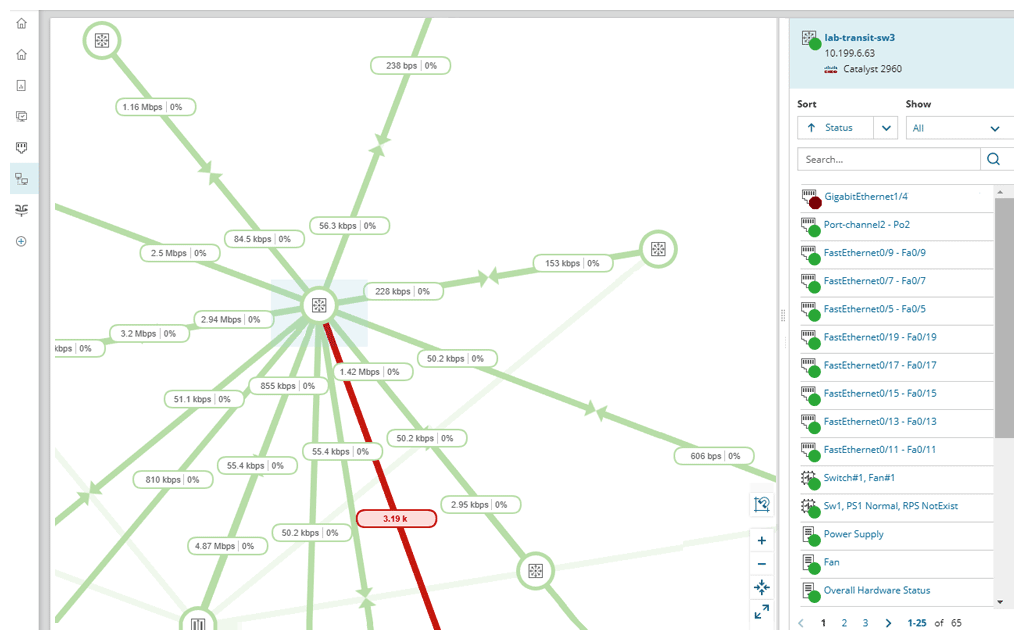
PathSolution’s TotalView is a network performance monitoring tool. PathSolutions emphasizes the platform’s issue diagnostics and recommended remediation assistance as a key differentiator.
N/A
SolarWinds NPM
Score 7.9 out of 10
N/A
SolarWinds NPM is a monitoring and performance management platform. It provides performance troubleshooting support, auto network discovery, customizable thresholds, and can be rapidly deployed.
$1,638
per year
Pricing
PathSolutions TotalView
SolarWinds Network Performance Monitor (NPM)
Editions & Modules
No answers on this topic
NPM
$1,638
per year
Offerings
Pricing Offerings
PathSolutions TotalView
SolarWinds NPM
Free Trial
No
Yes
Free/Freemium Version
No
No
Premium Consulting/Integration Services
No
No
Entry-level Setup Fee
No setup fee
Optional
Additional Details
—
—
More Pricing Information
Community Pulse
PathSolutions TotalView
SolarWinds Network Performance Monitor (NPM)
Considered Both Products
PathSolutions TotalView
Verified User
Technician
Chose PathSolutions TotalView
The three tools listed do different things with some similarities. For us the biggest need was data analysis, semi-automatic troubleshooting, and data gathering and topology mapping. TotalView hit the most of these in the price point we were looking for. Each tool has "extras," …
SolarWinds NPM
No answer on this topic
Features
PathSolutions TotalView
SolarWinds Network Performance Monitor (NPM)
Network Performance Monitoring
Comparison of Network Performance Monitoring features of Product A and Product B
TotalView is well suited for an infrastructure where you are looking for a cost-effective, additive network management tool for in-depth device diagnostic information. This will not be a one-stop shop application, but it does what is advertised very well. SNMP is required for configuration and adding additional devices is quick and simple. This product also works well with Shoretel VoIP systems and allows for a full overview of connected phones along with being able to view calls on an extension/IP basis.
SolarWinds Network Performance Monitor (NPM) is excellent on node monitoring, for servers, switches, voice routers, etc. It also provides quick information on the dashboard, so you can take a look an in a few seconds determine is an entire site is down, if portions are down, and what may be causing the issue. We have experienced some difficulty when working with our wireless environment. It is less than natural when attempting to determine if a wireless access point is down itself, or if the switch feeding the access point is down, either port or switch. It does a very good job telling you if a switch is down, but troubleshooting the devices (specifically access points) it struggles.
If you have some complexities in your network addressing, the network diagram tool will lay everything out automatically, but it will be confusing to look at. There is a way to edit the diagram so it looks more intuitive, but it may require some time to edit everything the right way.
TotalView will count virtual interfaces such as voice dial-peers and service modules as "ports," which counts against your license count. However, there is a way to edit each device to remove these "false positives" so it doesn't suck up licenses, but it can take some time to clean those up.
The entire IT staff relies on NPM in its daily operations. It would be impossible for us to maintain our level of service without it. If SolarWinds gets to proud of their product and begins to over charge for it, we would be forced to reconsider and use a different product. But as it stands it is worth the price to renew it.
SolarWinds Network Performance Monitor (NPM) is quite an extensive product, covering all our bases and requirements. There are a lot of customizable options and features which you can work with for their alerting which is really useful. I haven't found anything yet which I thought SolarWinds Network Performance Monitor (NPM) could do, but it actually couldn't so overall it works nicely and does the job.
In all of the times that we called support, someone at SolarWinds had the answer for us in a timely manner. Through thwack and other internet searching, we have been able to resolve all of our issues that arose to our satisfaction. The support staff have always been knowledgeable of their products or had a fellow support staff member to rely on to get the needed answers.
The training is good but during the implementation, you can get situations not learned during the training. The trainer was very open to hearing the questions about use cases and always sharing his experience. I really recommend having official training to take advantage of all features that the NPM can bring.
Make sure your inventory is accurate. Stand up some virtual machines for testing prior to installation. Make sure your database and its credentials are setup. Think about things you want to monitor that may not be obvious - UPS units, Door hardware, PBX systems, Fabric Channel switches, firewalls, routers, switches. Try to setup SNMP on these devices and have an IP that you will assign to the new server. If you do that it will go well.
The three tools listed do different things with some similarities. For us the biggest need was data analysis, semi-automatic troubleshooting, and data gathering and topology mapping. TotalView hit the most of these in the price point we were looking for. Each tool has "extras," but we felt that the extras provided by TotalView were good enough and that the other tools didn't justify the cost.
We use NPM along with PRTG Network Monitor. While NPM is great at monitoring network devices and network links and some aspects of the servers, PRTG provides more in-depth monitoring for Server systems, applications and application ports such as Web Ports etc. PRTG also provides a more comprehensive Root cause analysis.
SolarWinds allows us to proactively address hardware issues before they impact the business. We recently had a server that was experiencing issues sporadically and we were able to use the data from SolarWinds to track down and correct the issue before it tanked the server.
SolarWinds gives our IT department some piece of mind knowing that they'll be alerted of any issues real time.
We can use SolarWinds data to justify needed to replace or upgrade certain equipment that is key to our core business.